
1. Introduction
This instruction manual provides detailed information on the installation, operation, and maintenance of the YSRSAI ZigBee 3.0 0-10V LED Dimming Controller. This device is designed to control 0-10V or 1-10V dimmable LED drivers via a ZigBee 3.0 compatible gateway, enabling smart lighting control and automation.
2. Safety Information
- WARNING: Always turn off the main power supply before installation or maintenance to prevent electric shock.
- Installation should be performed by a qualified electrician or in accordance with local electrical codes.
- Ensure the device is used within its specified electrical parameters (input voltage, output current, operating temperature).
- The housing is made of flame-retardant ABS material for enhanced safety.
3. Product Features
- ZigBee 3.0 Compatibility: Requires a ZigBee 3.0 Hub (e.g., Tuya ZigBee Hub, SmartThings, zigbee2mqtt, Amazon Echo Plus) for functionality.
- 0-10V / 1-10V Dimmable Output: Designed for use with 0-10V or 1-10V dimmable LED power supply drivers.
- Voice Control: Compatible with Amazon Alexa (Echo Plus, Echo 4th Gen, Echo Studio, Echo Show 2nd Gen) and Google Assistant via a compatible ZigBee hub for on/off and brightness adjustment.
- Brightness Adjustment: Supports smooth brightness control from 0% to 100%.
- Smart Functions: Supports on/off, brightness adjustment, automatic shutdown, and scene functions through the ZigBee ecosystem.
- Compact and Secure Design: Small dimensions and screw terminals for easy connection and installation. Features anti-interference properties for long-term reliability.
4. Specifications
| Parameter | Value |
|---|---|
| Input Power | AC100-277Vac |
| Output Voltage | 0-10V |
| Output Current | 20mA |
| RF Protocol | ZigBee 3.0 |
| Operating Temperature | -20°C to 70°C |
| Dimensions (L x W x H) | 62 mm x 39 mm x 25 mm |
| Material | ABS Plastic |
| IP Rating | IP20 |
| Compliance | CE |

Figure 1: Product dimensions of the YSRSAI ZigBee 0-10V LED Dimming Controller.
5. Setup and Installation
5.1. Pre-installation Checklist
- Ensure you have a compatible ZigBee 3.0 gateway (e.g., Tuya ZigBee Hub, SmartThings, zigbee2mqtt, Amazon Echo Plus).
- Verify that your LED driver is 0-10V or 1-10V dimmable.
- Turn off the main power supply before beginning installation.
5.2. Wiring Diagram
Connect the controller according to the wiring diagram below. Ensure all connections are secure and correctly polarized.

Figure 2: Wiring diagram for connecting the YSRSAI ZigBee 0-10V LED Dimming Controller to AC power and a dimmable LED driver.
5.3. Pairing with a ZigBee Gateway
After wiring and restoring power, the device needs to be paired with your ZigBee 3.0 gateway. Refer to your gateway's instructions for adding new devices. Typically, this involves putting the gateway into pairing mode and then initiating the pairing process on the controller.
To initiate pairing on the controller, you may need to perform a reset (see Section 6.1).
6. Operating Instructions
6.1. Device Reset
If the device is not responding or needs to be re-paired, perform one of the following reset procedures:
- Method 1 (Control Button): Press and hold the control button on the device for ten seconds. The reset is complete when the load flashes.
- Method 2 (Power Cycle):
- Turn the power supply to the device OFF and ON within two seconds.
- Repeat Step 1 five times.
- After the device is powered on and Step 2 is completed, the connected load will flash three times and remain on, indicating a successful reset.
6.2. Brightness Adjustment
Once paired with your ZigBee gateway, you can control the brightness of the connected LED lights via the associated smart home application (e.g., Tuya Smart app, SmartThings app) or through voice commands.

Figure 3: Example of brightness adjustment via a smart home application.
6.3. Voice Control
For voice control, ensure your ZigBee gateway is linked to your Amazon Alexa or Google Assistant account. You can then use voice commands such as "Alexa, turn on the light" or "Hey Google, set brightness to 50%" to control your connected lights.
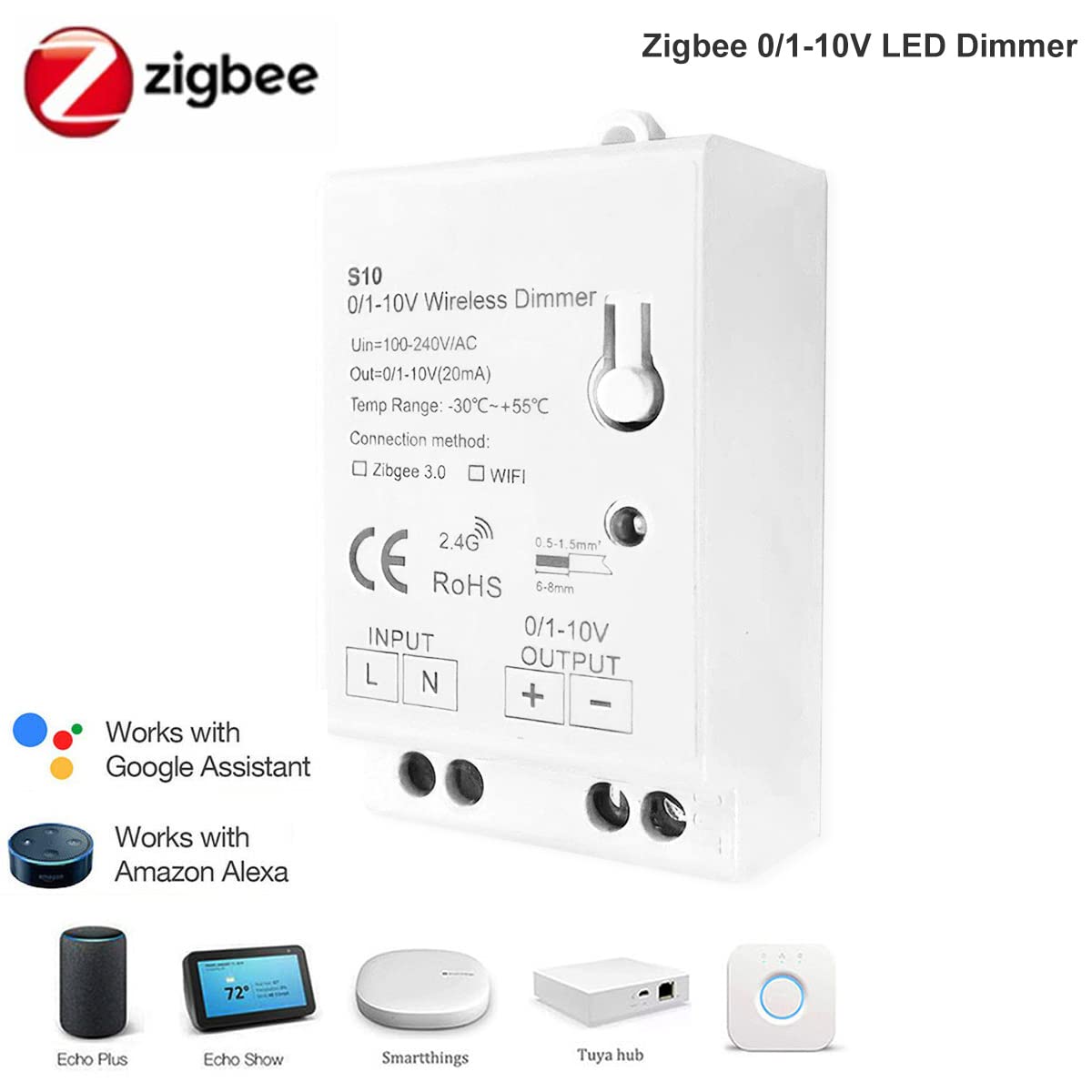
Figure 4: The controller works with Amazon Alexa and Google Assistant via compatible ZigBee hubs.
7. Troubleshooting
- Device Not Responding:
- Ensure the main power supply is ON.
- Verify all wiring connections are secure and correct.
- Confirm the device is properly paired with your ZigBee gateway. If not, perform a device reset and re-pair.
- Check if your ZigBee gateway is online and functioning correctly.
- Lights Not Dimming:
- Ensure your LED driver is specifically a 0-10V or 1-10V dimmable type. Standard LED drivers are not compatible.
- Check the 0-10V output wiring for correct polarity and connection to the LED driver's dimming input.
- Voice Control Issues:
- Confirm your ZigBee gateway is successfully linked to your Alexa or Google Assistant account.
- Ensure the device is discovered and named appropriately in your smart home app.
8. Maintenance
The YSRSAI ZigBee 3.0 0-10V LED Dimming Controller requires minimal maintenance. Keep the device clean and free from dust. Do not expose it to excessive moisture or extreme temperatures outside its operating range.
9. Warranty and Support
For warranty information or technical support, please refer to the product packaging or contact YSRSAI customer service directly. Keep your purchase receipt for warranty claims.
