
1. Introduction
This manual provides detailed instructions for the assembly, operation, and maintenance of your SUPERJARE 47-inch Reversible L-Shaped Desk. Please read this manual thoroughly before assembly and use to ensure proper function and longevity of the product.

Image 1.1: Overview of the SUPERJARE 47-inch Reversible L-Shaped Desk.
2. Product Features
- Reversible L-Shape Design: The desk can be configured with the longer section on either the left or right side to suit your space requirements.
- Integrated LED Lights: Features an LED light strip for customizable ambiance. Control options include an app (60,000+ colors, timing, mic, music modes) and a smart controller (12 scene modes, 3 brightness levels, speed adjustment). Requires USB power.
- Built-in Power Outlets: Includes 4 AC outlets, 2 USB ports, and 1 Type-C port for convenient device charging and power access.
- Ample Storage: Two open storage shelves, a dedicated CPU stand area, and a fabric drawer provide organized storage for office supplies and equipment.
- Elevated Monitor Stand: Designed to raise your monitor to an ergonomic viewing height, reducing neck and back strain.
- Sturdy Construction: Constructed with a powder-coated metal frame and durable particle board for stability and long-term use.
- Adjustable Feet: Ensures stability on uneven surfaces and protects flooring from scratches.

Image 2.1: Desk in a gaming setup, showcasing LED lights and monitor stand.
3. Setup and Assembly
The SUPERJARE L-Shaped Desk is designed for straightforward assembly. All necessary components are numbered, and tools are provided. Follow the included graphical instructions carefully.
3.1. Pre-Assembly Checklist
- Verify all parts are present according to the packing list.
- Ensure you have adequate space for assembly.
- Keep small parts out of reach of children.
3.2. Reversible Configuration
The L-shaped section of the desk can be assembled on either the left or right side. Refer to the assembly diagrams for specific steps to achieve your desired orientation.

Image 3.1: The desk's reversible design allows for left or right L-shape configuration.
3.3. Assembly Steps
- Unpack all components and lay them out on a clean, soft surface to prevent scratches.
- Follow the step-by-step instructions provided in the assembly guide. Pay close attention to the orientation of parts.
- Secure all screws and fasteners firmly, but do not overtighten until the entire structure is aligned.
- Once assembled, gently place the desk in its desired location. Adjust the leveling feet to ensure stability.

Image 3.2: Detailed dimensions of the desk components for assembly reference.
4. Operating Instructions
4.1. LED Lights Operation
The integrated LED light strip enhances your workspace ambiance. To activate, ensure the LED light strip is plugged into a USB power source.
- App Control: Download the designated app to access over 60,000 colors, timing functions, and sound-reactive modes (mic mode, music mode).
- Smart Controller: Use the included smart controller to switch between 12 scene modes, adjust speed levels, and set 3 brightness levels.

Image 4.1: Smart controller interface for LED light adjustments.
4.2. Power Outlets Usage
The built-in power strip provides convenient access to power for your devices.
- AC Outlets: 4 standard AC outlets (125V/12A) for monitors, laptops, and other electronics.
- USB Ports: 2 USB-A ports (5V/2A) for charging smartphones, tablets, and other USB-powered devices.
- Type-C Port: 1 USB-C port (5V/3A) for faster charging of compatible devices.
- Power Cord: The desk features a 6.6-foot power cord for flexible placement.

Image 4.2: Detailed view of the recessed power strip with various charging options.
5. Storage and Ergonomics
5.1. Storage Solutions
Utilize the integrated storage features to keep your workspace organized:
- Open Shelves: Two shelves provide space for books, decor, or additional equipment.
- Fabric Drawer: A pull-out fabric drawer is ideal for storing stationery and personal items, keeping them out of sight.
- CPU Stand: A designated area beneath the desk accommodates a PC tower, optimizing floor space.
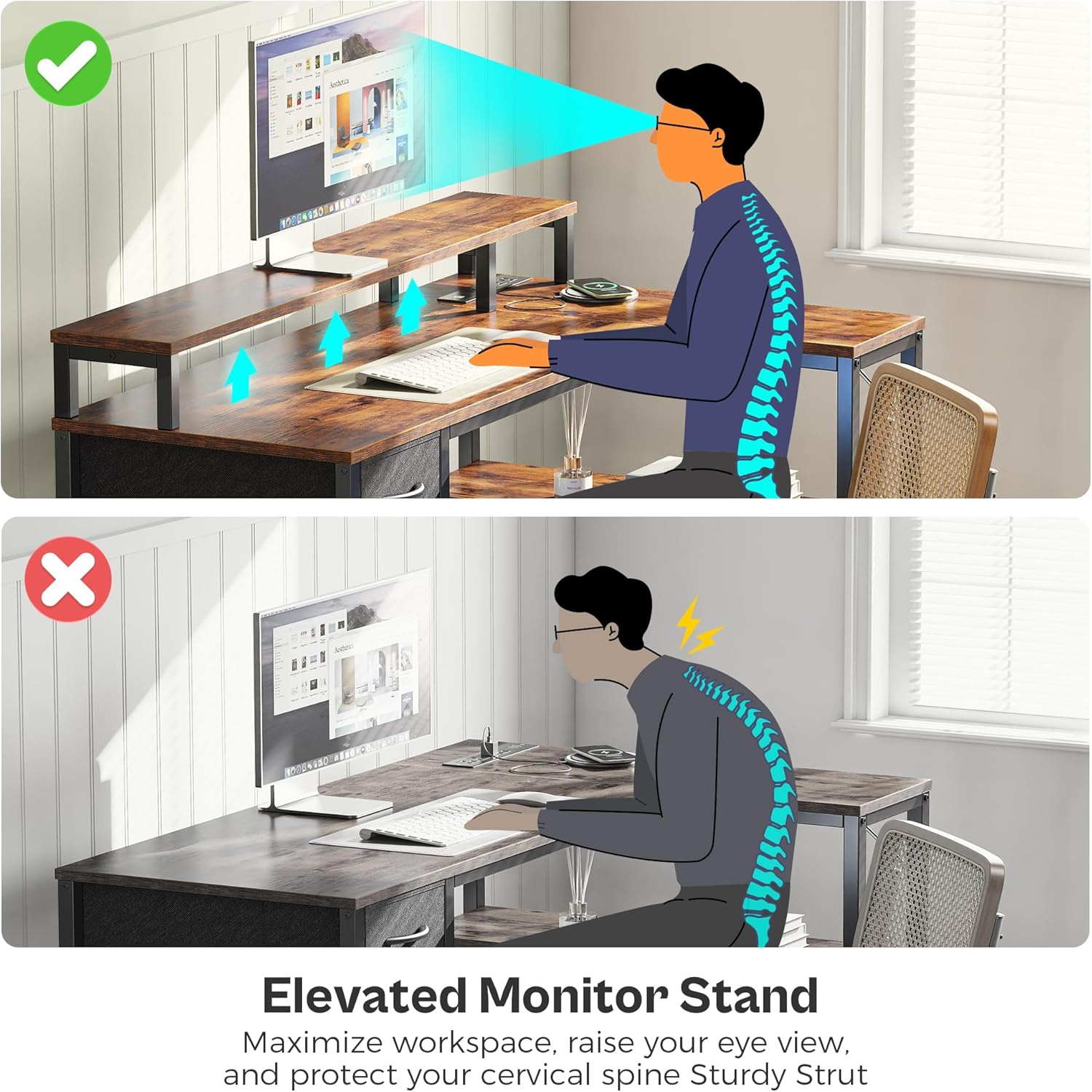
Image 5.1: The fabric drawer provides concealed storage for office essentials.
5.2. Ergonomic Monitor Stand
The elevated monitor stand helps maintain proper posture by raising your screen to eye level, reducing strain on your neck and back during extended use.

Image 5.2: Benefits of the elevated monitor stand for ergonomic posture.
6. Maintenance
Regular maintenance ensures the longevity and appearance of your desk.
- Cleaning: Wipe surfaces with a soft, damp cloth. Avoid harsh chemicals or abrasive cleaners that may damage the finish.
- Dusting: Regularly dust all surfaces, including the LED strip and power outlets, to prevent accumulation.
- Fasteners: Periodically check and tighten all screws and bolts to maintain structural integrity.
- Power Outlets: Ensure the power cord is not pinched or damaged. Do not overload the outlets.
7. Troubleshooting
If you encounter issues with your desk, consider the following common solutions:
- Desk Instability: Check that all assembly screws are tightened. Adjust the leveling feet on the bottom of the desk legs to compensate for uneven floors.
- LED Lights Not Working: Ensure the USB plug for the LED strip is securely connected to a powered USB port. Check the app or smart controller for correct settings and power status.
- Power Outlets Not Functioning: Verify the main power cord is fully plugged into a working wall outlet. Check if the power strip's circuit breaker (if present) has tripped. Avoid overloading the outlets with too many high-power devices.
- Missing or Damaged Parts: If any parts were missing or damaged upon arrival, contact SUPERJARE customer support for assistance.
8. Specifications
| Feature | Specification |
|---|---|
| Brand | SUPERJARE |
| Model Number | EU7035ZC |
| Product Dimensions (D x W x H) | 19.3"D x 47.3"W x 29.5"H |
| Color | Rustic Brown |
| Material | Engineered Wood (Particle Board), Metal |
| Item Weight | 40 Pounds |
| Maximum Weight Recommendation | 150 Pounds |
| AC Outlets | 4 (125V/12A) |
| USB-A Ports | 2 (5V/2A) |
| USB-C Port | 1 (5V/3A) |
| Power Cord Length | 6.6 feet |
| Number of Shelves | 3 |
| Number of Drawers | 1 (Fabric) |
| Assembly Required | Yes |
9. Warranty and Support
SUPERJARE products are designed for quality and durability. This product comes with a limited warranty. For specific warranty details, please refer to the documentation included with your purchase or contact SUPERJARE customer service.
9.1. Optional Protection Plans
Extended protection plans may be available for purchase separately to cover your product beyond the standard warranty period. These plans typically offer:
- 2-Year Protection Plan
- 3-Year Protection Plan
For more information on these plans, please consult the retailer or the protection plan provider.
9.2. Customer Support
If you have any questions, require assistance with assembly, or need to report a defect, please contact SUPERJARE customer support through their official website or the retailer where the product was purchased. Provide your model number (EU7035ZC) and purchase details for efficient service.