
HOMCOM 2-in-1 Elliptical and Exercise Bike User Manual
Model: FRA90-2990531
Introduction
This manual provides essential information for the safe assembly, operation, and maintenance of your HOMCOM 2-in-1 Elliptical and Exercise Bike. Please read it thoroughly before first use and retain it for future reference. This equipment combines the benefits of an elliptical trainer and a stationary exercise bike, offering a versatile full-body workout solution for your home.
Important Safety Instructions
- Consult a physician before starting any exercise program.
- The maximum user weight for this equipment is 100 kg (220 lbs).
- Place the equipment on a flat, stable surface. Ensure adequate space around the machine for safe operation.
- Keep children and pets away from the equipment during use.
- Regularly inspect all bolts and nuts for tightness. Tighten as necessary to prevent accidents.
- Wear appropriate exercise clothing and footwear.
- Stop exercising immediately if you feel faint, dizzy, or experience pain.
- Do not use the equipment if it is damaged or appears to be malfunctioning.
Package Contents
Carefully unpack all components and ensure you have received the following parts:
- Main Frame Assembly
- Handlebars (Fixed and Moving)
- Seat and Seat Post
- Pedals (Left and Right)
- Front and Rear Stabilizers
- LCD Monitor
- Hardware Kit (bolts, washers, nuts, basic assembly tools)
- User Manual
If any parts are missing or damaged, contact HOMCOM customer service before assembly.
Assembly Instructions
Follow these steps to assemble your 2-in-1 Elliptical and Exercise Bike. It is recommended to have two people for assembly.
- Step 1: Attach Stabilizers
Attach the front and rear stabilizers to the main frame using the provided bolts and washers. Ensure they are securely fastened to provide a stable base. - Step 2: Install Pedals
Identify the left (L) and right (R) pedals. Attach the left pedal by turning it counter-clockwise and the right pedal by turning it clockwise into the crank arms. Tighten firmly with the provided wrench. - Step 3: Mount Seat and Handlebars
Insert the seat post into the main frame and secure the seat. Attach the fixed and moving handlebars according to the diagrams in your physical manual. Connect any necessary cables for the pulse sensors. - Step 4: Connect LCD Monitor
Mount the LCD monitor onto its bracket. Connect the sensor cables from the main frame and pulse sensors to the corresponding ports on the back of the monitor. - Step 5: Final Check
Review all connections and ensure all bolts and nuts are tightened. Test the stability of the machine before first use.
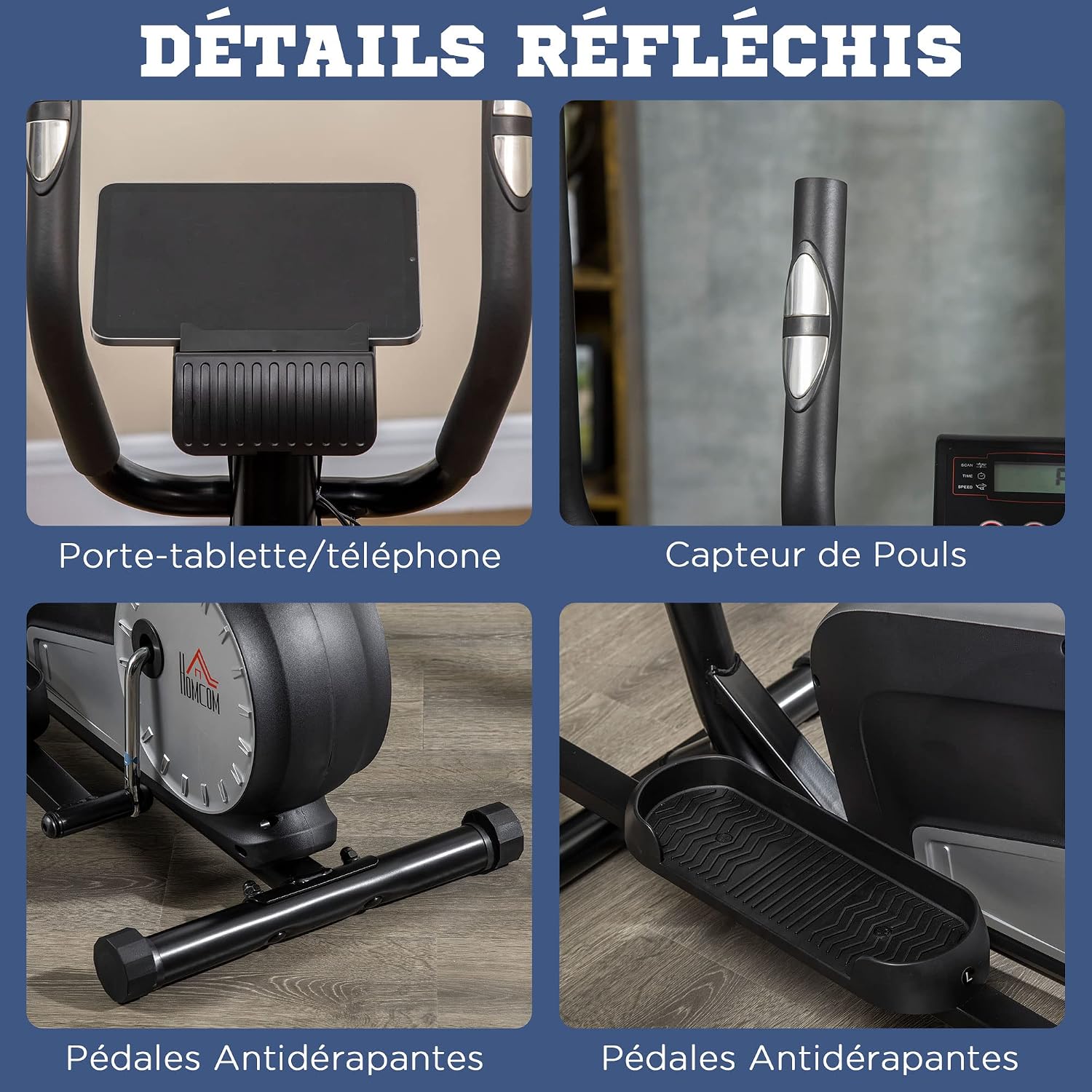
Image: Detailed features including tablet holder, pulse sensor, and anti-slip pedals.
Operating Instructions
Your HOMCOM 2-in-1 Elliptical and Exercise Bike offers two modes of exercise: elliptical training and stationary cycling.

Image: User performing elliptical exercise on the machine.
Elliptical Training Mode:
- Step onto the pedals, holding the moving handlebars for balance.
- Begin a smooth, continuous elliptical motion, coordinating arm and leg movements.
- Maintain an upright posture, engaging your core muscles throughout the exercise.
Stationary Cycling Mode:
- Adjust the seat to a comfortable height (refer to the "Adjustments" section).
- Sit on the seat and place your feet securely on the pedals.
- Hold the fixed handlebars or the moving handlebars for support, and begin pedaling.
Always perform a warm-up before your workout and a cool-down afterwards to prevent injury.
Adjustments
Resistance Adjustment:
The machine features 8 levels of magnetic resistance. To adjust the intensity of your workout, turn the resistance knob located on the main frame.
- Turn the knob clockwise to increase resistance (higher intensity).
- Turn the knob counter-clockwise to decrease resistance (lower intensity).
The resistance levels are generally categorized as:
- Levels 1-2: Improves blood circulation.
- Levels 3-4: Rehabilitation exercise.
- Levels 5-6: Enhances endurance.
- Levels 7-8: Stabilizes muscles and builds strength.

Image: Resistance adjustment knob with 8 levels.
Seat Adjustment:
The seat can be adjusted both vertically and horizontally to accommodate different user heights and preferences.
- Vertical Adjustment: The seat post has 5 adjustable height levels. Loosen the adjustment knob, slide the seat to the desired height, and re-tighten the knob securely.
- Horizontal Adjustment: The seat can be moved forward or backward by approximately 6 cm. Loosen the horizontal adjustment knob, slide the seat, and re-tighten firmly.

Image: Seat adjustment mechanism.
LCD Monitor Functions
The integrated LCD monitor displays key workout data to help you track your progress.

Image: LCD monitor displaying workout metrics.
Displayed Metrics:
- TIME: Duration of your current workout session.
- SPEED: Your current exercise speed.
- CALORIES (CAL): Estimated calories burned during the workout.
- DISTANCE (DIST): Distance covered during the current workout.
- TOTAL DISTANCE (ODO): Total accumulated distance from all workouts.
- PULSE: Your heart rate, measured by the integrated pulse sensors on the handlebars.
- SCAN: Automatically cycles through all displayed metrics every few seconds.
Buttons:
- MODE: Press to select a specific display function (TIME, SPEED, CALORIES, etc.) or to activate SCAN mode.
- RESET: Press and hold to clear all current workout data (TIME, DISTANCE, CALORIES).
- SET: Used for setting target values for TIME, DISTANCE, or CALORIES (refer to your physical manual for detailed instructions on setting targets).
The monitor typically uses 2 AAA batteries (not included). Replace them when the display becomes dim or unreadable.
Maintenance
Regular maintenance ensures the longevity and safe operation of your equipment.
- Cleaning: Wipe down the machine with a damp cloth after each use to remove sweat and dust. Do not use abrasive or corrosive cleaners.
- Inspection: Periodically check all bolts, nuts, and moving parts for tightness and wear. Tighten any loose fasteners immediately.
- Lubrication: No specific lubrication is required for this magnetic resistance system.
- Storage: Store the equipment in a dry, clean environment away from direct sunlight and extreme temperatures. The integrated transport wheels allow for easy relocation.

Image: Mobile roller design with transport wheels for easy movement.
Troubleshooting
If you encounter issues with your HOMCOM 2-in-1 Elliptical and Exercise Bike, refer to the following common solutions:
- Monitor not displaying: Check if the batteries are correctly installed and have sufficient charge. Ensure all sensor cables are securely connected to the monitor.
- Machine is unstable: Verify that the equipment is placed on a flat surface. Adjust the leveling caps on the stabilizers if the floor is uneven. Check and tighten all assembly bolts.
- Unusual noises during operation: Inspect all moving parts for any loose connections or obstructions. Ensure all bolts are tightened.
- Resistance not changing: Check if the resistance cable is properly connected and not kinked. Ensure the resistance knob is functioning correctly.
If the problem persists after attempting these solutions, contact HOMCOM customer support for further assistance.
Specifications
| Feature | Detail |
|---|---|
| Brand | HOMCOM |
| Model Number | FRA90-2990531 |
| Color | Black |
| Material | Alloy Steel |
| Product Dimensions (L x W x H) | 111 cm x 60 cm x 147 cm |
| Maximum User Weight | 100 kg |
| Resistance Mechanism | Magnetic |
| Number of Resistance Levels | 8 |
| Item Weight | 29 kg |

Image: Product dimensions diagram.
Warranty and Support
This product comes with a standard manufacturer's warranty. Please refer to the warranty card included in your package for specific terms and conditions regarding coverage and duration.
For technical support, replacement parts, or warranty claims, please contact HOMCOM customer service. Contact information can typically be found on the HOMCOM website or on the product packaging.


