
LIMETA R4EVO
LIMETA R4EVO 6-Slot Smart Battery Charger User Manual
Model: R4EVO
Introduction
The LIMETA R4EVO is an advanced 6-slot smart battery charger designed for a wide range of rechargeable battery types. It features independent charging channels, a high-definition LCD display, and multiple operational modes including charge, discharge, cycle, analysis, activation, and destroy. This manual provides detailed instructions for safe and efficient use of your charger.
Safety Information
- Always use the charger in a well-ventilated area.
- Do not attempt to charge non-rechargeable batteries.
- Ensure correct battery polarity when inserting batteries into the charger slots.
- Avoid exposing the charger to water, high temperatures, or direct sunlight.
- Keep out of reach of children.
- If the charger emits unusual sounds, smells, or smoke, immediately disconnect it from the power source.
- It is recommended to use a charging head with power not less than 9V/2A for optimal performance.
Package Contents
- 1 x LIMETA R4EVO 6-Slot Battery Charger
- 1 x USB-C Data Cable
- 1 x Multi-language Instruction Manual
Product Overview
The LIMETA R4EVO charger features a robust aluminum-magnesium alloy case and an IPS high-definition screen for real-time data display.
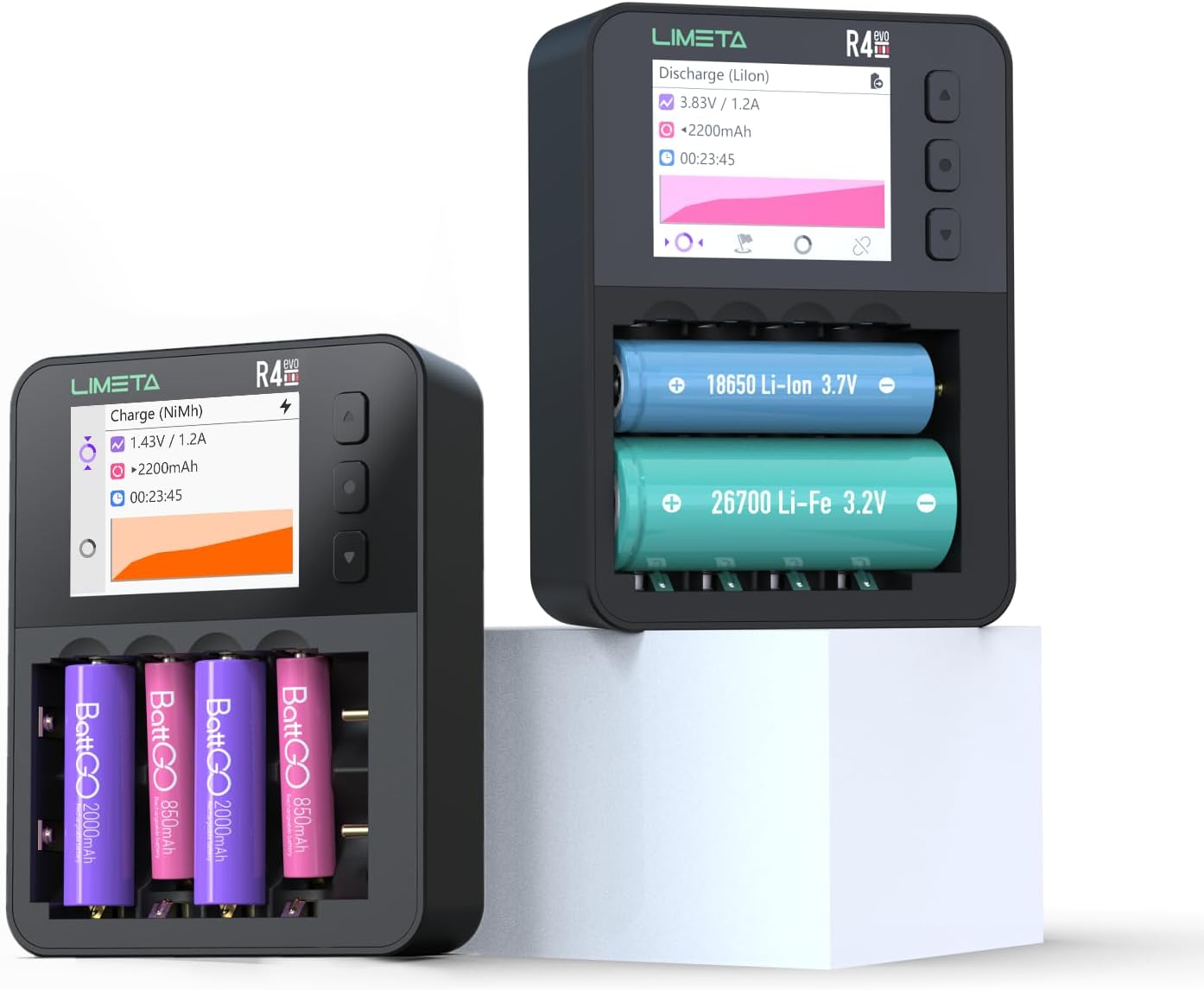
Image: The LIMETA R4EVO 6-Slot Smart Battery Charger, showcasing its compact design and LCD screen.
Key Features:
- Independent 6-Slot Design: Each channel operates independently, allowing for simultaneous charging of different battery types and sizes.
- Wide Battery Compatibility: Supports 3.7V Li-ion (10440, 10500, 12500, 13500, 14500, 14650, 16650, 17650, 17670, 18650, 18700, 20650, 20700, 21700, 22650, 26650, 26700) and 1.5V Lithium-ion/Ni-MH/Ni-ZN/Li-Fe/Li-Hv AA/AAA rechargeable batteries.
- LCD Display: IPS high-definition screen displays real-time data including charging progress, voltage, current, battery capacity, and temperature.
- Multi-Function Modes: Includes Charge, Discharge, Cycle, Analysis, Activation, and Destroy modes.
- Multiple Protections: Features short circuit protection, overheat protection, overcurrent protection, overcharge protection, and reverse polarity protection.
- USB-C Port: Universal charging port for convenient power input.

Image: Close-up of the LIMETA R4EVO's Ultra-HD color screen, showing detailed charging information.
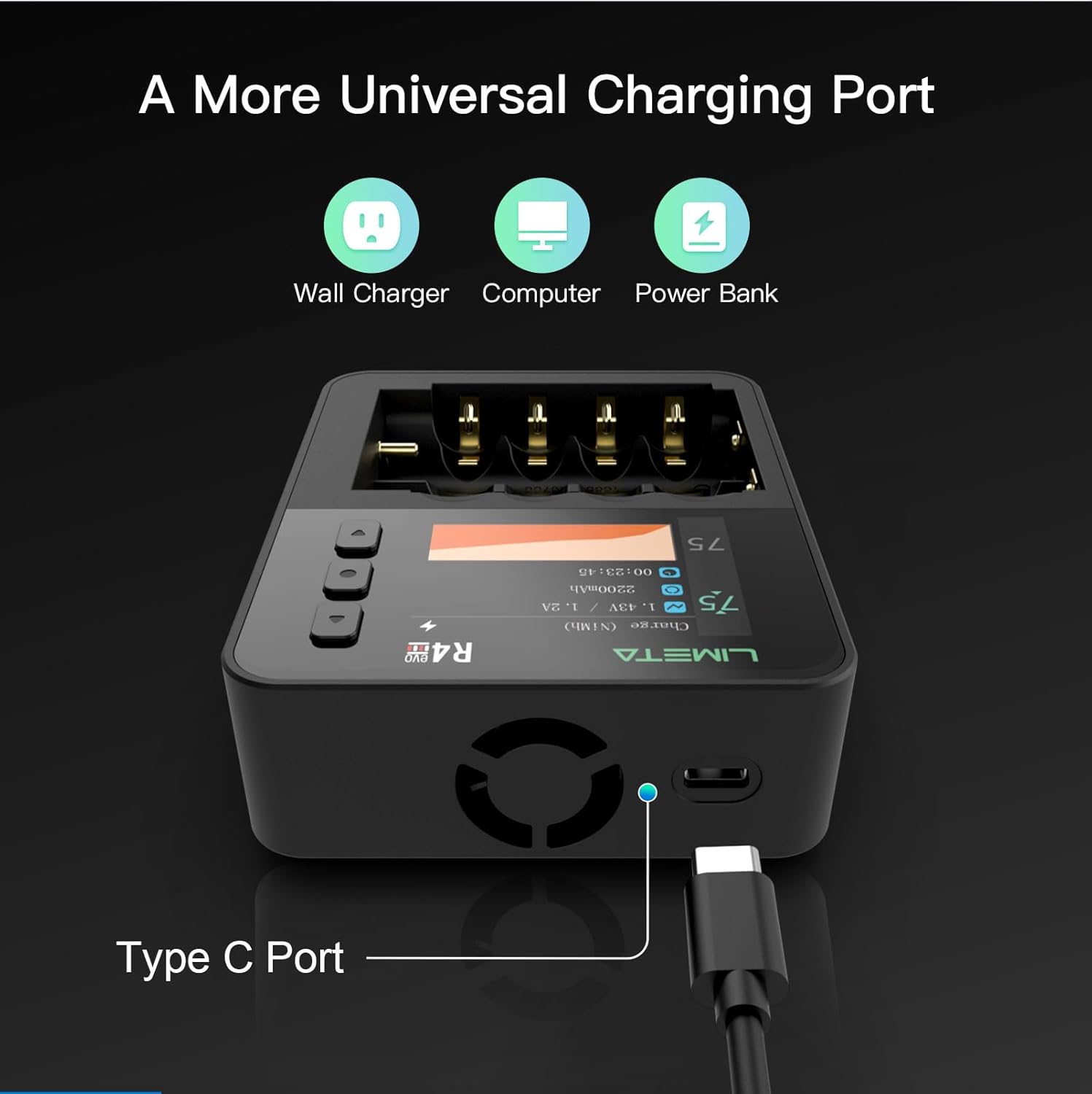
Image: The LIMETA R4EVO charger connected via its universal USB-C port, illustrating compatibility with various power sources like wall chargers, computers, and power banks.
Setup
1. Firmware Upgrade (Recommended)
For optimal performance and access to the latest features, it is recommended to upgrade the charger's firmware. Connect the charger to your computer using the provided USB-C data cable and download the ISD GO app to perform the upgrade.
2. Connecting Power
Connect the USB-C data cable to the charger's USB-C port and plug the other end into a compatible power source (e.g., a USB wall adapter, computer USB port, or power bank). Ensure the power source provides at least 9V/2A for fast charging.
3. Inserting Batteries
Carefully insert rechargeable batteries into the charger slots, ensuring correct polarity (+ and - terminals match the indicators in the slots). The charger's independent slots allow for mixed battery types and sizes simultaneously.

Image: The LIMETA R4EVO charger with various AA and 18650 batteries inserted into its slots, demonstrating its multi-size compatibility.
Operating Modes
The LIMETA R4EVO offers several operational modes to manage your batteries effectively. Use the control buttons next to the LCD screen to navigate and select modes for each independent slot.
Video: Demonstration of the LIMETA R8 Smart Charger's interface, showing how to switch between different working modes and adjust charging current. This video illustrates the user interface and functionality relevant to the R4EVO model.
1. Charge Mode
This is the standard mode for recharging batteries. The charger automatically detects the battery type and applies the appropriate charging protocol. You can adjust the charging current if needed.
2. Discharge Mode
This mode discharges the battery to a safe level. Useful for Ni-MH/Ni-Cd batteries to reduce memory effect or for preparing batteries for storage.
3. Cycle Mode
Performs a charge-discharge-charge cycle. This helps to optimize battery performance and determine its true capacity.
4. Analysis Mode
This mode charges, discharges, and then recharges the battery, providing a detailed analysis of its capacity and health. This is particularly useful for evaluating older batteries.
5. Activation Mode
Attempts to revive deeply discharged batteries that might not be recognized by standard chargers. Use with caution and monitor the battery closely.
6. Destroy Mode
This mode fully discharges batteries to a very low voltage, rendering them unusable for safe disposal. Use only for batteries you intend to permanently discard.
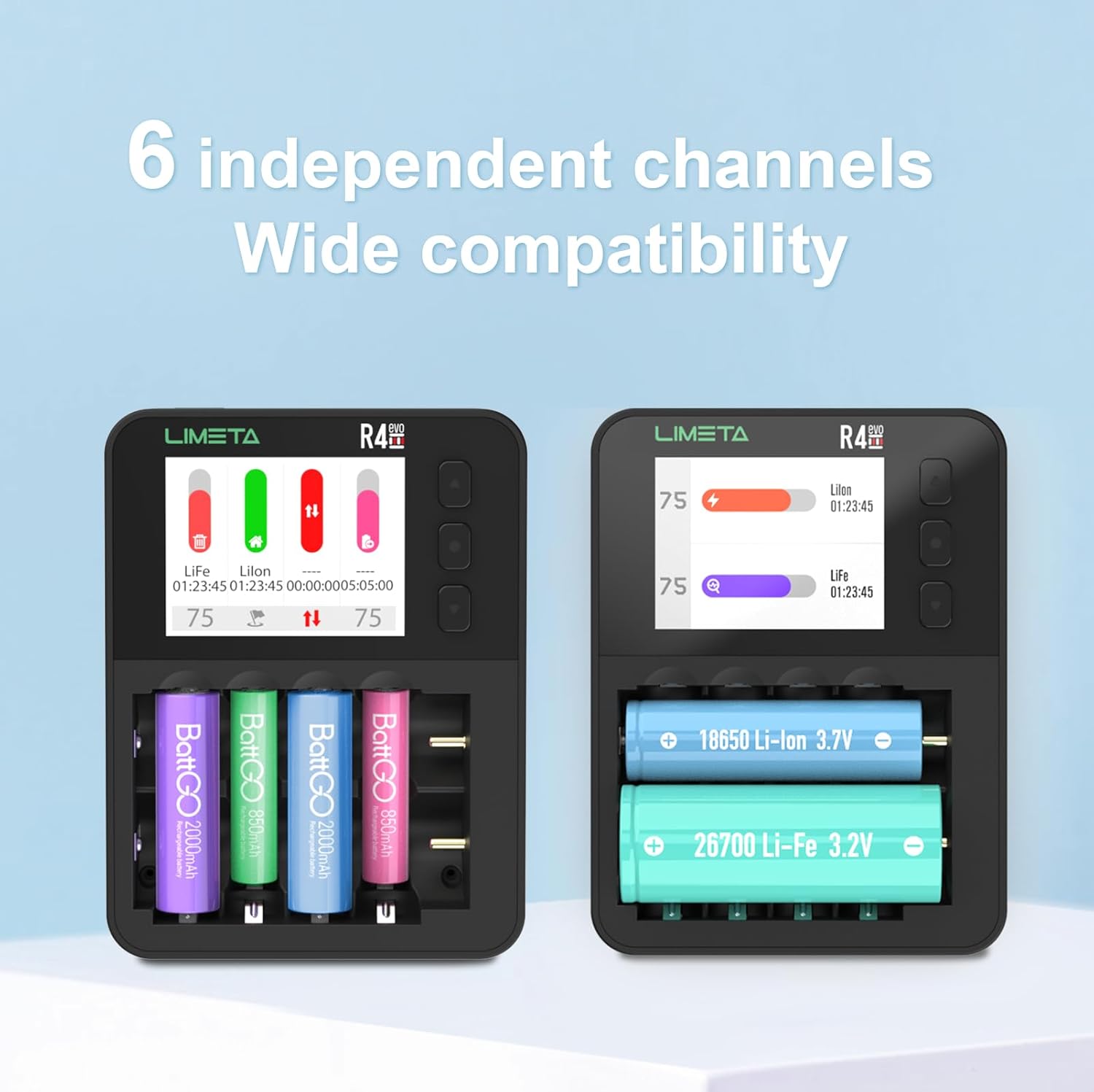
Image: The LIMETA R4EVO charger displaying its 6 independent channels, each showing individual battery status and charging progress.
Video: A brief overview of the LIMETA R4EVO Rechargeable AA AAA Batteries Charger, highlighting its features and operation. This video provides a general visual guide to the product.
Battery Compatibility
The LIMETA R4EVO is compatible with a broad range of rechargeable battery types and sizes. The independent slots allow for flexible use with different batteries simultaneously.
Supported Battery Types:
- 3.7V Li-ion batteries
- 1.5V Lithium-ion batteries
- Ni-MH (Nickel-Metal Hydride) batteries
- Ni-ZN (Nickel-Zinc) batteries
- Li-Fe (Lithium Iron Phosphate) batteries
- Li-Hv (High Voltage Lithium) batteries
Supported Battery Sizes:
- AA, AAA
- 10440, 10500, 12500, 13500, 14500, 14650, 16650, 17650, 17670, 18650, 18700, 20650, 20700, 21700, 22650, 26650, 26700

Image: The LIMETA R4EVO charger being used to charge batteries for various devices such as toy cars, gamepads, outdoor lighting, and electronic devices, illustrating its broad applicability.
Maintenance
- Clean the charger and battery contacts regularly with a dry, soft cloth to prevent oxidation and ensure good contact.
- Store the charger in a cool, dry place when not in use.
- Avoid dropping or subjecting the charger to strong impacts.
- Do not disassemble the charger; this will void the warranty and may cause damage.
Troubleshooting
1. Why is the measured contact resistance value high and inconsistent?
This product uses a contact plate charging design. Contact resistance may vary depending on the battery's placement angle and contact position. Oxidation or rust on the battery's positive or negative terminals can also lead to poor contact and increased resistance. Ensure batteries are clean and properly seated.
2. What is independent operation of each channel?
Independent channel operation means that the R series supports mixed charging of multiple battery types simultaneously. Each slot can be configured with different operating modes. If you need to use multiple functions simultaneously, such as charging and analysis, the R4EVO is designed for this flexibility.
3. What should I do if the battery is difficult to remove?
The product is designed with dedicated grooves for removing batteries. The correct method is to gently pry out the batteries in order, for example, from left to right or right to left.
4. Why do some batteries catch fire?
Fast charging requires extremely high battery consistency. Batteries with low internal resistance and good consistency are ideal. Some batteries have high internal resistance and poor consistency, which can cause overheating risks during fast charging. It is strongly recommended to prioritize well-known brand batteries. If you are unsure whether the battery has good consistency, please reduce the charging current to below 500mAh.
5. Why does the battery sometimes show as fully charged but actually have insufficient capacity?
This is related to the battery itself. Some batteries may have exaggerated capacity ratings or have aged. It is recommended to charge batteries from reputable brands. After the display shows fully charged, continue trickle charging for 15-30 minutes to supplement the capacity. Use the product's analysis function to check the actual capacity before charging. Malfunction issues may sometimes appear to be caused by the charger but are actually due to the battery.
6. What should I do if the product emits a beeping sound?
A beeping sound can indicate:
- Battery malfunction: Try replacing the battery.
- Charger malfunction: Power off or try a different slot for testing.
- Incorrect parameter settings: Carefully consult the manual and check and reset the charging parameters.
7. Is it normal for the battery or charger to heat up during charging?
It is common for chargers that support fast charging to generate heat during operation. This product's operating temperature strictly complies with international safety standards. The temperature measurement for the R series is located between the metal contact and the plastic casing of the charging slot, so the temperature reading may have some deviation. However, the temperature monitoring system is set within the battery's allowable maximum charging temperature. Once the temperature approaches the upper limit, the charger will automatically reduce the charging current to ensure safety.
8. Why are the temperature or current measurement values inaccurate?
Ensure the device is upgraded to the latest firmware. Environmental factors such as fluctuations in ambient temperature and other environmental conditions can cause variations in usage and measurements. The current contact plate design may lead to some measurement fluctuations (especially in temperature). Products will continue to be optimized and upgraded.
9. Why can't I get in touch with customer service or seller?
Your email may have been filtered as spam by the system. LIMETA aims to add a more convenient after-sales customer service channel in the official app in the future.
Specifications
| Feature | Detail |
|---|---|
| Product Dimensions | 3.5 x 1.5 x 4.5 inches (8.89 x 3.81 x 11.43 cm) |
| Item Weight | 12 ounces (340 Grams) |
| Input Voltage | 5 Volts |
| Output Voltage | 5 Volts |
| Manufacturer | isdt |
| Date First Available | September 5, 2022 |
Support
For further assistance or inquiries, please refer to the official LIMETA app for customer service channels. Ensure your device firmware is up to date for the best experience.
Related documentsR4EVO


Ask a question about this manual
Ask about setup, troubleshooting, compatibility, parts, safety, or missing instructions. Manuals+ will review the question and use this page’s manual context to help answer it.