
Introduction
This manual provides essential instructions for the safe and effective use of your BCXY replacement battery, model CS-HTA115PW. This battery is designed for compatibility with McCulloch ROB 600, ROB 500, ROB 800, and ROB S400 robotic lawnmowers. Please read this manual thoroughly before installation and operation to ensure proper function and to maximize battery life.
Safety Information
Observe the following safety precautions to prevent injury or damage to the battery and equipment:
- DO NOT attempt to disassemble, open, or service the battery pack.
- REPLACE ONLY with the battery pack designated for this product. Using an incompatible battery may cause fire or explosion.
- DO NOT crush, puncture, short external contacts, or dispose of in fire or water.
- DO NOT store above 60°C (140°F). High temperatures can damage the battery and pose a fire risk.
- A new battery pack MUST BE FULLY CHARGED before its first use to ensure optimal performance.
- To reduce the risk of fire or burns, always read the instructions in the operating guide of your robotic lawnmower before using the battery.
- This battery features built-in protection against overcharge, over-discharge, over-voltage, and short circuits to enhance battery life and safety.

Underside view of the battery showing the product label with model number, specifications, and safety warnings. For more information, visit cameronsino.com.
Setup (Installation)
Before installing the new battery, ensure your robotic lawnmower is turned off and disconnected from any power source. Refer to your McCulloch robotic lawnmower's original instruction manual for specific battery compartment location and removal procedures.
- Locate the battery compartment on your McCulloch robotic lawnmower. This is typically found on the underside or within a service panel.
- Carefully open the battery compartment cover, usually secured by screws or latches.
- Disconnect the old battery's connector from the mower's port. Remove the old battery.
- Align the connector of the new BCXY battery (Model CS-HTA115PW) with the corresponding port in the mower and firmly plug it in. Ensure a secure connection.
- Place the new battery into the compartment, ensuring it fits snugly and does not obstruct the cover.
- Close and secure the battery compartment cover.

Front view of the BCXY replacement battery, showing its compact black casing.

Close-up view of the battery's electrical connector, showing four pins. Ensure this connector matches your mower's port.
Operating
After installation, the new battery must be fully charged before its first use.
- Place your robotic lawnmower on its charging station or connect it to its charger as per the mower's instructions.
- Allow the battery to charge completely. The charging indicator on your mower will typically show when charging is complete. This initial charge may take several hours.
- Once fully charged, the mower is ready for operation. Follow your mower's manual for scheduling and operating instructions.
Maintenance
Proper maintenance ensures the longevity and performance of your battery.
- Regular Charging: For optimal battery health, avoid completely draining the battery frequently. Recharge it after each use or when the mower indicates a low battery level.
- Storage: If the mower or battery will not be used for an extended period (e.g., winter storage), charge the battery to approximately 50-60% capacity. Store the battery in a cool, dry place, away from direct sunlight and extreme temperatures (below 0°C / 32°F or above 40°C / 104°F).
- Cleaning: Keep the battery and its contacts clean and free from dirt or debris. Use a dry cloth to wipe the battery. Do not use liquids or solvents.
- Inspection: Periodically inspect the battery for any signs of damage, swelling, or leakage. If any issues are observed, discontinue use and replace the battery.
Troubleshooting
If you encounter issues with your battery, consider the following common solutions:
- Battery Not Charging:
- Ensure the battery is correctly installed and its connector is firmly seated.
- Verify that the charging station or charger is properly connected to power and functioning.
- Check the mower's charging contacts and the battery's contacts for dirt or corrosion. Clean if necessary.
- Short Run Time:
- Ensure the battery is fully charged before each operation.
- Battery performance can degrade over time with extensive use. If the battery is old, consider replacement.
- Extreme temperatures can affect battery performance. Operate the mower within recommended temperature ranges.
If problems persist, consult your McCulloch robotic lawnmower's manual or contact customer support.
Specifications
| Model Number | CS-HTA115PW |
| Part Numbers | 593 24 72-01, 590 21 42-02 |
| Battery Type | Lithium-ion |
| Voltage | 18.0V |
| Capacity | 2500mAh |
| Watt-Hours (Wh) | 45.0Wh |
| Dimensions (L x W x H) | 138.0 x 80.0 x 38.0 mm (5.43 x 3.15 x 1.5 inches) |
| Weight | 450 g (15.9 ounces) |
| Certifications | ISO9001, RoHS, CE, UN38.3, MSDS |
| Compatible Models | McCulloch ROB 600, ROB 500, ROB 800, ROB S400 |
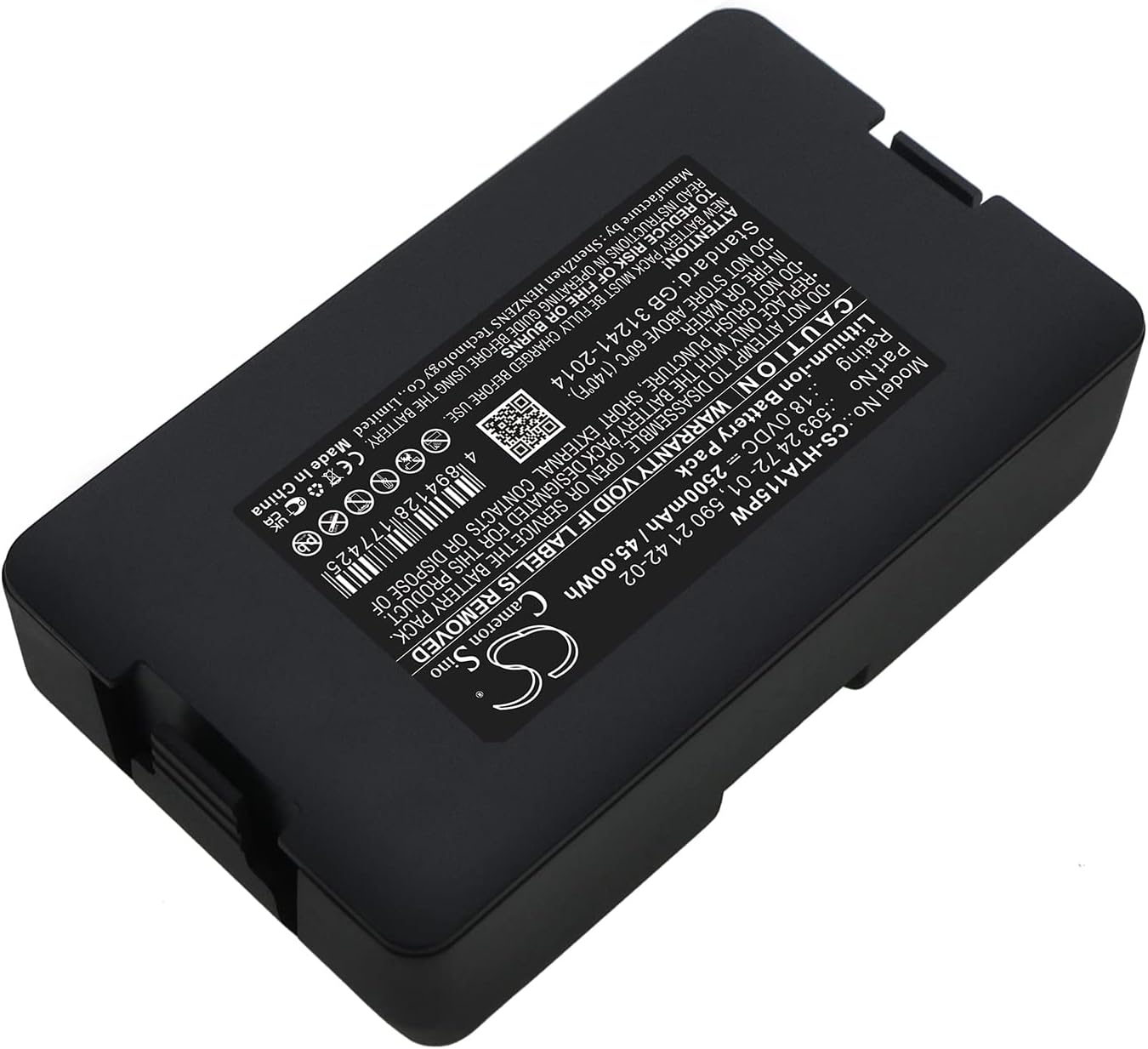
Angled view of the battery label, highlighting detailed specifications and safety instructions. For more information, visit cameronsino.com.
Warranty
Specific warranty details for this BCXY replacement battery may vary. Please refer to the seller or the manufacturer's official website for the most current and accurate warranty information.
Support
For technical assistance, troubleshooting beyond this guide, or inquiries regarding your BCXY battery, please contact the seller directly or visit the manufacturer's website for support resources. The manufacturer's website, as indicated on the battery label, is cameronsino.com.