
Introduction
The IMICE T97 RGB Honeycomb Gaming Mouse is designed to provide a precise and comfortable experience for gaming and general computer use. It features a high-precision 4800 DPI sensor, a durable and ergonomic design, and is compatible with various operating systems. This manual will guide you through the setup, operation, and maintenance of your new gaming mouse.
- Brand: IMICE
- Type: Mouse
- Compatibility: Computers and Laptops
- Key Features: High precision 4800 DPI, comfortable and durable design, anti-sweat design, precise positioning.
- Color: Black
Setup Instructions
1. Connecting the Mouse
The IMICE T97 mouse uses a standard USB connection for plug-and-play functionality. No additional drivers are typically required for basic operation on supported operating systems.
- Locate an available USB port on your computer or laptop.
- Insert the USB connector of the IMICE T97 mouse firmly into the USB port.
- Your operating system should automatically detect and install the necessary drivers. This process may take a few moments.
- Once installed, the mouse will be ready for use.
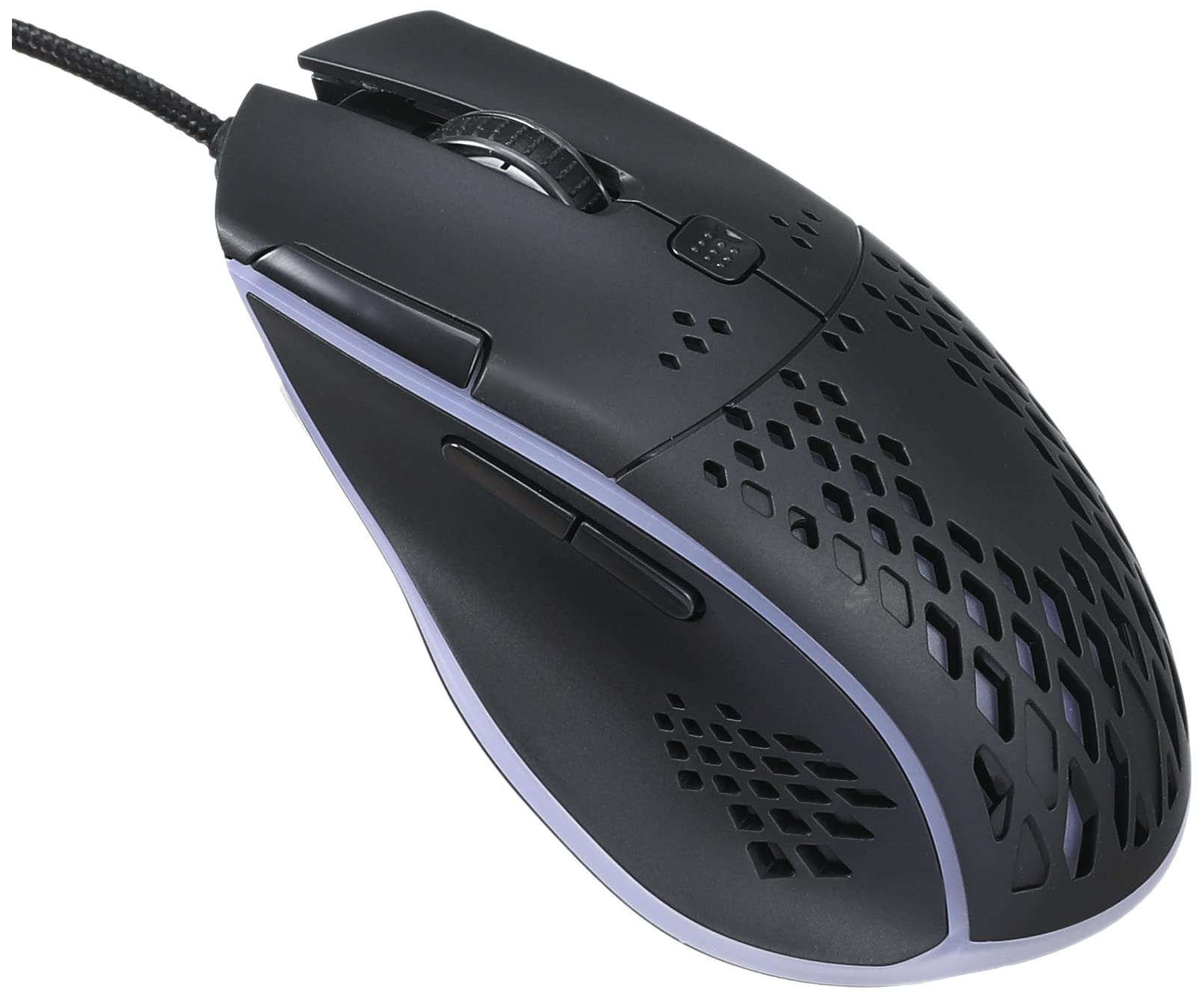
Image: Top-front view of the IMICE T97 RGB Honeycomb Gaming Mouse, showing its ergonomic shape and honeycomb shell design.
Operating the Mouse
Basic Functions
- Left Click: Primary action, selection, activation.
- Right Click: Context menu, secondary actions.
- Scroll Wheel: Scroll up/down documents and web pages. Can also be clicked for middle-click functionality.
- Side Buttons: (If present, typically for forward/back navigation in browsers or custom functions in games). The T97 model typically includes two side buttons.
DPI Adjustment
The IMICE T97 mouse features adjustable DPI (Dots Per Inch) settings, allowing you to change the cursor sensitivity. This mouse supports up to 4800 DPI. There is usually a dedicated button, often located behind the scroll wheel, to cycle through different DPI levels. Press this button to switch between sensitivity settings to find your preferred speed.
RGB Lighting
The mouse features RGB lighting, which typically cycles through various colors automatically. There may not be user-configurable software for lighting control, and it operates as a default aesthetic feature.

Image: Underside view of the IMICE T97 RGB Honeycomb Gaming Mouse, showing the optical sensor, product label with model T97, and regulatory marks.
Maintenance
Cleaning
- Disconnect the mouse from your computer before cleaning.
- Use a soft, dry, lint-free cloth to wipe the surface of the mouse.
- For stubborn dirt, slightly dampen the cloth with water or a mild cleaning solution (avoid harsh chemicals).
- Use a cotton swab or compressed air to clean around buttons and the scroll wheel.
- Ensure no liquid enters the mouse's internal components.
Storage
Store the mouse in a cool, dry place away from direct sunlight and extreme temperatures when not in use for extended periods.
Troubleshooting
| Problem | Solution |
|---|---|
| Mouse is not responding. |
|
| Cursor movement is erratic or jumpy. |
|
| Buttons or scroll wheel are not working. |
|
| Cannot find software for customization. | The IMICE T97 mouse is primarily designed for plug-and-play operation. Dedicated software for advanced customization (like button remapping or detailed RGB control) may not be available or easily accessible for this model. Most functions are hardware-controlled. |
Specifications
| Brand | IMICE |
| Model | T97 |
| Color | Black |
| Connectivity Technology | USB |
| DPI (Max) | 4800 DPI |
| Special Features | Comfortable design, RGB lighting, honeycomb shell |
| Hand Orientation | Ambidextrous |
| Recommended Uses | Gaming |
| Compatible Devices | Personal Computer, Laptop |
| Operating System Compatibility | Linux, Windows XP (and newer versions) |
| Item Weight | 120 grams |
| Shipping Dimensions | 15 x 11 x 5 cm |
| Batteries Included | No (Wired USB mouse) |
| ASIN | B0BD2DDWNQ |
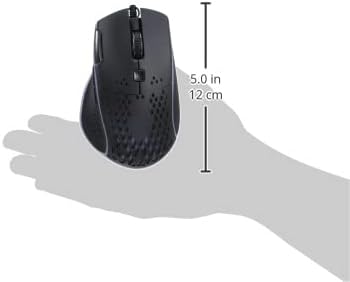
Image: Side view of the IMICE T97 RGB Honeycomb Gaming Mouse held in a hand, illustrating its compact size (approximately 5.0 inches or 12 cm in length).
Warranty Information
Please refer to the retailer or your purchase documentation for specific warranty terms and conditions. IMICE products typically come with a limited warranty against manufacturing defects. Keep your proof of purchase for warranty claims.
Customer Support
For technical assistance or further inquiries, please contact your retailer or visit the official IMICE website for support resources. Ensure you have your product model (T97) and purchase details ready when contacting support.