
1. Introduction
The Roland TD-27KV2 V-Drums kit is an advanced electronic drum system designed for expressive performance, recording, and practice. This manual provides essential information for setting up, operating, maintaining, and troubleshooting your TD-27KV2 kit. It features generously sized pads, Roland's digital snare, hi-hat, and ride pads for natural expression, and an updated TD-27 module with new preset kits, effects, and processing capabilities.
Key features include:
- Premium V-Drums kit with flagship-class sound.
- Updated TD-27 sound module with enhanced features and advanced Prismatic Sound Modeling.
- 75 ready-to-play preset kits, including 10 all-new kits and a variety of new samples.
- 14-inch digital snare, 14-inch digital hi-hat, and 18-inch ride cymbal with high-resolution, multi-sensor triggering.
- Large-diameter mesh-head pads and thin-profile cymbals for an acoustic-like playing experience.
- PureAcoustic Ambience technology for hyper-realistic sound spaces.
- Enhanced layer and transient functions plus support for parallel compression.
- Updated module interface for faster sound selection and drum customization.
- WAV sample import via SD card.
- Stereo mix output and two assignable outputs for PA mixer integration.
2. Setup and Assembly
2.1 Unpacking and Component Check
Carefully unpack all components from the boxes. Verify that all items listed below are present. If any items are missing or damaged, contact your retailer.
Included Components:
- Box 1: Drum sound module (TD-27) x 1, Snare (PD-140DS) x 1, Tom (PDX-100) x 3, Hi-hat (VH-14D) x 1, Crash1 (CY-12C-T) x 1, Crash2 (CY-14C-T) x 1, Ride (CY-18DR) x 1, Kick (KD-10) x 1.
- Box 2: Drum stand (MDS-STD2) x 1.
Items Sold Separately (Required for complete setup):
- Kick Pedal
- Hi-Hat Stand
- Snare Stand
- Drum Throne
- Drumsticks
- Headphones or Drum Monitor

Figure 2.1: Overview of included components and separately sold items.
2.2 Assembling the Drum Stand
Follow the detailed instructions provided in the separate MDS-STD2 stand manual for assembling the drum rack. Ensure all clamps and bolts are securely tightened to prevent movement during play.
2.3 Attaching Pads and Cymbals
- Attach the KD-10 kick pad to the stand. Install your kick pedal (sold separately).
- Mount the PD-140DS snare pad onto your snare stand (sold separately).
- Attach the three PDX-100 tom pads to the designated arms on the drum stand.
- Mount the VH-14D hi-hat onto your hi-hat stand (sold separately).
- Attach the CY-12C-T, CY-14C-T crash cymbals, and the CY-18DR ride cymbal to their respective cymbal arms.

Figure 2.2: Fully assembled Roland TD-27KV2 V-Drum Kit.
2.4 Connecting the Module
Connect each pad and cymbal to the TD-27 sound module using the included cables. Ensure each cable is securely plugged into the correct input on the module, corresponding to the label on the pad/cymbal.

Figure 2.3: Overhead view of the TD-27KV2 kit with module connections.
3. Operating Instructions
3.1 Powering On and Initial Setup
- Connect the AC adapter to the TD-27 module and then to a power outlet.
- Press the power button on the module to turn it on.
- Adjust the master volume to a low level before playing.
3.2 Navigating the TD-27 Module
The TD-27 module features an intuitive interface for sound selection and customization. Use the main dial and navigation buttons to browse through preset kits, adjust parameters, and access various functions.

Figure 3.1: TD-27 Module interface for sound selection and customization.
3.3 Selecting and Customizing Kits
The module comes with 75 ready-to-play preset kits. You can select a kit using the main dial. For customization, access the kit editing menu to modify individual drum sounds, adjust levels, add effects, and apply PureAcoustic Ambience technology.
3.4 Bluetooth Audio Streaming
The TD-27 module supports wireless Bluetooth audio. You can stream music from your smartphone or other Bluetooth-enabled devices directly to the module for practice or playing along with backing tracks.
- Enable Bluetooth on your external device.
- On the TD-27 module, navigate to the Bluetooth settings and initiate pairing.
- Select the TD-27 from your device's Bluetooth list to connect.

Figure 3.2: Connecting a smartphone to the TD-27 module via Bluetooth.
3.5 USB and MIDI Connectivity
The TD-27 module offers USB connectivity for recording up to 28 channels of audio to a computer with a single USB cable. It can also function as a MIDI controller for software instruments.
3.6 Importing WAV Samples
You can import your own WAV samples into the TD-27 module using an SD card. Refer to the detailed module manual for specific instructions on sample import and assignment.
4. Maintenance
4.1 Cleaning
Regularly clean the pads, cymbals, and module with a soft, dry cloth. For stubborn dirt, a slightly damp cloth can be used, followed by immediate drying. Avoid abrasive cleaners or solvents, as these can damage the surfaces.
4.2 Pad and Cymbal Care
The mesh heads on the pads are durable but can be replaced if they show significant wear. Avoid striking the pads with excessive force or using sharp objects, which can damage the mesh or sensors. Cymbals should be handled by their edges to avoid fingerprints and smudges on the playing surfaces.

Figure 4.1: Roland CY-12C-T Crash Cymbal.
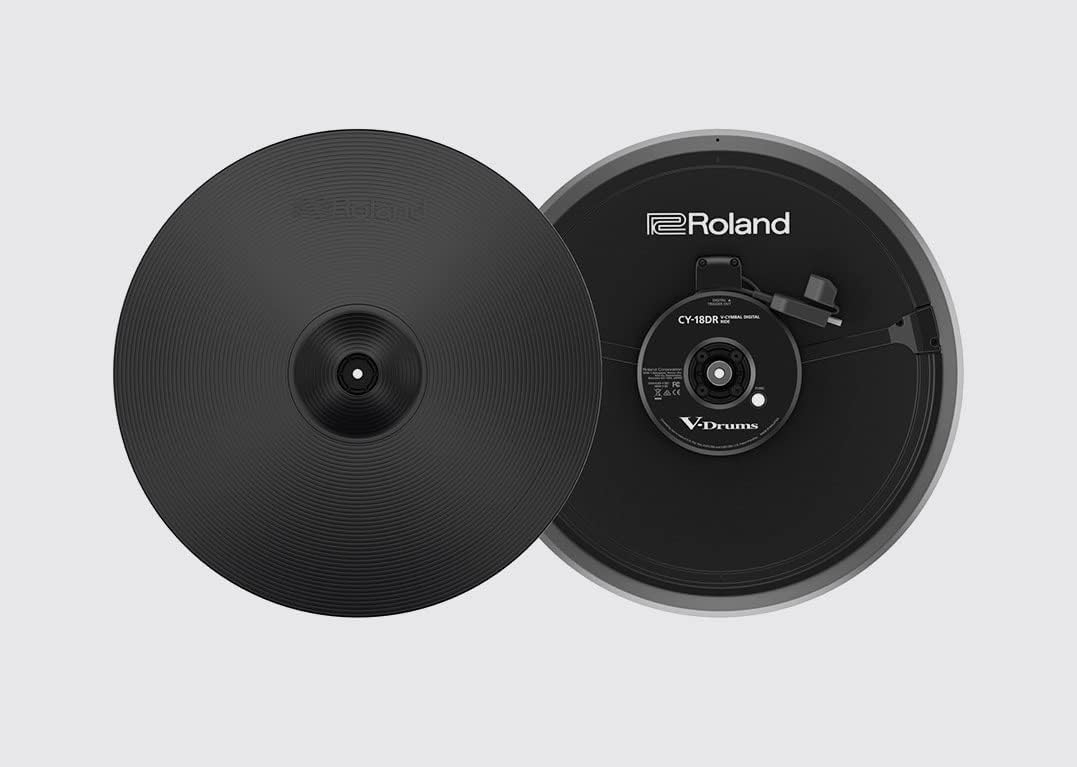
Figure 4.2: Roland CY-18DR Ride Cymbal.

Figure 4.3: Roland VH-14D Hi-Hat.
4.3 Storage
When not in use for extended periods, store the drum kit in a dry, temperature-controlled environment. Protect it from direct sunlight, extreme temperatures, and high humidity. If possible, cover the kit to prevent dust accumulation.
5. Troubleshooting
This section addresses common issues you might encounter with your TD-27KV2 kit. For more detailed troubleshooting, refer to the comprehensive TD-27 module manual.
5.1 No Sound Output
- Check Power: Ensure the module is powered on and the AC adapter is securely connected.
- Volume Levels: Verify that the master volume, individual pad volumes, and connected headphones/speakers are turned up.
- Cable Connections: Confirm all pad and output cables are correctly and securely connected to the module and your audio system.
- Headphone/Output Selection: Ensure the correct output (headphones or main output) is selected and functioning.
5.2 Incorrect Triggering or Sensitivity
- Cable Connections: Recheck that the correct pad is connected to the correct input on the module.
- Module Settings: Access the module's trigger settings to adjust sensitivity, threshold, and other parameters for each pad. These settings may need fine-tuning based on your playing style.
- Pad Condition: Inspect the pad heads and cymbal surfaces for any physical damage that might affect triggering.
5.3 Bluetooth Connection Issues
- Device Compatibility: Ensure your external device supports Bluetooth audio streaming.
- Pairing Mode: Make sure both the module and your device are in pairing mode.
- Interference: Move closer to the module and away from other wireless devices that might cause interference.
- Reset: Try turning Bluetooth off and on again on both the module and your device.
6. Specifications
The following table outlines the key specifications for the Roland TD-27KV2 V-Drum Kit.
| Feature | Specification |
|---|---|
| Model Name | TD-27KV2 |
| Item Model Number | TD-27KV2 |
| Brand | Roland |
| Item Weight | 91.5 Pounds (41.5 kg) |
| Product Dimensions (L x W x H) | 47.24 x 61.02 x 47.24 inches (120 x 155 x 120 cm) |
| Body Material | Metal |
| Finish Type | Black Lacquered |
| Color | Black |
| Connector Type | USB |
| UPC | 761294519196 |
| Date First Available | September 3, 2022 |
7. Warranty and Support
For warranty information, please refer to the warranty card included with your product or visit the official Roland website. Roland provides customer support for product inquiries, technical assistance, and service requests.
For further assistance, please contact Roland customer support or visit the Roland Store on Amazon.