
1. Product Overview
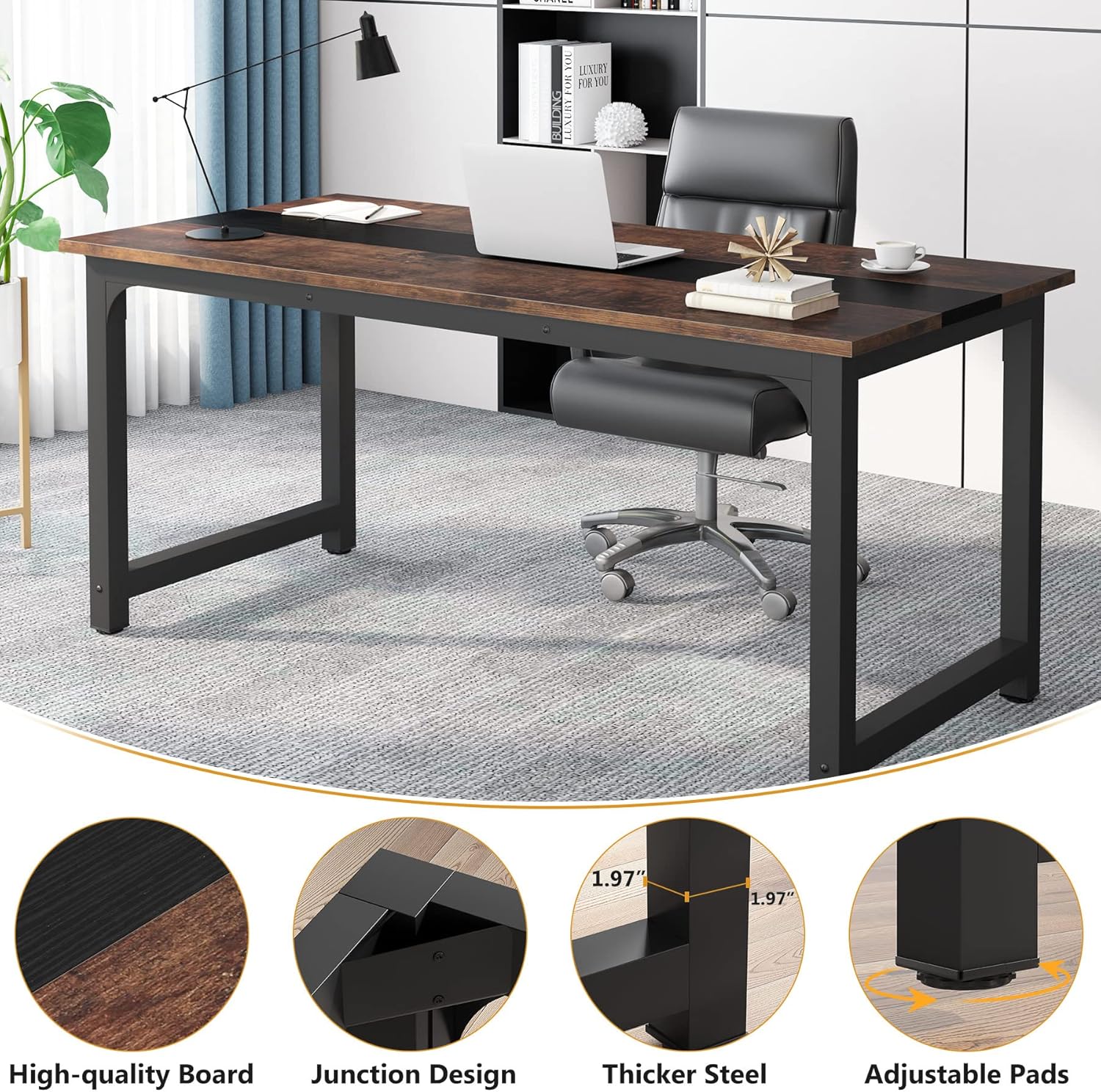
The Tribesigns 70.8" Executive Desk is a large, modern office computer desk designed for home and professional office workspaces. It features a spacious work surface and ample leg room, making it suitable for various tasks such as studying, working, and writing. The desk combines a charming wood-grain style with black finishes and angular metal legs, offering a stylish and functional addition to any office environment.
Key features include:
- Spacious Work Surface: Measuring 29.52'' H x 70.86'' W x 31.49'' D overall, providing ample space for laptops, books, office supplies, and paperwork.
- Multipurpose Design: Can be used as a large computer desk, executive desk, or small conference table.
- Durable Construction: Made with E1 particle wood and 2" x 2" thicker metal tubes for enhanced stability and long-lasting use.
- Unique Aesthetic: Features a two-tone design with rustic wood and black block elements.

2. Setup and Assembly
Assembly of the Tribesigns Executive Desk is required. It is designed for straightforward assembly, with all necessary hardware and tools included, except for a screwdriver. For optimal assembly, it is recommended that two people work together.
2.1 Before You Begin
- Unpack all components and verify against the parts list provided in your package.
- Ensure you have a clean, flat surface for assembly.
- Gather your own screwdriver, as it is not included.
- Familiarize yourself with the assembly instructions and diagrams before starting.
2.2 Assembly Steps
Follow the numbered steps in the included instruction manual. Each piece is labeled to facilitate easy identification and correct placement during assembly.
Note: Do not fully tighten all screws until the entire desk frame and top are assembled to allow for minor adjustments and proper alignment.

3. Usage and Operation
The Tribesigns 70.8" Executive Desk is designed to provide a comfortable and efficient workspace for various activities. Its generous dimensions allow for multiple setups and ample room for movement.
3.1 Optimal Placement
- Place the desk on a level surface to ensure stability.
- Consider natural light sources and electrical outlets when choosing a location.
- Ensure sufficient space around the desk for an office chair and any mobile cabinets.
3.2 Work Surface Utilization
The large surface area can accommodate multiple monitors, a laptop, keyboard, mouse, and other office essentials. The smooth top is ideal for writing and easy cleanup.


4. Maintenance and Care
Proper care will ensure the longevity and appearance of your Tribesigns Executive Desk.
4.1 Cleaning Instructions
- Wipe the desk surfaces with a dry cloth to remove dust and spills.
- Avoid using harsh chemicals or abrasive cleaners, as these may damage the finish.
- The desk surface is designed to be water-resistant and anti-scratch, making it easy to maintain.
4.2 General Care
- Periodically check and tighten all screws to ensure the desk remains sturdy.
- Avoid placing extremely hot or cold items directly on the surface without protective coasters.
- The desk features adjustable pads on the legs to help level the desk on uneven floors and protect your flooring.
5. Troubleshooting
This section provides general advice for common issues. For specific problems not addressed here, please contact customer support.
5.1 Desk Wobbles After Assembly
- Check all connections: Ensure all screws are securely tightened. If you did not fully tighten during assembly, do so now.
- Adjust leveling feet: Use the adjustable pads on the bottom of the legs to compensate for uneven flooring. Rotate them clockwise or counter-clockwise until the desk is stable.
- Verify correct part orientation: Double-check the assembly manual to ensure all parts, especially the frame components, are oriented correctly.
5.2 Gaps Between Desktop Panels
- Loosen and realign: Loosen the screws connecting the desktop panels and gently push them together to close any gaps. Then, retighten the screws evenly.
- Ensure correct panel placement: Confirm that each desktop panel is in its intended position as per the assembly instructions.
6. Specifications
| Feature | Detail |
|---|---|
| Brand | Tribesigns |
| Model Number | U0170LX |
| Product Dimensions (D x W x H) | 31.5"D x 70.8"W x 29.1"H |
| Color | Vintage Brown/Black |
| Style | Modern |
| Base Material | Metal |
| Top Material Type | Engineered Wood |
| Maximum Weight Recommendation | 500 Pounds |
| Required Assembly | Yes |
| Recommended Number of People for Assembly | 2 |
| Product Care Instructions | Wipe with Dry Cloth |
| UPC | 036659284652 |
7. Warranty and Support
7.1 Manufacturer's Warranty
The Tribesigns 70.8" Executive Desk comes with an 18-month limited warranty from the manufacturer. This warranty covers defects in materials and workmanship under normal use. Please retain your proof of purchase for warranty claims.
7.2 Customer Support
For any questions, assistance with assembly, or to report missing/damaged parts, please contact Tribesigns customer support. Contact information can typically be found on the product packaging or the official Tribesigns website.
You may also visit the Tribesigns Store on Amazon for additional product information and support resources.


