
1. Introduction
This manual provides essential instructions for the setup, operation, and maintenance of your Epson EpiqVision Ultra LS800 Ultra Short Throw Smart Streaming Laser Projector. Please read this manual thoroughly before using the product to ensure correct and safe operation. Keep this manual for future reference.

Image 1.1: The Epson EpiqVision Ultra LS800 Ultra Short Throw Smart Streaming Laser Projector in white, showcasing its sleek, rectangular design with a textured front grille and projection lens on top.
2. What's in the Box
Verify that all the following items are included in your product packaging:
- Epson EpiqVision Ultra LS800 Laser Projector
- Power Cable
- Smart Remote Control
- 2x AAA Batteries
- Quick Setup Guide
3. Setup
3.1 Placement
The Epson EpiqVision Ultra LS800 is an ultra short throw projector, designed to project large images from a very short distance from the screen or wall. Place the projector on a flat, stable surface directly below your desired projection area. The distance from the wall will determine the image size.

Image 3.1: The Epson LS800 projector positioned on a media console, projecting a large, vibrant sports scene onto a wall-mounted screen, demonstrating its ultra short throw capability in a typical living room environment.
3.2 Power Connection
- Connect the supplied power cable to the projector's power input.
- Plug the other end of the power cable into a functional electrical outlet.
3.3 Initial Setup and Picture Adjustment
Upon first power-on, the projector will guide you through the initial setup process, including network connection for Android TV features. Use the multi-point picture adjustment and individually adaptable feet to fine-tune the image alignment and focus. The projector can display images up to 150 inches diagonally.

Image 3.2: An illustration showing various projection sizes (80", 100", 120", 150") from the Epson LS800 projector, demonstrating the scalability of the image based on projector placement.
4. Operating the Projector
4.1 Basic Operation
Use the smart remote control to power the projector on/off, navigate menus, and adjust settings. Ensure the AAA batteries are correctly inserted into the remote.
4.2 Picture Settings
The LS800 features 4K PRO-UHD resolution and 10-bit HDR color processing, delivering vibrant and accurate visuals. With 4,000 lumens of color and white brightness, the projector produces a clear picture even in well-lit environments. Adjust picture modes and settings via the on-screen menu to optimize for different content types (e.g., movies, sports, gaming).

Image 4.1: A diagram illustrating the internal components of the Epson LS800, highlighting the 3-chip 3LCD technology that processes separate RGB color signals for enhanced color accuracy and brightness.
4.3 Audio Settings
The projector includes a built-in 2.1ch virtual surround sound system designed by Yamaha. This system offers various sound modes (TV, Sports, Movies, Music) for an optimized audio experience. You can also connect external audio devices via Bluetooth to use the projector as a standalone speaker.

Image 4.2: An exploded view of the Epson LS800 projector's internal audio components, showcasing the Yamaha-designed 2.1 channel speakers integrated into the unit.
4.4 Smart Features and Streaming
The integrated Android TV interface provides access to popular streaming services such as Amazon Prime Video, Hulu, Disney+, HBO Max, and YouTube. The remote control features voice search with built-in Google Assistant for convenient content discovery. A wireless network connection of 5 Mbps or faster is required for optimal streaming performance.

Image 4.3: A screenshot of the Android TV interface displayed on the Epson LS800 projector, showing various streaming app icons and content recommendations.
4.5 Connectivity
The projector is equipped with three HDMI ports, supporting 4K HDR content at 60 Hz. One HDMI port is specifically optimized for gaming, supporting 1080p/120 Hz signals. Additional connectivity options include USB, Wi-Fi, and Bluetooth for versatile device integration.
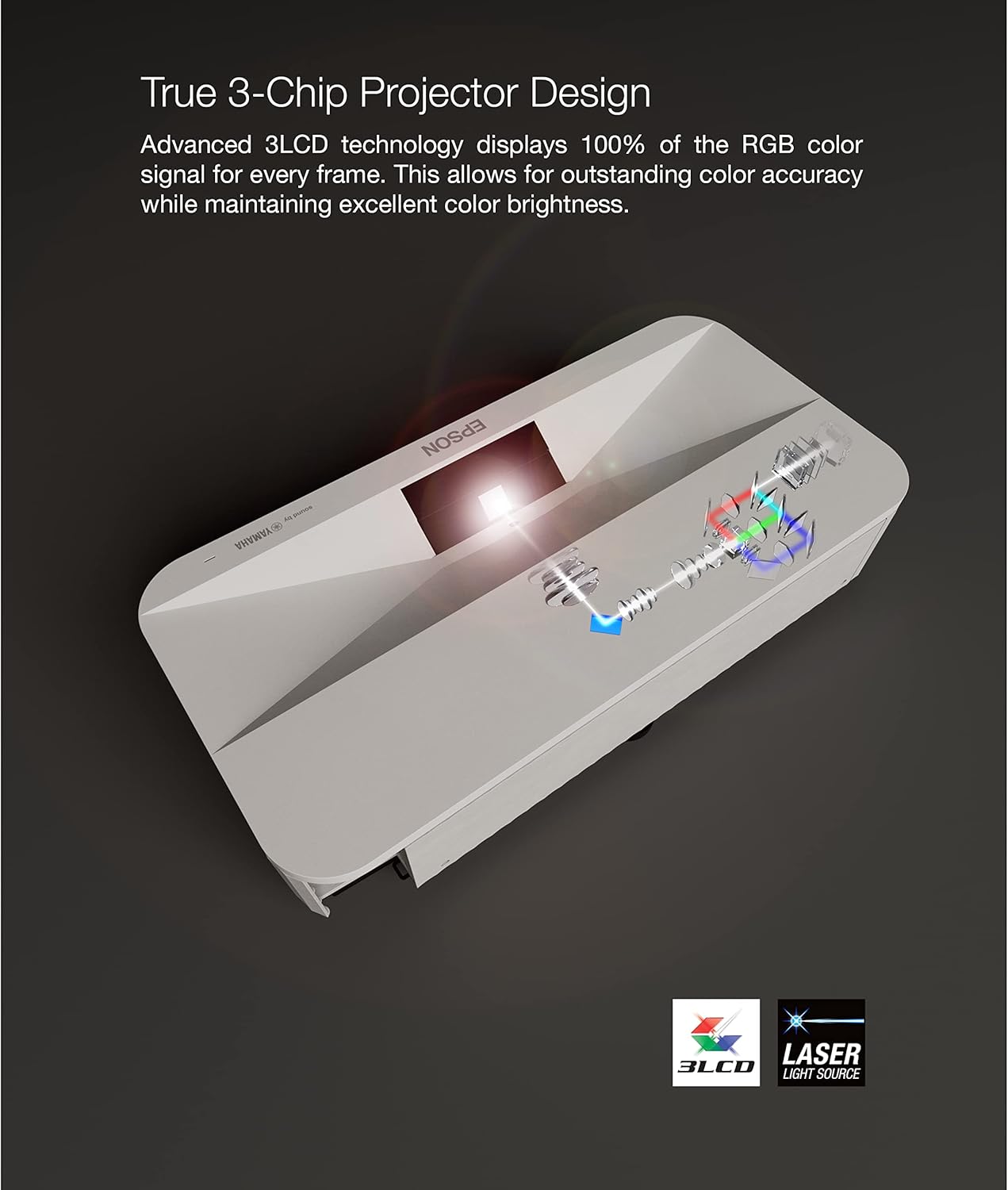
Image 4.4: A gaming console connected to the Epson LS800 projector, displaying a vibrant game scene on a large screen, highlighting the projector's suitability for gaming.
5. Maintenance
To ensure optimal performance and longevity of your projector, follow these maintenance guidelines:
- Cleaning the Exterior: Use a soft, dry cloth to wipe the projector's exterior. For stubborn marks, slightly dampen the cloth with water. Avoid abrasive cleaners or solvents.
- Cleaning the Lens: Gently wipe the projection lens with a lens cleaning cloth designed for optical surfaces. Do not use excessive force.
- Ventilation: Ensure the projector's ventilation openings are not blocked to prevent overheating. Maintain adequate space around the projector for airflow.
- Laser Light Source: The LS800 uses a laser light source designed for long operational life, eliminating the need for traditional lamp replacements.
6. Troubleshooting
If you encounter issues with your projector, refer to the following basic troubleshooting steps. For more detailed solutions, consult the comprehensive user manual available online.
- No Power: Ensure the power cable is securely connected to both the projector and a working electrical outlet. Check if the power indicator light is on.
- No Image: Verify that the correct input source is selected. Check all HDMI or other video cables for secure connections. Ensure the lens cap (if any) is removed.
- Poor Image Quality: Adjust focus and keystone settings. Ensure the projection surface is flat and clean. Check for any obstructions in the projection path.
- No Sound: Confirm that the volume is not muted or set too low. Check audio output settings on the projector and any connected source devices.
- Remote Control Not Working: Replace the AAA batteries in the remote. Ensure there are no obstructions between the remote and the projector's IR receiver.
7. Specifications
| Brand | Epson |
| Model Number | V11HA90020 |
| Display Resolution | 3840 x 2160 (4K PRO-UHD) |
| Brightness | 4,000 Lumens (Color and White) |
| Projection Technology | 3-Chip 3LCD, Laser Array Light Source |
| Max. Projected Image Size | 150 inches |
| HDR Support | 10-Bit HDR |
| Operating System | Android TV with Google Assistant |
| Audio | 2.1ch Yamaha Built-in Speakers |
| Connectivity | 3x HDMI (1 for gaming), USB, Wi-Fi, Bluetooth |
| Product Dimensions | 13.4 x 27.4 x 6.2 inches |
| Item Weight | 27.6 pounds |
| Color | White |
8. Warranty and Support
For detailed warranty information, please refer to the warranty card included with your product or visit the official Epson website. For further assistance, technical support, or to download the complete user manual in PDF format, please visit the Epson support page or refer to the link below:
Official User Manual (PDF): Download Here
9. Important Safety Information
Always follow basic safety precautions when using this product to reduce the risk of fire, electric shock, and injury to persons. Read all instructions before use. Do not attempt to service this product yourself. Refer all servicing to qualified service personnel. Do not expose the projector to rain or moisture. Avoid looking directly into the projector lens when the light source is active.


