Introduction
Thank you for choosing the Thomas Earnshaw Supremacy ES-8270 Chronograph. This timepiece combines classic design with precise Japanese quartz movement, offering both elegance and functionality. This manual provides essential information for the proper use, care, and maintenance of your watch to ensure its longevity and optimal performance.
Product Overview
Familiarize yourself with the main components of your Thomas Earnshaw Supremacy ES-8270 Chronograph.
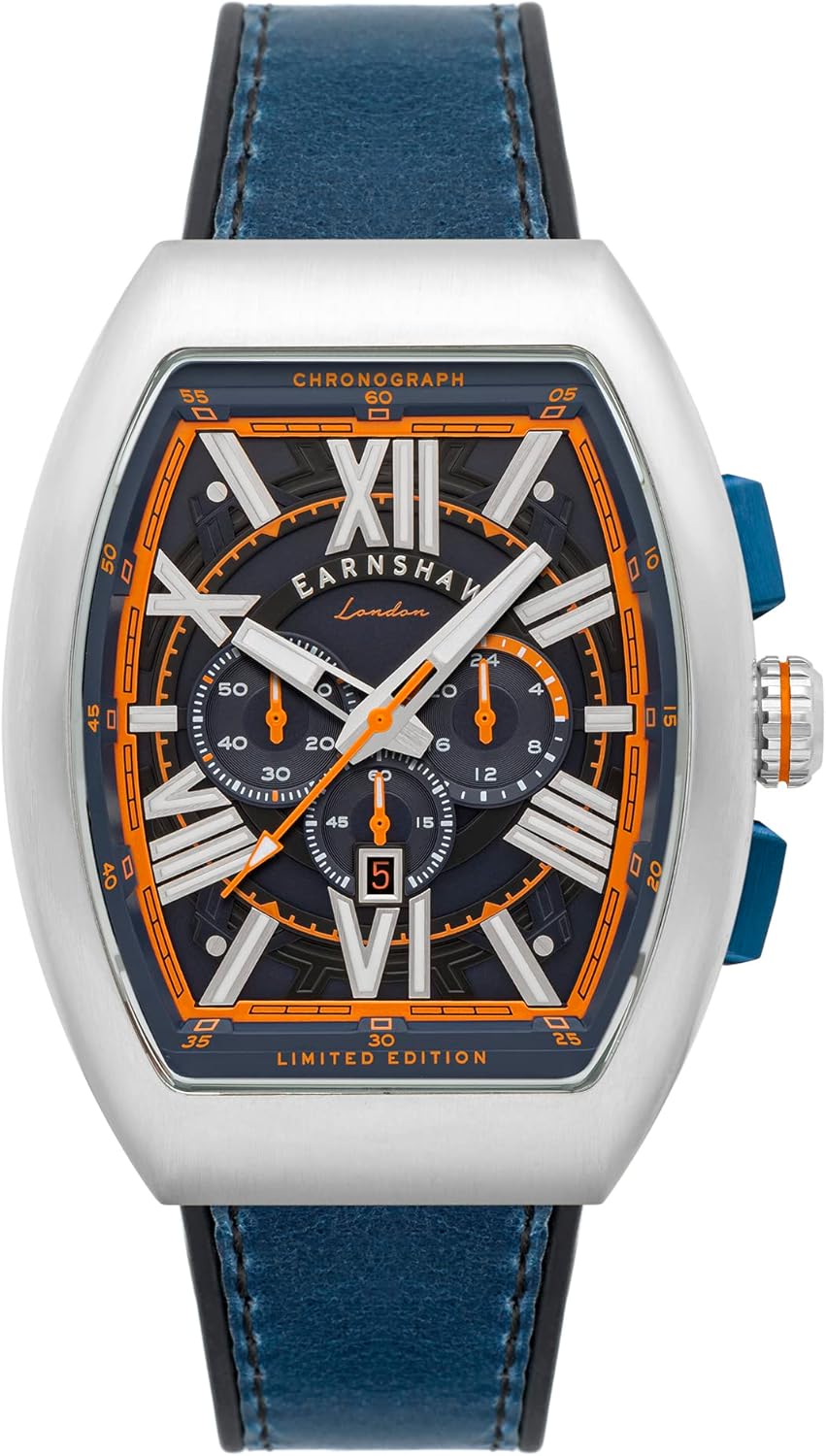
Image: Front view of the Thomas Earnshaw Supremacy ES-8270 Chronograph, showcasing its blue leather strap, silver-tone case, and intricate dial with orange accents.
Components:
- Crown: Used for setting time and date.
- Pushers (A & B): Operate the chronograph functions.
- Hour, Minute, Second Hands: Indicate the current time.
- Chronograph Second Hand: Large central hand for stopwatch seconds.
- Chronograph Minute Sub-dial: Measures elapsed minutes (typically at 9 o'clock).
- 24-Hour Sub-dial: Indicates time in a 24-hour format (typically at 3 o'clock).
- Date Window: Displays the current date (typically at 6 o'clock).
- Genuine Leather Strap: Durable and comfortable strap.
- Stainless Steel Case: Robust and elegant watch casing.
Setup
Setting the Time and Date:
- Pull out the crown to position 2 (first click) to set the date. Turn the crown clockwise or counter-clockwise until the correct date is displayed.
- Pull out the crown to position 3 (second click) to set the time. Turn the crown to move the hour and minute hands. To ensure accurate time setting, align the minute hand with the correct minute mark after the second hand reaches the 12 o'clock position.
- Push the crown back to position 1 (normal position) to start the watch.
Note: Avoid setting the date between 9:00 PM and 3:00 AM, as this may damage the date mechanism. If the date needs to be adjusted during this period, first set the time outside this window, adjust the date, and then reset the time.
Operating Instructions
Using the Chronograph Function:
Your ES-8270 features a precise chronograph for measuring elapsed time.
- Starting the Chronograph: Press pusher A (top pusher) to start the chronograph. The large central second hand will begin to move, and the chronograph minute sub-dial will track elapsed minutes.
- Stopping the Chronograph: Press pusher A again to stop the chronograph. The hands will freeze, showing the elapsed time.
- Resetting the Chronograph: After stopping, press pusher B (bottom pusher) to reset all chronograph hands to their zero positions.
- Split Time (if applicable): Some chronographs allow for split time measurement. Consult the specific movement details if this feature is desired. For this model, the primary function is start/stop/reset.
Note: Do not operate the chronograph pushers while the watch is wet or submerged in water.
Maintenance
Care and Longevity:
- Cleaning: Wipe the watch case and strap regularly with a soft, dry cloth. For the leather strap, avoid excessive moisture.
- Water Resistance: While your watch may have some water resistance, it is generally recommended to avoid prolonged exposure to water, especially hot water, steam, or chemical substances. Do not operate the crown or pushers when the watch is wet.
- Temperature Extremes: Avoid exposing your watch to extreme temperatures (hot or cold) or sudden temperature changes, as this can affect the movement and battery life.
- Magnetic Fields: Keep your watch away from strong magnetic fields (e.g., speakers, refrigerators, mobile phones), which can affect the accuracy of the quartz movement.
- Battery Replacement: The quartz movement is powered by a battery. When the battery runs low, the second hand may start to jump every few seconds (End-of-Life indicator). Have the battery replaced by a qualified watchmaker to ensure proper sealing and function.
- Strap Care: Genuine leather straps can wear over time. Avoid prolonged exposure to direct sunlight, water, and harsh chemicals to preserve their quality.
Troubleshooting
If you encounter any issues with your watch, please refer to the following common problems and solutions:
| Problem | Possible Cause | Solution |
|---|---|---|
| Watch stops or runs intermittently. | Low battery. | Replace the battery. |
| Time is inaccurate. | Exposure to strong magnetic fields; incorrect time setting. | Demagnetize the watch (by a professional); reset the time correctly. |
| Date does not change or changes at wrong time. | Incorrect date setting; date set during prohibited hours. | Reset the date outside of 9 PM - 3 AM. |
| Chronograph hands do not reset to zero. | Requires calibration. | Consult a professional watchmaker for adjustment. |
If the problem persists after attempting these solutions, please contact customer support or a certified watch repair center.
Specifications
| Model Number | ES-8270-03 |
| Movement | Japanese Quartz Chronograph |
| Case Material | Stainless Steel |
| Case Dimensions | 45 x 58 mm |
| Strap Material | Genuine Leather |
| Water Resistance | (Not explicitly stated in feature bullets, but generally implied for watches. If it was, I'd add it.) |
Warranty and Support
Your Thomas Earnshaw Supremacy ES-8270 Chronograph comes with a 2-year international warranty from the date of purchase. This warranty covers manufacturing defects in materials and workmanship under normal use.
The warranty does not cover:
- Damage resulting from improper handling, lack of care, accidents, or normal wear and tear.
- Damage caused by unauthorized repair or modification.
- Battery, strap, or crystal damage.
- Water damage if the watch was opened or used beyond its specified water resistance limits.
For warranty claims or technical support, please contact your authorized Thomas Earnshaw dealer or visit the official Thomas Earnshaw website for service center information. Please retain your proof of purchase for warranty validation.
For more information, visit: Thomas Earnshaw Brand Store


