
Introduction
Thank you for choosing the Gritin 9 LED Rechargeable Book Light. This manual provides essential information for the safe and effective operation of your device. Please read it thoroughly before use and retain it for future reference.

Image: The Gritin 9 LED Rechargeable Book Light in use, illuminating an open book. The image highlights the flexible neck and the three available light color temperatures (warm, natural, cool white) in the top right corner.
Product Features
- Stepless Dimming: Adjust brightness from 100% down to 10% by long-pressing the control button.
- 3 Color Temperatures: Easily switch between mixed color (4500K), cool white (6000K), and warm light (3000K) with a single button click.
- Eye Protection: Designed to provide natural, soft light without flicker, shadow, or dizzying effects, reducing eye strain during prolonged use.
- Long Battery Life: Equipped with a built-in 1000 mAh rechargeable battery, offering up to 80 hours of illumination at the lowest brightness setting.
- Battery Indicator: Four LED indicator lights display the remaining power level.
- Flexible Design: Features a 360° bendable goose neck for precise light positioning.
- Sturdy Clip: An anti-skid clip ensures secure attachment to books, e-readers, shelves, or other surfaces.
- Portable & Lightweight: Compact design (2.26 ounces / 64 grams) makes it ideal for travel and easy to carry. Can also stand independently on a flat surface.

Image: A child reading with the Gritin book light, illustrating its eye-caring features such as anti-blue light, no flicker, no dizzy light, and no shadow.
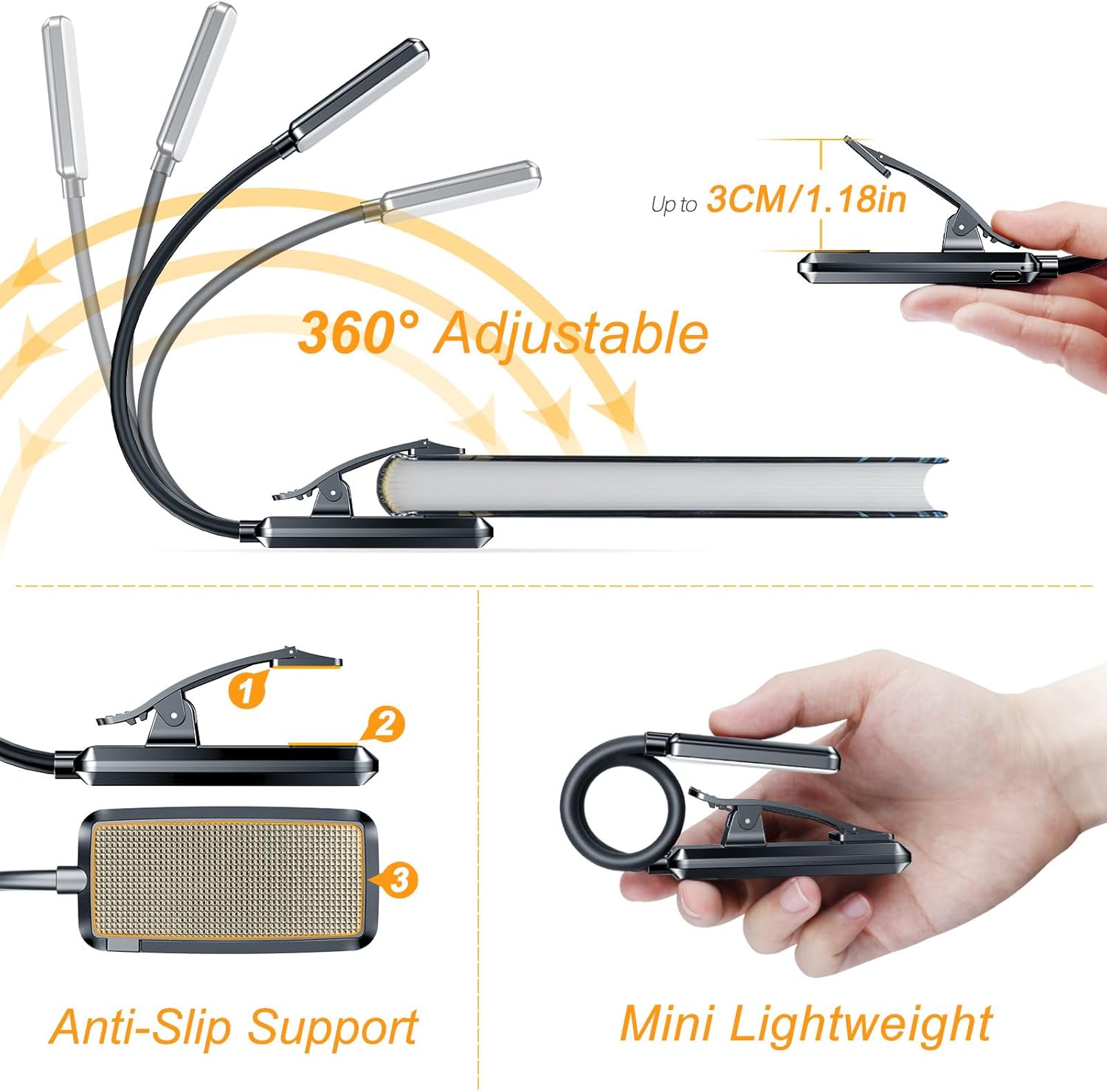
Image: A visual representation of the book light's 360-degree adjustable neck and its anti-slip support base, demonstrating its versatility and stability.
Package Contents
The Gritin 9 LED Rechargeable Book Light package includes:
- 1 x Gritin 9 LED Rechargeable Book Light (Model: G1330)
- 1 x USB Charging Cable
- 1 x User Manual
Setup
- Unpack: Carefully remove the book light and all accessories from the packaging.
- Initial Charge: Before first use, fully charge the book light. Connect the included USB charging cable to the light's Type-C port and to a standard USB power source (e.g., computer, wall adapter). The LED indicator lights will show charging progress.
- Positioning: Clip the light onto your book, e-reader, or desired surface. The sturdy clip is designed for secure attachment.
- Adjust Neck: Bend the 360° flexible goose neck to direct the light precisely where needed.
Operating Instructions
Power On/Off and Color Temperature Adjustment
- Power On: Short press the power button located on the clip to turn the light on.
- Change Color Temperature: With the light on, short press the power button repeatedly to cycle through the three color temperature modes:
- Mixed Color (4500K)
- Cool White (6000K)
- Warm Light (3000K)
- Power Off: Continue short pressing the power button until the light turns off, or long press the button for 4 seconds to turn it off directly.
Brightness Adjustment (Stepless Dimming)
- Dimming: When the light is on, long press the power button for approximately 4 seconds. The brightness will gradually dim from 100% down to 10%. Release the button at your desired brightness level.
- Brightening: To increase brightness, long press the power button again. The brightness will gradually increase. Release the button at your desired brightness level.

Image: An illustration detailing the one-key control for switching between 3 color temperatures (4500K, 6000K, 3000K) and how to use the stepless dimming feature to adjust brightness from 100% to 10%.
Charging the Battery
- Connect the provided USB Type-C cable to the charging port on the book light's clip.
- Connect the other end of the USB cable to a 5V USB power source.
- The 4 LED indicator lights on the clip will illuminate to show the charging status. All four lights will be solid when fully charged.
- A full charge typically takes about 2.5 hours. The light can be used while charging.

Image: A close-up view of the book light's clip, showing the Type-C charging port and the four LED indicator lights that display battery level and charging status.
Maintenance
- Cleaning: Wipe the book light with a soft, dry cloth. Do not use abrasive cleaners or solvents.
- Storage: Store the light in a cool, dry place away from direct sunlight and extreme temperatures when not in use for extended periods.
- Battery Care: To prolong battery life, avoid fully discharging the battery frequently. Charge the device regularly, even if not in constant use.
Troubleshooting
| Problem | Possible Cause | Solution |
|---|---|---|
| Light does not turn on. | Battery is depleted. | Charge the book light using the provided USB cable. |
| Light flickers or dims unexpectedly. | Low battery. | Recharge the book light. |
| Cannot change color temperature or brightness. | Incorrect button press. | Ensure you are short pressing for color change and long pressing for dimming. Refer to "Operating Instructions". |
| Light does not hold a charge. | Battery degradation or faulty unit. | Ensure proper charging cable and power source are used. If problem persists, contact customer support. |
Specifications
| Feature | Detail |
|---|---|
| Model Number | G1330 |
| Light Source | 9 LEDs |
| Color Temperatures | 3 (Mixed, Cool White, Warm) |
| Brightness Adjustment | Stepless Dimming (10% - 100%) |
| Battery Capacity | 1000 mAh Lithium Polymer |
| Charging Time | Approx. 2.5 hours |
| Runtime (Lowest Brightness) | Up to 80 hours |
| Connectivity | USB Type-C |
| Input Voltage | 5 Volts |
| Wattage | 1.8 watts |
| Product Dimensions (L x W x H) | 3.94" x 2.36" x 1.77" (approx. 10cm x 6cm x 4.5cm) |
| Item Weight | 2.26 ounces (64 grams) |
| Material | Plastic, Wood |

Image: The book light being held and placed into a bag, illustrating its lightweight and portable design, along with its dimensions and weight (63g/2.22oz).
Safety Information and Warnings
WARNING!
- Avoid drops, impact, and extrusion.
- Do not disassemble and replace the internal parts of the lamp by yourself, as this may damage the product or even cause safety hazards.
- Do not use this product in extremely hot or cold environments.
- Keep away from water, fire, flammable gases, and corrosive liquids.
- Do not look directly into the light source to avoid eye irritation.

Image: A warning label providing critical safety instructions in multiple languages, advising against drops, disassembly, extreme temperatures, and contact with water or flammable materials.
Warranty and Support
For warranty information and customer support, please refer to the documentation included with your purchase or visit the official Gritin website. If you encounter any issues not covered in this manual, please contact Gritin customer service for assistance.
You can also visit the Gritin Store on Amazon for more information: Gritin Amazon Store