1. Introduction
This manual provides essential information for the proper installation, operation, and maintenance of your LIAN LI SP850 White SFX 850W 80+ Gold Power Supply. Please read this manual thoroughly before using the product to ensure optimal performance and safety.
2. Safety Information
- Always disconnect the power supply from the main power outlet before installation or maintenance.
- Do not open the power supply unit. High voltages are present inside, which can cause electric shock.
- Ensure proper grounding to prevent electrical hazards.
- Use only the modular cables provided with this power supply. Using incompatible cables may damage the unit or connected components.
- Install the power supply in a well-ventilated area to prevent overheating.
- Keep the unit away from water, moisture, and extreme temperatures.
3. Package Contents
Verify that all items are present in your package:
- LIAN LI SP850 White SFX 850W 80+ Gold Power Supply Unit
- Modular Cable Set (White)
- SFX to ATX Bracket
- Mounting Screws
- AC Power Cord
- User Manual
4. Product Overview
The LIAN LI SP850 White is a high-performance SFX form factor power supply designed for compact PC builds. It features 80 PLUS Gold efficiency for reduced heat and lower operating costs, and a full modular design for improved cable management.
Key Features:
- 80 PLUS Gold Efficiency: Ensures high power efficiency, reducing energy waste and heat generation.
- Full Modular Design: Allows for custom cable management, connecting only the necessary cables to reduce clutter and improve airflow.
- 12VHPWR Connector: Includes a 12VHPWR connector cable (without sideband contact) for compatibility with modern GPUs (note: not compatible with 40 series graphic cards requiring sideband contact).
- Enhanced Protection: Features an added inrush current limiter for improved system protection.
- Optimized Fan Control: Adjusted fan start/stop limit to 60°C for quieter operation under lower loads.
Visual Overview:


Unboxing Video:
Video 1: An unboxing video of the Lian Li SP V2 PSU, demonstrating the packaging and initial contents. This video provides a visual guide to what to expect when opening your new power supply.
5. Installation (Setup)
Follow these steps to install your LIAN LI SP850 Power Supply:
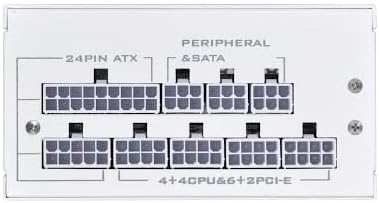
- Prepare the Power Supply: Connect all necessary modular cables to the power supply unit first. Refer to the labels on the PSU and cables to ensure correct connections.
- Mounting: If installing in an ATX case, attach the provided SFX to ATX bracket to the power supply. Secure the power supply into your PC case using the appropriate mounting screws.
- Connect to Components: Route the modular cables to your motherboard, CPU, GPU, and storage devices. Ensure all connections are firm and correctly seated.
- Connect to Wall Outlet: Once all internal connections are made and verified, connect the AC power cord to the power supply and then to a grounded wall outlet.
- Power On: Flip the power switch on the back of the PSU to the 'ON' position.
Modular Connections:

Installation Guide Video:
Video 2: An installation guide for Vetroo 850W SFX PSUs, demonstrating the process of connecting modular cables and mounting the power supply into a PC case. This video is highly relevant for understanding the physical installation steps.
6. Operating Instructions
The LIAN LI SP850 is designed for reliable and efficient operation. Once installed and connected, the power supply will provide stable power to your system. The fan operates intelligently, only spinning up when a certain core temperature is reached, ensuring quiet operation under light loads.
7. Maintenance
- Regularly check for dust accumulation on the fan and ventilation grilles. Use compressed air to gently clean dust from the unit.
- Ensure all cables are securely connected and free from damage.
- Avoid placing objects on top of the power supply or obstructing its airflow.
8. Troubleshooting
- No Power: Check if the AC power cord is securely connected to both the power supply and the wall outlet. Ensure the power switch on the PSU is in the 'ON' position. Verify all modular cables are correctly seated.
- Fan Not Spinning: The fan is designed to remain off under low load conditions until the internal temperature reaches 60°C. This is normal operation and not a fault. If the system is under heavy load and the fan is still not spinning, check for obstructions or contact support.
- System Instability: Ensure all power connections to your components (motherboard, CPU, GPU) are correct and secure. If issues persist, consult the motherboard and component manuals or contact support.
9. Specifications
| Feature | Specification |
|---|---|
| Power Supply Design | Full Modular |
| Material | Steel / Brush Aluminum Housing |
| Form Factor | SFX |
| Certification | 80 PLUS Gold |
| Max. DC Output | 850W |
| Combined +3.3V & +5V | 100W |
| Combined +12V | 840W |
| Input Voltage | 100 ~ 264 Vrms |
| Input Frequency Range | 47Hz – 63 Hz |
| PFC | Active PFC (PF)>0.90 at full load |
| Efficiency | 92.6 ~ 90.9% at 20% ~ 100% Load |
| Noise Level | 17.1 – 40.6 dBA |
| Dimensions (LxWxH) | 9.5 x 4 x 7 inches |
| Color | White |
Connectors:
- 1x 24/20-Pin Motherboard Connector (300mm)
- 2x 8/4+4 Pin CPU/ATX12V Connector (600mm)
- 1x 8/6+2 Pin PCIe Connector (400mm)
- 2x 8/6+2 Pin PCIe Connector (400mm-120mm)
- 2x 4x SATA Connector (120mm-120mm-120mm-120mm)
- 1x 4x 4-Pin Peripheral Connector (120mm-120mm-120mm-120mm)
- 1x 12VHPWR Connector Cable without sideband contact (400mm)
10. Warranty and Support
The LIAN LI SP850 White SFX 850W 80+ Gold Power Supply comes with a 5-year warranty from the date of purchase. For technical support, warranty claims, or further assistance, please visit the official Lian Li website or contact their customer service department.
For more information, visit the Lian Li Store.


