Introduction
This manual provides detailed instructions for the installation, operation, and maintenance of the Amesias WB24X22341 Surface Element Switch. This component is an OEM genuine replacement part designed for specific appliance models. Please read this manual thoroughly before attempting any installation or repair to ensure safe and correct usage.
Safety Information
WARNING: Before attempting any installation or repair, ensure the appliance is completely disconnected from its power source. Failure to do so may result in electric shock, personal injury, or property damage.
- Always disconnect power to the appliance before servicing.
- Wear appropriate personal protective equipment, such as gloves and eye protection.
- If you are unsure about any step, consult a qualified appliance repair technician.
- Keep children and pets away from the work area.
- Ensure all connections are secure and correct before restoring power.
Compatibility and Identification
This surface element switch is a direct replacement for part numbers WB24X22341, WB24X40331, 4455964, AP5983703, PS11721448, EAP11721448, and PD00043646. It is compatible with a wide range of appliance models. To ensure proper fit, always verify your appliance's model number before purchasing or installing this part.

Image Description: A red stop sign held by a person, emphasizing the importance of checking the model number for compatibility. Many replacement parts may appear similar but are not interchangeable across all models. Always confirm your appliance's specific model number to ensure this part is suitable.
Known Compatible Models (Partial List):
- CP350ST3SS-GEH
- JCP336DD2BB-GEH, JCP336DD2WW-GEH, JCP336SD2SS-GEH
- JP3030DJ1BB-GEH, JP3030DJ3BB-GEH, JP3030DJ4BB-GEH
- JP3030SJ1SS-GEH, JP3030SJ3SS-GEH, JP3030SJ4SS-GEH
- JP3030TJ1WW-GEH, JP3030TJ3WW-GEH, JP3030TJ4WW-GEH
- JP3036DL2BB-GEH, JP3036DL3BB-GEH
- JP3036SL2SS-GEH, JP3036SL3SS-GEH
- JP3036TL2WW-GEH, JP3036TL3WW-GEH
- JP336DD2BB-GEH, JP336DD2WW-GEH, JP336SD2SS-GEH
- JP3530DJ1BB-GEH, JP3530DJ3BB-GEH, JP3530DJ4BB-GEH
- JP3530SJ1SS-GEH, JP3530SJ3SS-GEH, JP3530SJ4SS-GEH
- JP3530TJ1WW-GEH, JP3530TJ3WW-GEH, JP3530TJ4WW-GEH
- JP3536DJ1BB-GEH, JP3536DJ2BB-GEH
- JP3536SJ1SS-GEH, JP3536SJ2SS-GEH
- JP3536TJ1WW-GEH, JP3536TJ2WW-GEH
- JP356BM4BB-GEH, JP356SM4SS-GEH, JP356WM4WW-GEH
- PCP932BM4BB-GEH, PCP932SM4SS-GEH, PCP932TM4WW-GEH
- PP912BM4BB-GEH, PP912KM4CC-GEH, PP912SM4SS-GEH, PP912TM4WW-GEH
- PP932BM4BB-GEH, PP932EH1ES-GEH, PP932SM4SS
Setup and Installation
Installation of the surface element switch typically involves accessing the control panel of your appliance. Due to the electrical nature of this component and the variety of appliance designs, professional installation is recommended. The following steps are general guidelines and may vary based on your specific appliance model.
- Disconnect Power: Locate the circuit breaker for your appliance and turn it off. Verify that the power is completely off before proceeding.
- Access Control Panel: Carefully remove the knobs and any screws securing the control panel. Gently pull the panel away from the appliance to expose the internal components.
- Identify and Disconnect Old Switch: Locate the existing surface element switch. Note the position and connection of each wire. It is highly recommended to take a photograph of the wiring before disconnecting anything. Carefully disconnect all wires from the old switch.
- Remove Old Switch: Unmount the old switch from the control panel. This may involve unscrewing mounting nuts or releasing clips.
- Install New Switch: Position the new WB24X22341 switch in the same location as the old one. Secure it using the original mounting hardware.
- Connect Wiring: Refer to your photograph and carefully connect each wire to its corresponding terminal on the new switch. Ensure all connections are firm and secure.
- Reassemble Appliance: Carefully reattach the control panel, ensuring no wires are pinched. Replace all screws and knobs.
- Restore Power: Turn the circuit breaker back on. Test the surface element to ensure the new switch is functioning correctly.

Image Description: A top-down view of the WB24X22341 Surface Element Switch. This image highlights the central metal shaft where the control knob attaches, along with the various electrical terminals and mounting points. This view is typical for identifying the switch's orientation during installation.

Image Description: A view of the underside of the WB24X22341 Surface Element Switch, revealing the plastic housing, copper terminals, and various manufacturer markings and specifications. This perspective is useful for verifying part numbers and understanding the electrical connections.
Operating the Switch
The WB24X22341 Surface Element Switch operates manually, controlling the power supply to a heating element on your appliance. When a control knob (not included with this part) is attached to the switch's shaft and rotated, it engages internal contacts to regulate the heat output of the corresponding surface element.
- The switch typically offers multiple heat settings, from low to high, depending on the appliance's design.
- Turning the knob to the "OFF" position disconnects power to the element.
- Ensure the knob is properly seated on the shaft for accurate control.
Maintenance
The WB24X22341 Surface Element Switch is a sealed component and requires no routine maintenance or lubrication. If the switch becomes faulty, it should be replaced rather than repaired.
- Keep the area around the control panel clean and free of debris.
- Avoid spilling liquids directly onto the control panel, as this could affect the switch's operation.
- If cleaning the control panel, ensure the appliance is unplugged and use a damp cloth, avoiding excessive moisture.
Troubleshooting
If you experience issues with your surface element, the switch may be a contributing factor. Here are some common symptoms and potential causes:
| Symptom | Possible Cause | Solution |
|---|---|---|
| Element does not heat up. | Faulty switch, loose wiring, or element failure. | Check wiring connections. If connections are secure, test the switch for continuity or replace it. Test the element for resistance. |
| Element heats continuously or does not turn off. | Switch contacts are stuck in the closed position. | Immediately disconnect power to the appliance. The switch is faulty and requires replacement. |
| Element heats only on one setting (e.g., high only). | Internal contacts within the switch are damaged or worn. | The switch is faulty and requires replacement. |
| Burning smell or visible arcing from control panel. | Electrical short or damaged switch. | Immediately disconnect power to the appliance. Do not use the appliance until inspected and repaired by a qualified technician. The switch likely needs replacement. |
If troubleshooting does not resolve the issue, or if you are uncomfortable performing these checks, it is recommended to contact a certified appliance repair technician.
Specifications
| Attribute | Detail |
|---|---|
| Model Number | WB24X22341 |
| Brand | Amesias |
| Operation Mode | Manual |
| Contact Type | Normally Open |
| Connector Type | Molex |
| Terminal Type | Through Hole |
| Circuit Type | 3-way |
| Actuator Type | Push Button (referring to the shaft's function) |
| Contact Material | Copper, Brass, Silver |
| International Protection Rating | IP20 |
| Specification Met | OEM |
| Approximate Dimensions (L x W x H) | 4 x 3 x 2 inches |
| Approximate Weight | 3.2 ounces |
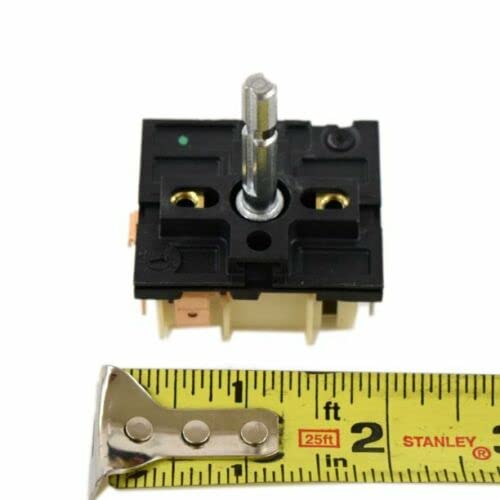
Image Description: The WB24X22341 Surface Element Switch positioned alongside a measuring tape, providing a visual reference for its physical dimensions. This image helps in confirming the part's size before installation.
Warranty and Support
This product is sold by Amesias and fulfilled by Amazon. For return inquiries, Amazon's standard return policy applies, typically allowing returns within 30 days of receipt for most items. For specific product support or warranty claims, please contact the seller, Amesias, directly through the Amazon platform.
- Returns: Refer to Amazon's return policy for details on eligibility and process.
- Seller Contact: For product-specific questions or issues, contact Amesias via their seller page on Amazon.