
1. Introduction and Overview
The Carina 88-Key Digital Piano LF-0088 combines a classic wooden design with modern digital piano functionality. Its elegant appearance allows it to blend seamlessly into various home environments, offering both aesthetic appeal and musical versatility.
Equipped with two high-quality 20W speakers and a premium French-made DREAM sound source, this digital piano delivers a powerful, clear, and rich sound experience. With a maximum polyphony of 128 notes, it ensures authentic performances and smooth practice sessions, even when using the sustain pedal or playing complex musical pieces.
The LF-0088 offers a wide range of features to enhance your musical journey, including 380 different tones, 128 rhythm patterns, and 80 built-in demo songs. Additional functions such as sustain, recording and playback, metronome, chord mode, dual keyboard mode, mix tone, transpose, tempo adjustment, and touch sensitivity are available, catering to both beginners and experienced musicians.
Connectivity options on the rear panel include a sustain pedal jack, MIDI connection port, audio input/output jacks, a 3.5mm headphone jack, and a DC 9-12V power input. The instrument also supports wireless MIDI for expanded creative possibilities.
Package Contents:
- Carina LF-0088 Digital Piano Body
- Music Stand
- Sustain Pedal
- Power Adapter
- Japanese Instruction Manual
Dimensions: Approximately 128.6 cm (Width) x 24.5 cm (Depth) x 9 cm (Height)
Weight: 10.75 kg

Image 1.1: The Carina LF-0088 Digital Piano, showcasing its sleek design and 88-key layout.
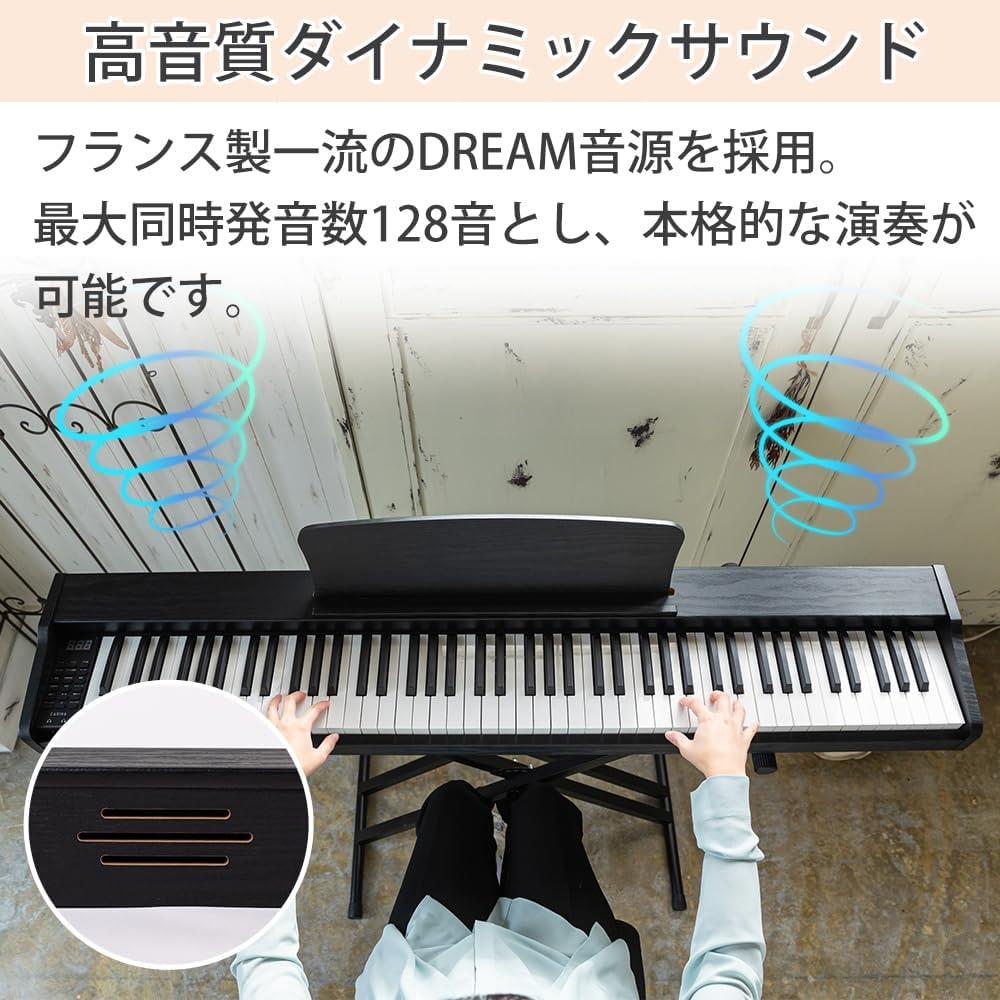
Image 1.2: Detail of the wooden design on the Carina LF-0088 Digital Piano, highlighting its natural aesthetic.
2. Setup Instructions
2.1 Unpacking and Inspection
Carefully remove all components from the packaging. Verify that all items listed in the 'Package Contents' section are present and undamaged. If any items are missing or damaged, please contact customer support.
2.2 Attaching the Music Stand
Locate the music stand. Insert the stand into the designated slots on the top panel of the digital piano. Ensure it is securely seated.

Image 2.1: Simple installation of the music stand by inserting it into the piano body.
2.3 Connecting the Sustain Pedal
Connect the included sustain pedal cable to the 'SUSTAIN' jack located on the rear panel of the piano. The pedal is designed for authentic feel, similar to an acoustic piano.

Image 2.2: The included sustain pedal, providing a realistic playing experience.
2.4 Power Connection
Connect the power adapter to the 'DC 9-12V' input jack on the rear panel of the piano, then plug the adapter into a standard electrical outlet.

Image 2.3: Rear panel connections, including the power input and MIDI port.
3. Operating Instructions
3.1 Power On/Off and Volume
Press the POWER button to turn the piano on or off. Use the VOLUME + and VOLUME - buttons to adjust the master volume.
3.2 Selecting Tones and Rhythms
The piano features 380 tones and 128 rhythm patterns. Use the dedicated buttons and the display to navigate and select your desired tone or rhythm. Refer to the detailed tone and rhythm list in the Japanese instruction manual for specific numbers.

Image 3.1: The control panel with options for 380 tones, 128 rhythms, and 80 demo songs.
3.3 Playing Demo Songs
The piano includes 80 demo songs. Press the DEMO button to start playback. Use the SELECT buttons to cycle through the demo songs.
3.4 Recording and Playback
To record your performance, press the RECORD button. Play your desired piece. Press PLAY to listen to your recorded performance.
3.5 Metronome Function
Activate the metronome by pressing the METRONOME button. Adjust the tempo using the TEMPO controls.
3.6 Headphone Use
For private practice, connect standard 3.5mm headphones to the headphone jack on the rear panel. This will mute the internal speakers.
3.7 MIDI Connectivity
The piano supports both wired and wireless MIDI connections. Use the MIDI port on the rear panel for wired connections to compatible devices. For wireless MIDI, refer to the detailed instructions in the Japanese manual for pairing procedures.
Video 3.1: A demonstration of the Carina electronic piano, showcasing its sound and features. This video is provided by the official Carina store.
Video 3.2: Another demonstration of a Carina electronic piano (model SR0088C), highlighting its playability and sound. This video is provided by the official Carina store.
4. Maintenance
4.1 Cleaning the Instrument
To clean the piano, use a soft, dry cloth. For stubborn dirt, slightly dampen the cloth with water and a mild, non-abrasive cleaner, then wipe dry immediately. Avoid using harsh chemicals, solvents, or abrasive materials, as these can damage the finish.
4.2 Key Care
Wipe the keys regularly with a soft, dry cloth to remove dust and fingerprints. Avoid excessive moisture. Note that the gaps between keys may not be perfectly uniform, which is normal for this product.
4.3 Storage Recommendations
Store the digital piano in a stable environment, away from direct sunlight, extreme temperatures, and high humidity. These conditions can affect the wooden components and electronic parts. When not in use for extended periods, cover the piano to protect it from dust.
4.4 Natural Wood Characteristics
The product utilizes Western Red Cedar wood, known for its excellent sound resonance. Due to the nature of natural wood, minor stains or discoloration from resin, or changes over time due to environmental conditions, may occur. These are inherent characteristics of natural wood and do not indicate a defect or affect the product's functionality.
5. Troubleshooting
If you encounter any issues with your Carina LF-0088 Digital Piano, please refer to the following common troubleshooting steps before contacting support.
5.1 No Sound
- Ensure the piano is powered on and the power adapter is securely connected.
- Check the master volume level. Increase it using the VOLUME + button.
- If headphones are connected, disconnect them to enable the internal speakers.
- Verify that the selected tone is not set to a silent or very low volume instrument.
5.2 Distorted Sound
- Reduce the master volume.
- Ensure no external audio devices are causing interference.
- Check if the power adapter is the correct one supplied with the piano.
5.3 Keys Not Responding
- Turn the piano off and then on again.
- Ensure no foreign objects are lodged between the keys.
- If only specific keys are affected, contact customer support.
5.4 Sustain Pedal Issues
- Ensure the sustain pedal cable is fully and correctly inserted into the 'SUSTAIN' jack.
- Test the pedal with different tones to confirm if the issue persists.
5.5 MIDI Connection Problems
- For wired MIDI, ensure the cables are correctly connected to both the piano and the external device.
- For wireless MIDI, re-attempt the pairing process as described in the full Japanese manual.
- Check the MIDI settings on both the piano and the connected device.
6. Specifications
| Brand | Carina |
| Model Number | LF-0088 |
| Number of Keys | 88 |
| Dimensions (W x D x H) | 128.6 cm x 24.5 cm x 9 cm |
| Weight | 10.75 kg |
| Speakers | 2 x 20W |
| Sound Source | French DREAM Sound Source |
| Max. Polyphony | 128 notes |
| Tones | 380 types |
| Rhythm Patterns | 128 types |
| Demo Songs | 80 types |
| Functions | Sustain, Recording/Playback, Metronome, Chord, Dual Keyboard, Mix Tone, Transpose, Tempo, Touch Sensitivity |
| Connectivity | Sustain Pedal Jack, MIDI Port, Audio In/Out, Headphone Jack (3.5mm), Power (DC 9-12V), Wireless MIDI Support |
| Power Source | Power Cord |
| Origin | China |

Image 6.1: Product dimensions and included accessories for the Carina LF-0088.
7. Warranty and Support
7.1 Warranty Information
This Carina LF-0088 Digital Piano comes with a 1-year warranty from the date of purchase. The warranty covers manufacturing defects and malfunctions under normal use. Please retain your proof of purchase for warranty claims.
The warranty does not cover damage caused by misuse, accidents, unauthorized modifications, or normal wear and tear. Issues arising from the natural characteristics of the wooden materials, such as minor stains or discoloration, are not covered under warranty as they are not considered defects.
7.2 Customer Support
For technical assistance, warranty claims, or any questions regarding your Carina LF-0088 Digital Piano, please contact our customer support team. Contact details can be found on the official Carina website or in the original product packaging.
Please have your model number (LF-0088) and purchase date ready when contacting support to ensure efficient service.