
Rain Bird TBOS-BT4LT
Contents
Rain Bird TBOS Bluetooth 4 Station LT Irrigation Controller User Manual
Model: TBOS-BT4LT
1. Introduction and Product Overview
This manual provides comprehensive instructions for the installation, operation, and maintenance of your Rain Bird TBOS Bluetooth 4 Station LT irrigation controller. Designed for efficient water management, this battery-operated controller offers convenient programming via a smartphone app and is built for durability in various environments.
Key Features:
- 4-Station Capacity: Manages up to four independent irrigation zones.
- Battery-Operated: Requires one 9-volt battery for power, ideal for locations without AC power.
- Bluetooth Connectivity: Program and adjust settings wirelessly using the free Rain Bird app on your smartphone.
- Durable Design: Features a vandal-proof and IP-68 rated waterproof case for reliable operation in harsh conditions, including submersion.
- Versatile Application: Suitable for various installations, including street and highway medians, roundabouts, and other remote sites.

Front view of the Rain Bird TBOS Bluetooth 4 Station LT controller, showing the Rain Bird logo, TBOS-BT branding, and wiring terminals at the bottom. The blue cap on the left likely covers the battery compartment.
2. Setup and Installation
Follow these steps to properly set up and install your TBOS Bluetooth controller.
2.1 Battery Installation
- Locate the blue cap on the left side of the controller.
- Unscrew the blue cap counter-clockwise to open the battery compartment.
- Insert one new 9-volt alkaline battery, ensuring correct polarity.
- Screw the blue cap back on clockwise until it is hand-tight to ensure a waterproof seal.
2.2 Mounting and Wiring
The TBOS-BT4LT controller is designed for outdoor installation, typically within an irrigation valve box. Its IP-68 rating ensures it can operate reliably even when submerged.
- Choose a suitable location, such as an underground valve box, that provides protection and easy access for maintenance.
- Secure the controller to the inside of the valve box or a stable surface using appropriate fasteners through the mounting holes.
- Connect the wires from your irrigation valves to the corresponding terminals on the controller. Each colored wire typically corresponds to a specific zone. Ensure all connections are secure and waterproof.
- Connect the common wire from your valves to the common terminal on the controller.
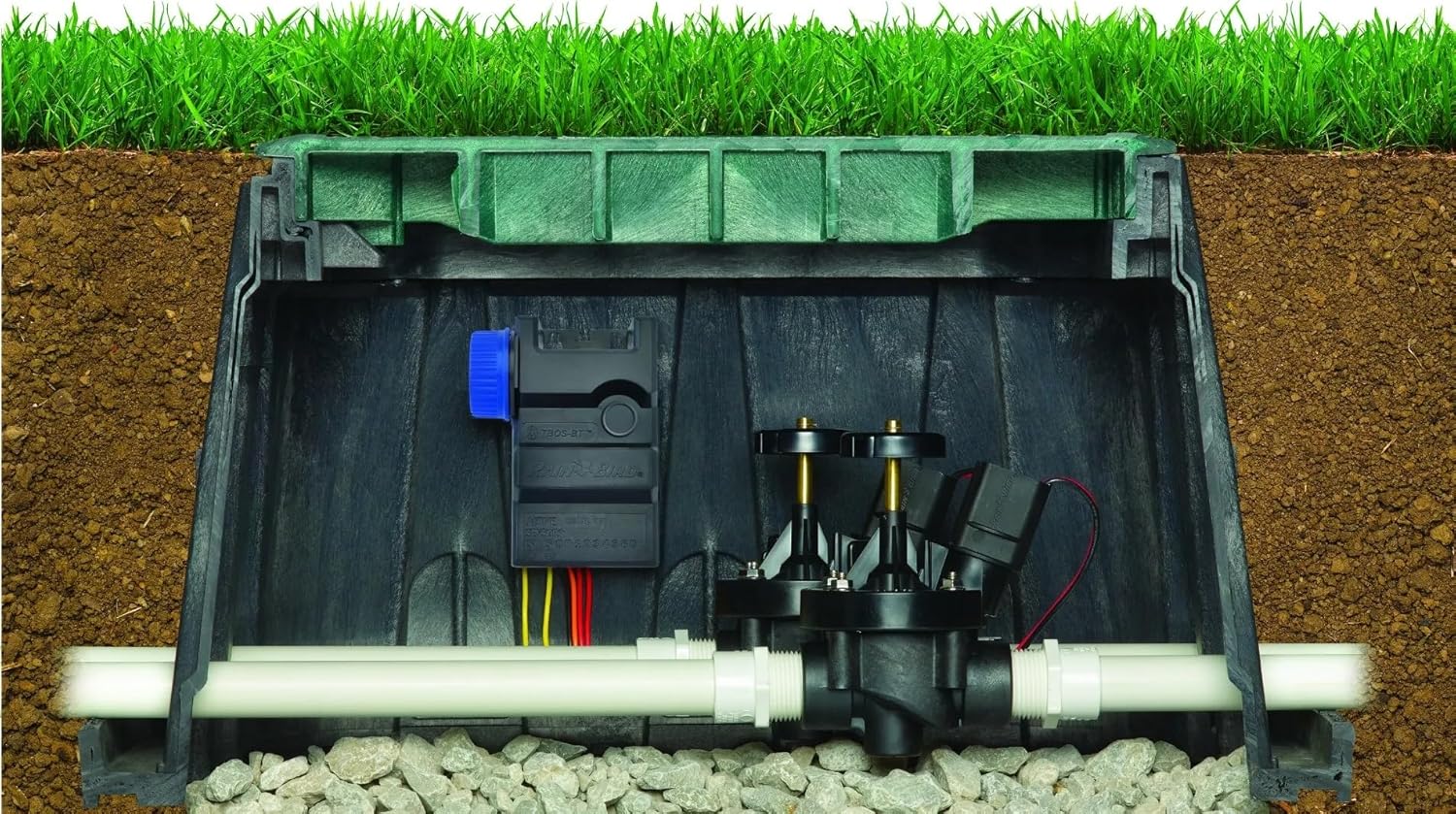
The Rain Bird TBOS Bluetooth 4 Station LT controller is shown installed within an underground irrigation valve box, alongside irrigation valves and piping. This illustrates its typical installation environment, protected from the elements.
3. Operating Instructions
The TBOS Bluetooth controller is programmed and managed wirelessly using the Rain Bird app on your smartphone or tablet.
3.1 Downloading the Rain Bird App
- Download the free "Rain Bird" app from the Apple App Store (for iOS devices) or Google Play Store (for Android devices).
- Ensure your device's Bluetooth is enabled.
3.2 Connecting to the Controller
- Open the Rain Bird app on your smartphone.
- Select the option to add a new controller or scan for nearby devices.
- The app will detect your TBOS-BT4LT controller. Select it from the list to establish a Bluetooth connection.
- Once connected, the app will display the controller's status and programming options.
3.3 Programming Irrigation Schedules
Within the Rain Bird app, you can set up various irrigation programs:
- Start Times: Define when irrigation cycles begin.
- Run Times: Specify the duration for each irrigation zone.
- Watering Days: Select specific days of the week for irrigation, or choose cyclical watering.
- Seasonal Adjust: Easily increase or decrease watering duration for all zones by a percentage to adapt to changing weather conditions.
- Manual Operation: Initiate a manual watering cycle for a specific zone or all zones directly from the app.
Refer to the in-app help or the Rain Bird website for detailed instructions on advanced programming features.
4. Maintenance
Regular maintenance ensures the longevity and optimal performance of your TBOS Bluetooth controller.
- Battery Replacement: Replace the 9-volt battery annually, or when the low battery indicator appears in the app, to prevent loss of programming.
- Connection Check: Periodically inspect all wire connections to ensure they are secure and free from corrosion.
- Cleanliness: Keep the controller and its immediate surroundings free from excessive dirt, debris, or standing water (though it is waterproof, keeping it clean helps with inspection).
- Winterization: In freezing climates, ensure all irrigation lines are properly drained to prevent damage to valves and pipes. The controller itself is designed to withstand submersion and temperature variations, but protecting the entire system is crucial.
5. Troubleshooting
If you encounter issues with your TBOS Bluetooth controller, refer to the table below for common problems and their solutions.
| Problem | Possible Cause | Solution |
|---|---|---|
| Controller not responding via Bluetooth. | Low battery; Bluetooth disabled on device; controller out of range. | Replace 9V battery; Enable Bluetooth on your smartphone; Move closer to the controller. |
| Zones not watering. | No power to controller; Incorrect wiring; Valve malfunction; Program not set. | Check/replace battery; Verify all wire connections; Inspect valves for issues; Ensure a watering program is active in the app. |
| Watering schedule not running. | Program disabled; Incorrect start times/run times; Rain sensor active (if connected). | Check app to ensure program is enabled; Verify schedule settings; Check if a rain sensor is preventing operation. |
| App cannot find controller. | Controller is off; Bluetooth issue; App needs restart. | Ensure battery is installed and functional; Restart your phone's Bluetooth; Close and reopen the Rain Bird app. |
6. Specifications
| Attribute | Detail |
|---|---|
| Model Number | TBOS-BT4LT |
| Number of Stations | 4 |
| Power Source | 1 x 9V Alkaline Battery (not included) |
| Connectivity | Bluetooth Low Energy (BLE) |
| Water Resistance Rating | IP-68 (submersible) |
| Dimensions (H x W x D) | 5.1 x 3.8 x 2 inches (approx.) |
| Weight | 1.04 pounds (approx.) |
| Operating Temperature | Refer to Rain Bird app or official documentation for specific range. |
7. Warranty and Support
Rain Bird products are manufactured to high quality standards. For information regarding warranty coverage, technical support, or to find authorized service centers, please visit the official Rain Bird website or contact their customer service department.
Rain Bird Official Website: www.rainbird.com
Always refer to the latest information available on the manufacturer's website for the most up-to-date warranty terms and support contact details.
Ask a question about this manual
Ask about setup, troubleshooting, compatibility, parts, safety, or missing instructions. Manuals+ will review the question and use this page’s manual context to help answer it.