
Lufeiya awhite
Lufeiya White Small Desk (Model: awhite) User Manual
Your guide to assembly, operation, and maintenance.
Introduction
This manual provides comprehensive instructions for the assembly, operation, and maintenance of your Lufeiya White Small Desk. Designed for compact spaces, this desk offers a functional workspace with convenient features. Please read this manual thoroughly before assembly and use to ensure proper setup and longevity of your product.
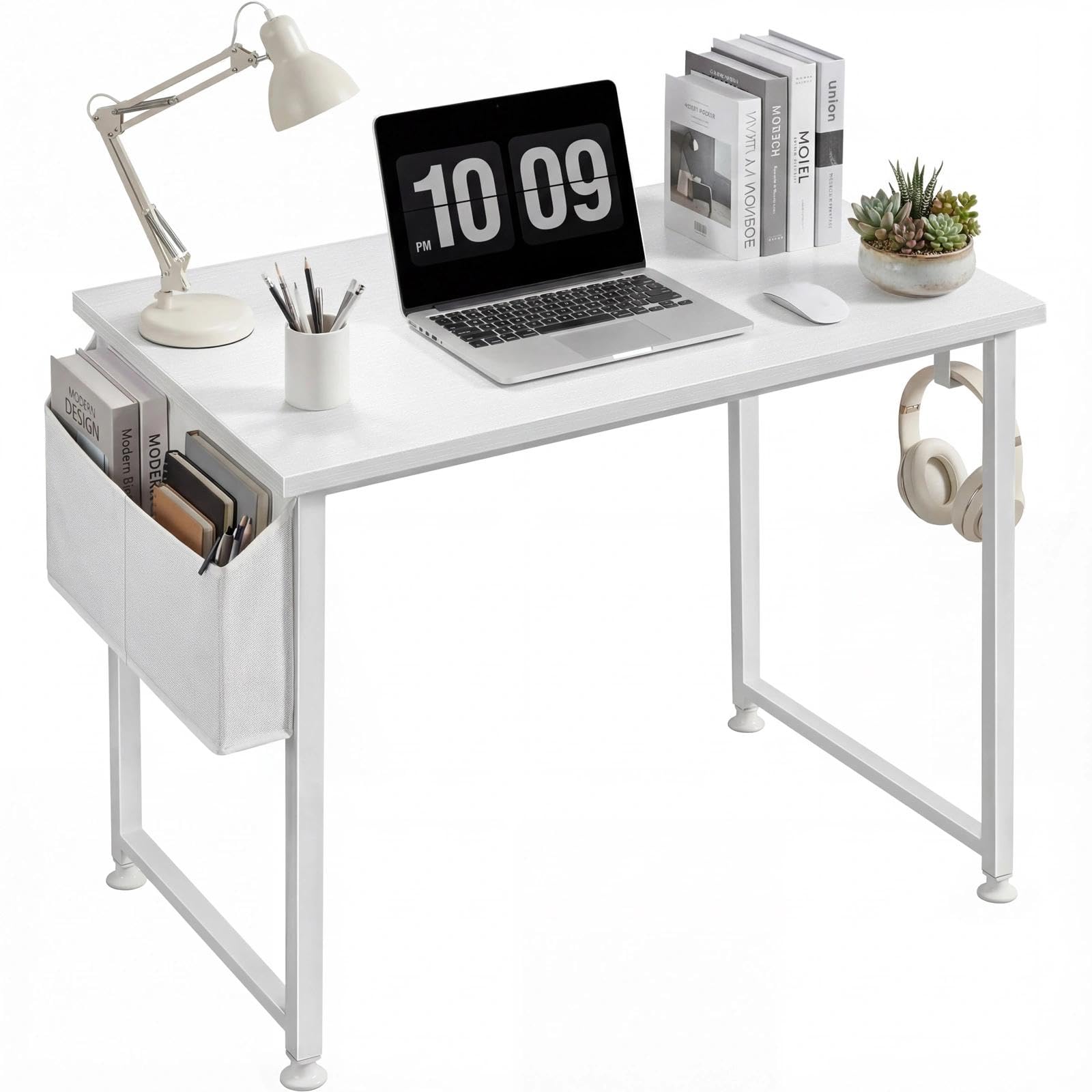
Image: The Lufeiya White Small Desk, showcasing its compact design and suitability for various room types.
Safety Information
- Caution: Be aware of the desk's height to prevent head injuries, especially in areas with low ceilings or overhead fixtures.
- This product is not UL listed. Use with caution and ensure all electrical connections (if any are added by the user) comply with local safety standards.
- Do not overload the desk. Refer to the specifications section for weight capacity.
- Ensure all screws and fasteners are securely tightened during assembly and periodically checked for tightness to maintain stability.
Package Contents
Before beginning assembly, verify that all parts are present and undamaged. The package should contain:
- Desk Top (Engineered Wood)
- Metal Frame Components
- Storage Bag
- Headphone Hook
- Adjustable Leg Pads
- Assembly Hardware (screws, bolts, etc.)
- Assembly Tool (Allen wrench, etc.)
- Instruction Manual
Setup and Assembly
The Lufeiya White Small Desk is designed for quick and easy assembly, typically taking about 10 minutes with one person. A detailed instruction manual and all necessary tools are included in the package.
- Unpack Components: Carefully remove all parts from the packaging and lay them out on a clean, soft surface to prevent scratches.
- Assemble Frame: Follow the step-by-step diagrams in the included assembly instruction manual to connect the metal frame components. Ensure all connections are secure but do not fully tighten screws until the entire frame is assembled.
- Attach Desktop: Carefully place the desktop onto the assembled frame and secure it using the provided screws. Fully tighten all screws at this stage.
- Install Accessories: Attach the removable storage bag and headphone hook to the designated points on the desk frame.
- Adjust Leg Pads: The desk features adjustable leg pads. Rotate these pads at the bottom of each leg to level the desk on uneven surfaces and protect your floor from scratches.

Image: Product dimensions (31.5'' L x 19.7'' W x 29.5'' H) for planning your space.

Image: Detail of the adjustable leg pads, designed for stability on uneven floors and floor protection.
Operating Instructions
Your Lufeiya White Small Desk is designed for versatile use in various settings, including bedrooms, home offices, and dormitories. Its compact size makes it ideal for small spaces.
- Work Surface: The 31.5-inch long and 19.7-inch wide desktop provides ample space for a laptop, books, and other study or work essentials.
- Storage Bag: Utilize the removable storage bag to keep notebooks, documents, or other items organized and within easy reach, maximizing desktop space.
- Headphone Hook: The removable headphone hook allows for convenient storage of headphones, bags, or other accessories, keeping your workspace tidy.

Image: The removable storage bag and headphone hook provide convenient organization solutions.
Maintenance
To ensure the longevity and appearance of your desk, follow these maintenance guidelines:
- Cleaning: The desktop is made of thick particle board with a scratch-resistant, anti-collision, and waterproof finish. Wipe the surface with a soft, damp cloth. Avoid abrasive cleaners or harsh chemicals that could damage the finish.
- Spills: Due to its waterproof nature, spills can be easily wiped away. Clean spills immediately to prevent any potential damage or staining.
- Stability Check: Periodically check all screws and connections to ensure they remain tight. Re-tighten if necessary to maintain the desk's stability.

Image: The desk surface features a waterproof coating for easy cleaning and protection against spills.
Troubleshooting
If you encounter any issues with your desk, refer to the following common troubleshooting tips:
- Wobbling: If the desk feels unstable or wobbles, ensure all assembly screws are fully tightened. Adjust the individual leg pads at the bottom of each leg to compensate for uneven flooring.
- Missing Parts: If any parts are missing upon arrival, please contact customer service immediately for a replacement.
- Damage: If the product arrives damaged, do not proceed with assembly. Contact customer service for assistance.
Specifications
| Brand | Lufeiya |
| Model Number | awhite |
| Product Dimensions | 19"D x 31"W x 29"H (31.5'' L x 19.7'' W x 29.5'' H) |
| Color | White |
| Material Type | Engineered Wood (Top), Metal (Base) |
| Item Weight | 14 Pounds |
| Special Features | Compact, Scratch-resistant, Waterproof, Adjustable Leg Pads, Removable Storage Bag, Headphone Hook |
| Assembly Required | Yes (Recommended 1 person) |
Warranty and Support
Lufeiya provides professional customer service and a limited warranty for this product. If you experience any quality problems with your desk, a quick and easy replacement is guaranteed. Please feel free to contact us for assistance.
For support, please refer to the contact information provided with your purchase or visit the official Lufeiya store on Amazon.
Note: This product is not UL listed.
Related documentsawhite


Ask a question about this manual
Ask about setup, troubleshooting, compatibility, parts, safety, or missing instructions. Manuals+ will review the question and use this page’s manual context to help answer it.