
1. Introduction
The HACH 9531000E Pocket Pro pH and Temperature Tester is a precise instrument designed for accurate pH and temperature measurements across various water testing applications. Its intuitive user interface and large LCD display ensure ease of use and clear readability. This manual provides essential information for setting up, operating, calibrating, and maintaining your device.
pH is a critical parameter measured in diverse fields including food and beverage production, drinking water quality, swimming pool maintenance, and wastewater treatment. The Pocket Pro tester offers a simple yet effective solution for these needs.
2. Package Contents
Upon unboxing your HACH Pocket Pro pH and Temperature Tester, verify that all components are present:
- HACH Pocket Pro pH and Temperature Tester
- AAA Batteries (typically supplied separately for installation)
- Instruction Manual / Quick Start Guide
- pH Buffer Solutions (e.g., pH 4.01, pH 7.00, pH 10.01 singlets)
- Storage Cap
- Sample Cup (transparent cap doubles as a sample cup)
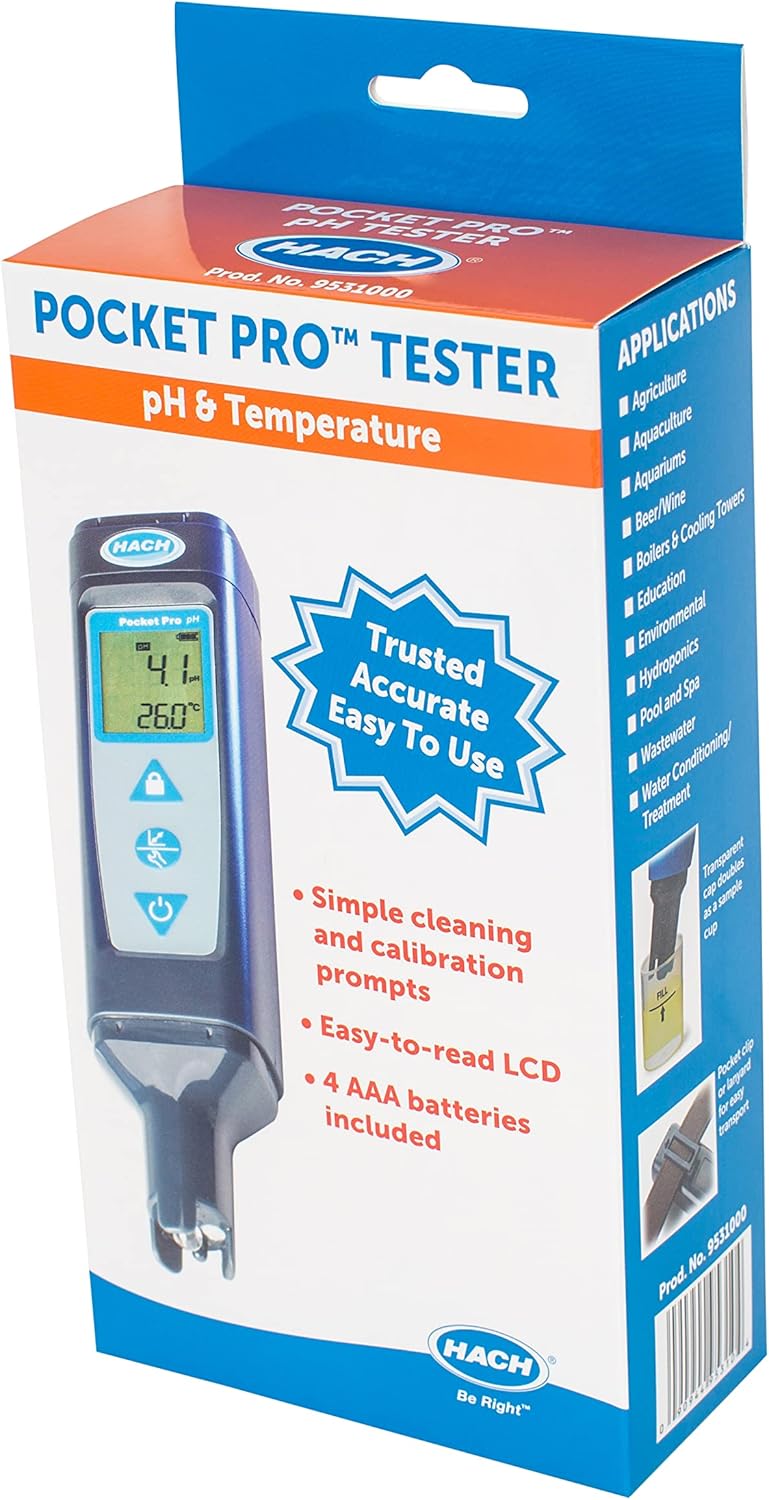
Image 1: HACH Pocket Pro pH and Temperature Tester in its retail packaging. The box highlights key features such as a replaceable sensor, built-in backlight, simple calibration prompts, and included AAA batteries.
3. Setup
3.1 Battery Installation
The HACH Pocket Pro tester requires AAA batteries for operation. These are typically supplied outside the device to prevent discharge during storage. To install the batteries, open the battery compartment, insert the batteries according to the polarity markings, and securely close the compartment.
3.2 Initial Probe Preparation
Before first use or after prolonged storage, it is crucial to prepare the pH probe:
- Remove the storage cap from the probe.
- Rinse the probe thoroughly with deionized (DI) water.
- Gently dab the probe dry with a lint-free wipe (e.g., Kimwipe). Avoid rubbing the glass bulb vigorously.

Image 2: Close-up view of the HACH Pocket Pro pH and Temperature Tester, showing the main unit with its LCD display and control buttons, and the exposed pH probe at the bottom.
4. Calibration
Calibration is essential for accurate pH measurements. The Pocket Pro uses a potentiometric technique, comparing a reference inside the probe with the reading at the bulb. This requires regular calibration to ensure precision. A 3-point calibration using pH 4, 7, and 10 buffers is recommended.
4.1 pH Calibration Procedure (3-Point)
- Turn on the tester by pressing the power button.
- Prepare three separate containers (e.g., beakers or clean cups) and pour a small amount of pH 4.01, pH 7.00, and pH 10.01 buffer solutions into each.
- Rinse the probe with DI water and gently dab it dry.
- Press and hold the 'Cal' button to enter calibration mode. The display will prompt for the pH 7 buffer.
- Dip the probe into the pH 7.00 buffer solution. Make sure the probe tip is fully immersed.
- Wait for the reading to stabilize. Once stable, press 'Cal' again to confirm. The tester will then prompt for either pH 4 or pH 10.
- Remove the probe from the pH 7 buffer, rinse with DI water, and gently dab dry.
- Dip the probe into the pH 4.01 buffer solution. Wait for stabilization, then press 'Cal' to confirm. The tester will then prompt for the remaining pH 10 buffer.
- Remove the probe from the pH 4 buffer, rinse with DI water, and gently dab dry.
- Dip the probe into the pH 10.01 buffer solution. Wait for stabilization, then press 'Cal' to confirm.
- The tester will indicate successful 3-point calibration and return to measurement mode.
Important: Always use fresh buffer solutions for calibration. Old or contaminated buffers can lead to inaccurate calibration and measurements. If the tester does not accept a buffer, it may indicate an issue with the buffer solution itself (e.g., expired, contaminated, or left open to atmosphere, especially pH 10 buffer which absorbs CO2).
Video 1: Hach PocketPro Tester - This video demonstrates the setup, 3-point pH calibration, and measurement process for the HACH Pocket Pro tester.
5. Operating Instructions
5.1 Taking a Measurement
- Ensure the tester is calibrated (refer to Section 4).
- Rinse the probe with DI water and gently dab it dry.
- Dip the probe into the sample solution, ensuring the tip is fully immersed.
- Gently stir the solution to ensure proper mixing.
- Wait for the reading on the LCD display to stabilize. The display will show both pH and temperature.
5.2 Using the Hold/Lock Function
If the reading is fluctuating slightly, you can use the hold/lock function to capture a stable value. Once the reading has stabilized for a few seconds, press the 'Hold' or 'Lock' button (indicated by a padlock icon on the device) to freeze the display. Press it again to release the hold.
6. Maintenance
6.1 Cleaning the Probe
After each measurement and before storage, always rinse the probe thoroughly with deionized (DI) water to prevent contamination and buildup. Gently dab the probe dry with a lint-free wipe.
6.2 Probe Storage
Proper storage is vital to prolong the life and accuracy of your pH probe. The probe's glass bulb must always remain wet. Use the provided storage cap filled with a suitable storage solution (e.g., 3M KCl solution) or pH 4 buffer solution. Ensure the probe tip is immersed in the solution when the cap is secured.
Caution: Never store the probe dry. If the probe dries out, it may become permanently damaged and require replacement.
7. Troubleshooting
While the HACH Pocket Pro is designed for reliability, certain issues may arise:
- Inaccurate Readings: This is most commonly due to improper or outdated calibration. Always calibrate before use, especially if the device has been stored for a while or if you are measuring a new type of sample. Ensure buffer solutions are fresh and uncontaminated.
- Slow Response/Unstable Readings: The probe may be dry or contaminated. Clean the probe thoroughly and ensure it is properly hydrated in storage solution. If the probe has dried out completely, it may need rehydration (soak in storage solution for 1-2 hours) or replacement if severely damaged.
- Calibration Failure: Check the quality of your buffer solutions. Expired or contaminated buffers will prevent successful calibration. Replace with fresh singlets.
- No Power: Check battery installation and replace batteries if necessary.
8. Specifications
- Product Dimensions: 6 x 3 x 9 inches
- Item Weight: 2 pounds
- Manufacturer: HACH
- Item Model Number: 9531000E
9. Warranty and Support
For warranty information, technical support, or service inquiries, please contact HACH customer service directly. Refer to the contact details provided in the product packaging or visit the official HACH website.


