
Introduction
Thank you for choosing the ANNKE 6MP PoE Panoramic Surveillance Camera. This manual provides essential information for the proper installation, operation, and maintenance of your security camera. Please read this manual thoroughly before using the product and retain it for future reference.
Product Features
- 180° Ultra-Wide Panoramic View: Equipped with two lenses and BSI sensors, this camera delivers a seamless 180° field of view with 6MP clarity, eliminating distortion common in multi-camera setups.
- 6MP High Resolution: Capture vivid details with 6-megapixel resolution, providing superior image quality compared to standard 1080p cameras.
- Full-Color Night Vision: Two integrated spotlights enable full-color surveillance even in low-light conditions, enhancing visibility and detail at night.
- Advanced AI Motion Detection: Intelligently distinguishes between people and vehicles, sending real-time alerts and minimizing false alarms. Customizable detection zones and lines are supported.
- Two-Way Audio: Communicate directly through the camera with built-in microphone and speaker, allowing for interaction with visitors or deterring intruders.
- IP66 Weatherproof Rating: Designed for outdoor use, the camera is protected against dust and powerful water jets, ensuring reliable operation in various weather conditions.
- H.265 Video Compression: Efficient H.265 compression technology reduces file sizes, saving storage space and bandwidth without compromising video quality.
- Local Storage Support: Supports Micro SD cards up to 256GB for continuous local recording (card not included).
- Intelligent WDR Function: Wide Dynamic Range (WDR) technology balances exposure in scenes with both very bright and very dark areas, ensuring clear images in challenging lighting.
- Broad Compatibility: Accessible via the ANNKE Vision app on smartphones and compatible with various web browsers including Google Chrome, Firefox, Microsoft Edge, and Safari.

Image: A diagram illustrating how one ANNKE dual-lens camera with a single cable provides the coverage of two traditional cameras, simplifying installation and reducing costs.
Package Contents
Please check the package for the following items:
- 1 x ANNKE Dual Lens Camera
- 1 x 1m Network Cable
- 1 x Mounting Plate
- 1 x Mounting Hole Stencil
- 1 x Instruction Manual
- 1 x Surveillance Sticker
- 1 x Screw Pack
Setup Guide
1. Unboxing and Initial Inspection
Carefully remove all components from the packaging. Inspect the camera and accessories for any signs of damage. Ensure all items listed in the "Package Contents" section are present.
2. Physical Installation
Choose a suitable mounting location that provides the desired 180° panoramic view and is within range of your PoE network cable. The camera is designed for outdoor use with an IP66 rating.
- Use the provided mounting hole stencil to mark the drilling positions on the wall or ceiling.
- Drill holes and insert wall plugs if necessary.
- Secure the mounting plate to the surface using the screws from the screw pack.
- Attach the camera to the mounting plate, ensuring it is firmly fixed. Adjust the camera angle for optimal coverage.

Image: The ANNKE camera mounted on an exterior wall, demonstrating its IP66 weatherproof construction against rain.
3. Network Connection (PoE)
This camera supports Power over Ethernet (PoE), simplifying installation by providing both power and data through a single Ethernet cable.
- Connect one end of the provided network cable to the camera's Ethernet port.
- Connect the other end of the network cable to a PoE-enabled switch, NVR, or PoE injector.
- Ensure the network connection is stable. The camera will power on automatically.
4. Initial Configuration via ANNKE Vision App
For initial setup and remote access, download the ANNKE Vision app.
- Download the "ANNKE Vision" app from the App Store (iOS) or Google Play Store (Android).
- Register for an ANNKE account or log in if you already have one.
- Tap the "+" icon to add a new device. Follow the on-screen instructions to scan the QR code on the camera or manually enter its serial number.
- Once added, you can view the live feed and configure camera settings.

Image: The ANNKE Vision app interface on a smartphone, illustrating remote access and motion detection notifications.
Operating Instructions
1. Live View
Access the live video feed through the ANNKE Vision app or a compatible web browser. The 180° panoramic view provides comprehensive coverage.

Image: A visual representation of the ANNKE camera's 180-degree stitched panoramic view, showing its wide coverage without distortion.

Image: The ANNKE camera's interface displayed across various devices, highlighting its wider compatibility with different browsers and the mobile app.
2. Recording and Playback
The camera supports continuous recording to a Micro SD card (up to 256GB, not included) or to a compatible NVR. Recorded footage can be accessed and played back through the app or web interface.

Image: A detailed view of the camera's Micro SD card slot, emphasizing its 256GB storage capacity for continuous recording.

Image: A bar chart illustrating the storage benefits of H.265 compression compared to H.264, showing H.265 uses significantly less space.
3. Motion Detection and Alerts
Configure AI-powered motion detection to receive alerts for specific events.
- In the app settings, navigate to "Motion Detection" or "Event Detection."
- Enable "Person Detection" and "Vehicle Detection" to filter out irrelevant movements.
- Define custom detection zones or lines to monitor specific areas of interest.
- Set up notification preferences to receive real-time alerts on your smartphone.
- Activate the customizable siren for active deterrence when motion is detected.
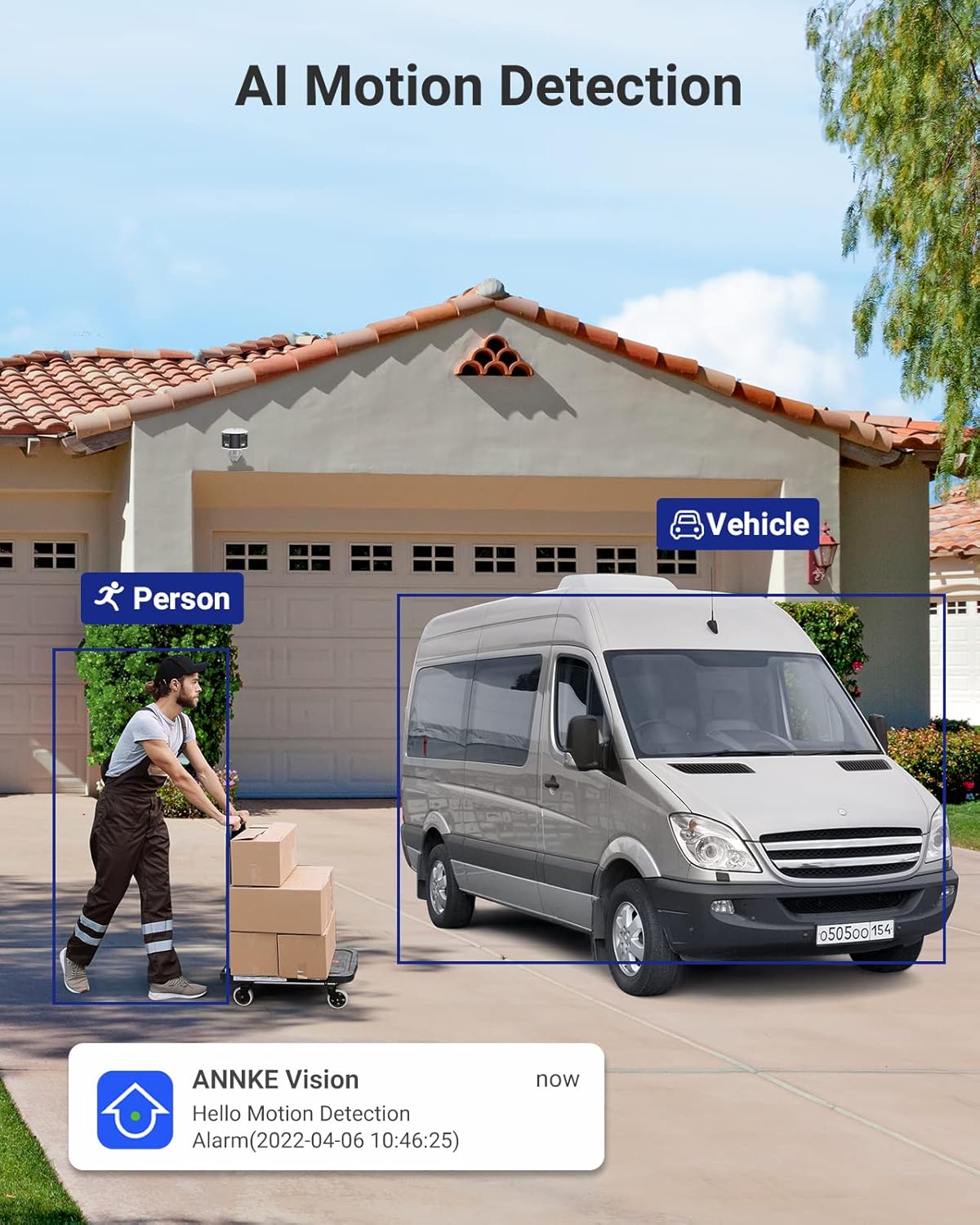
Image: The camera's AI motion detection in action, identifying a person and a vehicle, accompanied by a mobile app notification.

Image: An illustration of the camera's audible siren feature deterring an intruder, highlighting its active alarm capabilities.
4. Two-Way Audio
Use the two-way audio feature to communicate with individuals near the camera.
- From the live view in the ANNKE Vision app, tap the microphone icon to speak.
- Your voice will be transmitted through the camera's speaker.
- The camera's built-in microphone will capture audio from the environment.

Image: A delivery person interacting with the camera's two-way audio, demonstrating its communication capabilities.
5. Night Vision
The camera automatically switches to full-color night vision in low-light conditions, utilizing its integrated spotlights to provide clear, vibrant images.

Image: The camera's full-color night vision in operation, illuminating a backyard scene with its two spotlights.
6. Wide Dynamic Range (WDR)
The Intelligent WDR function helps to produce clear images in scenes with high contrast lighting, preventing overexposure in bright areas and underexposure in dark areas.

Image: A visual comparison demonstrating the effectiveness of the Intelligent WDR function, showing improved image clarity in high-contrast lighting.
Maintenance
- Cleaning: Regularly clean the camera lens with a soft, dry cloth to ensure clear image quality. Do not use harsh chemicals or abrasive materials.
- Firmware Updates: Check for and install firmware updates through the ANNKE Vision app or ANNKE website to ensure optimal performance, security, and access to new features.
- Storage Management: If using a Micro SD card, periodically check its status and manage recorded footage. Consider backing up important recordings to another storage device.
- Cable Inspection: Periodically inspect the network cable for any signs of wear or damage, especially in outdoor installations, to maintain a reliable connection.
Troubleshooting
| Problem | Possible Solution |
|---|---|
| No Power/Camera Not Turning On |
|
| No Video Feed |
|
| Poor Image Quality |
|
| Motion Detection Not Working |
|
| Two-Way Audio Issues |
|
Specifications
| Feature | Detail |
|---|---|
| Model Name | AP-I51DW0104 |
| Brand | ANNKE |
| Connectivity Technology | Wired (PoE) |
| Video Capture Resolution | 6 MP |
| Special Features | Night Vision (Full-Color), Motion Detection, Two-Way Audio, AI Person/Vehicle Detection, WDR |
| Compatible Devices | Smartphone, NVR, Web Browsers |
| Mounting Type | Wall Mount |
| Color | White, Black |
| Form Factor | Bullet |
| Material | Metal |
| Alarm Type | Audio and Motion |
| Light Source Type | Infrared, Spotlights |
| Control Method | App |
| Number of Channels | 1 |
| Power Source | Wired Electric (PoE) |
| Voltage | 12 Volt |
| Viewing Angle | 180 Degrees |
| Item Dimensions | 45 x 32 x 9 cm |
| Storage Support | Micro SD card up to 256GB (not included) |
Warranty and Support
ANNKE products come with a standard manufacturer's warranty. For detailed warranty information, please refer to the warranty card included in your package or visit the official ANNKE website.
For technical assistance, troubleshooting, or any product-related inquiries, please contact ANNKE Customer Support:
- Online Support: Visit the ANNKE Support Center for FAQs, guides, and contact options.
- Email Support: Refer to your product packaging or the ANNKE website for the latest support email address.
- Brand Store: Explore other ANNKE products and resources at the official ANNKE Amazon Store.
Please have your model number (AP-I51DW0104) and purchase details ready when contacting support.


