
1. Introduction
This manual provides comprehensive instructions for the safe and efficient operation, setup, and maintenance of your KATOOL KT-B700 Wheel Balancer. Designed for home garages, service shops, and repair facilities, this machine ensures precise wheel balancing for various vehicle types. Please read this manual thoroughly before operating the equipment to ensure proper use and to prevent injury or damage.

Figure 1: KATOOL KT-B700 Wheel Balancer with a wheel mounted, showcasing its compact design and user interface.
2. Safety Information
WARNING: Failure to follow these safety instructions may result in serious injury or death.
- Always wear appropriate personal protective equipment (PPE), including safety glasses and gloves, when operating the machine.
- Ensure the machine is placed on a level, stable surface capable of supporting its weight and the weight of the wheel being balanced.
- Connect the machine to a properly grounded electrical outlet with the correct voltage.
- Keep hands, hair, and loose clothing away from moving parts during operation.
- Do not operate the machine if any parts are damaged or missing.
- Keep children and unauthorized personnel away from the operating area.
- Before performing any maintenance or adjustments, disconnect the machine from the power supply.
- Do not attempt to balance wheels that exceed the machine's specified weight or size limits.
- Familiarize yourself with the emergency stop button location and function.
3. Components and Parts List
The KATOOL KT-B700 Wheel Balancer typically includes the following main components and accessories:
- Wheel Balancer Machine (Main Unit)
- Wheel Shaft Assembly
- Quick Release Nut
- Balancing Cones (various sizes)
- Wheel Weight Pliers
- Calibration Weight
- Measuring Caliper
- Safety Hood (if applicable)
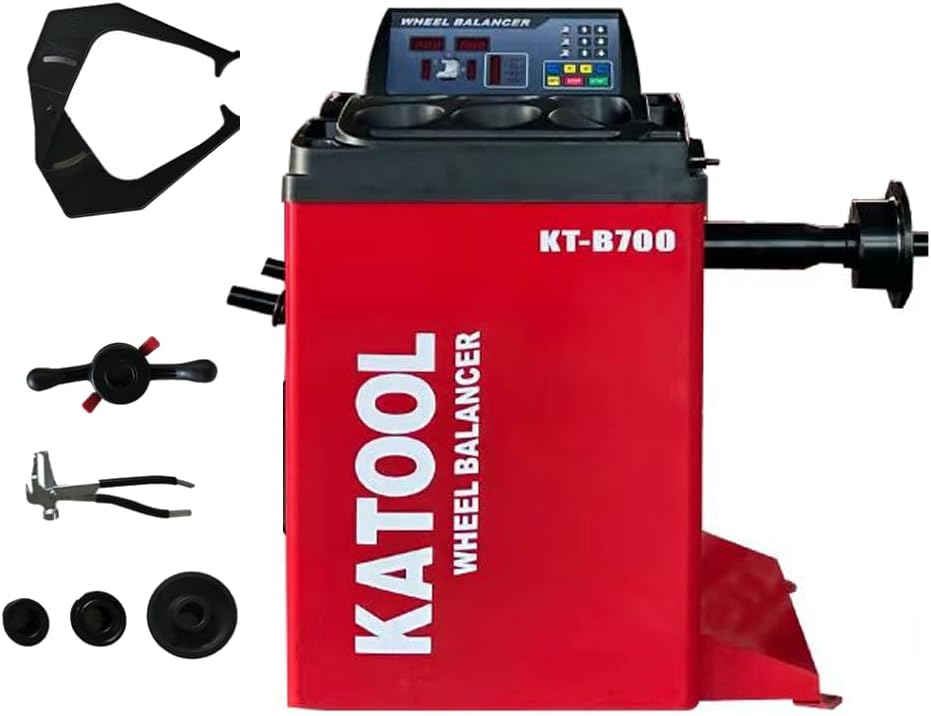
Figure 2: Overview of the KATOOL KT-B700 Wheel Balancer and its standard accessories, including cones, pliers, and measuring tools.
4. Setup and Installation
4.1 Unpacking and Placement
Carefully unpack the wheel balancer from its shipping crate. Ensure all components are present and undamaged. Place the machine on a solid, level concrete floor. The machine's dimensions are approximately 30 x 35 x 40 inches, so ensure adequate space for operation and movement around the unit.
4.2 Shaft Assembly
The KT-B700 features a longer shaft designed to accommodate wider wheels. Assemble the shaft according to the diagrams provided. Ensure all connections are secure.

Figure 3: Detailed view of the shaft assembly process, showing how components fit together for secure wheel mounting.

Figure 4: Diagram illustrating the shaft dimensions, including a 270mm extension and 36mm diameter, designed for wider wheels.
4.3 Electrical Connection
Connect the power cord to a suitable electrical outlet. Verify the voltage requirements of the machine match your power supply.
5. Operating Instructions
5.1 Mounting the Wheel
Select the appropriate balancing cone for the wheel's center bore. Mount the wheel securely onto the shaft, ensuring it is centered and tightened with the quick-release nut. The machine supports reverse fitting for certain wheel types.
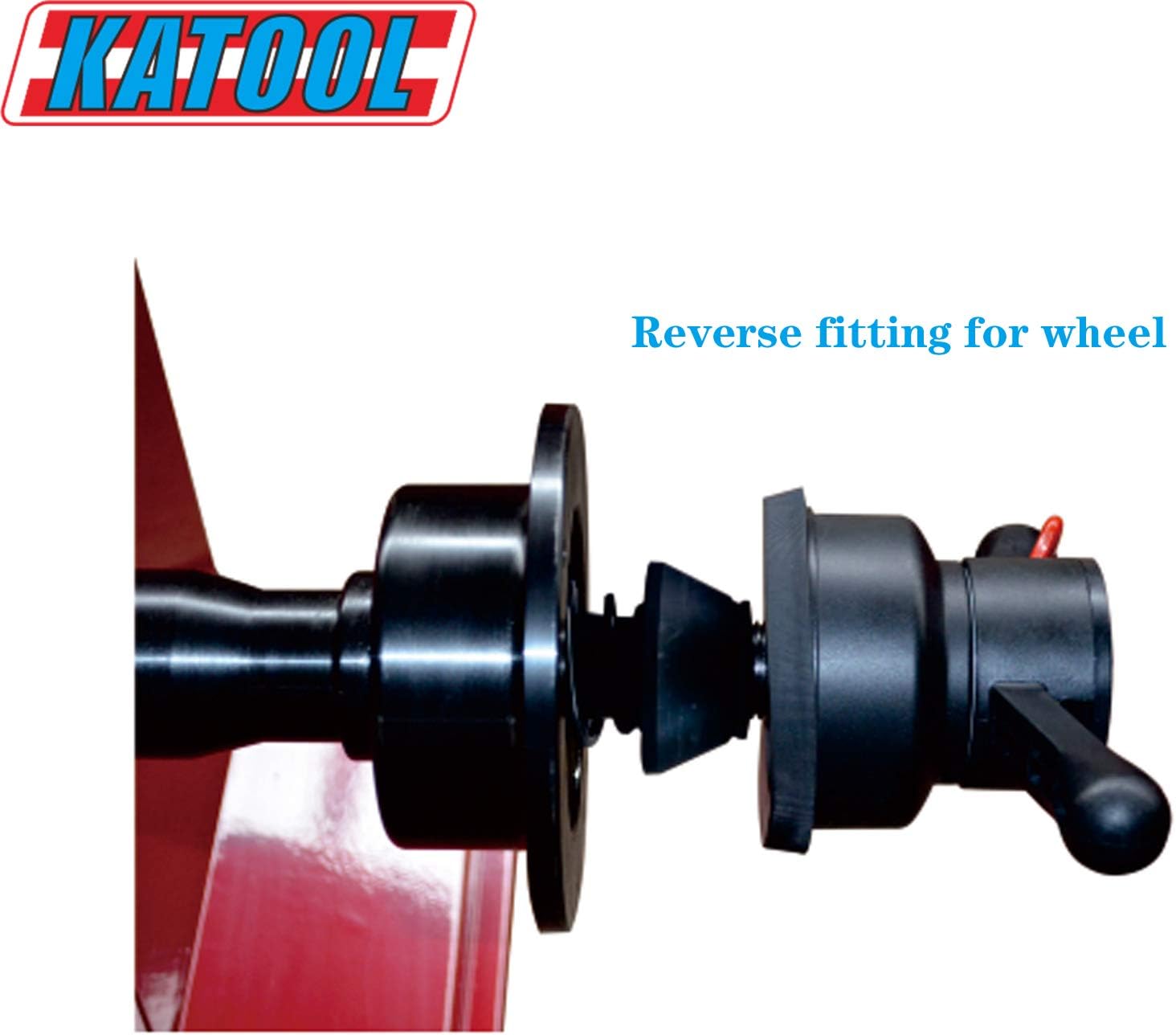
Figure 5: Illustration of the reverse fitting method for mounting wheels, providing versatility for different rim designs.
5.2 Inputting Wheel Data
Use the control panel to input the wheel's diameter, width, and offset. Refer to the measuring caliper for accurate measurements. The KT-B700 features a high-quality integrated power board for stable and reliable operation.
5.3 Selecting Balance Mode
The machine offers various balance modes to suit different rim types (e.g., steel, alloy, static, dynamic). Select the appropriate mode for the wheel being balanced to ensure precision.
5.4 Starting the Balance Cycle
Lower the safety hood (if equipped) and press the START button. The machine will spin the wheel and calculate the required balance weights and their positions. The top-level motor with pure copper winding ensures fast heat dissipation and a low defect rate for longer service life.
5.5 Applying Weights
Follow the on-screen instructions to apply the correct amount of weight to the indicated positions on the wheel. Re-spin the wheel to verify balance. Repeat if necessary until the display shows zero imbalance.
6. Maintenance
6.1 Cleaning
Regularly clean the machine, especially the shaft and mounting area, to prevent dirt and debris from affecting accuracy. Use a soft, damp cloth and mild detergent. Do not use abrasive cleaners or solvents.
6.2 Calibration
Periodic calibration is crucial for maintaining the accuracy of your wheel balancer. Refer to the machine's specific calibration procedure outlined in the on-screen menu or a dedicated calibration section of the full manual. Users have noted that calibration can sometimes be challenging, requiring careful attention to detail to achieve optimal precision. If you experience consistent inaccuracies, recalibration should be the first step.
6.3 Inspection
Inspect all cables, connections, and moving parts regularly for signs of wear or damage. Replace any worn or damaged components immediately.
7. Troubleshooting
| Problem | Possible Cause | Solution |
|---|---|---|
| Machine does not power on. | No power supply; tripped circuit breaker; faulty power cord. | Check power connection; reset circuit breaker; inspect power cord for damage. |
| Inaccurate balancing results. | Improper calibration; incorrect wheel data input; dirty shaft/cones; wheel not securely mounted. | Perform calibration; re-enter wheel data accurately; clean shaft and cones; re-mount wheel securely. |
| Machine vibrates excessively. | Unstable surface; damaged internal components. | Ensure machine is on a level, stable surface; contact support if vibration persists. |
| Calibration issues (e.g., asking for more weight). | Incorrect calibration weight used; environmental factors; sensor issues. | Ensure correct calibration weight is used and properly placed. Follow calibration steps precisely. If issues persist, contact KATOOL support. |
8. Specifications
| Feature | Detail |
|---|---|
| Model | KT-B700 |
| Manufacturer | KATOOL |
| Product Dimensions | 30 x 35 x 40 inches |
| Country of Origin | China |
| Motor Type | Top level motor with pure copper winding |
| Power Board | High quality integration power board |
| Shaft Length | Longer shaft for wider wheels (e.g., 270mm extension, 36mm diameter) |
| Balance Modes | Various balance modes for different rim types |
9. Warranty and Support
9.1 Warranty Information
The KATOOL KT-B700 Wheel Balancer comes with a Free 12 months FULL parts warranty. This warranty covers defects in materials and workmanship under normal use. Please retain your proof of purchase for warranty claims.
Additional protection plans may be available for purchase, offering extended coverage for 2 or 3 years. Refer to your purchase documentation for details on these plans.
9.2 Customer Support
For technical assistance, troubleshooting, or warranty claims, please contact Rainier Engineering, LTD, the authorized seller and manufacturer of KATOOL products. Their contact information can typically be found on your purchase invoice or the KATOOL brand store on Amazon.
When contacting support, please have your model number (KT-B700) and purchase date ready to expedite service.


