
1. Introduction
Thank you for choosing the Tribesigns C0162 Two Person Desk with Bookshelf. This desk is designed to provide a spacious and functional workspace for two individuals, featuring integrated storage solutions. This manual provides essential information for the safe assembly, operation, maintenance, and troubleshooting of your new desk. Please read it thoroughly before assembly and retain it for future reference.

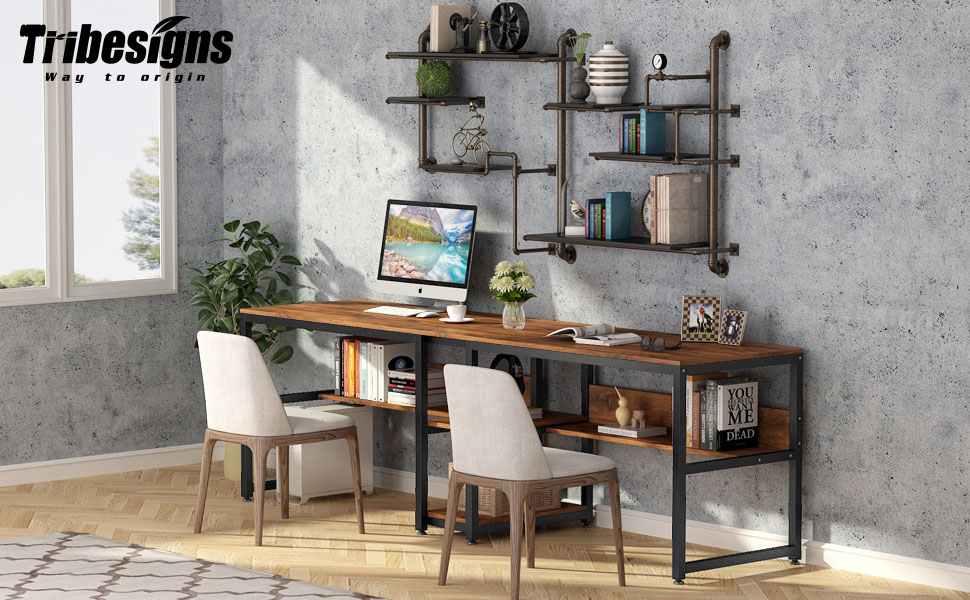
Image 1.1: The Tribesigns C0162 Two Person Desk in a modern office environment, showcasing its dual workspace and integrated shelving.
2. Setup and Assembly
Before beginning assembly, ensure all parts are present and undamaged. It is recommended to assemble the desk on a soft, clean surface to prevent scratches. Two people are recommended for assembly.
2.1 Package Contents
Verify that your package contains all the components listed in the included assembly instructions. Typically, this includes:
- Desktop panels
- Metal frame components
- Bookshelf and storage shelf panels
- Hardware pack (screws, bolts, Allen wrench)
- Adjustable foot pads
- Assembly instruction manual
2.2 Assembly Steps
- Unpack and Identify: Carefully unpack all components and lay them out. Compare them with the parts list in your instruction manual.
- Assemble Frame: Begin by attaching the metal frame components according to the numbered steps in the manual. Do not fully tighten screws until all parts are loosely assembled.
- Attach Shelves: Secure the bookshelf and middle storage shelf panels to the frame.
- Install Desktop: Place the desktop panels onto the assembled frame and secure them with the provided hardware.
- Tighten All Screws: Once all components are in place, systematically tighten all screws and bolts to ensure stability.
- Attach Foot Pads: Screw the adjustable foot pads into the bottom of the desk legs.

Image 2.1: Detailed dimensions of the Tribesigns C0162 desk, including overall length, width, height, and shelf measurements.
2.3 Leveling the Desk
After assembly, place the desk in its desired location. If the desk wobbles, adjust the foot pads by rotating them until the desk is stable and level on uneven floors. This also helps prevent scratches on your flooring.

Image 2.2: Adjustable leg pads allow for leveling the desk on uneven surfaces and protect floors.
3. Operating Instructions
The Tribesigns C0162 desk is designed for versatile use in home or office environments, accommodating two users comfortably with ample storage.
3.1 Workspace Utilization
- Dual Workstations: The 78.7-inch desktop provides generous space for two individuals to work side-by-side without interference. Each side can comfortably hold a monitor, keyboard, mouse, and other office essentials.
- Versatile Use: Suitable for computer work, writing, studying, gaming, or creative projects.

Image 3.1: The desk configured for two users, highlighting the independent workspace each person has.
3.2 Storage Features
- Integrated Bookshelves: Two open bookshelves are located under each main desktop section, ideal for storing books, binders, and decorative items.
- Middle Storage Shelves: A 2-tier central storage unit provides additional space for office supplies, files, or personal items, keeping your desktop clutter-free.

Image 3.2: Visual breakdown of the desk's key features: expansive desktop, integrated open bookshelves, and central storage shelves.
3.3 Product Overview Video
Video 3.1: An official product video showcasing the Tribesigns Two Person Desk with Bookshelf, highlighting its design, features, and functionality.
4. Maintenance
Proper care will ensure the longevity and appearance of your Tribesigns desk.
- Cleaning: Wipe the desk surfaces with a dry, soft cloth. For stubborn marks, a slightly damp cloth can be used, followed immediately by a dry cloth. Avoid abrasive cleaners or harsh chemicals, as they can damage the finish.
- Protection: Avoid placing hot items directly on the desktop. Use coasters for drinks.
- Prevent Scratches: Avoid using sharp objects directly on the desk surface. Use desk mats or pads under keyboards, mice, and other items that may cause scratches.
- Hardware Check: Periodically check all screws and bolts to ensure they are tight. Re-tighten if necessary to maintain stability.
5. Troubleshooting
If you encounter any issues with your desk, please refer to the following common solutions:
- Desk Wobbles: Ensure all assembly screws are fully tightened. Adjust the leveling foot pads on each leg until the desk is stable on the floor.
- Missing Parts: If any parts are missing or damaged upon arrival, do not proceed with assembly. Contact customer support immediately for assistance.
- Difficulty Assembling: Review the assembly instructions carefully. Ensure you are using the correct hardware for each step. If issues persist, consider seeking assistance from another person.
- Surface Damage: For minor scratches, furniture repair kits may be used. For significant damage, contact customer support.
6. Specifications
| Feature | Detail |
|---|---|
| Brand | Tribesigns |
| Model Number | C0162 |
| Product Dimensions | 78.74"W x 23.62"D x 29.52"H |
| Color | Brown (Rustic Brown tabletop, Black frame) |
| Style | Industrial |
| Top Material Type | Engineered Wood (E1 Particle Board) |
| Base Material | Alloy Steel (Metal Frame) |
| Item Weight | 70.6 pounds |
| Maximum Weight Recommendation | 550 lbs (250 kg) |
| Number of Shelves | 2 (under desktop) + 2 (middle storage) |
| Tabletop Thickness | 0.98 inches |
| Assembly Required | Yes (Recommended 2 people) |
7. Warranty Information
This Tribesigns C0162 Two Person Desk comes with a Limited Warranty. The manufacturer provides a 6-month warranty covering parts and labor from the date of purchase. This warranty covers manufacturing defects and material flaws under normal use. It does not cover damage resulting from misuse, accidents, unauthorized repairs, or normal wear and tear. Please retain your proof of purchase for warranty claims.
8. Customer Support
If you have any questions, require assistance with assembly, or need to report missing/damaged parts, please contact Tribesigns customer support. Refer to the contact information provided with your product packaging or visit the official Tribesigns website for support options.
We are committed to providing excellent customer service and will respond to inquiries within 24 hours.