
ADVWIN 111800700
ADVWIN Air Dehumidifier User Manual
Model: 111800700
1. Important Safety Instructions
Please read all instructions carefully before operating the dehumidifier and retain this manual for future reference. Failure to follow these instructions may result in electric shock, fire, or serious injury.
- Always connect the unit to a properly grounded electrical outlet.
- Do not operate the dehumidifier with a damaged cord or plug.
- Do not block air inlets or outlets. Ensure at least 20cm of space around the unit for proper airflow.
- Do not use the unit in areas where flammable liquids or gases are stored.
- Keep children and pets away from the unit during operation. The child lock feature should be utilized.
- Always unplug the dehumidifier before cleaning or performing any maintenance.
- Do not immerse the unit, power cord, or plug in water or other liquids.
- If the unit makes unusual noises, emits strange odors, or smokes, unplug it immediately and contact customer support.
2. Product Overview
The ADVWIN Air Dehumidifier is designed to efficiently remove excess moisture from your indoor environment, improving air quality and comfort. It features a compact design, multiple operating modes, and user-friendly controls.

Figure 2.1: Front view of the ADVWIN Air Dehumidifier.
2.1 Components
- Control Panel with LED Display
- Air Inlet (rear)
- Air Outlet (top)
- Water Tank (6.5L capacity)
- Continuous Drainage Outlet
- Removable and Washable Filter
- 360° Universal Wheels
- Ergonomic Handle

Figure 2.2: Key components of the dehumidifier, including handles, wheels, and filter access.
3. Setup
3.1 Unpacking
- Carefully remove the dehumidifier from its packaging.
- Remove all packing materials, including any tape or protective films.
- Inspect the unit for any signs of damage during transit. If damaged, do not operate and contact customer support.
3.2 Placement
- Place the dehumidifier on a flat, stable surface.
- Ensure there is at least 20 cm (8 inches) of clear space around all sides of the unit to allow for proper air circulation.
- Avoid placing the unit near heat sources, direct sunlight, or in areas exposed to freezing temperatures.
- For optimal performance, close all doors and windows in the room where the dehumidifier is operating.
3.3 Power Connection
Plug the power cord into a grounded electrical outlet (240V, 50Hz). The unit will enter standby mode.
4. Operating Instructions
4.1 Control Panel
The control panel provides access to all functions of the dehumidifier. The LED display shows the current humidity level or timer settings.

Figure 4.1: Detailed view of the control panel and its functions.
- STAND-BY Button: Press to turn the unit On or Off.
- CHILD LOCK Button: Press and hold to activate/deactivate the child lock, preventing accidental changes to settings.
- TIMER Button: Set the 1-24 hour timer for automatic power on/off.
- HUMIDITY SETTING Button: Adjust the target humidity level from 30% to 80% in 5% increments.
- FAN Button: Adjust fan speed (High/Low).
- SLEEP Button: Activates sleep mode, which reduces fan speed and dims the display for quiet operation.
- DEHUMIDIFY MODE Button: Cycle through the available operating modes.
4.2 Operating Modes
The dehumidifier offers four distinct operating modes to suit various needs:
- Dehumidification Mode: Provides comfortable home humidity levels. The unit will operate to reach your set target humidity.
- Drying Mode: Ideal for drying clothes in humid conditions. The unit operates continuously at a high fan speed to quickly remove moisture.
- Continuous Mode: Maintains a dry and comfortable environment by running continuously, regardless of the set humidity level. Useful for very damp areas.
- Strong Dehumidification Mode: Designed for highly humid areas like basements and garages, providing maximum moisture removal.

Figure 4.2: Dehumidification mode in a typical living space.

Figure 4.3: Drying mode, suitable for laundry areas.

Figure 4.4: Continuous mode, effective in bathrooms or basements.
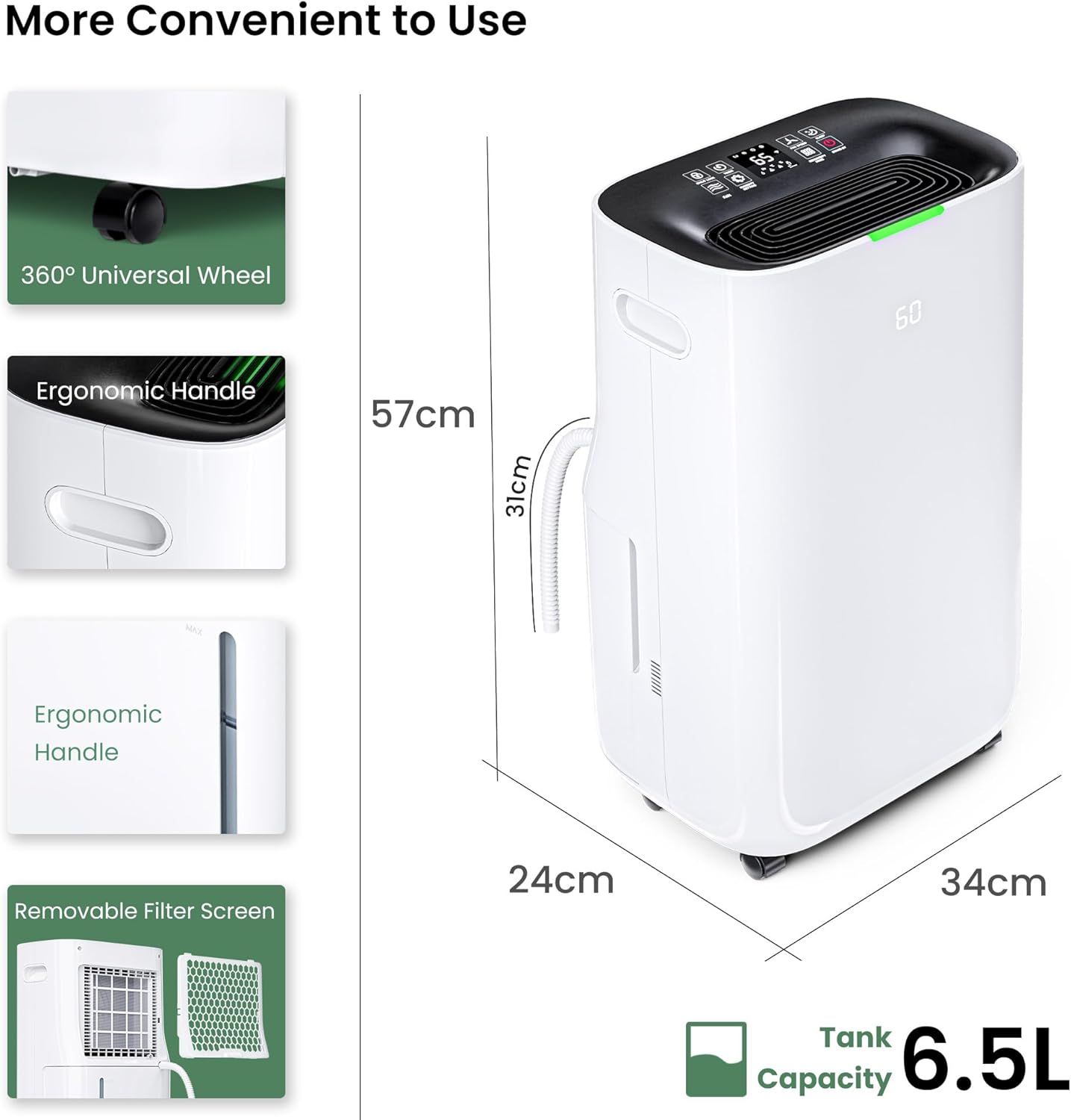
Figure 4.5: Strong Dehumidification mode for very damp spaces.
4.3 Water Tank and Drainage
The dehumidifier features a 6.5L water tank. When the tank is full, the unit will automatically shut off and an indicator light will illuminate. You have two drainage options:
- Manual Drainage: Carefully remove the water tank from the unit and empty the collected water. Reinsert the tank firmly until it clicks into place.
- Continuous Drainage: For continuous operation without manual emptying, attach a drainage hose (not included) to the continuous drainage outlet on the back of the unit. Ensure the hose is sloped downwards to allow gravity drainage into a suitable drain.
Figure 4.6: Illustration of manual and continuous drainage methods.
4.4 Auto Defrost
The dehumidifier is equipped with an auto-defrost system. If frost builds up on the evaporator coils, the unit will automatically enter defrost mode to melt the ice, ensuring efficient operation, especially in cooler environments.

Figure 4.7: The auto defrost feature ensures efficient operation in cooler conditions.
5. Maintenance
Regular maintenance ensures the longevity and efficient operation of your dehumidifier.
5.1 Cleaning the Air Filter
The removable and washable filter should be cleaned every two weeks or more frequently depending on usage and air quality.
- Turn off the dehumidifier and unplug it from the power outlet.
- Locate and remove the air filter from the back of the unit.
- Rinse the filter under running water (not hot) or use a vacuum cleaner to remove dust and debris.
- Allow the filter to air dry completely before reinserting it into the unit. Do not use a dryer or direct heat.

Figure 5.1: The removable filter is easily accessible for cleaning.
5.2 Cleaning the Unit Exterior
Wipe the exterior of the dehumidifier with a soft, damp cloth. Do not use harsh chemicals, abrasive cleaners, or solvents, as these may damage the surface.
5.3 Water Tank Cleaning
Clean the water tank periodically to prevent mold and mildew growth. Use a mild detergent and warm water, then rinse thoroughly and dry before reinserting.
5.4 Storage
If the dehumidifier will not be used for an extended period:
- Empty and clean the water tank.
- Clean the air filter.
- Unplug the unit and coil the power cord neatly.
- Store the unit upright in a cool, dry place, away from direct sunlight and extreme temperatures.
6. Troubleshooting
Before contacting customer support, please refer to the following troubleshooting guide for common issues.
| Problem | Possible Cause | Solution |
|---|---|---|
| Dehumidifier does not turn on. | No power supply; Power cord not plugged in; Water tank full or not properly inserted. | Check power outlet; Ensure power cord is securely plugged in; Empty water tank and reinsert correctly. |
| Unit is running but not collecting water. | Humidity level is already low; Air filter is clogged; Room temperature is too low; Unit is in defrost mode. | Check current humidity level; Clean the air filter; Ensure room temperature is above 5°C (41°F); Wait for defrost cycle to complete. |
| Unit is noisy. | Unit is not on a level surface; Air filter is clogged; Fan speed is set to high. | Place unit on a flat, stable surface; Clean the air filter; Select a lower fan speed. |
| Water leaks from the unit. | Water tank is not properly seated; Continuous drainage hose is blocked or improperly connected. | Ensure water tank is fully inserted; Check continuous drainage hose for kinks or blockages and ensure secure connection. |
7. Specifications
| Specification | Value |
|---|---|
| Brand | ADVWIN |
| Model Number | 111800700 |
| Capacity (Moisture Removal) | 30 Liters/Day |
| Water Tank Capacity | 6.5 Liters |
| Power/Wattage | 240.00 W |
| Voltage | 240 Volts |
| Material | Acrylonitrile Butadiene Styrene (ABS) |
| Auto Shut-off | Yes |
| Number of Speeds | 2 |
| Special Features | Continuous Draining, Portable, Washable Filter |
| Item Weight | 13.7 kg |
| Product Dimensions (L x W x H) | 24 x 34 x 57 cm |
8. Warranty and Support
For warranty information, product registration, or technical support, please refer to the official ADVWIN website or contact their customer service department. Keep your purchase receipt as proof of purchase for any warranty claims.
Customer Support: Please visit the ADVWIN official website for contact details or refer to the contact information provided at the point of purchase.
Ask a question about this manual
Ask about setup, troubleshooting, compatibility, parts, safety, or missing instructions. Manuals+ will review the question and use this page’s manual context to help answer it.