Introduction
The LG StanbyME is a versatile 27-inch portable touch-screen monitor designed for flexible use in various environments. It features a built-in battery, full swivel rotation, and integrated wheels for easy mobility. This manual provides essential information for setting up, operating, and maintaining your StanbyME monitor.
Safety Information
Please read all safety instructions carefully before using the product. Keep this manual for future reference.
- Do not expose the unit to rain or moisture.
- Ensure proper ventilation to prevent overheating.
- Use only the power adapter supplied with the device.
- Avoid placing the unit on unstable surfaces.
- Keep out of reach of children and pets.
What's in the Box
Verify that all components are present before beginning assembly.
- LG StanbyME Monitor
- Stand
- Remote Control
- Remote Control Battery (AA)
- Power Cable
- Mobile Device Holder
- Quick Start Guide (refer to the digital PDF for full details)

Image: The LG StanbyME monitor in portrait orientation on its stand, showcasing its sleek design and portability.
Setup
1. Assembly
- Carefully unpack all components from the box.
- Attach the monitor panel to the stand arm. Ensure it clicks securely into place.
- Connect the stand arm to the base. The base includes five wheels for easy movement.
- Insert the AA batteries into the remote control.
- Connect the power cable to the monitor and then to a power outlet.

Image: Rear view of the LG StanbyME monitor showing the connection point to the stand and the fabric-covered back panel.
2. Initial Power On and Network Connection
- Press the power button located on the monitor or remote control.
- Follow the on-screen prompts to select your language and region.
- Connect to your Wi-Fi network by selecting it from the list and entering the password.
Operating the LG StanbyME
1. Screen Orientation and Mobility
The LG StanbyME offers exceptional flexibility:
- Rotation: The screen can be rotated 90 degrees to switch between portrait and landscape modes. Gently rotate the screen until it locks into the desired position.
- Tilt: Adjust the screen's vertical tilt for optimal viewing angles.
- Height Adjustment: The stand allows for vertical height adjustment.
- Mobility: The five wheels on the base enable easy movement across even surfaces. Exercise caution when moving over rough or uneven terrain to prevent damage.
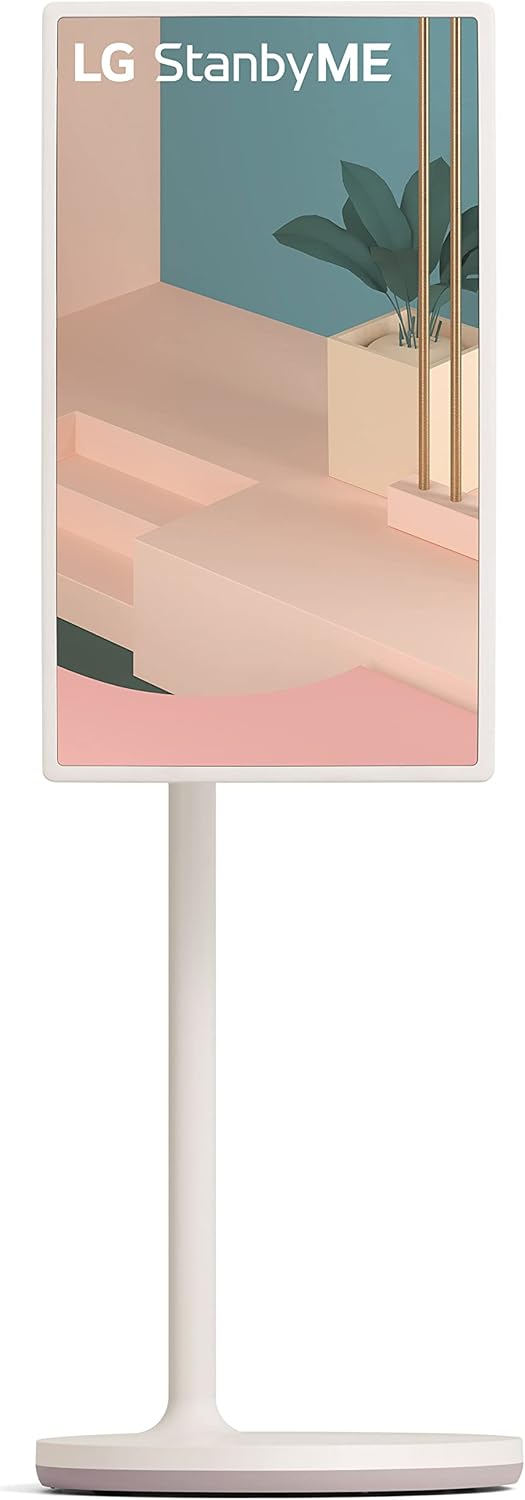

Image: The LG StanbyME monitor shown in both portrait and landscape orientations, demonstrating its rotational capability.
2. Touchscreen and Remote Control
Navigate the StanbyME using its intuitive touchscreen or the included remote control. The touchscreen allows for direct interaction with apps and menus, while the remote provides traditional control options.
3. Connectivity Options
- Wi-Fi: Connect to your home network for streaming content and accessing online features.
- Bluetooth: Pair with external audio devices like headphones or speakers.
- HDMI: Connect external devices such as gaming consoles or Blu-ray players.
- USB: For media playback from USB drives.
- NFC: Tap your compatible mobile device to the NFC logo on the rear of the screen for quick content mirroring.
- AirPlay 2: Stream, share, or mirror content from your Apple devices (iPhone, iPad, Mac).

Image: A close-up of the NFC tag located on the back of the LG StanbyME monitor, indicating the tap-to-connect area.
4. Smart Features and Apps
The StanbyME runs on LG's webOS platform, providing access to a variety of streaming services and applications. The α7 Gen4 AI Processor optimizes screen settings based on content genre and ambient lighting for an enhanced viewing experience.
Maintenance
- Cleaning the Screen: Use a soft, lint-free cloth specifically designed for electronics. Do not use abrasive cleaners or sprays directly on the screen.
- Cleaning the Stand: Wipe the stand and base with a dry or slightly damp cloth. Ensure the wheels are free of debris for smooth movement.
- Battery Care: To prolong battery life, avoid fully discharging the battery frequently. Store the unit in a cool, dry place if not used for extended periods.
Troubleshooting
| Problem | Possible Cause | Solution |
|---|---|---|
| No Power | Power cable not connected; Battery drained. | Ensure power cable is securely connected. Charge the battery. |
| No Wi-Fi Connection | Incorrect password; Router issue; Out of range. | Verify password. Restart router. Move closer to router. |
| Screen Not Rotating | Obstruction; Not rotated fully. | Ensure no obstructions. Gently rotate until it clicks into place. |
| Touchscreen Unresponsive | Temporary software glitch. | Restart the monitor. Ensure screen is clean. |
Specifications
| Feature | Detail |
|---|---|
| Model Number | 27ART10AKPL |
| Screen Size | 27 Inches |
| Resolution | 1080p |
| Refresh Rate | 60 Hz |
| Display Technology | LCD |
| Connectivity | Bluetooth, Wi-Fi, USB, HDMI, NFC, AirPlay 2 |
| Item Weight | 38.6 Pounds |
| Product Dimensions | 15.6"D x 24.4"W x 49.8"H |
| Color | Calming Beige |
| On-mode Power Consumption | 36 watts |
Warranty and Support
For warranty information and technical support, please refer to the official LG website or contact LG customer service. Keep your purchase receipt for warranty claims.
- Official LG Website: www.lg.com
- User Manual (PDF): Download PDF Manual