
1. Introduction
This manual provides detailed instructions for the installation, operation, and maintenance of your Bileeko Backup Camera and 5-inch Monitor Kit. Please read this manual thoroughly before installation and use to ensure proper function and safety. This system is designed to assist drivers in safely reversing and parking various vehicles by providing a clear rear view.
2. Package Contents
Verify that all components are present in the package:
- 5-inch LCD Monitor
- Backup Camera
- Power Cord Connector
- Video Cable
- Dash Stand Bracket
- Suction Cup Bracket
- Cigarette Lighter Power Adapter
- Installation Diagram

Figure 2.1: Package Contents. This image displays the 5-inch monitor, backup camera, various cables, and two types of mounting brackets.
3. Product Features
- 5-inch HD 1080P Monitor: Full color TFT LCD display with sun-shield design to block strong sunlight, ensuring clear visual effects. Adjustable brightness, contrast, color, hue, and zoom via menu buttons.
- 170° Ultra-Wide Viewing Angle Camera: Provides a broad field of vision to minimize blind spots behind the vehicle.
- IP69 Waterproof Camera: Features a 6-layer glass lens and full glue design, ensuring reliable operation in rain, snow, or during car washes.
- Night Vision: Equipped with high-resolution photosensitive sensors and a 6-layer full glass lens for clear visual images in low-light conditions.
- Plug & Play Connectivity: Connects directly via a 4-pin cable with a power cord connector for high-quality images and strong signals.
- Flexible Power Options: Can be powered by connecting to reverse lights for use in reverse gear, or directly to a 12V source (fuse box, cigarette lighter, ignition switch) for continuous use.
- DIY Settings: The camera allows customization of image display (mirror/normal), parking guide lines (on/off), and video mode (CVBS/AHD) by cutting specific wire loops. Note: This monitor only supports CVBS mode; do not cut the orange cable.
- Dual Video Inputs: The monitor includes two video input ports. The white video cable is the priority signal input, typically for the rear view camera. The yellow video cable can connect to other video devices.
- Automatic Activation: When reversing, the monitor automatically starts and displays video from the backup camera.
- Versatile Mounting: Includes both a dash stand bracket and a suction cup bracket for flexible installation.

Figure 3.1: 5-inch LCD Display. The monitor provides a clear rear view for driving assistance.

Figure 3.2: Professional Camera Lens. This image highlights the 6-layer glass lens for enhanced clarity in both day and night conditions.

Figure 3.3: 170 Degree Super Viewing Angle. The wide angle helps eliminate dangerous blind spots.

Figure 3.4: IP69 Waterproof Camera. The camera is designed to withstand heavy rain, snow, and other extreme weather conditions.
4. Setup and Installation
The Bileeko backup camera system is designed for compatibility with most DC12V vehicles, including cars, sedans, vans, minivans, pickups, SUVs, trucks, campers, and trailers.

Figure 4.1: Compatible Vehicles. The system is suitable for a wide range of DC12V vehicles.
4.1 Mounting the Monitor
Choose between the dash stand bracket or the suction cup bracket based on your preference and vehicle's dashboard configuration.
- Dash Stand Bracket: Securely attach the monitor to your dashboard using the adhesive base.
- Suction Cup Bracket: Attach the monitor to your windshield or a smooth dashboard surface using the suction cup.

Figure 4.2: Monitor Mounting Options. Choose between the suction cup or dash stand bracket.
4.2 Camera Placement
Install the backup camera at the rear of your vehicle, typically above the license plate or on the bumper, ensuring a clear, unobstructed view.
4.3 Wiring Diagram
The system offers two primary wiring methods:
- Cigarette Lighter Power: For easy installation, connect the monitor to the cigarette lighter socket. The camera connects to the monitor via the video cable.
- Direct 12V Power: For continuous use or a cleaner installation, connect the monitor's red wire to a 12V power source (e.g., fuse box, ignition switch) and the black wire to ground (GND). The camera can be powered by connecting its red wire to the vehicle's reverse lights (for reverse-only activation) or to a constant 12V source for continuous operation.
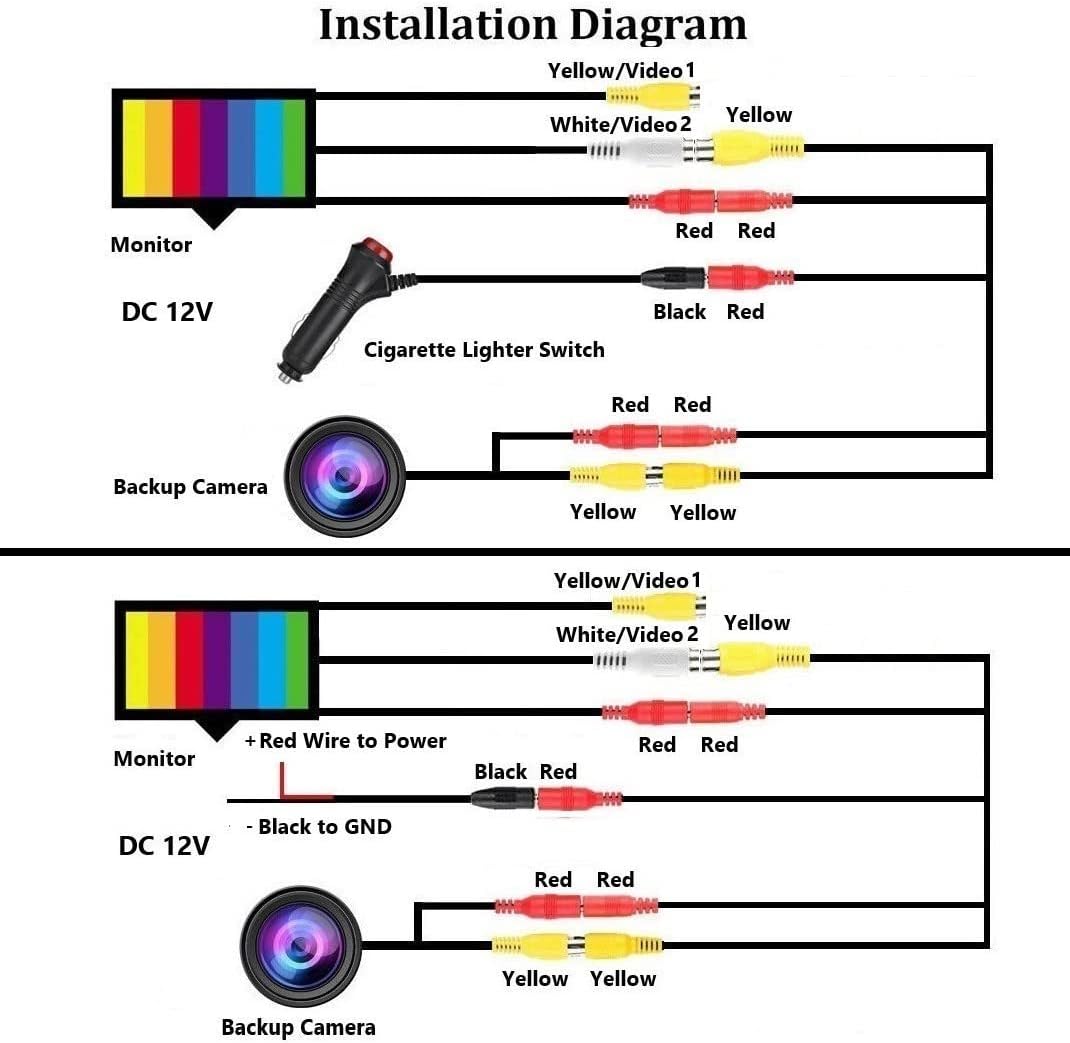
Figure 4.3: Installation Diagram. This diagram illustrates the two main wiring configurations for the system.
5. Operating Instructions
5.1 Basic Operation
- If powered by reverse lights, the monitor will automatically turn on and display the camera feed when the vehicle is shifted into reverse.
- If powered continuously, the monitor can be manually turned on/off or will remain on, displaying the selected video input.
5.2 Monitor Settings
Use the menu buttons on the monitor to adjust display settings:
- Brightness: Adjust the screen's luminosity.
- Contrast: Modify the difference between light and dark areas.
- Color: Adjust the intensity of colors.
- Hue: Change the tint of the colors.
- Zoom: Adjust the display size of the image.

Figure 5.1: Adjusting Image Display. Use the menu buttons to customize your viewing experience.
5.3 Camera Customization (DIY Settings)
The camera features wire loops that allow for customization of its output. Always disconnect power before cutting any wires. Reconnect power after cutting for changes to take effect.
- Parking Guide Line:
- Keep the green wire loop: Parking guide lines appear.
- Cut the green wire loop: Parking guide lines disappear. - Image Orientation:
- Keep the white wire loop: Mirror image (default for rear view).
- Cut the white wire loop: Positive image (for front view). - Video Signal Output:
- Keep the orange wire loop: CVBS video signal output (Required for this monitor).
- Cut the orange wire loop: AHD video signal output. DO NOT CUT THE ORANGE CABLE as this monitor only supports CVBS mode.

Figure 5.2: Camera DIY Settings. Instructions for modifying camera output by cutting specific wire loops.
6. Maintenance
- Cleaning: Regularly clean the camera lens and monitor screen with a soft, damp cloth. Avoid abrasive cleaners that may scratch surfaces.
- Waterproof Design: The camera is IP69 rated, meaning it is highly resistant to water and dust ingress. However, avoid directing high-pressure water jets directly at the camera for extended periods.
- Cable Inspection: Periodically check all cables and connections for any signs of wear, damage, or loose connections. Ensure all connections are secure to maintain optimal performance.
- Temperature: While designed for vehicle use, extreme temperatures can affect electronic components. Avoid prolonged exposure to direct sunlight in very hot conditions or extreme cold when not in use.
7. Troubleshooting
If you encounter issues with your Bileeko Backup Camera and Monitor Kit, refer to the following common problems and solutions:
- No Image on Monitor:
- Check all power connections to both the monitor and camera. Ensure they are securely connected and receiving power.
- Verify the video cable is properly connected between the camera and the monitor's white video input.
- If the camera is powered by reverse lights, ensure the vehicle is in reverse gear. - Flickering or Distorted Image:
- Check for loose cable connections.
- Ensure the power supply is stable (12V DC).
- Verify that the orange wire loop on the camera has not been cut, as this monitor only supports CVBS video mode. - No Parking Guide Lines:
- Check if the green wire loop on the camera has been cut. If you want guide lines, ensure the green wire loop is intact. Remember to power cycle the system after making changes. - Image is Mirrored (or not mirrored as desired):
- Check the white wire loop on the camera. Cut it for a positive (front view) image, or keep it intact for a mirror (rear view) image. Power cycle after changes. - Monitor Not Turning On:
- If powered by cigarette lighter, ensure the lighter socket is functional and the adapter is fully inserted.
- If hardwired, check the 12V power connection and ground.
If problems persist after attempting these troubleshooting steps, please contact Bileeko customer support.
8. Specifications
| Feature | Specification |
|---|---|
| Brand | Bileeko |
| Screen Size | 5 Inches |
| Display Technology | LCD |
| Video Capture Resolution | 1080p |
| Real Angle of View | 170 Degrees |
| Optical Sensor Technology | CCD |
| Lux Rating | 0.1 Lux |
| Voltage | 12 Volts |
| Installation Type | Surface Mount |
| Waterproof Rating | IP69 |
9. Warranty and Support
This Bileeko product comes with a 2-year warranty from the date of purchase. This warranty covers manufacturing defects and malfunctions under normal use. It does not cover damage caused by misuse, accident, unauthorized modification, or improper installation.
For technical support, warranty claims, or any questions regarding your Bileeko Backup Camera and Monitor Kit, please contact Bileeko customer service through the retailer where the product was purchased or refer to the contact information provided with your product packaging.
