
1. Introduction
Thank you for choosing the SGNICS TWS Wireless Bluetooth 5.0 Earbuds. These earbuds are designed to provide a high-quality audio experience with advanced features such as Bluetooth V5.0 connectivity, ultra-low-latency, and IPX5 water resistance. This manual provides detailed instructions on how to set up, operate, and maintain your earbuds to ensure optimal performance and longevity.
2. Package Contents
Please check the package contents upon unboxing to ensure all items are present:
- True Wireless Earbuds (Left and Right)
- Charging Case
- Type-C Charging Cable
- Ear Cushions (various sizes)
- User Manual
3. Product Overview

Figure 3.1: The SGNICS TWS Wireless Bluetooth 5.0 Earbuds shown inside their open charging case. The earbuds are white with silver accents, and a blue fingerprint icon indicates the touch control area on one earbud. A small green LED on the case indicates its status.
The SGNICS TWS Wireless Bluetooth 5.0 Earbuds feature an ergonomic design for comfortable wear. Each earbud is equipped with touch controls and a microphone. The compact charging case provides additional battery life and protects the earbuds when not in use.
4. Setup
4.1 Charging the Earbuds and Charging Case
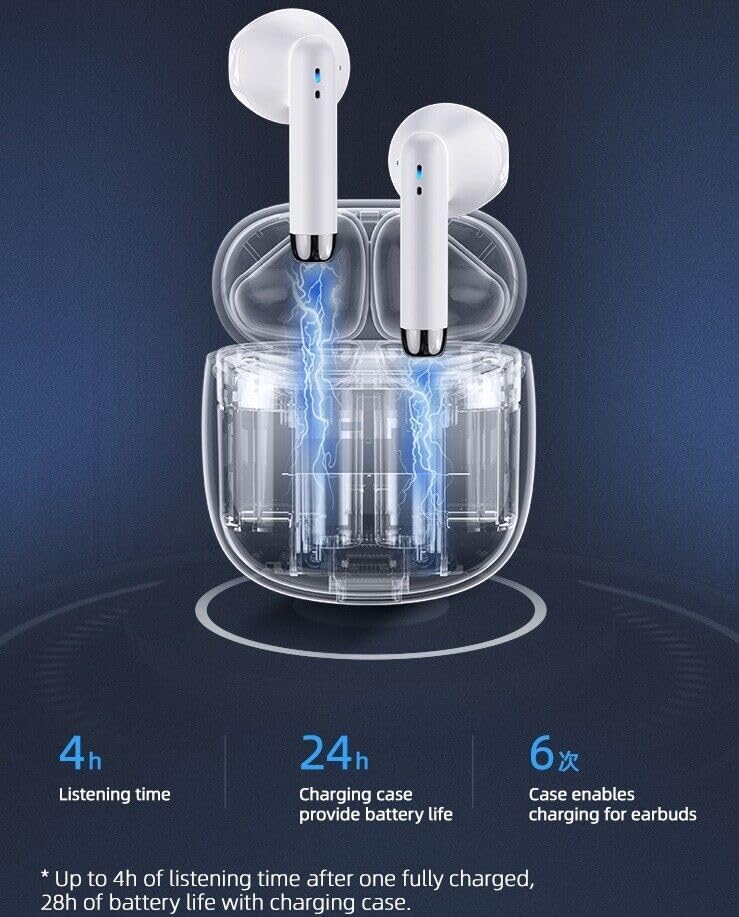
Figure 4.1: The earbuds are placed inside the charging case, illustrating the charging process. The image also highlights the battery life: 4 hours listening time per charge, 24 hours additional from the case, totaling 28 hours.
- Initial Charge: Before first use, fully charge both the earbuds and the charging case.
- Charging the Case: Connect the provided Type-C cable to the charging port on the case and to a USB power source. The indicator light on the case will show charging status.
- Charging the Earbuds: Place the earbuds into their respective slots in the charging case. Ensure they are properly seated. The earbuds will automatically begin charging.
- Battery Life: A full charge provides up to 4 hours of listening time. The charging case provides an additional 24 hours of battery life, allowing for multiple recharges on the go.
4.2 Pairing with a Bluetooth Device

Figure 4.2: The earbuds and charging case are shown alongside a smartphone, demonstrating their use with a mobile device. The image also highlights key battery specifications: 4.0 hours play time, 32 hours standby time, and 1.0 hour charging time.
- First-time Pairing:
- Open the charging case and remove both earbuds. They will automatically power on and enter pairing mode.
- On your device (smartphone, tablet, etc.), enable Bluetooth and search for available devices.
- Select "SGNICS Earbuds" (or similar name) from the list of found devices.
- Once connected, you will hear a confirmation tone, and the earbuds' indicator lights will change.
- Automatic Reconnection: After the initial pairing, the earbuds will automatically connect to the last paired device when removed from the charging case, provided Bluetooth is enabled on your device.
- Single Earbud Use: Either earbud can be used independently. Simply remove one earbud from the case, and it will connect to your device.
5. Operating Instructions
The SGNICS earbuds feature intuitive touch controls on each earbud for managing audio playback and calls.
5.1 Touch Controls
| Action | Function |
|---|---|
| Single Tap (Left/Right Earbud) | Play/Pause Music, Answer/End Call |
| Double Tap (Right Earbud) | Next Track |
| Double Tap (Left Earbud) | Previous Track |
| Triple Tap (Left/Right Earbud) | Activate Voice Assistant (Siri, Google Assistant) |
| Long Press (Left/Right Earbud, 2 seconds) | Reject Incoming Call |
5.2 Power On/Off
- Power On: Earbuds automatically power on when removed from the charging case.
- Power Off: Earbuds automatically power off when placed back into the charging case and the lid is closed.
6. Maintenance
Proper maintenance ensures the longevity and optimal performance of your earbuds.
6.1 Cleaning
- Use a soft, dry, lint-free cloth to clean the earbuds and charging case.
- Do not use abrasive cleaners, solvents, or aerosol sprays.
- Gently clean the ear tips and speaker mesh with a cotton swab if necessary, ensuring no moisture enters the speaker opening.
6.2 Storage
- Always store the earbuds in their charging case when not in use to protect them and keep them charged.
- Store in a cool, dry place away from extreme temperatures and direct sunlight.
6.3 Water Resistance

Figure 6.1: The earbuds and charging case are depicted on a surface with water droplets, highlighting their sweat-proof and water-resistant design, suitable for sports use.
The earbuds are IPX5 water-resistant, meaning they can withstand splashes of water and sweat. They are suitable for workouts and light rain. However, they are not designed for swimming or submersion in water. Do not expose the charging case to water.
7. Troubleshooting
If you encounter any issues with your earbuds, please refer to the following common solutions:
- Earbuds not pairing:
- Ensure both earbuds are charged.
- Place earbuds back in the case, close the lid, wait a few seconds, then open and remove them again.
- Turn off and on Bluetooth on your device.
- Forget the device from your phone's Bluetooth settings and try pairing again.
- Only one earbud working:
- Ensure both earbuds are charged.
- Place both earbuds back in the charging case, close the lid, then open and remove them simultaneously.
- If the issue persists, try resetting the earbuds (refer to manufacturer's specific reset instructions if available, otherwise, forgetting and re-pairing is the common method).
- Low volume or poor sound quality:
- Adjust the volume on your connected device.
- Ensure the earbuds are clean and free from debris.
- Try different ear cushion sizes for a better seal in your ear canal.
- Ensure the earbuds are within the Bluetooth range of your device.
- Charging case not charging:
- Check the Type-C charging cable and power adapter for damage.
- Ensure the charging cable is securely connected to both the case and the power source.
- Try a different charging cable or power source.
8. Specifications
| Feature | Detail |
|---|---|
| Connectivity Technology | Wireless (Bluetooth 5.0) |
| Ear Placement | In Ear |
| Form Factor | In Ear |
| Color | White |
| Control Method | Touch |
| Water Resistance Level | Water Resistant (IPX5) |
| Special Features | Microphone Included, Noise Cancellation (CVC 8.0), Sports & Exercise suitability |
| Compatible Devices | Tablets, Cell Phones, Computers, Smart Phones (Android, iOS) |
| Manufacturer | Shenzhen HUOER Technology.,LTD |
| ASIN | B0BC4NPRPF |
9. Warranty and Support
For warranty information, please refer to the documentation included with your purchase or contact the retailer/manufacturer directly. If you require further assistance or have questions not covered in this manual, please reach out to SGNICS customer support through their official channels.