
1. Introduction and Overview
Welcome to the Z GRILLS Wood Pellet Grill and Smoker user manual. This guide provides essential information for the safe and efficient operation, maintenance, and troubleshooting of your ZPG-11002BPro model.
The ZPG-11002BPro combines the rich flavor of wood-fired cooking with modern technology, offering an 8-in-1 cooking versatility including grilling, smoking, baking, roasting, braising, searing, char-grilling, and barbecuing.
Key features include Wi-Fi connectivity for remote control via the Z Grills App, a PID controller for precise temperature management, Super Smoke Mode for enhanced flavor, a Prime function for quick heating, and a Keep Warm Mode.

Image: The Z GRILLS ZPG-11002BPro Wood Pellet Grill and Smoker, showcasing its sleek black design and integrated Wi-Fi antenna.
2. Setup
Unpacking and Assembly
Carefully unpack all components. Assembly is straightforward, with numbered parts and included tools. It is recommended to follow the assembly instructions provided in the separate user guide for detailed steps.
Initial Burn-In
Before first use, perform an initial burn-in cycle. This process burns off any manufacturing oils and seasons the grill. Refer to the detailed instructions in your user guide for the specific steps and duration of the burn-in.
Pellet Loading
Ensure the hopper is clean before loading wood pellets. Use high-quality wood pellets designed for pellet grills.

Image: A collage highlighting key features such as the PID 2.0 Technology control panel, the large 28 lbs pellet hopper, built-in meat probes, the pellet cleanout system, and the removable grease tray.
3. Operating Instructions
Powering On and Temperature Setting
Connect the grill to a power source. Use the control panel to power on the unit and set your desired cooking temperature. The PID 2.0 Technology ensures consistent temperature by auto-tuning fuel and airflow.
Wi-Fi Connectivity
Download the Z Grills App to your mobile device. Follow the in-app instructions to connect your ZPG-11002BPro grill to your Wi-Fi network. This allows you to monitor and control your grill remotely.

Image: A hand holding a smartphone displaying the Z Grills App interface, demonstrating remote monitoring and control of the grill via Wi-Fi technology.
Using Meat Probes
Two stainless steel meat probes are included. Insert them into the thickest part of your food, avoiding bone. Monitor internal food temperatures directly from the control panel or the Z Grills App.
Special Cooking Modes
- Super Smoke Mode: Activate this mode for maximum wood-fired flavor. This setting boosts smoke production.
- Prime Function: Reduces startup times and quickly brings the grill back to temperature after opening the lid.
- Keep Warm Mode: Maintains food at a warm temperature without overcooking, ideal for serving flexibility.

Image: A close-up of the Z GRILLS control panel, illustrating the various functions such as Timer, Super Smoke Mode, Keep Warm Mode, Prime Function, and Start button.
4. Maintenance
Regular cleaning is crucial for optimal performance and longevity of your Z GRILLS pellet grill.
Grease Management
The grill features a superior grease management system with a removable grease tray. For easier cleanup, it is recommended to cover the grease drain pan with aluminum foil.
Pellet Cleanout
Utilize the easy pellet cleanout system to empty the hopper quickly. This is useful for changing pellet flavors or for long-term storage.
Grill Grates
The porcelain-coated steel grill grates should be cleaned after each use. Allow them to cool before cleaning to prevent damage and ensure safety.
Ash Removal
Regularly remove ash from the fire pot and ash tray to ensure proper airflow and combustion. Accumulated ash can hinder performance.
5. Troubleshooting
Temperature Fluctuations
While the PID controller minimizes fluctuations, ensure the lid remains closed as much as possible during cooking. External factors like wind and ambient temperature can affect internal grill temperature. For significant or persistent fluctuations, consult the detailed troubleshooting section in your user manual.
Insufficient Smoke Flavor
If you desire more intense smoke flavor, consider using supplemental smoke tubes. These can be purchased separately and provide additional smoke for several hours, enhancing the wood-fired taste.
Pellet Feeding Issues
Ensure pellets are dry and free of debris. Moisture can cause pellets to swell and jam the auger. Check the auger for any blockages if pellets are not feeding correctly. Always store pellets in a dry environment.
For more detailed troubleshooting steps and solutions, refer to the comprehensive User Manual (PDF) available on the product support page.
6. Specifications
| Attribute | Detail |
|---|---|
| Brand | Z GRILLS |
| Model Name | ZPG-11002BPro |
| Power Source | Corded Electric |
| Color | Black |
| Outer Material | Stainless Steel |
| Item Weight | 200 Pounds |
| Product Dimensions (D x W x H) | 32"D x 57"W x 47"H |
| Inner Material | Stainless Steel |
| Fuel Type | Wood Pellet |
| Total Cooking Space | 1068 sq. in. |
| Hopper Capacity | 28 lbs |
| Temperature Range | 160-500 °F |
| Grill Grate Material | Porcelain coated steel |
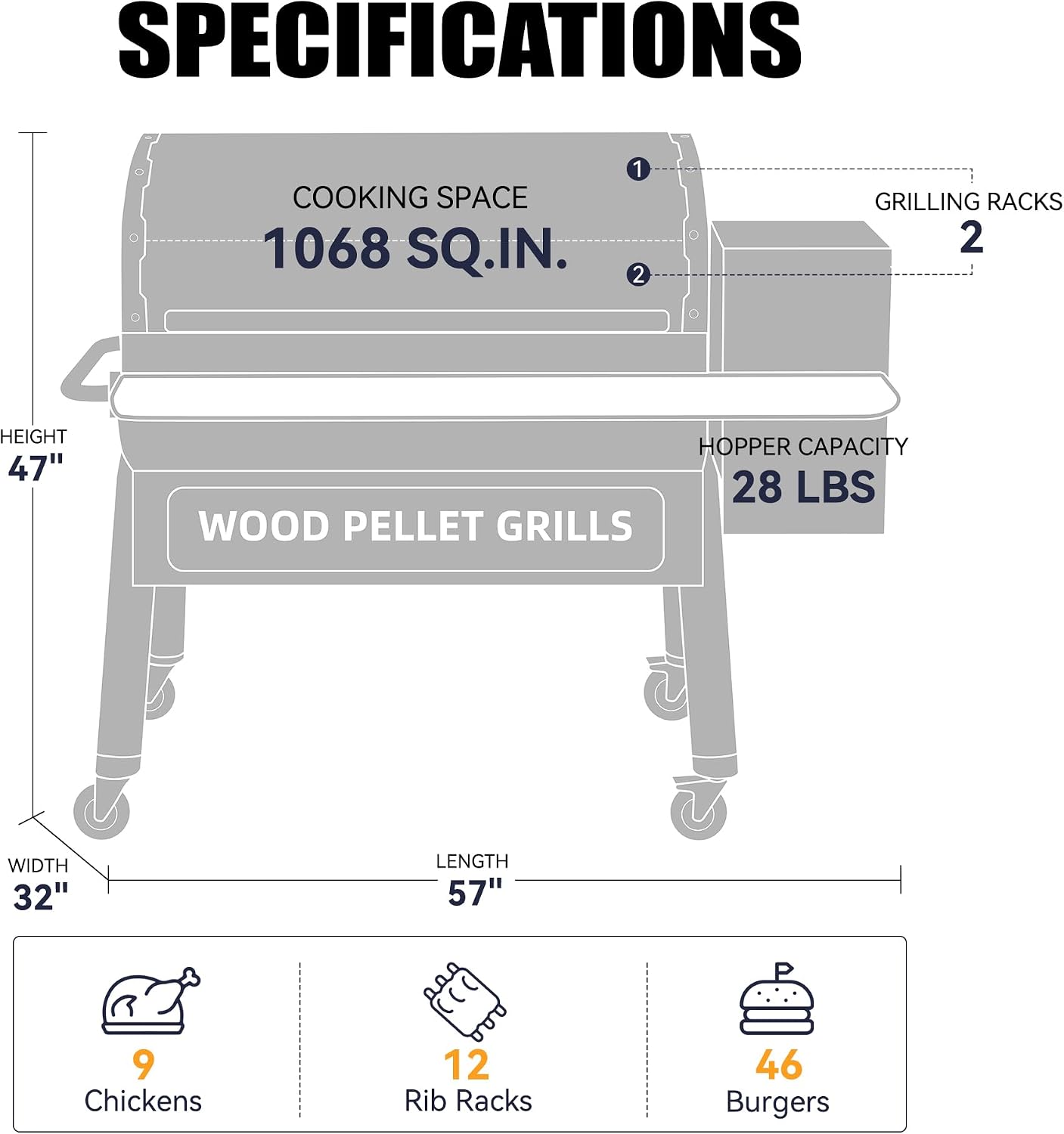
Image: A diagram illustrating the key specifications of the ZPG-11002BPro, including its 1068 sq. in. cooking space, 28 lbs hopper capacity, and overall dimensions.
7. Warranty and Support
Warranty
Z GRILLS offers a 3-year support period for the ZPG-11002BPro model, covering manufacturing defects and ensuring long-term reliability.
Customer Support
For assistance, contact Z GRILLS customer service via phone or online channels. Refer to the official Z GRILLS website for up-to-date contact details and additional resources.
Additional Resources
Comprehensive documentation, including a User Guide (PDF), Instructions for Use (IFU) (PDF), and a detailed User Manual (PDF), are available for download to provide further guidance and information.


