
1. Introduction
Thank you for purchasing the Mediacom MCI SK22 Bluetooth Karaoke Speaker. This portable and rechargeable speaker system is designed to provide high-quality audio for music playback and karaoke performances. It comes equipped with two professional wireless microphones, offering a versatile entertainment experience for various occasions.
2. Safety Information
- Read all instructions carefully before using the product.
- Keep the speaker away from water, moisture, and extreme temperatures.
- Do not attempt to disassemble or repair the unit yourself. Refer all servicing to qualified personnel.
- Use only the provided power adapter for charging.
- Avoid placing heavy objects on the speaker.
- Ensure proper ventilation around the speaker during use.
3. Package Contents
Please check the box for the following items:
- Mediacom MCI SK22 Bluetooth Karaoke Speaker
- 2 x Wireless Microphones
- Remote Control
- Power Adapter
- User Manual
4. Product Overview
Familiarize yourself with the various parts and controls of your MCI SK22 speaker.
4.1 Front View with Microphones

Image: Front view of the Mediacom MCI SK22 speaker, showcasing the main unit and the two accompanying wireless microphones.
4.2 Side View

Image: Side view of the Mediacom MCI SK22 speaker, highlighting its compact and portable design.
4.3 Rear View with Ports

Image: Rear view of the Mediacom MCI SK22 speaker, displaying the various input and output ports for connectivity.
4.4 Speaker Dimensions
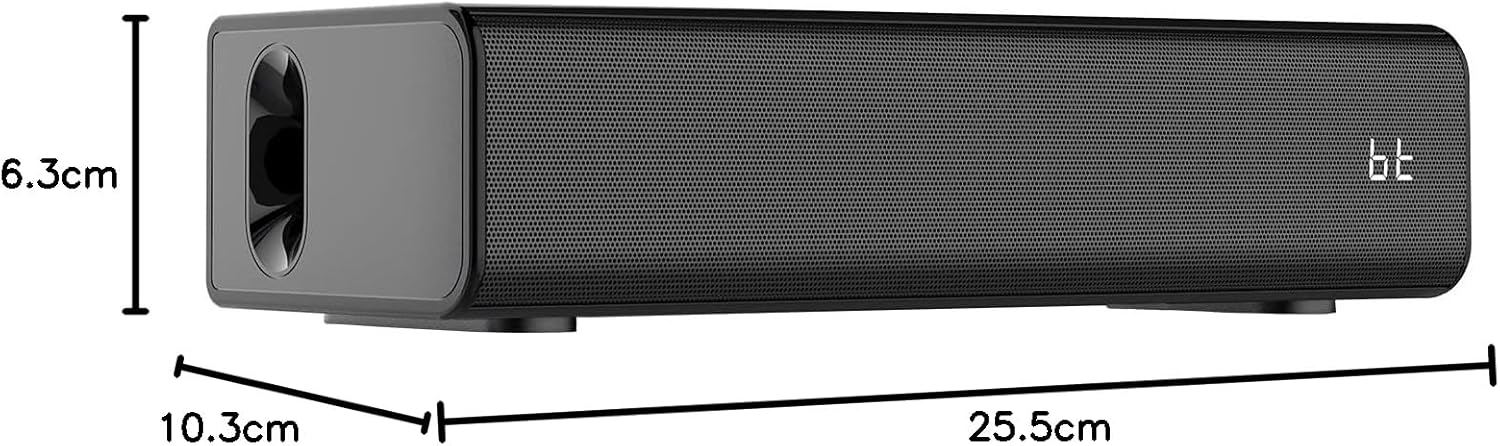
Image: A diagram illustrating the length, width, and height of the Mediacom MCI SK22 speaker.
5. Setup
5.1 Charging the Speaker
- Connect the provided power adapter to the speaker's charging port.
- Plug the power adapter into a suitable power outlet.
- The charging indicator light will illuminate. Allow the speaker to fully charge before first use (approximately X hours, refer to LED indicator for full charge).
5.2 Powering On/Off
- To power on, press and hold the Power button on the speaker or remote control until the display illuminates.
- To power off, press and hold the Power button again.
5.3 Microphone Setup
- Ensure the wireless microphones have fresh batteries installed.
- Turn on the microphones using their respective power switches. They should automatically connect to the speaker.
6. Operating Instructions
6.1 Bluetooth Pairing
- Turn on the speaker. The Bluetooth indicator will flash, indicating it is in pairing mode.
- On your device (smartphone, tablet, etc.), enable Bluetooth and search for available devices.
- Select "MCI SK22" from the list. Once paired, the Bluetooth indicator will stop flashing and remain solid.
6.2 USB Playback
- Insert a USB flash drive containing MP3 audio files into the USB port on the speaker.
- The speaker will automatically switch to USB mode and begin playing music. Use the speaker's or remote's controls to navigate tracks.
6.3 AUX Input
- Connect an external audio device (e.g., TV, computer, music player) to the speaker's AUX input port using a 3.5mm audio cable (not included).
- The speaker will automatically switch to AUX mode. Adjust volume from both the speaker and the connected device.
6.4 Microphone Usage and Echo Effects
- Once connected, speak or sing into the wireless microphones.
- Use the dedicated controls on the speaker or remote to adjust microphone volume and apply echo effects for an enhanced karaoke experience.
6.5 Volume Control
- Adjust the main speaker volume using the volume controls on the speaker or the remote control.
- Individual microphone volume can be adjusted separately.
7. Maintenance
- Cleaning: Use a soft, dry cloth to clean the speaker's surface. Do not use abrasive cleaners or solvents.
- Storage: When not in use for extended periods, store the speaker in a cool, dry place, away from direct sunlight and extreme temperatures.
- Battery Care: To prolong battery life, fully charge the speaker before storing it for long periods and recharge it every few months.
8. Troubleshooting
| Problem | Possible Cause | Solution |
|---|---|---|
| No power | Battery is low or depleted. Power adapter not connected. | Charge the speaker using the provided power adapter. Ensure the power adapter is securely connected to both the speaker and the power outlet. |
| No sound | Volume is too low. Incorrect input mode selected. Device not properly connected. | Increase the volume on the speaker and the connected device. Ensure the correct input mode (Bluetooth, USB, AUX) is selected. Check all cable connections. |
| Bluetooth not pairing | Speaker is not in pairing mode. Device's Bluetooth is off. Interference. | Ensure the speaker's Bluetooth indicator is flashing. Turn off and on your device's Bluetooth. Move closer to the speaker and away from other wireless devices. |
| Microphones not working | Microphone batteries are low. Microphones are not turned on. | Replace microphone batteries. Ensure microphones are switched on. |
9. Specifications
| Feature | Detail |
|---|---|
| Brand | Mediacom |
| Model Number | MCI SK22 |
| Connectivity Technology | Bluetooth, AUX, USB |
| Audio Input | Bluetooth, AUX, USB |
| Special Features | Bass boost, USB port, Built-in microphone, Hi-Res Audio, Echo effects |
| Compatible Devices | Mobile Phone, iPhone, Laptop, Smartphone, TV, Computer, Tablet, Music Player, DVD Player |
| Power Source | Battery Powered |
| Material | Plastic |
| Color | Black |
| Item Dimensions (L x W x H) | 10.3 x 25.5 x 6.3 cm |
| Item Weight | 1.68 Kilograms |
| Manufacturer | China |
10. Warranty and Support
Mediacom products are designed for reliability and performance. For warranty information and technical support, please refer to the warranty card included in your package or visit the official Mediacom website. Keep your purchase receipt as proof of purchase for any warranty claims.
