
1. Introduction
The SP CONNECT Wireless Charging Module SPC+ is designed to provide convenient inductive charging for your SPC+ compatible smartphone while on the go. This module integrates seamlessly with all SPC+ mounting heads, offering a secure and weatherproof solution for keeping your device powered during various activities such as cycling or motorcycling.
This manual provides essential information regarding the installation, operation, maintenance, and troubleshooting of your Wireless Charging Module SPC+.
2. Package Contents
Please verify that all items listed below are included in your package:
- 1 × SP CONNECT Wireless Charging Module SPC+
- 1 × USB-A to USB-C Cable (Waterproof)
- 1 × Instruction Manual (this document)
3. Safety Information
Read all safety warnings and instructions before using this product to avoid injury or damage. Keep these instructions for future reference.
- Power Source: Ensure the power source connected to the module provides stable 5V DC output. Using an incompatible power source may damage the device or connected smartphone.
- Water Resistance: The module and USB cable are designed to be waterproof. However, ensure the USB-C connection is dry before connecting to a power source to prevent electrical short circuits.
- Mounting: Always ensure the module is securely attached to an SPC+ mounting head and your smartphone is firmly locked into the module before riding. Verify the connection regularly.
- Interference: Keep the charging module away from medical devices (e.g., pacemakers) to avoid potential electromagnetic interference.
- Temperature: Avoid exposing the module to extreme temperatures or direct sunlight for prolonged periods, as this may affect performance and battery life of the connected device.
- Disassembly: Do not attempt to disassemble or modify the charging module. This will void the warranty and may lead to malfunction or injury.
4. Setup and Installation
Follow these steps to set up your Wireless Charging Module SPC+:
4.1 Attaching the Module to an SPC+ Mount
The Wireless Charging Module SPC+ is compatible with all SP CONNECT SPC+ mounting heads (sold separately). To attach the module:
- Align the SPC+ interface on the back of the charging module with the corresponding receiver on your SPC+ mounting head.
- Place the module onto the mount and rotate it 90 degrees clockwise until it locks securely into place. You should hear an audible click.
- Gently pull on the module to ensure it is firmly attached before proceeding.

Image: The Wireless Charging Module SPC+ securely mounted on a bicycle handlebar, ready for use.

Image: A detailed view of the SPC+ interface on the charging module, showing the locking mechanism.
4.2 Connecting to Power
The module requires a 5V DC power source. Use the provided USB-A to USB-C cable to connect the module:
- Connect the USB-C end of the cable to the port on the Wireless Charging Module SPC+.
- Connect the USB-A end of the cable to a compatible 5V USB power source (e.g., a power bank, motorcycle USB port, or bicycle e-bike system).
- Ensure the connection is secure and the cable is routed safely to avoid interference with vehicle operation.

Image: The Wireless Charging Module SPC+ shown from above, highlighting the integrated USB-C cable for power connection.

Image: A side profile of the charging module, illustrating its compact design and the point where the USB-C cable connects.
5. Operation
Once the module is securely mounted and connected to a power source, you can begin wirelessly charging your smartphone.
5.1 Charging Your Smartphone
To charge your smartphone:
- Ensure your smartphone is equipped with an SP CONNECT SPC+ Phone Case. The module is designed exclusively for SPC+ cases.
- Align your SPC+ cased smartphone with the charging module on the mount.
- Place the smartphone onto the module and rotate it 90 degrees clockwise until it locks securely into place.
- Once locked, wireless charging will begin automatically. Your phone's screen should indicate that it is charging.
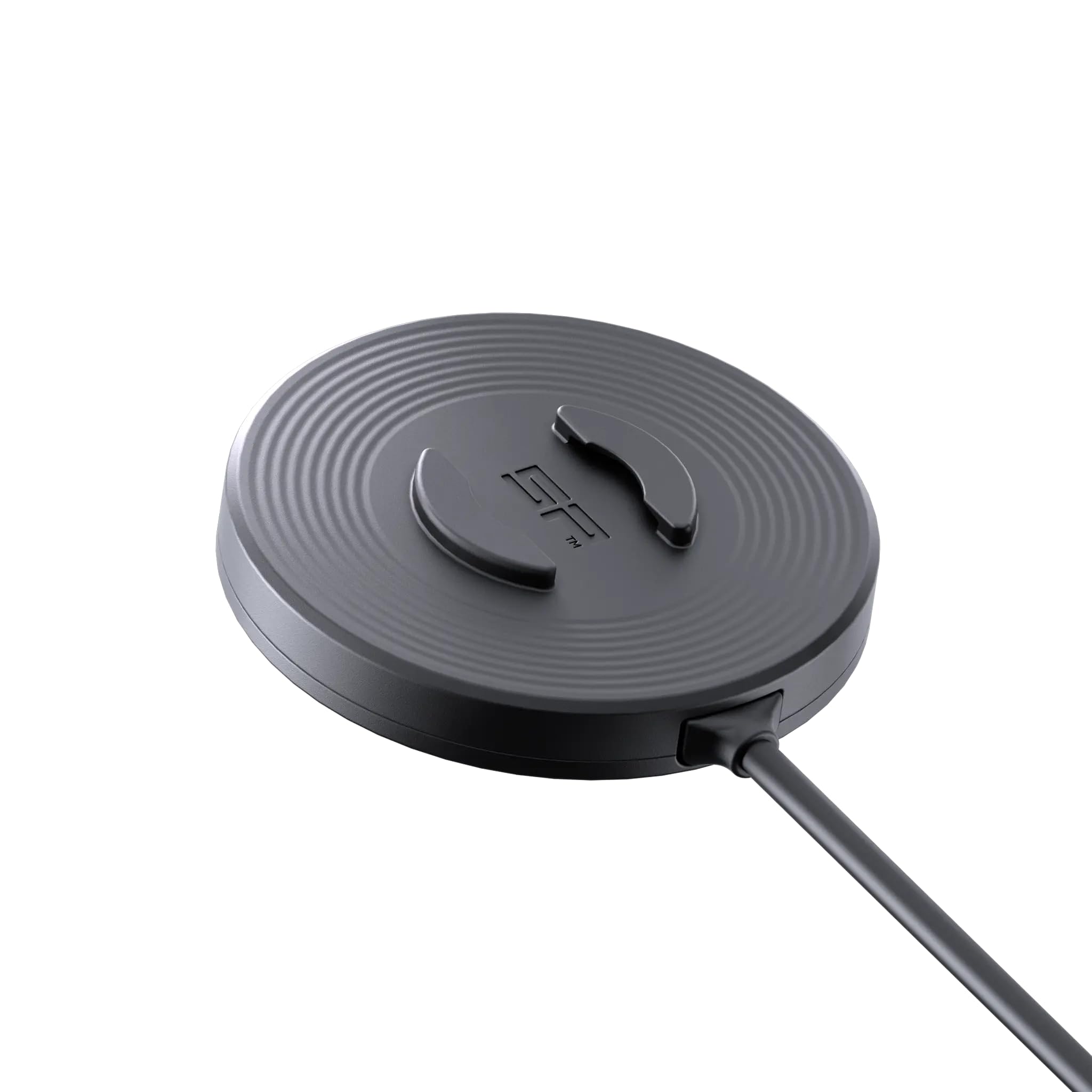
Image: A smartphone, protected by an SPC+ case, being attached to the wireless charging module on a bicycle handlebar.

Image: A smartphone actively charging, indicated by a green charging icon, while securely mounted on the SP CONNECT Wireless Charging Module SPC+.
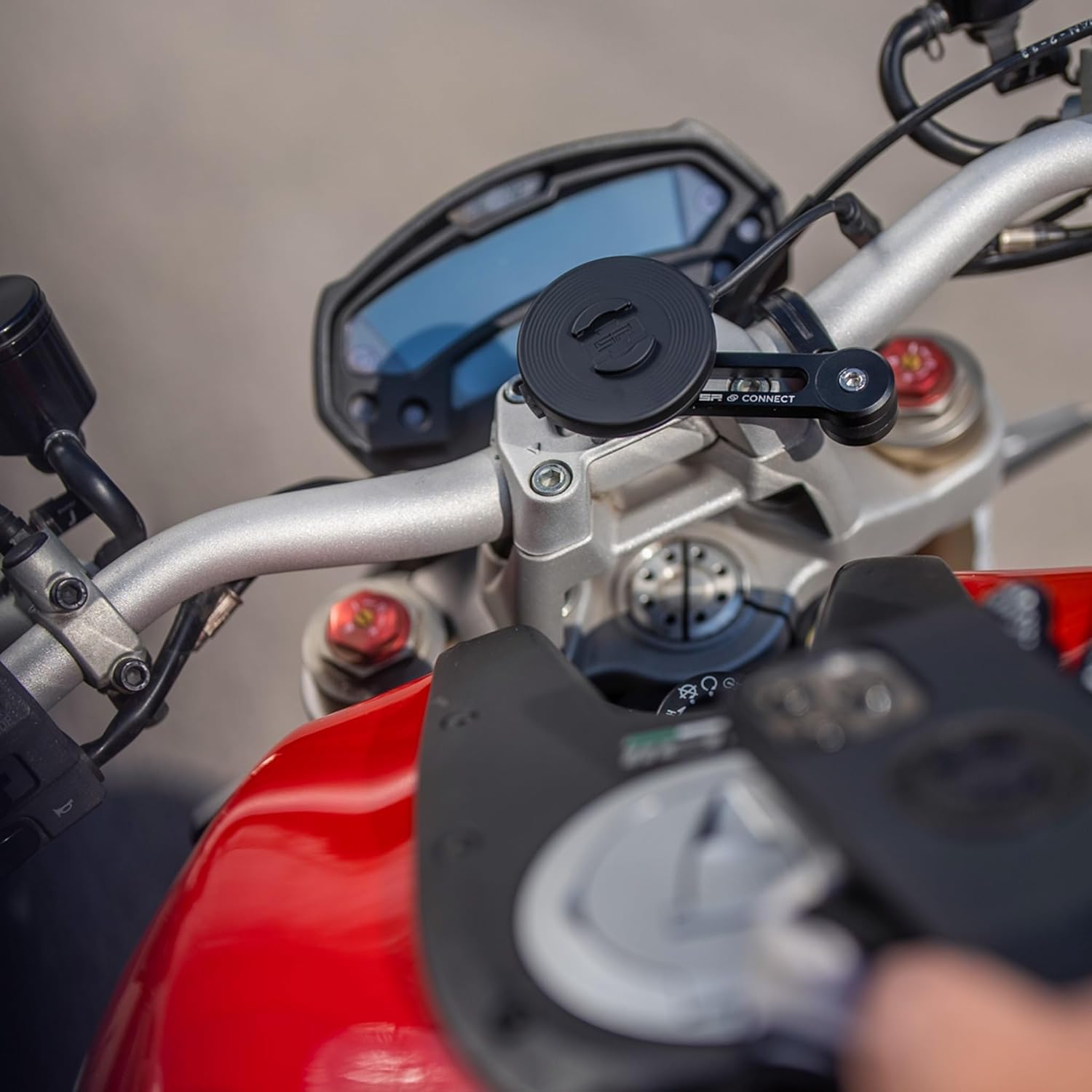
Image: A hand demonstrating the placement of an SPC+ cased smartphone onto the wireless charging module, which is mounted on a motorcycle.

Image: A smartphone securely locked onto the wireless charging module, which is mounted on a motorcycle handlebar, indicating readiness for charging.
6. Maintenance
Proper maintenance ensures the longevity and optimal performance of your Wireless Charging Module SPC+.
- Cleaning: Use a soft, damp cloth to clean the module. Avoid abrasive cleaners or solvents that could damage the surface or waterproof seals.
- Cable Care: Inspect the USB-A to USB-C cable regularly for any signs of wear or damage. Ensure the connectors are clean and free of debris.
- Storage: When not in use for extended periods, store the module in a cool, dry place away from direct sunlight.
- Connection Points: Periodically check the SPC+ locking mechanism on both the module and your mounting head for any obstructions or wear that might affect a secure connection.
7. Troubleshooting
If you encounter issues with your Wireless Charging Module SPC+, refer to the following common problems and solutions:
- Smartphone Not Charging:
- Ensure the module is securely connected to a functional 5V DC power source.
- Verify that your smartphone is equipped with an official SP CONNECT SPC+ Phone Case. The module is not compatible with other cases or direct phone contact.
- Confirm the smartphone is correctly aligned and locked onto the charging module. Rotate it 90 degrees clockwise until it clicks.
- Check for any debris or foreign objects between the phone case and the charging module that might obstruct the wireless charging connection.
- Try connecting the module to a different USB power source to rule out power supply issues.
- Slow Charging:
- Ensure your power source provides sufficient amperage (at least 0.9 Amps at 5V). Lower power output will result in slower charging.
- Close unnecessary applications on your smartphone to reduce power consumption during charging.
- High ambient temperatures can sometimes reduce charging efficiency.
- Module Not Locking Securely:
- Inspect the SPC+ interface on both the module and the mounting head for any damage or wear.
- Ensure no debris is obstructing the locking mechanism.
- Confirm you are rotating the module 90 degrees clockwise until it clicks into place.
If the problem persists after trying these solutions, please contact SP CONNECT customer support.
8. Specifications
| Feature | Detail |
|---|---|
| Brand | SP CONNECT |
| Model Number | 52807 |
| Model Name | SP Connect SP Charging Module SPC+ |
| Connector Type | USB Type C |
| Compatible Devices | Smartphones with SPC+ Phone Case |
| Compatible Phone Models | Samsung Galaxy S21, Samsung Galaxy S22 (and other SPC+ compatible models) |
| Included Components | Charging Module SPC+, USB-A/USB-C cable, instruction manual |
| Special Feature | Waterproof, Inductive charging |
| Color | Black |
| Amperage | 0.9 Amps |
| Wattage | 4.5 watts |
| Output Current | 0.9 Amps |
| Output Voltage | 5 Volts |
| Power Source | DC |
| Current Rating | 0.9 Amps |
| Frequency Range | 50Hz to 60Hz |
| Item Weight | 39 Grams |
| Enclosure Material | Multiple |
| Form Factor | Compact rectangular design |
9. Warranty and Support
9.1 Warranty Information
This SP CONNECT Wireless Charging Module SPC+ is covered by the Original Manufacturer Warranty. For specific details regarding warranty terms, duration, and coverage, please refer to the warranty documentation provided with your purchase or visit the official SP CONNECT website.
The warranty typically covers defects in materials and workmanship under normal use. Damage resulting from misuse, accidents, unauthorized modifications, or failure to follow instructions in this manual may not be covered.
9.2 Customer Support
For technical assistance, troubleshooting beyond the scope of this manual, or warranty claims, please contact SP CONNECT customer support. You can typically find contact information on the official SP CONNECT website or through your retailer.
When contacting support, please have your product model number (52807) and proof of purchase readily available.


