
Introduction
This manual provides detailed instructions for the assembly, setup, operation, and maintenance of your HOOBRO TV Stand with Power Outlets, Model BF60DS01. Please read all instructions carefully before beginning assembly and retain this manual for future reference.
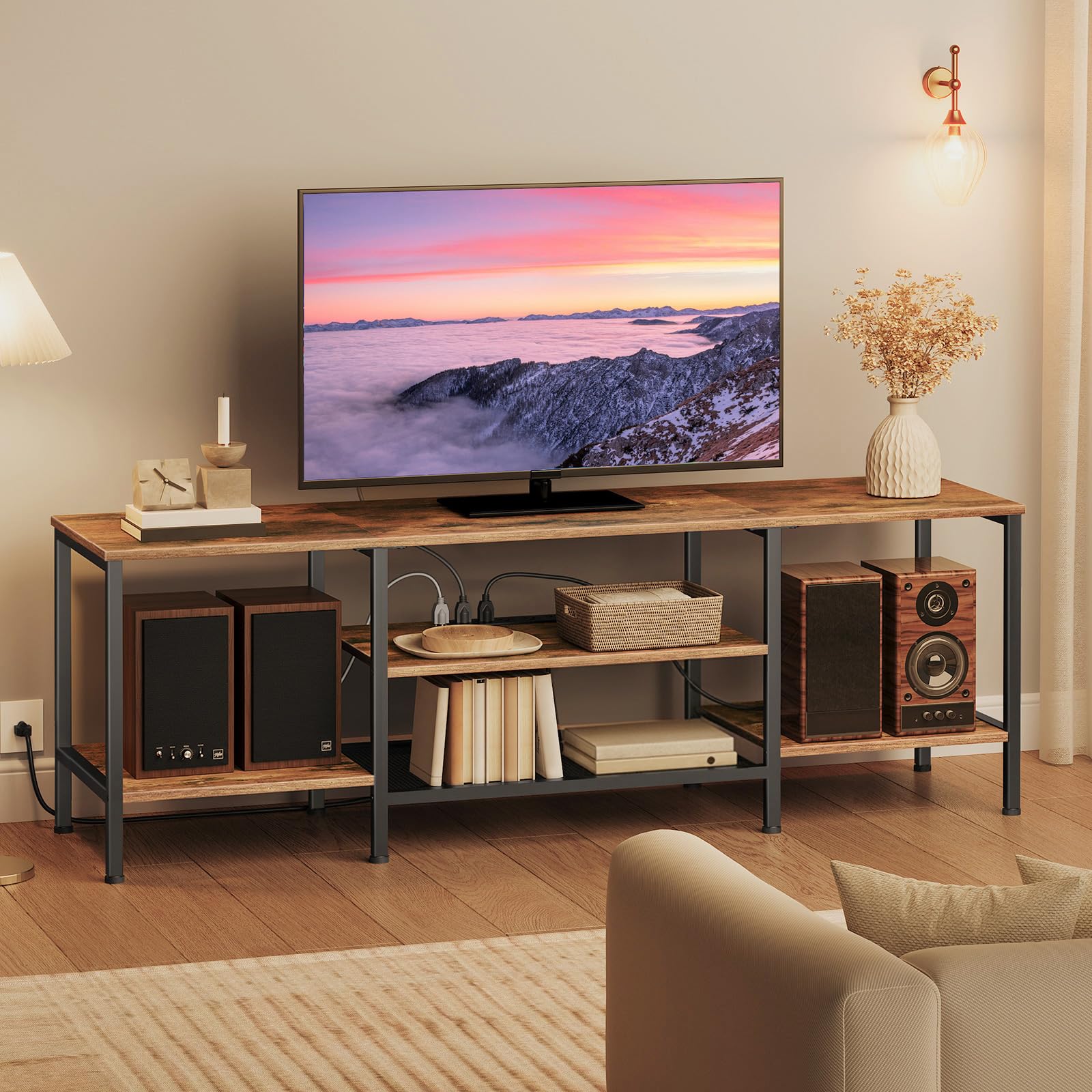
Image: The HOOBRO TV Stand with Power Outlets, Model BF60DS01, in rustic brown and black finish.
Safety Information
WARNING:
- Do not exceed the maximum load capacities to prevent potential damage or injury.
- Top shelf maximum load capacity: 132 lb (59 kg).
- Lower shelves maximum load capacity: 22 lb (10 kg) each.
- Ensure all screws and fasteners are securely tightened before use.
- Keep small parts away from children during assembly.
Package Contents
Before assembly, verify that all components listed below are present and undamaged. If any parts are missing or damaged, please contact customer support.
- All necessary wooden panels (top, middle, bottom shelves).
- Metal frame components.
- Power outlet strip with cable.
- Hardware pack (screws, bolts, Allen wrench, etc.).
- Instruction manual.

Image: Exploded view showing various components of the TV stand.
Assembly Instructions
Assembly is straightforward and can be completed by following the detailed instructions provided in the package. It is recommended to have a Phillips head screwdriver in addition to the included tools.
- Unpack Components: Carefully remove all parts from the packaging and lay them out on a clean, soft surface to prevent scratches.
- Assemble Frame: Attach the metal frame components using the provided screws and Allen wrench. Do not fully tighten screws until all parts are aligned.
- Install Shelves: Secure the wooden shelves to the metal frame. Start with the bottom shelf, then the middle, and finally the top shelf. Ensure the power outlet section is correctly oriented.
- Secure Power Outlet: Mount the power outlet strip into its designated slot on the top shelf.
- Final Tightening: Once all parts are in place and aligned, fully tighten all screws.

Image: Illustration of an assembly step, showing frame attachment.

Image: Illustration of an assembly step, showing shelf installation.
Video: Official HOOBRO US video demonstrating the TV Stand with Power Outlet features and assembly overview.
Setup
- Placement: Choose a flat, stable surface for the TV stand. Ensure there is adequate space around the stand for ventilation and access to power outlets.
- TV Placement: Carefully place your television on the top shelf. This stand is designed to support TVs up to 75 inches.
- Connect Power: Plug the power cord from the integrated power outlet strip into a wall socket.
- Organize Cables: Utilize the open storage shelves and any available cable management features to route and organize your device cables.

Image: Rear view of the TV stand showing cable routing and organization.
Operating the Power Outlets
The HOOBRO TV Stand features an integrated power strip with 4 standard plug outlets for convenient power access.
- Plug your TV, game consoles, DVD players, soundbars, and other media devices directly into the outlets on the stand.
- Ensure the total power draw of all connected devices does not exceed the power strip's maximum rating (refer to the power strip label for details).
- Avoid overloading the outlets to prevent electrical hazards.

Image: Close-up view of the integrated power outlets on the TV stand.
Maintenance
- Cleaning: Wipe the surfaces with a dry, soft cloth. Avoid abrasive cleaners or harsh chemicals that may damage the finish.
- Inspection: Periodically check all screws and connections to ensure they remain tight. Retighten if necessary.
- Avoid Moisture: Keep the TV stand away from excessive moisture or direct sunlight to prevent warping or discoloration.
Troubleshooting
- Stand feels wobbly: Ensure all screws are fully tightened. Check that the stand is placed on a level surface.
- Power outlets not working: Verify the power cord is securely plugged into both the stand and the wall outlet. Check the wall outlet with another device to ensure it is functional.
- Scratches on surface: Minor scratches can sometimes be touched up with furniture repair markers matching the rustic brown finish.
Specifications
| Model Number | BF60DS01 |
| Brand | HOOBRO |
| Dimensions (L x W x H) | 63" x 15.7" x 20.5" (160 cm x 40 cm x 52 cm) |
| Material | Engineered Wood, Metal |
| Color | Rustic Brown + Black |
| Top Shelf Load Capacity | 132 lb (59 kg) |
| Lower Shelves Load Capacity | 22 lb (10 kg) each |
| Number of Shelves | 3 |
| Power Outlets | 4 Standard Plugs |
| Assembly Required | Yes |
Warranty and Support
HOOBRO products are designed for quality and durability. For any questions regarding assembly, missing parts, or product defects, please contact HOOBRO customer support.
- Customer Support: Refer to the contact information provided on the product packaging or the official HOOBRO website.
- Warranty: Specific warranty details may vary. Please retain your proof of purchase for warranty claims.
