
Introduction
This manual provides comprehensive instructions for the installation, use, and maintenance of your Varmilo Limited Edition Phoenix II Keycap Set. Designed for mechanical keyboards, these 104-key, Dye Sub PBT keycaps offer a durable and aesthetically pleasing upgrade. Please read this manual thoroughly before installation to ensure proper handling and longevity of your keycaps.
Package Contents
- 104 x Varmilo Limited Edition Phoenix II Dye Sub PBT Keycaps (Full-Size Set)
- Keycap Puller (may be included depending on packaging)
Note: This product includes keycaps only. A mechanical keyboard is not included and must be purchased separately.
Setup and Installation
Follow these steps to properly install your new keycaps onto a compatible mechanical keyboard.
- Prepare Your Keyboard: Disconnect your keyboard from your computer. If your keyboard has existing keycaps, use a keycap puller to carefully remove them. Grip the keycap firmly with the puller and pull straight up to avoid damaging the switch stem.
- Organize Keycaps: Lay out your new Phoenix II keycaps according to their intended positions on the keyboard layout. This set is a 104-key full-size layout.
- Install Keycaps: Align each new keycap with its corresponding switch stem. Gently push the keycap down until it clicks securely into place. Ensure the keycap is level and fully seated.
- Verify Installation: Once all keycaps are installed, visually inspect them to ensure they are all properly aligned and seated. Reconnect your keyboard to your computer and test all keys to confirm functionality.
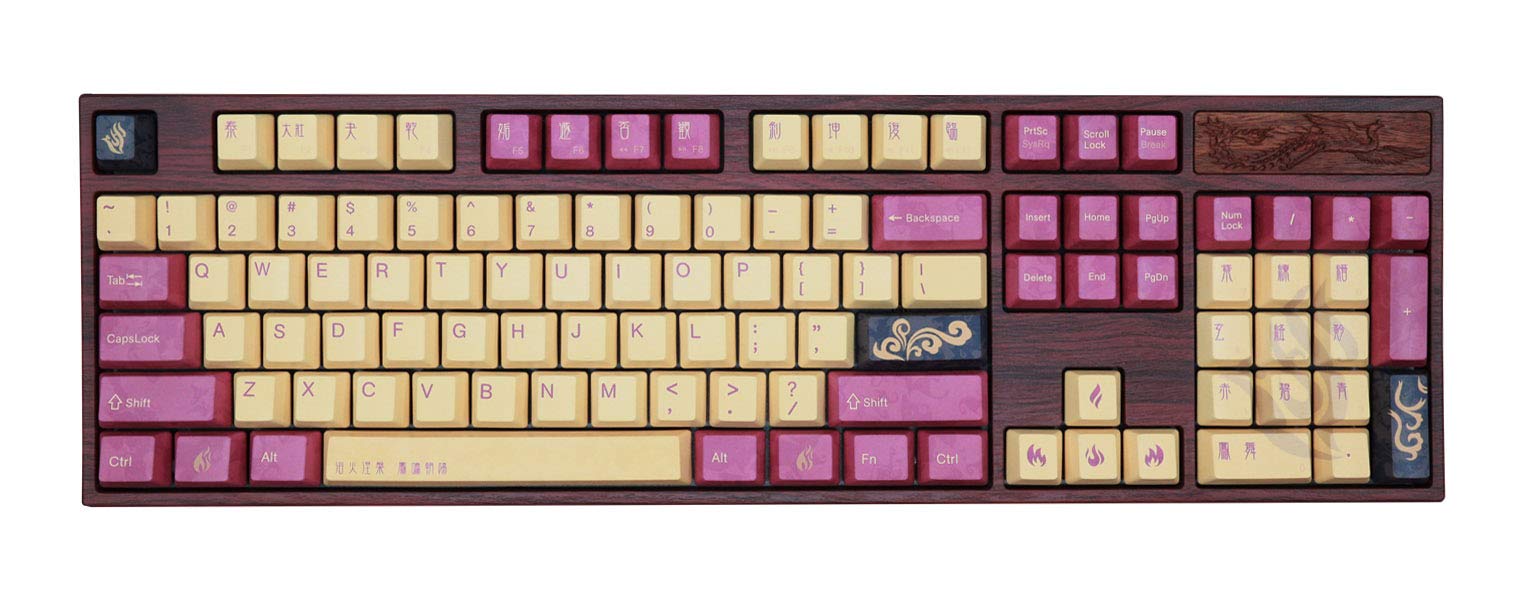
Image: The Varmilo Limited Edition Phoenix II Keycap Set, featuring a full 104-key layout with a distinctive blue and white color scheme, installed on a mechanical keyboard. This image illustrates the complete aesthetic of the keycap set when in use.
Operating (Usage)
The Varmilo Phoenix II keycaps are designed for standard mechanical keyboard use. Their PBT material and Dye Sub legends ensure a durable and long-lasting typing experience.
- Typing Experience: Enjoy the unique feel and sound profile provided by the high-quality PBT material.
- Durability: PBT keycaps are known for their resistance to shine and wear over time, maintaining their texture and appearance.
- Legend Longevity: Dye-sublimated legends are infused into the plastic, making them highly resistant to fading or rubbing off, even with extensive use.
Maintenance
Proper maintenance will extend the life and preserve the appearance of your keycaps.
- Regular Cleaning: Use a soft brush or compressed air to remove dust and debris from between the keycaps.
- Deep Cleaning: For more thorough cleaning, carefully remove the keycaps using a keycap puller. Wash them in lukewarm water with a mild soap (e.g., dish soap). Rinse thoroughly and allow them to air dry completely before re-installing. Avoid harsh chemicals or abrasive materials.
- Storage: If removing keycaps for extended periods, store them in a clean, dry container away from direct sunlight to prevent discoloration or damage.
Troubleshooting
If you encounter any issues during or after installation, refer to the following common solutions.
- Keycap Feels Loose: Ensure the keycap is fully pushed down onto the switch stem. If it continues to feel loose, the switch stem or keycap cross-mount might be slightly out of tolerance. Try rotating the keycap 90 or 180 degrees and re-installing, or try it on a different switch to isolate the issue.
- Keycap Not Seating Properly: Check for any obstructions on the switch stem or inside the keycap. Ensure you are pushing straight down and not at an angle.
- Keycap Legends Fading: This is highly unlikely with Dye Sub PBT keycaps. If you observe fading, ensure you are not using harsh cleaning agents.
Specifications
| Feature | Detail |
|---|---|
| Brand | Varmilo |
| Model | Limited Edition Phoenix II Keycap Set |
| Key Count | 104-Key (Full-Size) |
| Material | Polybutylene Terephthalate (PBT) |
| Legend Printing | Dye Sublimation (Dye Sub) |
| Profile | Varmilo profile |
| Compatibility | Compatible with most mechanical keyboards using Cherry MX style switches. |
| ASIN | B0BBSQ2YLW |
| GTIN | 06924427352280 |
Warranty and Support
Warranty: This product is typically covered by a 30-day return policy from the date of purchase. Please refer to your retailer's specific return and warranty terms for detailed information.
Customer Support: For technical assistance, questions regarding installation, or warranty claims, please contact the retailer from whom you purchased the product or visit the official Varmilo website for support resources.