
1. Introduction
The FEELWORLD LUT5 is a 5.5-inch ultra-high bright field monitor designed for DSLR and mirrorless cameras. It features a 3000nit daylight viewable display, touchscreen controls, HDR support, and 3D LUT capabilities, providing professional monitoring solutions for various filming environments. This manual provides detailed instructions for setting up, operating, and maintaining your LUT5 monitor.
2. Key Features
- 5.5-inch LCD with 3000nit Brightness: Offers superior color fidelity and exceptional screen clarity, even in intense lighting conditions. Features 1000:1 contrast ratio and sRGB / Rec.709 Color Gamut.
- Automatic Dimming: Can automatically adjust monitor brightness to suit the filming environment.
- Built-in Cooling System: Features a heat-conducting unit, low consumption fan, and multidimensional cooling holes for effective heat dissipation, ideal for outdoor shooting.
- Touchscreen and 3D LUT: Intuitive tap and swipe gestures for control. Supports loading up to 50 custom 3D LUTs for real-time preview of filming looks.
- HDR Monitoring: Built-in HLG 2020, HLG 709, HLG P3 HDR 3D LUTs, and Rec709 De-slog3 LUTs (including SLOG2, SLOG3, LOGC, VLOG) for displaying HDR signals with clarity and detail.
- 4K HDMI Input and Output: Supports 4K@30Hz signal input and loop-out without loss.
- Flexible Mounting: Equipped with two standard 1/4-inch mounting threads (bottom, right side) for versatile camera or equipment attachment.
3. What's in the Box
- 1x FEELWORLD LUT5 Monitor
- 1x Micro HDMI Cable
- 1x Mini Hot Shoe Mount + Hex Wrench
- 1x User Manual
Additional accessories such as storage bags, cable ties, and batteries may be sold separately or included in specific bundles.
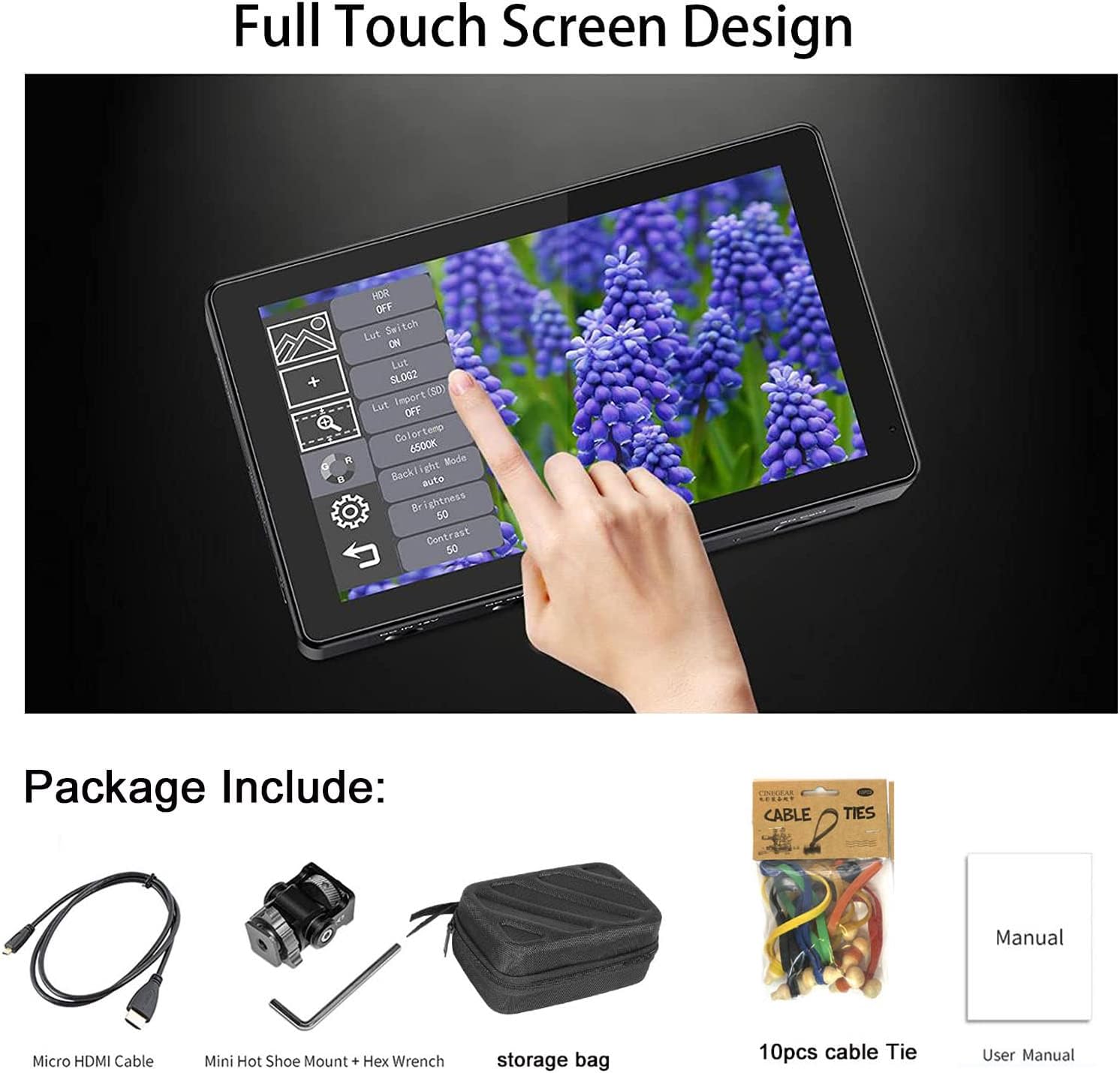
Image: The FEELWORLD LUT5 monitor and its standard accessories, including a Micro HDMI cable, mini hot shoe mount with hex wrench, and user manual.
4. Setup
4.1 Powering the Monitor
The LUT5 monitor can be powered using a Sony NP-F series battery (F970, F960, F950, F930, F770, F750, F730, F570, F550, F530) or via a DC 12V power adapter. Batteries are not included and must be purchased separately.

Image: The side view of the FEELWORLD LUT5 monitor showing the 4K HDMI input/output ports, DC 12V input, and the battery plate for Sony NP-F series batteries.
4.2 Mounting the Monitor
Attach the monitor to your camera rig or other equipment using the provided mini hot shoe mount or the 1/4-inch mounting threads located on the bottom and right side of the monitor. Ensure the monitor is securely fastened.
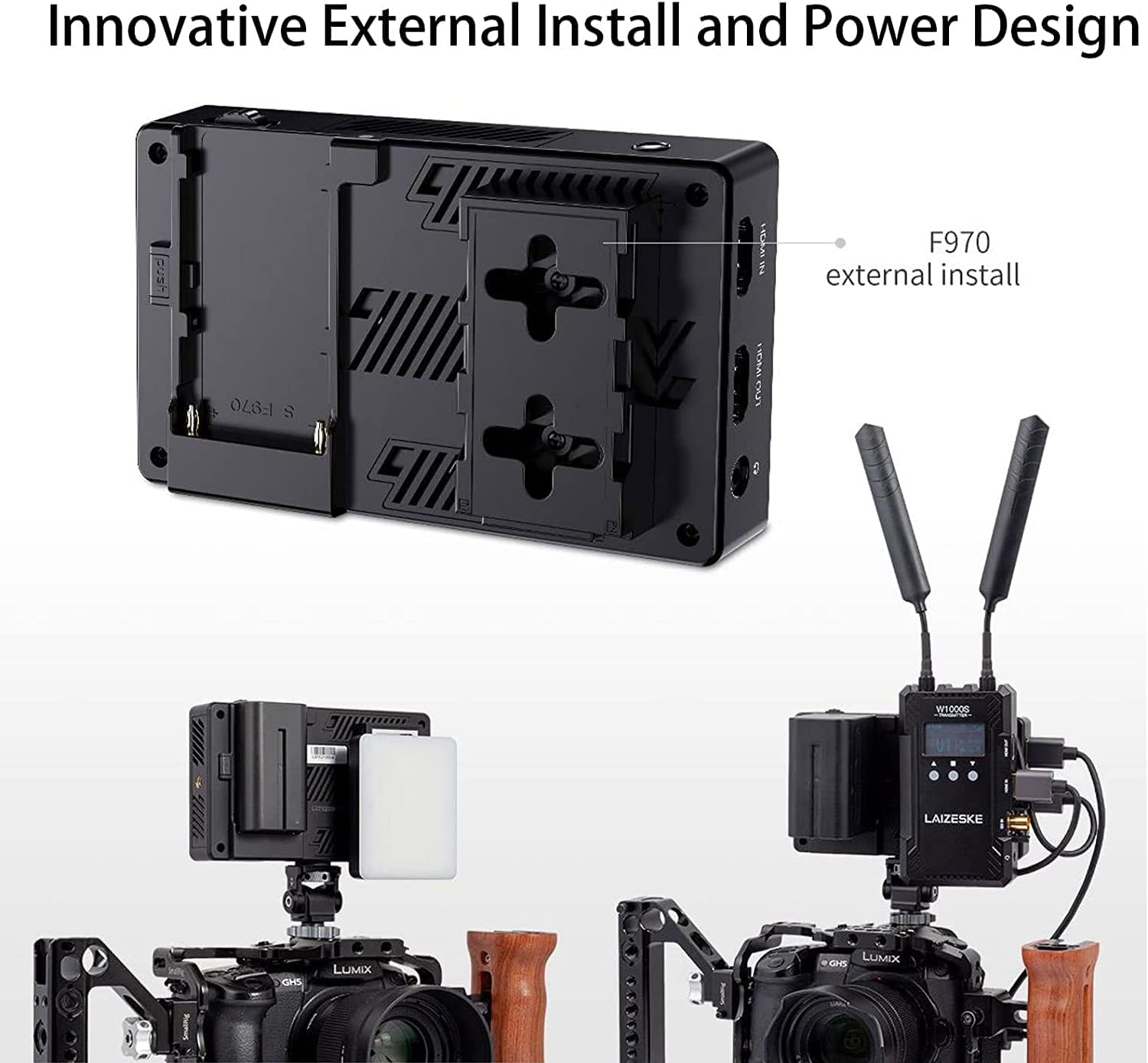
Image: The back of the FEELWORLD LUT5 monitor showing the F970 external install battery plate and how it can be mounted on a camera rig with additional accessories like a wireless video transmitter.
4.3 Connecting HDMI
Connect your camera's HDMI output to the monitor's HDMI IN port using the Micro HDMI cable. If needed, you can loop out the HDMI signal to another device using the HDMI OUT port.
5. Operating Instructions
5.1 Power On/Off
Press and hold the power button located on the top or side of the monitor to turn it on or off.
5.2 Touchscreen Operation
The LUT5 features a full touchscreen interface. Use tap and swipe gestures to navigate menus and control functions.
- Double-tap: Double-tap the screen to open the main menu.
- Swipe from left edge: Access the shortcut menu.
- Swipe up/down on right side: Adjust backlight.
- Swipe up/down on left side: Adjust volume.

Image: Diagram illustrating the touchscreen gestures for the FEELWORLD LUT5 monitor, including double-tap for main menu, left swipe for shortcut menu, and vertical swipes for backlight and volume control.
5.3 Brightness Adjustment
The monitor's brightness can be adjusted manually via the touchscreen menu or automatically using the auto-dimming feature. The auto-dimming function adapts the screen brightness to ambient light conditions for optimal viewing.

Image: Comparison of monitor brightness at 450nit and 3000nit in daylight, demonstrating the effectiveness of the 3000nit display and the auto-dimming feature of the FEELWORLD LUT5.
6. Advanced Features
6.1 3D LUTs
The LUT5 supports loading up to 50 custom 3D LUTs via an SD card. This allows you to preview your desired color grade or look directly on set, ensuring consistency in your workflow. To load LUTs:
- Save your .cube LUT files to an SD card.
- Insert the SD card into the monitor's SD card slot.
- Navigate to the LUT menu on the monitor and select 'Import LUT'.
- Choose the desired LUT files to load onto the monitor.
Image: The bottom section of the image shows a comparison of an image 'Before Loading' and 'After Loading' a custom 3D LUT on the FEELWORLD LUT5 monitor, demonstrating the color transformation.
6.2 Monitoring Tools
The LUT5 includes a comprehensive suite of monitoring tools to assist with exposure, focus, and color accuracy:
- Waveform: Displays the luminance and chrominance levels of your video signal.
- Vector Scope: Shows the color saturation and hue of your video signal.
- Histogram: Visualizes the distribution of tones in your image.
- Peaking Filter: Highlights sharp edges to assist with focus.
- False Colors: Helps set proper exposure by displaying different exposure levels as distinct colors.
- Exposure (Zebras): Indicates overexposed areas with zebra stripes.
- Zoom-in: Magnifies a portion of the image for critical focus.
- Image Flip: Flips the image horizontally or vertically.
- Embedded Audio: Displays audio levels.
- Nine Grid: Provides a compositional guide.
- Anamorphic Mode: De-squeezes anamorphic footage.

Image: An overview of the FEELWORLD LUT5 monitor displaying various professional monitoring tools such as 3D LUT, Waveform, Vector Scope, Histogram, Peaking Filter, False Colors, Exposure, Zoom-in, Image Flip, Embedded Audio, and Nine Grid.
6.3 HDR Monitoring
The LUT5 supports HDR (High Dynamic Range) monitoring with built-in HLG 2020, HLG 709, HLG P3 HDR 3D LUTs, and Rec709 De-slog3 LUTs. This allows for accurate visualization of HDR content, simplifying post-production by providing precise control during shooting.

Image: The FEELWORLD LUT5 monitor displaying a vibrant image, highlighting its 1920x1080 resolution, 368 PPI, 1000:1 contrast, 160° viewing angle, Rec.709 color gamut, and HDR monitoring capabilities for sharp and accurate colors.
7. Maintenance
- Cleaning: Use a soft, dry cloth to clean the monitor screen and body. For stubborn smudges, use a screen-specific cleaning solution applied to the cloth, not directly to the screen.
- Storage: When not in use, store the monitor in a cool, dry place, away from direct sunlight and extreme temperatures. Use a protective bag or case to prevent scratches and damage.
- Avoid Impact: Protect the monitor from drops and impacts, which can damage the screen or internal components.
8. Troubleshooting
- No Power: Ensure the battery is fully charged and correctly inserted, or that the DC power adapter is securely connected and providing power.
- No Signal: Verify that the HDMI cable is properly connected to both the camera and the monitor. Check the camera's HDMI output settings.
- Image Issues (Flickering, Distortion): Try a different HDMI cable. Ensure the input signal resolution and frame rate are supported by the monitor.
- Touchscreen Unresponsive: Power cycle the monitor. If the issue persists, perform a factory reset (refer to the on-screen menu for this option).
- Overheating: Ensure the cooling vents are not obstructed. Operating in extremely hot environments can cause the monitor to heat up. The built-in cooling system is designed to manage heat, but extreme conditions may still affect performance.
9. Specifications
| Feature | Specification |
|---|---|
| Display Size | 5.5 inches |
| Resolution | 1920x1080 |
| Brightness | 3000nit |
| Contrast Ratio | 1000:1 |
| Viewing Angle | 160° |
| HDMI Input/Output | 4K@30Hz |
| Power Input | DC 12V, NP-F Battery Plate |
| Item Weight | 1.5 pounds |
| Package Dimensions | 7.3 x 5 x 3.4 inches |
| Date First Available | August 24, 2022 |
10. Product Video
Watch this video for a quick overview of the FEELWORLD LUT5 monitor's features and usage.
Video: An official product video showcasing the FEELWORLD LUT5 monitor, its ultra-bright display, touchscreen functionality, and use in various filming scenarios.
11. Warranty and Support
For warranty information and technical support, please refer to the official FEELWORLD website or contact their customer service directly. Keep your purchase receipt as proof of purchase for warranty claims.
FEELWORLD Official Website: www.feelworld.cn