
1. Introduction and Overview
The Xiaomi Robot Vacuum X10+ is an advanced robotic vacuum cleaner designed for automated floor cleaning, featuring both vacuuming and mopping capabilities. It comes equipped with an innovative all-in-one station that provides automatic dust emptying, mop pad cleaning, hot air drying of mop pads, and water refilling for the robot's water tank, ensuring a truly hands-free cleaning experience. With powerful 4000Pa suction and intelligent navigation, it efficiently cleans various floor types.
2. Important Safety Information
Please read all safety instructions carefully before use and retain for future reference.
- This appliance can be used by children aged 8 years and above and persons with reduced physical, sensory or mental capabilities or lack of experience and knowledge if they have been given supervision or instruction concerning use of the appliance in a safe way and understand the hazards involved.
- Do not allow children to play with the appliance. Cleaning and user maintenance shall not be made by children without supervision.
- Use only the power adapter supplied with the product. Using an incompatible adapter may cause fire, electric shock, or product damage.
- Ensure the power voltage matches the product's requirement (220 Volts).
- Do not use the robot vacuum to pick up large objects, sharp objects, liquids, or burning/smoking materials.
- Keep hair, loose clothing, fingers, and all parts of body away from openings and moving parts.
- Do not operate the robot vacuum in areas with open flames or fragile objects.
- Always remove the robot from the charging station before cleaning or performing maintenance.
3. Package Contents
Carefully unpack the box and ensure all items are present:
- Xiaomi Robot Vacuum X10+
- All-in-One Station
- Power Cable
- Dust Bag (pre-installed in station)
- Mop Pads (x2, pre-installed)
- Side Brush
- Cleaning Tool
- User Manual
4. Product Components
4.1 Robot Vacuum X10+

Figure 4.1: Top view of the Robot Vacuum X10+.
The robot features a top-mounted LiDAR navigation system for precise mapping and obstacle avoidance. It has a power button and a home button for basic controls. The dustbin and water tank are integrated or accessible under the top cover.

Figure 4.2: Front view of the Robot Vacuum X10+ with bumper and sensors.
The front bumper contains anti-collision sensors, and additional sensors are located on the sides and bottom for cliff detection and wall following.
4.2 All-in-One Station

Figure 4.3: Robot Vacuum X10+ docked in the All-in-One Station.
The all-in-one station serves as the robot's charging base and performs automated maintenance tasks. It houses the clean water tank, dirty water tank, and a dust bag for automatic dust collection.

Figure 4.4: All-in-One Station with front panel open.
Opening the front panel provides access to the clean water tank, dirty water tank, and the dust bag compartment for easy refilling and emptying.
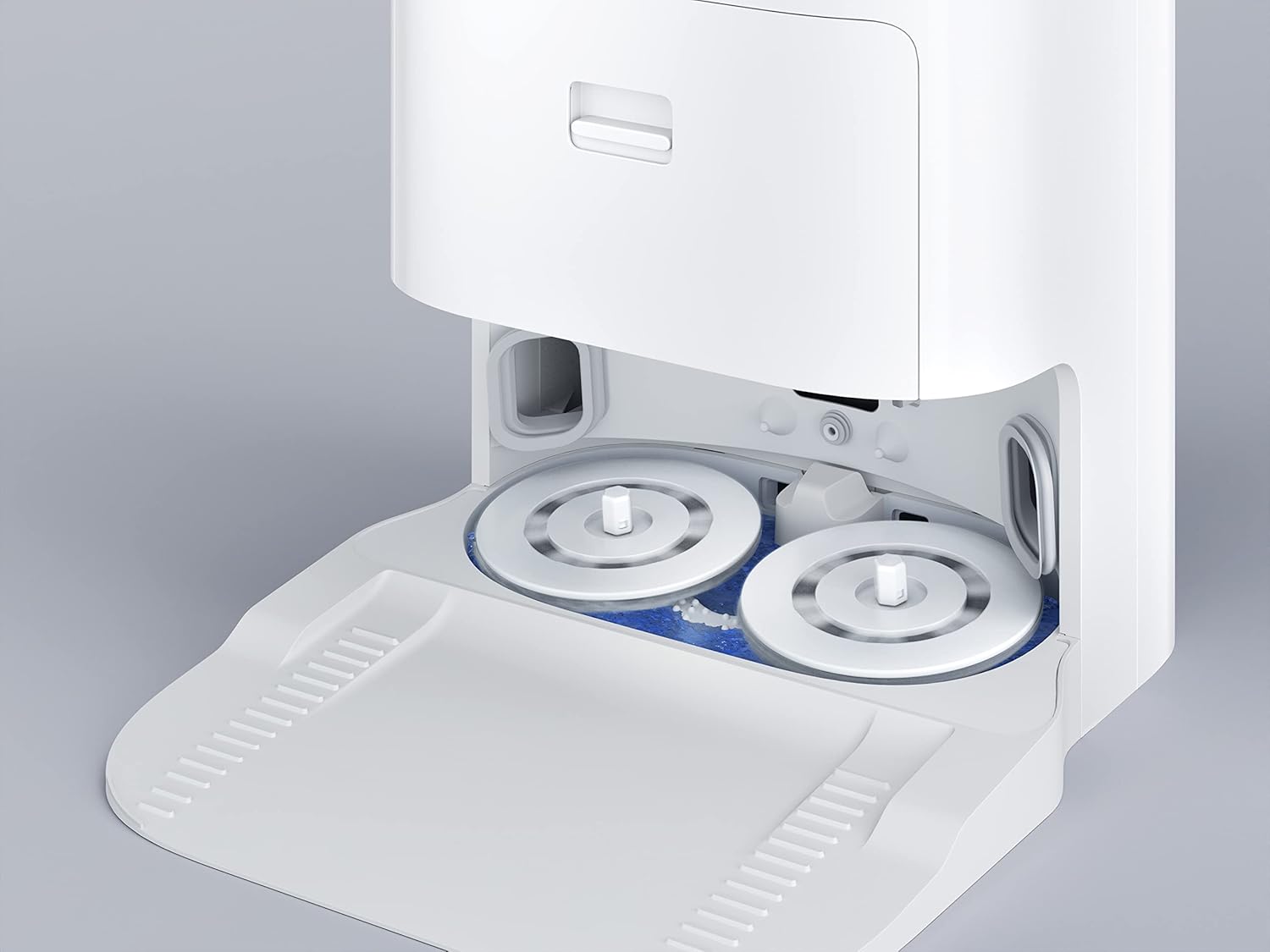
Figure 4.5: Close-up of the station's mop cleaning tray.
The base of the station features a cleaning tray where the robot's mop pads are automatically washed and scrubbed during and after cleaning cycles.

Figure 4.6: Automatic water refilling mechanism.
The station automatically refills the robot's internal water tank, ensuring continuous mopping without manual intervention.

Figure 4.7: Hot air drying system for mop pads.
After cleaning, the station uses hot air to dry the mop pads, preventing mildew and odors.
5. Setup Guide
5.1 Unpacking and Placement
- Remove all packaging materials and protective films from the robot and the station.
- Place the all-in-one station on a hard, level surface against a wall. Ensure there is at least 0.5 meters (1.6 feet) of clear space on both sides and 1.5 meters (4.9 feet) in front of the station for optimal robot navigation.
- Plug the power cable into the station and then into a wall outlet.
5.2 Initial Charging
Place the robot onto the charging contacts of the station. The robot will automatically power on and begin charging. For first-time use, it is recommended to fully charge the robot before its initial cleaning cycle.
5.3 App Connection
- Download the Xiaomi Home app from your mobile app store (Google Play Store or Apple App Store).
- Create a Xiaomi account or log in if you already have one.
- Tap the '+' icon in the top right corner of the app to add a device.
- Select the 'Xiaomi Robot Vacuum X10+' from the list of available devices or scan the QR code on the robot/manual.
- Follow the in-app instructions to connect the robot to your Wi-Fi network. Ensure your phone is connected to a 2.4GHz Wi-Fi network during setup.
5.4 Filling Water Tanks
Open the front panel of the all-in-one station. Remove the clean water tank (usually marked with blue or a clean water icon) and fill it with clean tap water. Reinsert the tank securely. The dirty water tank should be empty before starting operations.
6. Operating Instructions
6.1 Starting a Cleaning Cycle
- Via Robot Buttons: Press the Power button once to start a full cleaning cycle. Press the Home button to send the robot back to the station.
- Via Xiaomi Home App: Open the app, select your robot, and tap 'Clean' to start. You can also select specific cleaning modes (Vacuum, Mop, Vacuum & Mop) or areas.
6.2 Cleaning Modes
- Vacuum Mode: The robot will only vacuum. Ideal for carpets or when mopping is not desired.
- Mop Mode: The robot will only mop. Ensure mop pads are attached and the water tank is filled.
- Vacuum & Mop Mode: The robot will perform both vacuuming and mopping simultaneously. This is the default and most common mode.
6.3 Advanced Features (via App)
- Map Management: The robot will create a map of your home during its first cleaning. You can then divide, merge, or name rooms.
- Zone Cleaning: Select specific areas on the map for the robot to clean.
- Scheduled Cleaning: Set up daily or weekly cleaning schedules for specific times and rooms.
- No-Go Zones/Virtual Walls: Draw virtual boundaries on the map to prevent the robot from entering certain areas.
- Suction Power & Water Level Adjustment: Customize cleaning intensity based on your needs.
6.4 Voice Control
The Xiaomi Robot Vacuum X10+ is compatible with Amazon Echo. Link your Xiaomi Home account to your Amazon Alexa app to control the robot using voice commands (e.g., "Alexa, tell Robot Vacuum to start cleaning").
7. Maintenance
Regular maintenance ensures optimal performance and extends the lifespan of your robot vacuum.
7.1 Robot Vacuum Maintenance
- Emptying Dustbin: The station automatically empties the robot's dustbin. Replace the dust bag in the station when full (indicated by the app or station light).
- Cleaning Main Brush: Remove the main brush cover and the brush. Use the cleaning tool to remove hair and debris. Clean weekly or as needed.
- Cleaning Side Brush: Remove the side brush and clean off any tangled hair or debris. Replace if worn. Clean monthly.
- Cleaning Mop Pads: The station automatically cleans and dries the mop pads. Periodically remove and hand wash the mop pads for a deeper clean. Replace every 1-3 months depending on usage.
- Cleaning Sensors: Wipe all sensors (cliff sensors, wall sensor, charging contacts) on the robot and station with a clean, dry cloth. Clean monthly.
7.2 All-in-One Station Maintenance
- Emptying Dirty Water Tank: Empty the dirty water tank after each mopping session or when full. Rinse with clean water.
- Cleaning Clean Water Tank: Refill with clean water as needed. Clean periodically to prevent buildup.
- Cleaning Cleaning Tray: The cleaning tray at the base of the station can accumulate dirt. Remove and rinse it regularly.
- Replacing Dust Bag: Replace the dust bag in the station when the indicator light or app notifies you. Typically every 1-2 months.
8. Troubleshooting
If you encounter issues with your Xiaomi Robot Vacuum X10+, refer to the following common problems and solutions:
| Problem | Possible Cause | Solution |
|---|---|---|
| Robot does not power on or charge. | Low battery; Not properly docked; Power cable disconnected. | Ensure robot is correctly docked; Check power cable connection; Allow robot to charge for several hours. |
| Robot gets stuck frequently. | Obstacles; Tangled cables; Cliff sensors dirty. | Clear obstacles from cleaning path; Tidy up cables; Clean cliff sensors. |
| Poor cleaning performance. | Full dustbin/dust bag; Clogged filter; Worn brushes; Dirty mop pads. | Empty dustbin/replace dust bag; Clean/replace filter; Clean/replace brushes; Clean/replace mop pads. |
| Robot cannot connect to Wi-Fi. | Incorrect Wi-Fi password; Router too far; 5GHz network selected. | Ensure correct 2.4GHz Wi-Fi network and password; Move router closer; Reset Wi-Fi on robot (refer to app instructions). |
| Mop pads not cleaning or drying properly. | Dirty water tank full; Clean water tank empty; Cleaning tray clogged. | Empty dirty water tank; Refill clean water tank; Clean the station's cleaning tray. |
For more complex issues or error codes, refer to the Xiaomi Home app's help section or contact customer support.
9. Specifications
| Feature | Specification |
|---|---|
| Brand | XIAOMI |
| Model Name | BHR6363EU |
| Suction Power | 4000 Pa |
| Battery Life | Up to 120 minutes |
| Product Dimensions (Robot) | Approx. 13.78"L x 13.78"W x 3.7"H (estimated from typical robot size) |
| Product Dimensions (Station) | Approx. 13.78"L x 22.05"W x 16.54"H (overall combined dimensions) |
| Item Weight | 27.3 pounds (combined) |
| Voltage | 220 Volts |
| Clean Water Tank Capacity | 2.5 Liters (for station) |
| Control Method | App, Buttons |
| Compatible Devices | Amazon Echo |
| Filter Type | Cloth |
10. Warranty and Support
The Xiaomi Robot Vacuum X10+ comes with a standard manufacturer's warranty. Please refer to the warranty card included in your product packaging or visit the official Xiaomi website for detailed warranty terms and conditions specific to your region.
For technical support, troubleshooting assistance, or warranty claims, please contact Xiaomi Customer Service through the Xiaomi Home app's 'Help & Feedback' section or visit the official Xiaomi support website.
Keep your purchase receipt as proof of purchase for warranty purposes.


