
1. Product Overview
The PERLESMITH PSLF10 Full Motion TV Wall Mount is designed to provide optimal viewing flexibility for televisions ranging from 37 to 75 inches. Its robust dual-arm design supports TVs weighing up to 100 lbs and is compatible with VESA mounting patterns from 200x100mm to 600x400mm. This mount allows for smooth swivel, tilt, and extension adjustments, ensuring a comfortable viewing experience from various angles.

Image: The PERLESMITH PSLF10 mount features a sturdy dual-arm design, capable of holding up to 100 lbs. Dimensions shown are 17.06 inches in width and 5.74 inches in height for the wall plate.
2. Compatibility and Safety
Before installation, ensure your TV meets the following criteria:
- TV Size: Fits most 37-75 inch flat and curved TVs.
- Weight Capacity: Supports up to 100 lbs (45.3 kg). Do not exceed this weight limit.
- VESA Compatibility: Compatible with VESA mounting patterns from Min 200x100mm to Max 600x400mm.
- Wall Type: Suitable for installation on 8"/12"/16" wood studs, concrete walls, and brick walls. DO NOT install on drywall alone.
- TV Ports: Verify that the mount will not block any necessary TV ports or connections.

Image: A visual guide to confirm TV compatibility, including screen size (37"-75"), weight (up to 110 lbs, note: product title states 100 lbs, adhere to lower limit), VESA patterns (Min 200x100mm, Max 600x400mm), and suitable wall types (wood studs, concrete, brick walls).
3. Setup and Installation
Follow these general steps for installation. Always refer to the detailed instruction manual included with your product for specific safety and installation guidelines.
3.1 Prepare the Wall
- Locate Studs: Use a stud finder to locate the center of your wood studs. Mark the stud locations.
- Position Template: Use the provided drilling template to mark pilot hole locations on the wall. Ensure the template is level using a spirit level.
- Drill Pilot Holes: Drill pilot holes at the marked locations.
3.2 Attach Wall Plate to Wall
- Align the wall plate with the drilled pilot holes.
- Secure the wall plate to the wall using the appropriate lag bolts and washers for your wall type. Tighten securely.
3.3 Attach TV Brackets to TV
- Lay your TV face down on a soft, clean surface to prevent scratches.
- Identify the correct screws and spacers for your TV's VESA pattern.
- Attach the TV brackets to the back of your TV using the selected screws and spacers. Ensure they are securely fastened.
3.4 Hang TV on Wall Mount
- Carefully lift the TV and hook the TV brackets onto the wall plate.
- Engage the security locks on the TV brackets to prevent accidental dislodgement.

Image: A visual representation of the easy 3-step installation process: 1) Attach brackets to your TV, 2) Mount arm assembly on wall, and 3) Hang TV on the arm assembly.
Video: This video demonstrates the installation process for the PERLESMITH PSLF10 full motion TV wall mount, showing how to attach the mount to the wall and then secure the TV.
4. Operating Instructions
The PERLESMITH PSLF10 mount offers versatile adjustments for optimal viewing.
- Extension: Pull the TV gently away from the wall to extend it up to 16 inches for better viewing angles or access to cables.
- Retraction: Push the TV gently back towards the wall for a low-profile look, retracting to 2.9 inches.
- Swivel: Swivel the TV up to ±45° left or right to adjust the viewing angle for different seating positions.
- Tilt: Tilt the TV up 5° or down 15° to reduce glare and achieve the perfect viewing angle.
- Leveling: After installation, you can adjust the two leveling bolts to ensure your TV is perfectly horizontal (±3°).

Image: The TV mount extends up to 16 inches from the wall for closer viewing and retracts to a low-profile 2.9 inches when not in use.
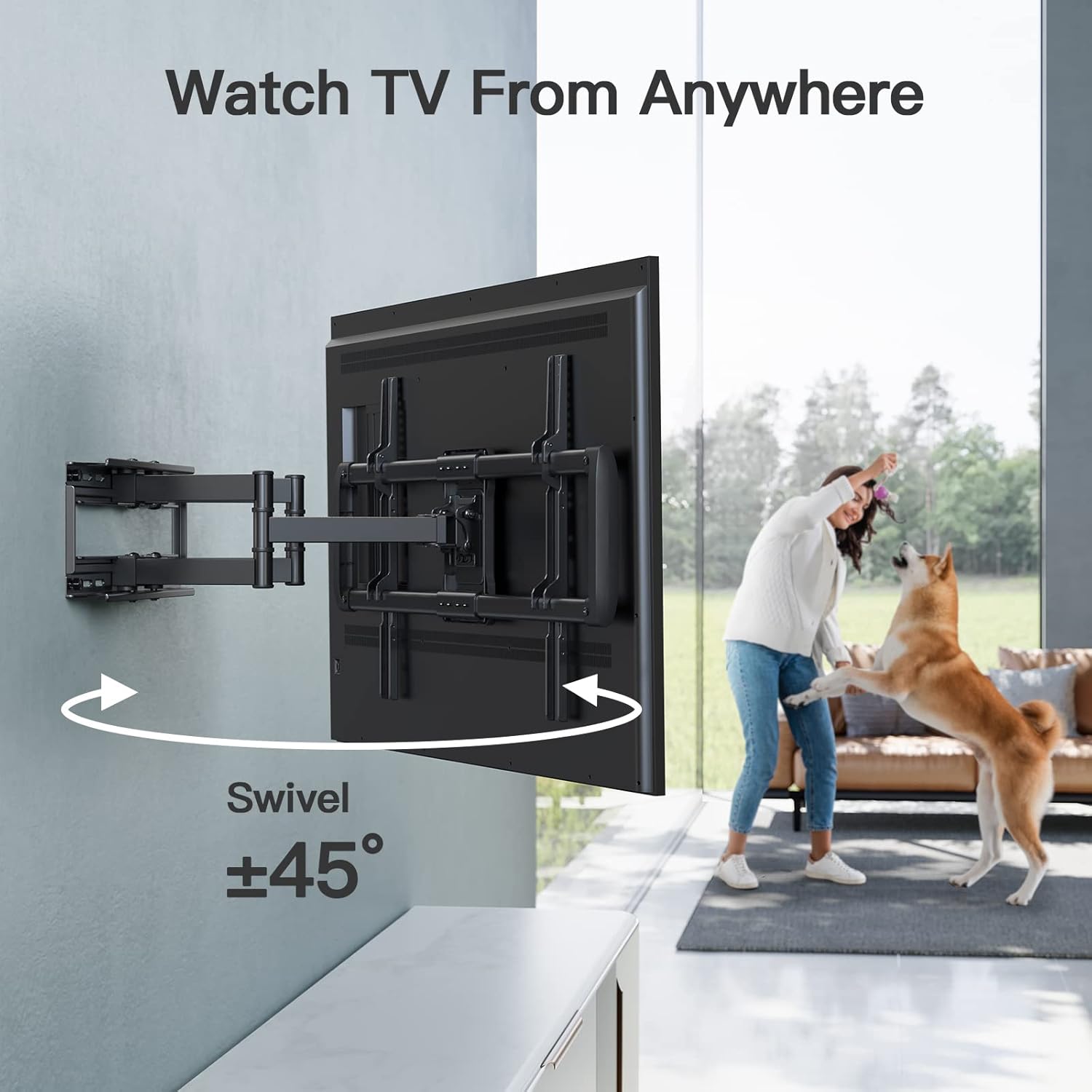
Image: The mount allows for a swivel of ±45°, enabling flexible viewing from various positions in a room.

Image: The TV can be tilted up 5° and down 15° to reduce glare and optimize the viewing angle.

Image: The mount allows for easy post-installation leveling of ±3° by adjusting two specific bolts.
5. Maintenance
- Regular Checks: Periodically check all screws and connections to ensure they remain tight and secure.
- Cleaning: Clean the mount with a soft, dry cloth. Avoid abrasive cleaners or solvents that could damage the finish.
- Lubrication: If movement becomes stiff, apply a small amount of silicone-based lubricant to the articulating joints.
6. Troubleshooting
- TV Not Level: Use the leveling bolts on the TV brackets to make fine adjustments.
- Mount Feels Loose: Re-tighten all lag bolts securing the wall plate to the wall studs. Ensure proper stud engagement.
- Difficulty Moving TV: Check for any obstructions. Apply lubricant to moving parts if necessary.
- Cables Interfering: Use the provided cable ties to manage and secure cables, preventing interference with mount movement.
7. Specifications
| Feature | Detail |
|---|---|
| Brand | PERLESMITH |
| Model Number | PSLF10 |
| Mounting Type | Wall Mount |
| Movement Type | Articulating, Swivel, Tilt |
| Material | Alloy Steel |
| Color | Black |
| Compatible TV Sizes | 37 - 75 inches |
| Weight Capacity | Up to 100 lbs (45.3 kg) |
| VESA Compatibility | Min 200x100mm to Max 600x400mm |
| Wall Stud Spacing | 8"/12"/16" Wood Studs |
| Tilt Range | Up 5°, Down 15° |
| Swivel Range | ±45° |
| Extension from Wall | Up to 16 inches |
| Retraction to Wall | 2.9 inches |
| Post-Installation Leveling | ±3° |
| Product Dimensions | 17.32 x 9.57 x 3.15 inches (packaged) |
| Item Weight | 12.76 pounds |
8. Warranty and Support
PERLESMITH products are designed for durability and ease of use. For any questions regarding installation, missing parts, or product functionality, please contact PERLESMITH customer support. Keep your purchase receipt for warranty claims.
For further assistance, please visit the official PERLESMITH website or contact their customer service directly.


