1. Introduction
The Xiaomi Band 7 Pro is a sophisticated health and fitness activity tracker designed to seamlessly integrate into your daily life. Featuring a high-resolution AMOLED screen, built-in GPS, and comprehensive health monitoring capabilities, it offers a convenient and stylish way to stay on top of your fitness goals and daily notifications.

Figure 1: Xiaomi Band 7 Pro Smartwatch in Black.
2. Key Features
- 1.64" High-Resolution AMOLED Screen: Experience vibrant colors and clear visuals with an open interface layout, making information easily accessible at a glance.
- Built-in Independent GPS Module: Accurately track your outdoor activities without needing your phone, supporting Beidou, GPS, GLONASS, Galileo, and QZSS satellite systems.
- 110+ Sports Modes: Choose from a wide variety of workout modes to track your performance across different activities.
- Comprehensive Health Monitoring: Includes continuous heart rate, SpO₂ (blood oxygen), and stress monitoring, along with advanced sleep tracking.
- 12-Day Battery Life: Enjoy extended usage on a single charge, reducing the need for frequent recharging.
- 5ATM Water Resistance: Suitable for swimming and other water activities, allowing you to wear it worry-free.
- Metallic Luster and NCVM Technology: Features a high-bright metallic texture for a premium look and a lightweight, comfortable feel.

Figure 2: Visual overview of the Xiaomi Smart Band 7 Pro's main features.
3. Setup
3.1 Unboxing and Initial Charge
Upon unboxing your Xiaomi Band 7 Pro, you will find the smartwatch unit and its charging cable. Before first use, it is recommended to fully charge the device.

Figure 3: Xiaomi Band 7 Pro with its magnetic charging cable.
3.2 Pairing with the Mi Fitness App
To unlock the full potential of your Xiaomi Band 7 Pro, pair it with the Mi Fitness app on your smartphone. The app allows for detailed data tracking, settings customization, and firmware updates.
- Download the Mi Fitness app from your device's app store.
- Open the app and create an account or log in.
- Follow the on-screen instructions to add a new device. Select 'Xiaomi Smart Band 7 Pro' from the list.
- Ensure Bluetooth is enabled on your smartphone and bring the band close to your phone.
- Confirm the pairing request on both your phone and the band.
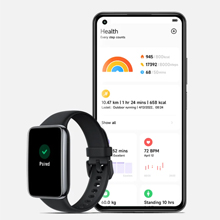
Figure 4: Illustration of the Mi Fitness app pairing process.
For a visual guide on setup and initial features, watch this official video:
Video 1: Outdoor running with Xiaomi Smart Band 7 Pro. This video demonstrates the band's features during outdoor activities, including GPS tracking and interface navigation.
4. Operating the Device
4.1 Display and Navigation
The 1.64-inch AMOLED display offers a large, clear interface. Swipe up, down, left, or right to navigate through menus, notifications, and widgets. The intelligent brightness adjustment feature automatically adapts the screen's luminosity to ambient light conditions for optimal visibility.
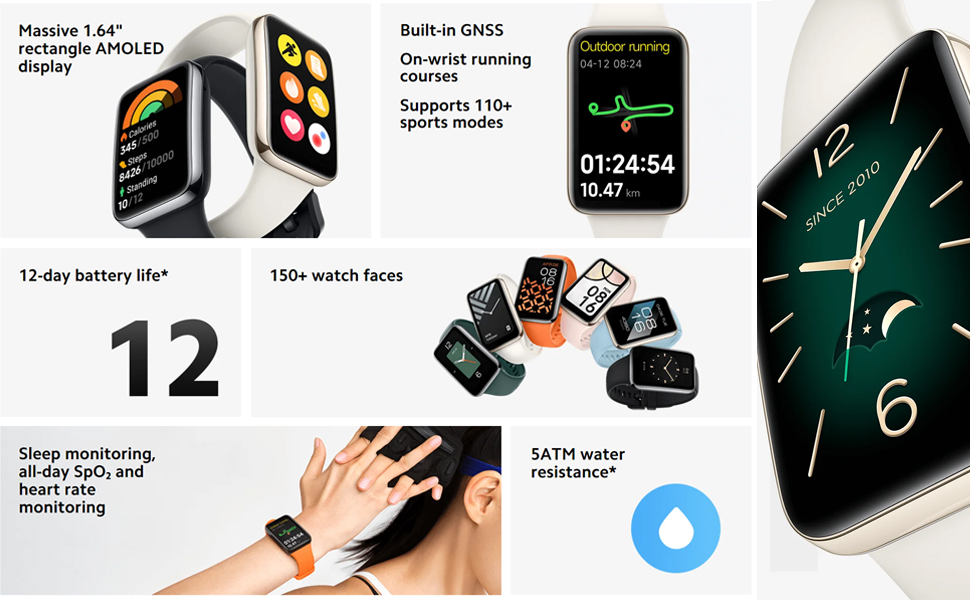
Figure 5: The expansive AMOLED display of the Xiaomi Band 7 Pro, showcasing its clear interface.
4.2 Watch Faces
Personalize your Band 7 Pro with over 150 watch faces available through the Mi Fitness app. You can also set custom photos as your watch face.

Figure 6: A selection of customizable watch faces for the Xiaomi Band 7 Pro.
4.3 Notifications and Basic Functions
Receive call, message, and app notifications directly on your wrist. The band also includes convenient built-in functions such as a timer, stopwatch, and a flashlight feature that illuminates the screen brightly.

Figure 7: The Xiaomi Band 7 Pro displaying its Alexa integration feature.
5. Fitness and Health Tracking
5.1 GPS and Sports Modes
The independent GPS module allows for precise tracking of outdoor activities like running, cycling, and hiking without carrying your phone. Choose from over 110 sports modes to get tailored metrics for your workouts.

Figure 8: The Band 7 Pro displaying GPS tracking data for an outdoor run.
5.2 Health Monitoring
The Band 7 Pro offers continuous monitoring of vital health metrics:
- Heart Rate: Tracks your heart rate 24/7, providing insights into your cardiovascular health.
- SpO₂ (Blood Oxygen): Monitors your blood oxygen saturation levels, crucial for understanding overall well-being.
- Sleep: Provides detailed analysis of your sleep patterns, including deep, light, and REM sleep stages.
- Stress: Measures your stress levels throughout the day and offers breathing exercises to help manage stress.
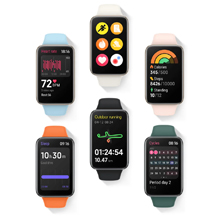
Figure 9: The Band 7 Pro displaying real-time heart rate data.
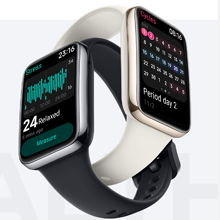
Figure 10: The Band 7 Pro showing stress level measurements.
6. Maintenance
6.1 Water Resistance
The Xiaomi Band 7 Pro is rated 5ATM for water resistance, meaning it can withstand pressures equivalent to a depth of 50 meters. This makes it suitable for showering, swimming in pools, and shallow-water activities. Avoid wearing it in hot showers, saunas, or during diving, as steam and high-pressure water jets may compromise the seal.

Figure 11: Illustration of the Band 7 Pro's 5ATM water resistance.
6.2 Cleaning and Care
Regularly clean your band and wrist to prevent skin irritation and maintain device functionality. Use a soft, damp cloth to wipe the band and the device body. Ensure the charging contacts on the back of the device are clean and dry before charging.
6.3 Battery Care
To prolong battery life, avoid exposing the device to extreme temperatures. Charge the device using the provided magnetic charging cable. While the battery life is up to 12 days with normal use, heavy GPS usage or continuous monitoring may reduce this duration.

Figure 12: The Band 7 Pro displaying its battery life and charging status.
7. Troubleshooting
If you encounter issues with your Xiaomi Band 7 Pro, consider the following common solutions:
- Connectivity Issues: Ensure Bluetooth is enabled on your phone and the band is within range. Try restarting both the band and your phone. If the issue persists, unpair and re-pair the device in the Mi Fitness app.
- App Synchronization Problems: Verify that the Mi Fitness app has all necessary permissions enabled on your phone (e.g., location, notifications, background activity). Check for app updates.
- Inaccurate Data Readings: Ensure the band is worn snugly on your wrist, about one finger's width above the wrist bone. Clean the sensors on the back of the device.
- Display Not Responding: Try restarting the band by holding down the side button (if applicable) or connecting it to the charger.
- Battery Draining Quickly: Review your settings in the Mi Fitness app. Continuous heart rate monitoring, always-on display, and frequent GPS usage can significantly impact battery life. Adjust these settings to optimize battery performance.
8. Specifications
| Feature | Specification |
|---|---|
| Model Name | Xiaomi Smart Band 7 Pro |
| Screen Size | 1.64 Inches |
| Display Technology | AMOLED |
| Connectivity Technology | Bluetooth |
| GPS | True (Built-in independent GPS module) |
| Water Resistance | 5ATM |
| Battery Life | Up to 12 days (normal use) |
| Item Weight | 0.705 ounces (20 Grams) |
| Product Dimensions | 1.77 x 0.43 x 1.13 inches |
| Manufacturer | Xiaomi |
9. Warranty and Support
For warranty information and customer support, please refer to the official Xiaomi website or contact their authorized service centers in your region. Keep your proof of purchase for warranty claims.


