
1. Introduction
Thank you for choosing the TurboTronic AFD32 Air Fryer Oven. This versatile appliance combines the functions of an air fryer, dehydrator, and traditional oven, offering a wide range of cooking possibilities. Designed for efficiency and convenience, it features a spacious 32-liter capacity, powerful 1700-watt heating, and intuitive digital controls. Please read this manual thoroughly before operation to ensure safe and optimal use of your new appliance.
2. Important Safety Instructions
When using electrical appliances, basic safety precautions should always be followed, including the following:
- Read all instructions before using the appliance.
- Do not touch hot surfaces. Use handles or knobs.
- To protect against electrical shock, do not immerse cord, plugs, or the appliance in water or other liquid.
- Close supervision is necessary when any appliance is used by or near children.
- Unplug from outlet when not in use and before cleaning. Allow to cool before putting on or taking off parts.
- Do not operate any appliance with a damaged cord or plug, or after the appliance malfunctions or has been damaged in any manner.
- The use of accessory attachments not recommended by the appliance manufacturer may cause injuries.
- Do not use outdoors.
- Do not let cord hang over edge of table or counter, or touch hot surfaces.
- Do not place on or near a hot gas or electric burner, or in a heated oven.
- Extreme caution must be used when moving an appliance containing hot oil or other hot liquids.
- Always attach plug to appliance first, then plug cord into the wall outlet. To disconnect, turn any control to "off", then remove plug from wall outlet.
- Do not use appliance for other than intended use.
- Oversized foods or metal utensils must not be inserted in a toaster oven as they may create a fire or risk of electric shock.
- A fire may occur if the oven is covered or touching flammable material, including curtains, drapes, walls, and the like, when in operation.
- Do not place any of the following materials in the oven: paper, cardboard, plastic, and other non-food items.
- Do not store any materials, other than manufacturer's recommended accessories, in this oven when not in use.
- Do not place cooking utensils or baking dishes on the glass doors.
- Always wear protective, insulated oven mitts when inserting or removing items from the hot oven.
3. Product Overview
3.1 Components and Features
The TurboTronic AFD32 Air Fryer Oven is designed with user convenience and cooking versatility in mind. Below are the key components and their functions.

Figure 3.1: Front view of the TurboTronic AFD32 Air Fryer Oven, showcasing its French doors, digital LED display, and control knobs.
- French Doors: Dual doors that open outwards, providing easy access to the oven interior and minimizing heat loss. Made with tempered glass for clear viewing.
- Digital LED Display: Shows selected program, temperature, time, and other operational indicators.
- Control Knobs: Three multi-function knobs for program selection, temperature/light control, and timer/fan speed adjustment.
- Interior Light: Integrated light for monitoring cooking progress without opening the doors.
- AirChef Pro Technology: Utilizes 360° hot air circulation for even cooking and crispy results with minimal oil.
- Spacious Interior: 32-liter capacity, suitable for various dishes including a whole chicken or large pizza.
3.2 Control Panel
The control panel features a digital LED display and three intuitive knobs for easy operation.

Figure 3.2: Detailed view of the control panel, highlighting the display and knob functions.
- Left Knob (SELECT / ROTISSERIE): Rotate to select from 12 pre-set cooking programs. Press to activate/deactivate the rotisserie function.
- Middle Knob (TEMP / LIGHT): Rotate to adjust cooking temperature (25°C – 230°C). Press to turn the interior light on/off.
- Right Knob (TIMER / FAN): Rotate to set the cooking timer (1-99 minutes for most functions, up to 72 hours for dehydrate). Press to select fan speed.
- START/STOP Button: Initiates or pauses the cooking process.
- Digital Display: Provides real-time information on cooking settings and status.
3.3 Included Accessories
Your TurboTronic AFD32 comes with a comprehensive set of accessories to enhance your cooking experience. All accessories are dishwasher safe for easy cleaning.

Figure 3.3: Overview of the accessories included with the oven.
- Rotisserie Set: Includes a rotisserie spit and forks for roasting whole chickens or other meats evenly.
- Tray Handle: For safely inserting and removing hot trays and racks.
- Air Fry Basket: Designed for optimal air circulation when air frying, ensuring crispy results.
- Wire Rack: Standard rack for baking, roasting, or placing dishes.
- Crumb Tray: Collects crumbs and drips at the bottom of the oven for easy cleaning.
- Bake/Broil Pan: A versatile pan for baking, broiling, or catching drips from items on the wire rack.
4. Setup and First Use
4.1 Unpacking and Placement
- Carefully remove the oven and all accessories from the packaging.
- Remove any packing materials, stickers, or protective film from the appliance.
- Place the oven on a stable, level, heat-resistant surface, ensuring adequate clearance (at least 10-15 cm) on all sides for proper ventilation. Do not place it directly against a wall or under cabinets.
- Ensure the power cord is not pinched or damaged.

Figure 4.1: Product dimensions for proper placement.
4.2 Before First Use
- Wash all accessories (air fry basket, wire rack, bake/broil pan, rotisserie set, crumb tray) in warm, soapy water. Rinse thoroughly and dry completely.
- Wipe the interior and exterior of the oven with a damp cloth. Do not immerse the main unit in water.
- Insert the crumb tray at the very bottom of the oven.
- Plug the power cord into a grounded electrical outlet.
- To eliminate any manufacturing odors, operate the oven empty for approximately 15-20 minutes at 200°C (400°F) in "Bake" mode. A slight odor or smoke may be present, which is normal for first use. Ensure the area is well-ventilated.
- Allow the oven to cool completely before storing or using for cooking.
5. Operating Instructions
5.1 General Operation
- Plug the oven into a suitable power outlet. The digital display will illuminate.
- Open the French doors and place your food and desired accessories inside. Close the doors securely.
- Rotate the Left Knob to select your desired cooking program (e.g., Air Fry, Bake, Roast). The selected program will be highlighted on the display.
- Rotate the Middle Knob to adjust the temperature. The display will show the current temperature setting.
- Rotate the Right Knob to set the cooking time. The display will show the remaining time.
- Press the START/STOP button to begin cooking. The oven will typically preheat first, then begin the cooking cycle.
- To pause cooking, press the START/STOP button again. Press it once more to resume.
- To turn on the interior light during cooking, press the Middle Knob. Press again to turn off.
- When cooking is complete, the oven will beep and automatically shut off. Carefully remove food using oven mitts and the tray handle.
5.2 Cooking Programs
The TurboTronic AFD32 offers 12 pre-set cooking programs for various culinary needs.

Figure 5.1: The 12 versatile cooking programs available.
- Toast: Ideal for perfectly browned toast.
- Bagel: Toasts bagels to perfection, often toasting the cut side more.
- Broil: Uses top heating element for grilling and browning.
- Bake: Standard oven function for cakes, casseroles, etc.
- Roast: For roasting meats and vegetables.
- Pizza: Optimized for cooking pizzas with a crispy crust.
- Proof: Provides a warm environment for dough to rise.
- Air Fry: Uses rapid hot air circulation for crispy, fried results with little to no oil.
- Reheat: Gently warms up leftovers.
- Cookies: Specific setting for baking cookies.
- Slow Cook: For long, low-temperature cooking.
- Dehydrate: Removes moisture from food for preservation (e.g., fruit, jerky). Timer can be set up to 72 hours.
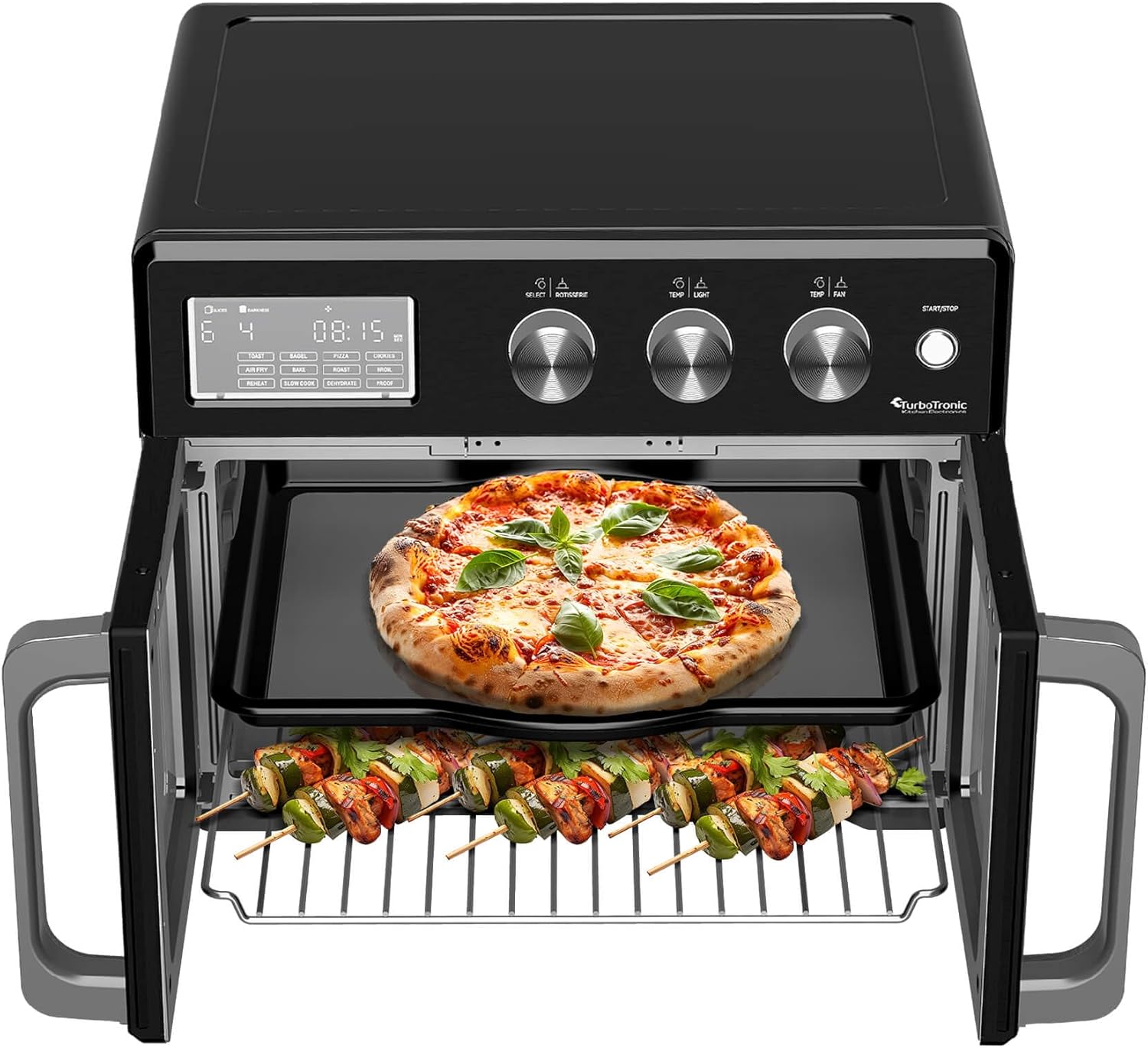
Figure 5.2: Example of cooking multiple items simultaneously.
5.3 Using the Rotisserie Function
The rotisserie function is perfect for roasting whole chickens or other meats, ensuring even cooking and a crispy exterior.

Figure 5.3: Two chickens roasting using the rotisserie function.
- Assemble the rotisserie spit and forks, securing your food item firmly in the center.
- Insert the pointed end of the rotisserie spit into the rotisserie drive socket on the right side of the oven interior.
- Rest the notched end of the spit onto the rotisserie support on the left side.
- Select a suitable cooking program (e.g., Roast, Air Fry).
- Press the Left Knob (SELECT / ROTISSERIE) to activate the rotisserie rotation. The rotisserie icon will appear on the display.
- Set temperature and time as needed, then press START/STOP.
- To remove the hot rotisserie, use the provided tray handle or rotisserie removal tool to lift the spit from the support and then pull it out of the drive socket.
6. Maintenance and Cleaning
Regular cleaning of your TurboTronic AFD32 Air Fryer Oven will ensure its longevity and optimal performance.
- Always unplug the oven from the power outlet and allow it to cool completely before cleaning.
- Interior Cleaning: Wipe the interior walls with a damp cloth and mild detergent. For stubborn stains, a non-abrasive cleaner can be used. Avoid abrasive sponges or metal scourers that can damage the non-stick coating.
- Exterior Cleaning: Wipe the exterior with a damp cloth. Do not use harsh chemicals or abrasive cleaners.
- Crumb Tray: Remove the crumb tray regularly and empty it. Wash it with warm, soapy water, rinse, and dry thoroughly.
- Accessories: All included accessories (air fry basket, wire rack, bake/broil pan, rotisserie set, tray handle) are dishwasher safe. For best results, hand wash with warm, soapy water.
- Ensure all parts are completely dry before reassembling and storing the oven.
Caution: Never immerse the main unit of the oven in water or any other liquid.
7. Troubleshooting
If you encounter any issues with your TurboTronic AFD32 Air Fryer Oven, please refer to the following common problems and solutions:
| Problem | Possible Cause | Solution |
|---|---|---|
| Oven does not turn on. | Not plugged in; power outlet malfunction; appliance malfunction. | Ensure the power cord is securely plugged into a working outlet. Check the circuit breaker. If the issue persists, contact customer support. |
| Food is not cooking evenly. | Overcrowding; incorrect temperature/time; food placement. | Do not overcrowd the oven or basket. Ensure food is in a single layer for air frying. Adjust temperature and time as needed. Rotate food halfway through cooking. |
| White smoke coming from the oven. | Grease/food residue on heating elements or crumb tray. | Unplug the oven and allow it to cool. Clean the interior, especially the heating elements and crumb tray, to remove any residue. |
| Rotisserie function not working. | Rotisserie not properly seated; function not activated. | Ensure the rotisserie spit is correctly inserted into both the drive socket and support. Press the Left Knob to activate the rotisserie function. |
| Digital display not responding. | Temporary electronic glitch. | Unplug the oven from the power outlet for a few minutes, then plug it back in to reset. |
8. Technical Specifications
| Specification | Detail |
|---|---|
| Brand | TurboTronic |
| Model | TT-AFD32 |
| Capacity | 32 Litres |
| Wattage | 1700 Watts |
| Voltage | 240 Volts |
| Temperature Range | 25°C – 230°C |
| Timer | 1-99 minutes (cooking), up to 72 hours (dehydrate) |
| Product Dimensions (L x W x H) | 34 x 45 x 37 cm |
| Item Weight | 11 kg |
| Material | Stainless Steel (Inner and Outer) |
| Control Console | Knob with Digital Display |
| Special Features | Temperature Control, Fan Convection, Interior Light, Automatic Shut-off |
9. Warranty and Support
The TurboTronic AFD32 Air Fryer Oven comes with a 12-month manufacturer's warranty from the date of purchase. This warranty covers defects in materials and workmanship under normal use.
For warranty claims, technical support, or any questions regarding your appliance, please contact the retailer or manufacturer's customer service. Please have your proof of purchase and model number (TT-AFD32) ready when contacting support.
For more information, you may visit the TurboTronic Store on Amazon.


