
1. Introduction
The ChunHee Wireless Caregiver Pager System (Model TY) is designed to provide a reliable and easy-to-use communication solution for caregivers and individuals needing assistance. This system includes a portable receiver and a call button, enabling users to alert their caregiver with a simple press of a button. It is ideal for home use, assisting the elderly, patients, pregnant women, children, and individuals with disabilities.

Image 1.1: The ChunHee Wireless Caregiver Pager System in use, showing both the call button and the portable receiver.
2. Package Contents
Please verify that all items are present in your package:
- 1 x Call Button (Transmitter)
- 1 x Receiver
- 1 x Lanyard (for call button)
- 1 x Accessory (e.g., small screwdriver for battery compartment)

Image 2.1: Contents of the product package.
3. Product Overview
The system consists of two main components: the call button (transmitter) and the receiver. Understanding their parts will aid in setup and operation.
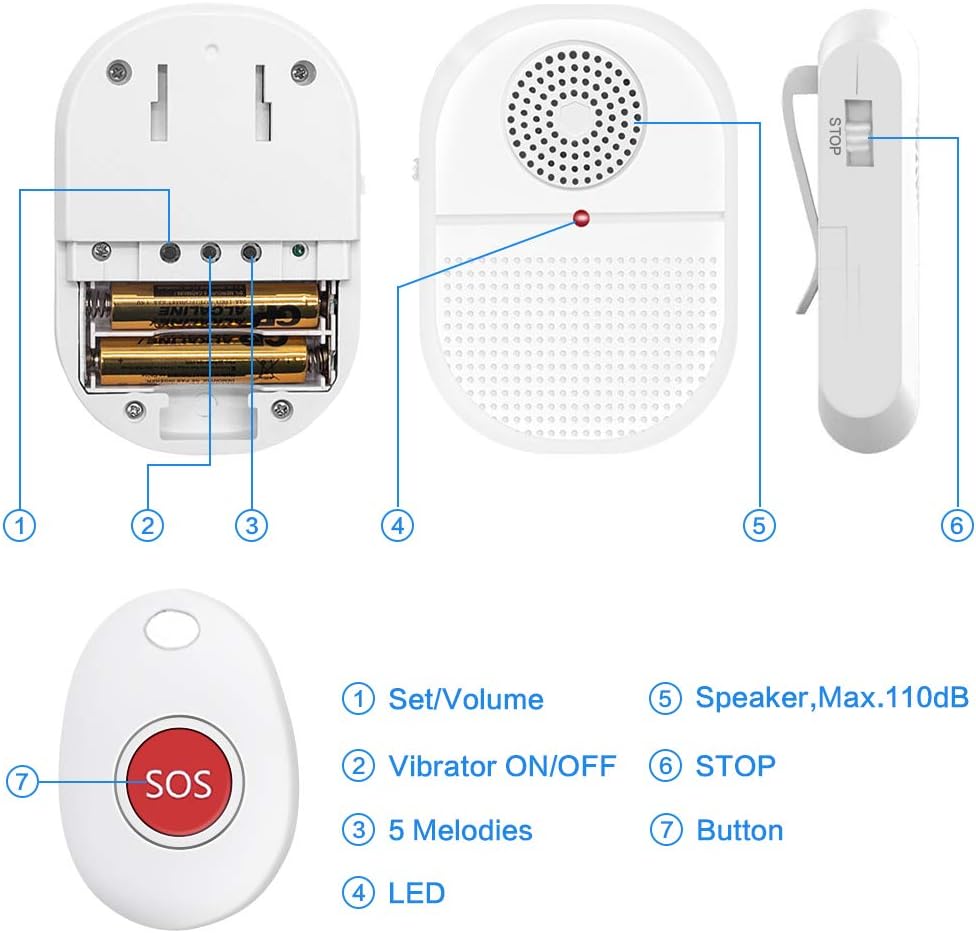
Image 3.1: Labeled components of the receiver and call button.
Receiver Features:
- Set/Volume Button: Adjusts volume levels and enters pairing mode.
- Vibrator ON/OFF Switch: Enables or disables vibration alerts.
- Melodies Button: Cycles through available alert melodies.
- LED Indicator: Flashes during alerts and pairing.
- Speaker: Emits audible alerts (Max. 110dB).
- STOP Button: Silences an active alert.
Call Button Features:
- SOS Button: Activates the alert signal to the receiver.
- Waterproof Design: IP65 rated for splash resistance.
4. Setup
4.1 Battery Installation (Receiver)
The receiver requires 2 AAA batteries (included). To install:
- Locate the battery compartment on the back of the receiver.
- Use the provided accessory (small screwdriver) to open the battery cover.
- Insert 2 AAA batteries, ensuring correct polarity (+/-).
- Replace the battery cover and secure it.
4.2 Pairing Transmitters (Call Buttons)
Follow these steps to pair the call button with the receiver:

Image 4.1: Step-by-step guide for pairing the call button with the receiver.
- Ensure the receiver is powered on.
- Press and hold the Set/Volume button on the receiver until you hear a "di-di" sound and the receiver's LED indicator flashes. This indicates pairing mode.
- Quickly press the SOS button on the call button. The receiver will emit another "di-di" sound and its indicator will flash.
- Press the SOS button on the call button once more to confirm the pairing. The receiver should respond with an alert sound, confirming successful pairing.
5. Operating Instructions
5.1 Activating an Alert
To send an alert, simply press the large SOS button on the call button. The receiver will then activate its alert (sound, vibration, and flashing LED) according to its current settings.
5.2 Adjusting Volume and Melodies
The receiver offers 4 volume levels (25dB-110dB) and 15 melodies.
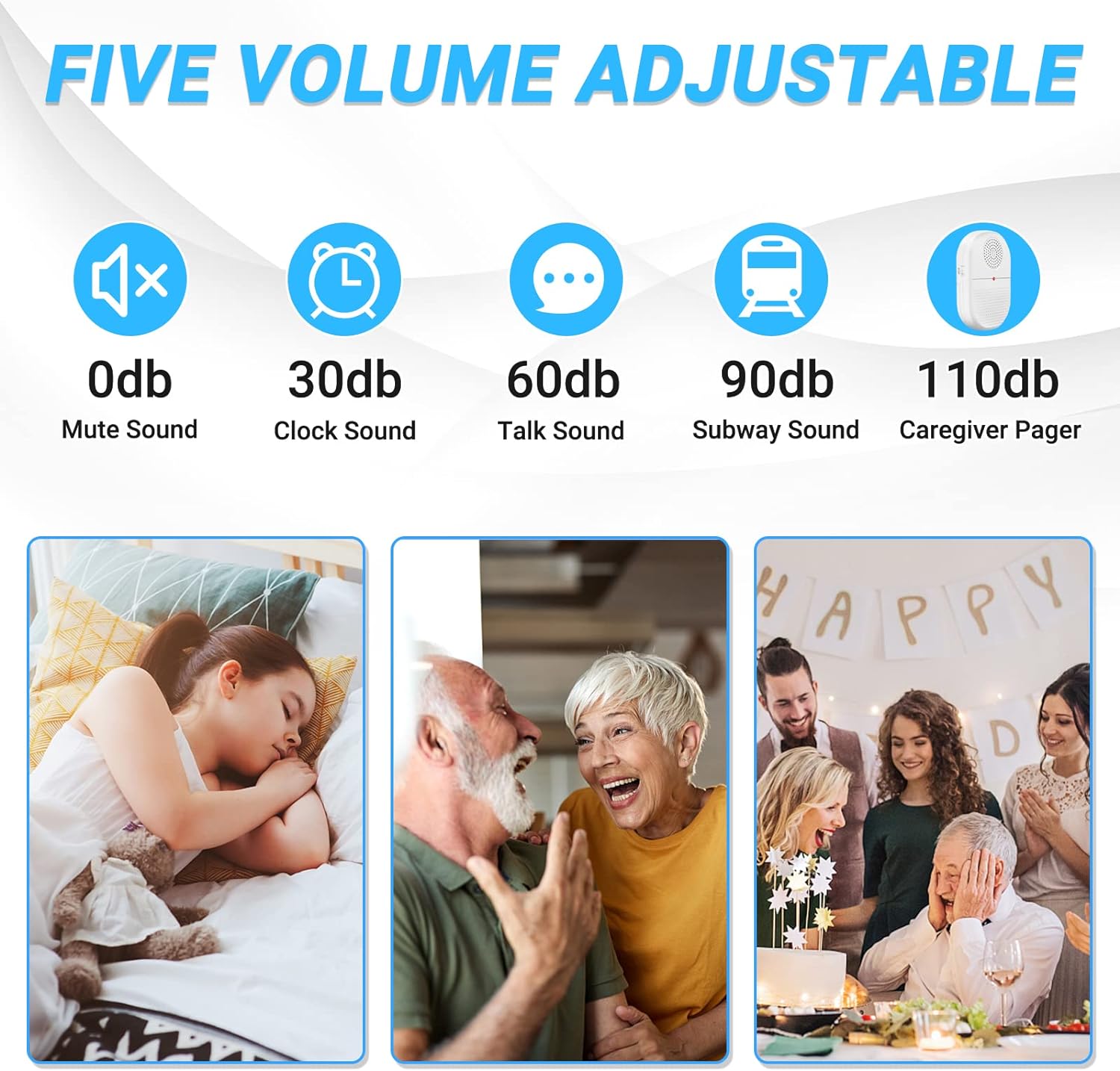
Image 5.1: Visual representation of the adjustable volume levels.
- Volume: Press the Set/Volume button repeatedly to cycle through the 4 volume levels.
- Melodies: Press the Melodies button repeatedly to cycle through the 15 available alert tones.
5.3 Vibration Mode
Use the Vibrator ON/OFF switch on the side of the receiver to enable or disable the vibration alert. This is useful for silent alerts or for caregivers who are hearing impaired.
5.4 Stopping an Alert
To stop an active alert on the receiver, press the STOP button located on the side of the receiver.
5.5 Wireless Range
The system boasts an operating range of over 800 feet in an open area. Walls and other obstructions may reduce this range.

Image 5.2: Depiction of the system's ultra-long wireless range.
5.6 Portability and Placement
The receiver can be carried in a pocket, clipped to a belt, or placed on a table. The call button can be worn around the neck using the lanyard or placed within easy reach.

Image 5.3: Examples of how to carry the portable receiver and call button.
6. Applications
This system is versatile and can be used in various scenarios to provide peace of mind and quick assistance:

Image 6.1: Various users benefiting from the caregiver pager system.
- Elderly Care: Allows seniors to call for help from anywhere in the home.
- Patient Monitoring: Provides a simple way for patients to alert caregivers.
- Pregnant Women: Offers quick access to assistance during pregnancy.
- Children: Can be used by children to call for parental attention.
- Disabled Individuals: Enhances independence by providing an easy call system.
7. Maintenance
7.1 Cleaning
Wipe the devices with a soft, dry cloth. Do not use abrasive cleaners or solvents. The call button is IP65 waterproof, meaning it is protected against water splashes, but it should not be submerged.

Image 7.1: The call button's IP65 waterproof feature.
7.2 Battery Replacement
Replace the AAA batteries in the receiver when the low battery indicator activates or when performance diminishes. The call button also has a low battery reminder feature.
8. Troubleshooting
| Problem | Possible Cause | Solution |
|---|---|---|
| Receiver does not alert when button is pressed. | 1. Batteries are low or incorrectly installed. 2. Call button and receiver are not paired. 3. Out of range. | 1. Replace receiver batteries; check polarity. 2. Re-pair the call button and receiver (refer to Section 4.2). 3. Move receiver closer to the call button. |
| Alert sound is too quiet or too loud. | Volume setting is not optimal. | Adjust the volume using the Set/Volume button on the receiver (refer to Section 5.2). |
| Receiver does not vibrate. | Vibration mode is off. | Toggle the Vibrator ON/OFF switch on the receiver (refer to Section 5.3). |
| Reduced wireless range. | 1. Environmental interference (walls, electronics). 2. Low battery in either device. | 1. Reposition devices to minimize obstructions. 2. Replace batteries in both the receiver and call button. |
9. Specifications
| Feature | Detail |
|---|---|
| Model Number | TY |
| Brand | ChunHee |
| Power Source | Battery Powered |
| Receiver Batteries | 2 x AAA (Alkaline) |
| Call Button Batteries | Lithium Polymer (built-in, with low battery reminder) |
| Operating Range | 800+ feet (open area) |
| Noise Level | 25dB - 110dB (adjustable) |
| Melodies | 15 options |
| Waterproof Rating (Call Button) | IP65 (splash-proof) |
| Control Method | Touch (button press) |
| Product Dimensions | Receiver: 4.72 x 5.91 x 3.94 inches Call Button: 3.54 x 1.77 x 0.79 inches (approx.) |
| Item Weight | 5.3 ounces (total) |
10. Warranty and Support
For warranty information or technical support, please refer to the contact details provided with your purchase or visit the official ChunHee website. Keep your purchase receipt for warranty claims.


