
1. Introduction
This manual provides instructions for the LBW Dual Head Desk Grow Light. This full-spectrum LED grow light is designed to support the growth of indoor plants by providing essential light wavelengths, adjustable brightness, multiple lighting modes, and an automatic timer function. Its flexible goosenecks and height-adjustable telescopic rod allow for versatile positioning to suit various plant sizes and environments.

Image: The LBW Dual Head Desk Grow Light positioned on a table with two potted plants, showcasing its design and application.
2. Product Features
- Full Spectrum Lighting: Equipped with 100 LEDs, providing a full spectrum from 380nm to 800nm to promote photosynthesis, germination, blooming, and fruiting. This includes 60 Warm White Chips, 28 Cold White Chips, and 12 Red Chips.
- Adjustable Height: The telescopic rod allows height adjustment from 15 to 30 inches (38 to 76 cm).
- Flexible Goosenecks: Two 360° adjustable goosenecks for precise light positioning.
- Multiple Lighting Modes: Three switch modes allow individual control of each light head or both simultaneously.
- Six Brightness Levels: Dimmable from 10% to 100% (10%-20%-40%-60%-80%-100%).
- Automatic Timer: Features a 3H/6H/12H auto on/off cycle for consistent light exposure.
- Stable Base: Designed with a thickened metal base for stability, including a sponge pad to prevent table scratches.

Image: An illustration detailing the full spectrum output of the grow light, highlighting the composition of warm white, cold white, and red LED chips and their respective roles in plant development.
3. Safety Information
- Ensure the power supply voltage matches the product's requirements (12 Volts).
- Do not expose the grow light to water or high humidity. This product is for indoor use only.
- Avoid looking directly into the LED lights for extended periods, as this may cause eye strain.
- Keep the device away from flammable materials.
- Do not attempt to disassemble or modify the product. Refer to qualified personnel for repairs.
- Unplug the power adapter from the outlet when not in use or before cleaning.
4. Package Contents
Verify that all components are present in the package:
- 1 x Dual-head Grow Light with Timer
- 2 x Gooseneck
- 1 x Connector
- 1 x Telescopic Rod
- 1 x Circular Base
- 1 x Adapter
- 1 x Tool Kit (includes wrench and nuts)
- 1 x User Manual (this document)

Image: All components included in the LBW Grow Light package, laid out for inspection.
5. Setup Instructions
Follow these steps to assemble your LBW Dual Head Desk Grow Light:
- Install the Telescopic Rod to the Base: Screw the telescopic rod securely into the circular base.
- Screw the Goosenecks to the Telescopic Rod: Attach the two flexible goosenecks to the top of the telescopic rod using the provided connector.
- Fix the Lamp: Attach the dual-head lamp panels to the goosenecks using the provided nuts and wrench from the tool kit. Ensure they are securely fastened.
- Plug In and Turn On: Connect the power adapter to the grow light and then plug it into a standard electrical outlet. The light is now ready for operation.

Image: Step-by-step visual instructions for the assembly of the grow light, from attaching the rod to the base to connecting the lamp heads and plugging in the power.
6. Operating Instructions
6.1. Adjusting Height and Position
- Height Adjustment: The telescopic rod can be adjusted from approximately 15 to 30 inches (38 to 76 cm) to accommodate plants of different heights. Loosen the locking mechanism on the rod, extend or retract to the desired height, and then secure the lock.
- Flexible Goosenecks: The two goosenecks are 360° adjustable, allowing you to direct light precisely where needed for optimal coverage of your plants.
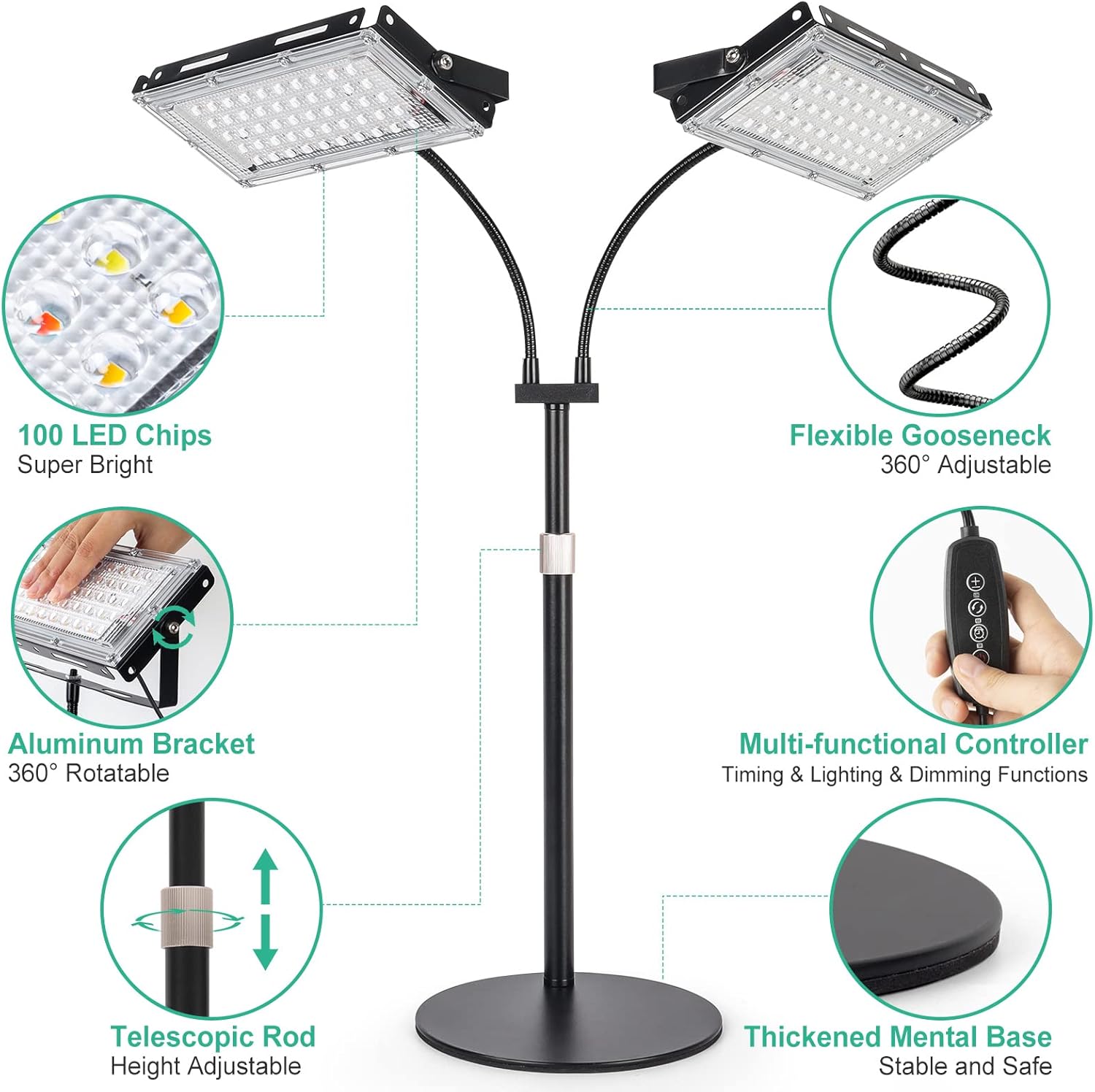
Image: Detailed view of the grow light's features, highlighting the flexible goosenecks, height-adjustable telescopic rod, and stable base.
6.2. Lighting Modes and Brightness Levels
The grow light features a multi-functional controller to manage lighting settings:
- 3 Lighting Modes: You can control each light head individually. Options include:
- One light head on
- The other light head on
- Both light heads on
- 6 Brightness Levels: Adjust the light intensity from 10% to 100% (10%-20%-40%-60%-80%-100%) to suit different plant growth stages and light requirements.
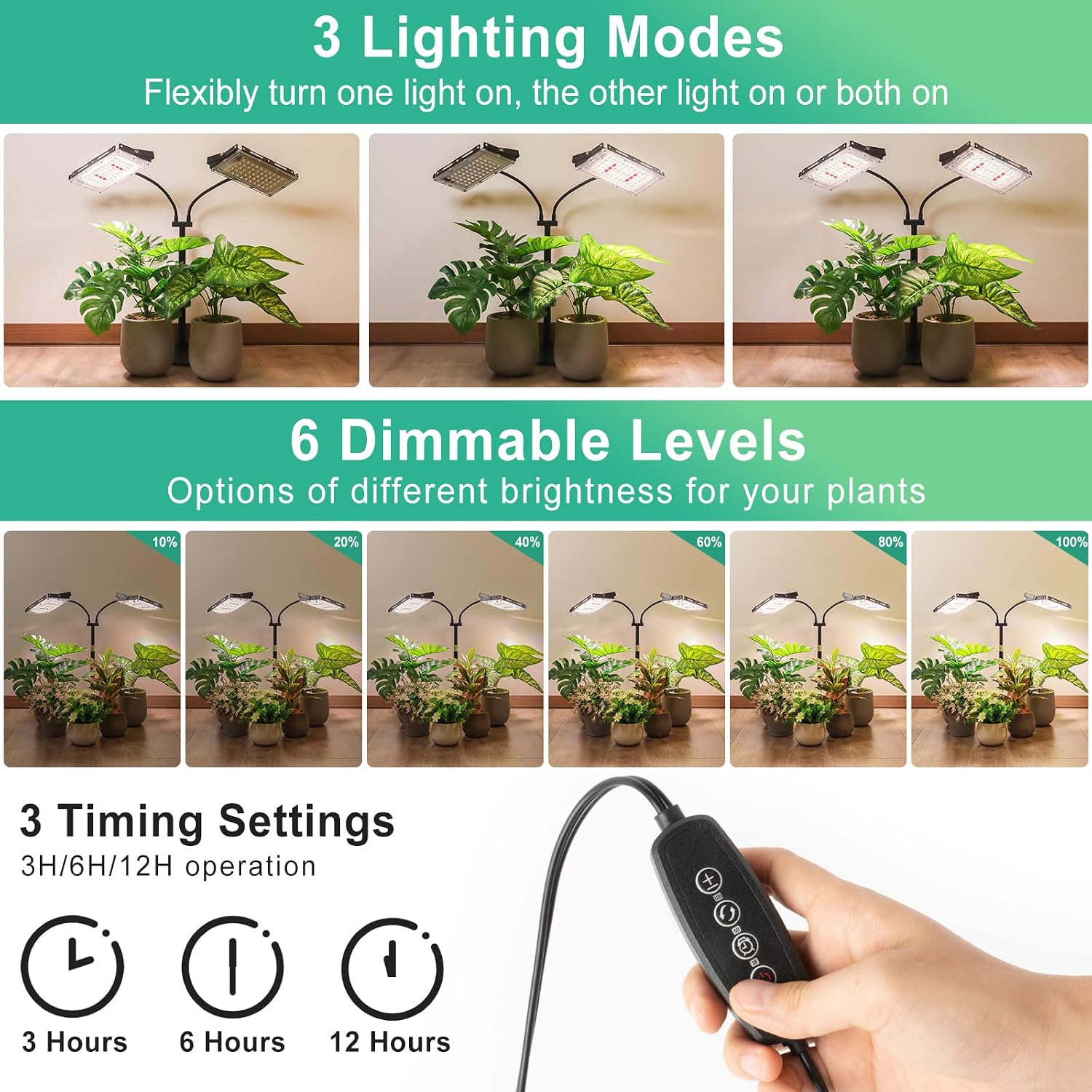
Image: Visual representation of the three distinct lighting modes and six adjustable brightness levels available on the grow light.
6.3. Automatic Timer Function
The grow light includes a 24-hour auto on/off cycle timer:
- Timer Settings: Choose from 3H (3 hours), 6H (6 hours), or 12H (12 hours) operation.
- Activation: Press the desired time button (3H, 6H, or 12H) on the controller. The light will automatically turn on for the set duration and then turn off. It will then repeat this cycle daily at the same time.
7. Maintenance
- Cleaning: Gently wipe the LED panels and other surfaces with a soft, dry cloth. Do not use liquid cleaners or abrasive materials.
- Storage: If storing the grow light for an extended period, unplug it, disassemble if necessary, and store in a cool, dry place away from direct sunlight.
- Cable Inspection: Periodically check the power cord and adapter for any signs of damage. If damage is found, discontinue use and contact customer support.
8. Troubleshooting
| Problem | Possible Cause | Solution |
|---|---|---|
| Light does not turn on. | Power cord not properly connected, power outlet malfunction, or faulty power adapter. |
|
| Lights are dim or flickering. | Incorrect brightness setting, power supply issue, or LED degradation. |
|
| Timer function is not working correctly. | Incorrect timer setting or power interruption. |
|
9. Specifications
| Feature | Detail |
|---|---|
| Brand | LBW |
| Model Number | dual head desk grow light |
| Color | 2 Head with Base |
| Shape | Rectangular |
| Material | Aluminum |
| Finish Type | Powder Coated |
| Light Source Type | LED |
| Power Source | Corded Electric |
| Voltage | 12 Volts |
| Light Output Maximum | 4500 Lumens |
| Maximum Compatible Light Source Wattage | 36 Watts |
| Light Source Wattage | 36 Watts |
| Mounting Type | Table Mount |
| Special Features | Adjustable Brightness, Multiple Modes, Auto Timer |
| Number of Light Sources | 100 LEDs |
| Item Weight | 3.3 Pounds (1.5 kg) |
| Item Dimensions (L x W x H) | 3.94"L x 3.94"W x 3.94"H (10cm x 10cm x 10cm) - Note: This dimension seems to be for the base or packaging, not the full assembled product. |
| Adjustable Height Range | 15-30 inches (38-76 cm) |
10. Warranty and Support
This product comes with a standard manufacturer's warranty. For specific warranty details, claims, or technical support, please refer to the warranty card included in your package or contact LBW customer service directly through their official website or the retailer where the product was purchased.
For further assistance, you may visit the LBW Store on Amazon.