1. Introduction
Thank you for choosing the BYINTEK P19 Mini 3D DLP Projector. This portable device offers a high-quality viewing experience with its advanced DLP technology, Android 9.0 operating system, and built-in battery. This manual provides essential information for setting up, operating, and maintaining your projector to ensure optimal performance and longevity.

The BYINTEK P19 Mini Projector in an operational setting, demonstrating its ability to project clear images for entertainment.
2. Safety Information
- Read all instructions before using the projector.
- Do not block the ventilation openings. Ensure adequate airflow around the projector.
- Use only the power adapter provided with the device.
- Avoid direct exposure to the projector lens light, as it can be harmful to the eyes.
- Keep the projector away from water, moisture, and extreme temperatures.
- Do not attempt to disassemble or repair the projector yourself. Contact customer support for assistance.
3. Package Contents
Please check the package contents upon unboxing to ensure all items are present:
- 1 x BYINTEK P19 Projector
- 1 x IR Remote Control
- 1 x Power Adapter (DC 12V/2A)
- 1 x USB Charging Cable (supports ≥ DC 5V 3A input)
- 1 x User Manual
- 1 x Storage Bag

The standard package includes the P19 projector, a storage bag, user manual, remote control, USB charging cable, and a DC 12V/2A power adapter.
4. Product Overview
4.1 Projector Components

The BYINTEK P19 Mini Projector, a compact device capable of projecting large images, shown here displaying a high-definition movie.
4.2 Ports and Connections

The projector's connectivity options, including USB 3.0, HD-in, DC-in, and Audio-out, supporting connections to devices like PS4, U Disk, GamePad, Mouse, HD DVD/Network HD player, Smartphone/tablet/laptop, Desktop Computer, and external Speakers.
- Focus: Manual focus adjustment wheel.
- Keypad: Control buttons on the top panel.
- IR Receiver: For remote control signals.
- USB 3.0: For connecting USB drives or other peripherals.
- DC-in (12V 2A): Power input port.
- HD-in: HDMI input for external video sources.
- Audio-out: 3.5mm jack for external speakers or headphones.
5. Key Features
- Mini DLP Projector: Advanced DLP technology for clear and vibrant images.
- Built-in Battery: 7800 mAh rechargeable lithium battery providing 1.5 to 2.5 hours of operation.
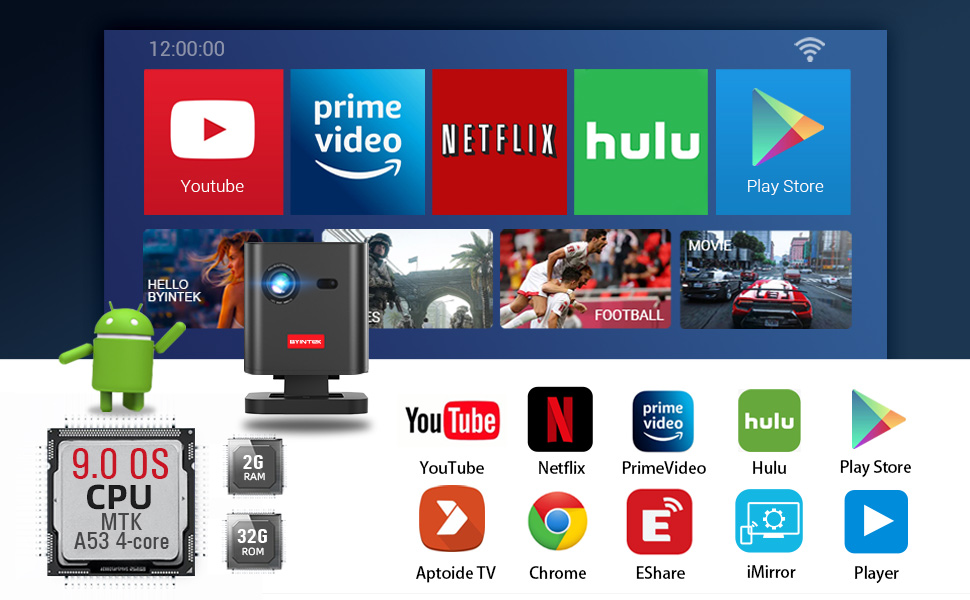
- Android 9.0 OS: Integrated smart operating system with pre-installed media apps and Play Store access.
- Wireless Display: Supports screen mirroring for smartphones, tablets, and PCs.
- Hi-Fi Stereo Speaker: Dual 3W speakers for integrated audio.
- 6D Keystone Correction: Auto/Manual vertical and corner keystone adjustments.
- 3D Support: DLP-Link 3D compatibility for immersive viewing.
- Connectivity: 2.4G/5G dual-band Wi-Fi, USB, and HDMI inputs.
- Resolution: Native 1280x720, supports up to 4K input.
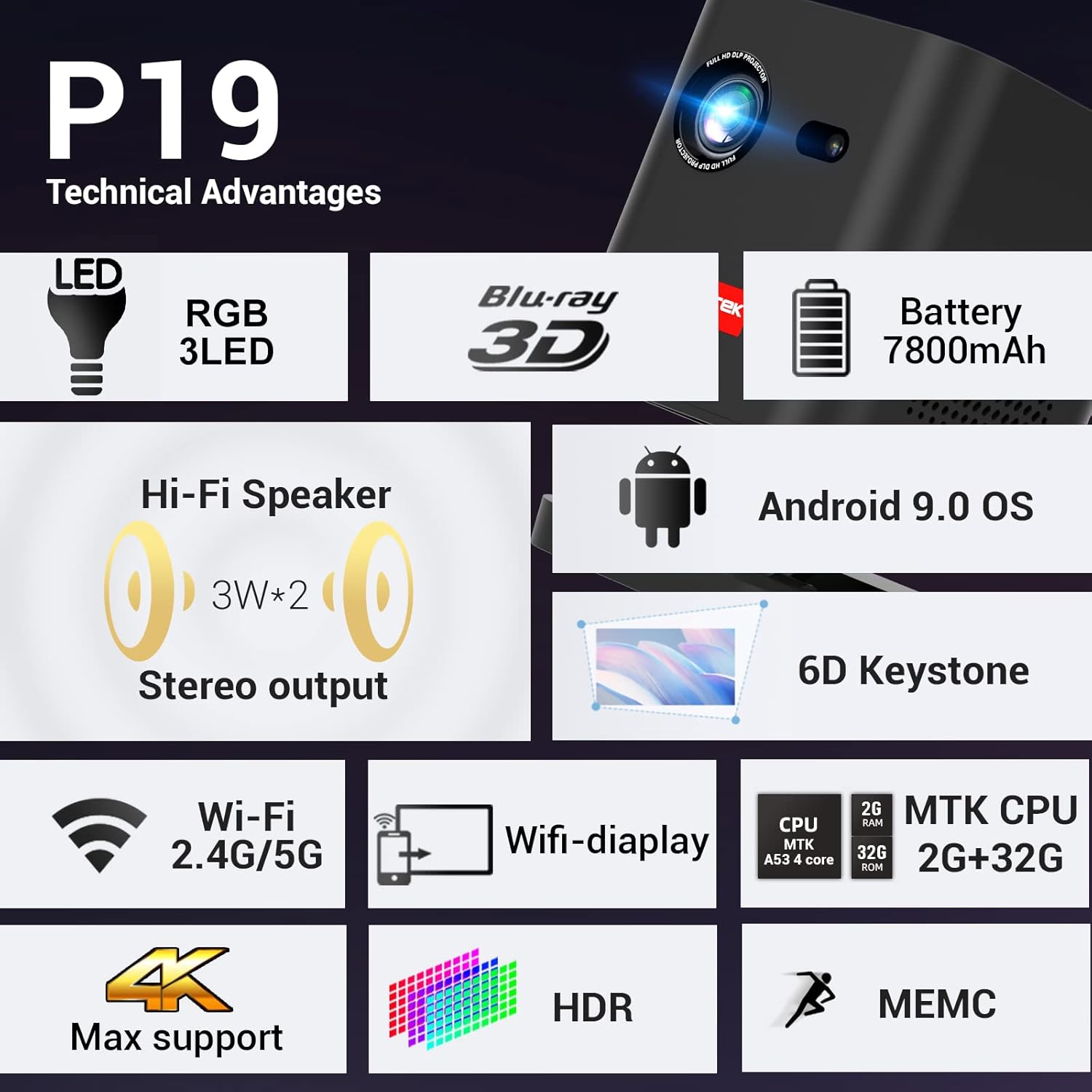
A summary of the P19's technical features, including RGB 3LED, 7800mAh battery, Android 9.0 OS, 6D Keystone, 2.4G/5G Wi-Fi, 4K Max support, HDR, and MEMC.
6. Setup
6.1 Powering On/Off
- Connect the power adapter to the DC-in port of the projector and then to a power outlet.
- Press and hold the power button on the projector or remote control to turn it on.
- To turn off, press and hold the power button again until the projector shuts down.
6.2 Placement
The BYINTEK P19 is designed for flexible placement, supporting both tabletop and tripod mount configurations. Ensure the projector is placed on a stable surface or securely mounted.
The projector's portability and long battery life make it ideal for outdoor entertainment, as shown by friends watching a movie under the stars.
6.3 Focus Adjustment
Rotate the focus adjustment wheel located on the side of the projector until the projected image appears sharp and clear on the screen.
6.4 Keystone Correction
The P19 features 6D Keystone correction to adjust image distortion. This includes:
- Auto/Manual Vertical Keystone: Corrects vertical distortion when the projector is tilted up or down.
- Manual Corner Keystone: Allows adjustment of each corner of the image independently to achieve a perfect rectangular shape.
Access these settings through the projector's menu system.

The 6D Keystone correction system allows for both manual corner and auto/manual vertical adjustments to achieve a perfectly rectangular image from various projection angles.

Visual representation of the projector's keystone correction, showing how it can rectify distorted images caused by angled projection.
7. Operating Instructions
7.1 Android 9.0 OS Navigation
The BYINTEK P19 runs on Android 9.0 OS, providing a smart TV-like experience. Use the remote control to navigate the interface:
- Directional Buttons: Move cursor or selection.
- OK Button: Confirm selection.
- Back Button: Return to the previous screen.
- Home Button: Go to the main home screen.
Pre-installed apps include YouTube, Netflix, Prime Video, and Hulu. You can download more applications from the Play Store.

The projector's Android 9.0 OS comes pre-loaded with popular apps and allows access to the Play Store for additional downloads, enhancing its smart capabilities.
7.2 Wireless Display (Screen Mirroring)
The projector supports wireless display functionality, allowing you to mirror content from your smartphone, tablet, or PC. Refer to the projector's on-screen instructions or the EShare app for detailed setup.
7.3 Connecting External Devices
Use the available ports to connect various devices:
- HDMI (HD-in): Connect devices like PCs, PS4, Fire TV Stick, or Blu-ray DVD players.
- USB 3.0: Plug in USB drives for media playback, or connect a mouse/gamepad.
- Audio-out: Connect external speakers or headphones for enhanced audio.
7.4 Audio Output
The P19 is equipped with powerful dual 3W Hi-Fi stereo speakers for a complete audio-visual experience. For private listening or higher fidelity, connect external audio devices via the Audio-out port.

The projector features dual 3W Hi-Fi stereo speakers, providing integrated audio for an enhanced viewing experience.
7.5 3D Functionality
The projector supports DLP-Link 3D, allowing you to watch 3D content from compatible sources (e.g., Blu-ray 3D) using active shutter 3D glasses. Ensure your 3D content is in SBS (Side-by-Side) or TNB (Top-and-Bottom) format.

An illustration of the projector's DLP-Link 3D capability, allowing users to experience immersive 3D content from sources like Blu-ray 3D.
8. Maintenance
- Cleaning the Lens: Use a soft, lint-free cloth specifically designed for optical lenses. Do not use abrasive cleaners or cloths.
- Cleaning the Casing: Wipe the projector's exterior with a soft, dry cloth. For stubborn marks, a slightly damp cloth can be used, followed by a dry one.
- Storage: When not in use for extended periods, store the projector in a cool, dry place, preferably in its original packaging or a protective bag, away from dust and direct sunlight.
- Ventilation: Regularly check that the ventilation openings are clear of dust and debris to prevent overheating.
9. Troubleshooting
- No Image / Dim Image:
- Ensure the projector is powered on and connected correctly.
- Adjust the focus wheel for clarity.
- Check the input source selection.
- Ensure the room is sufficiently dark for optimal brightness.
- Distorted Image:
- Use the keystone correction settings (vertical and corner) to adjust the image shape.
- Ensure the projector is placed perpendicular to the screen as much as possible.
- No Internet Connection:
- Verify your Wi-Fi network is active and working.
- Check Wi-Fi settings on the projector to ensure it's connected to the correct network.
- Restart the projector and your Wi-Fi router.
- 3D Playback Issues:
- Ensure your 3D content is in a compatible format (SBS or TNB).
- Verify your 3D glasses are charged and properly synced with the projector.
- Check the 3D settings in the projector's menu.
- Remote Control Not Working:
- Replace the batteries in the remote control.
- Ensure there are no obstructions between the remote and the projector's IR receiver.
10. Specifications
| Feature | Specification |
|---|---|
| Brand | BYINTEK |
| Model | P19 |
| Display Technology | DLP |
| Native Resolution | 1280 x 720 |
| Max Supported Resolution | 3840 x 2160 (4K) |
| Image Contrast Ratio | 2500:1 |
| Operating System | Android 9.0 OS |
| RAM | 2GB DDR3 |
| ROM | 32GB eMMC |
| Wi-Fi | 2.4G/5G Dual Band |
| Battery | 7800 mAh (1.5 to 2.5 hours battery life) |
| Speakers | Dual 3W Hi-Fi Stereo |
| Keystone Correction | 6D (Auto/Manual Vertical, Manual Corner) |
| Connectivity | USB, HDMI, Wi-Fi |
| Compatible Devices | PC, PS4, Fire TV Stick, Blu-ray DVD, U-disk, Air Mouse, Gamepad |
| Voltage | 12 Volts |
| Wattage | 82 Watts |
| Item Weight | 1 kg 400 g |
| Package Dimensions | 26.6 x 21.2 x 16.4 cm |
11. Warranty and Support
The BYINTEK P19 Mini 3D DLP Projector comes with a 1-year warranty from the date of purchase, covering manufacturing defects.
For technical support, warranty claims, or any inquiries, please contact:
- Manufacturer: BYINTEK
- Phone Number: +91 8885241706
- Email: care@justshop24x7.com
Please have your purchase receipt and product model number (P19) ready when contacting support.


