
MEGATEK PD-1256
MEGATEK 12.5" Portable DVD Player User Manual
Model: PD-1256
Introduction
Thank you for purchasing the MEGATEK 12.5" Portable DVD Player. This manual provides essential information for setting up, operating, and maintaining your device. Please read it thoroughly before use to ensure optimal performance and longevity of your player.
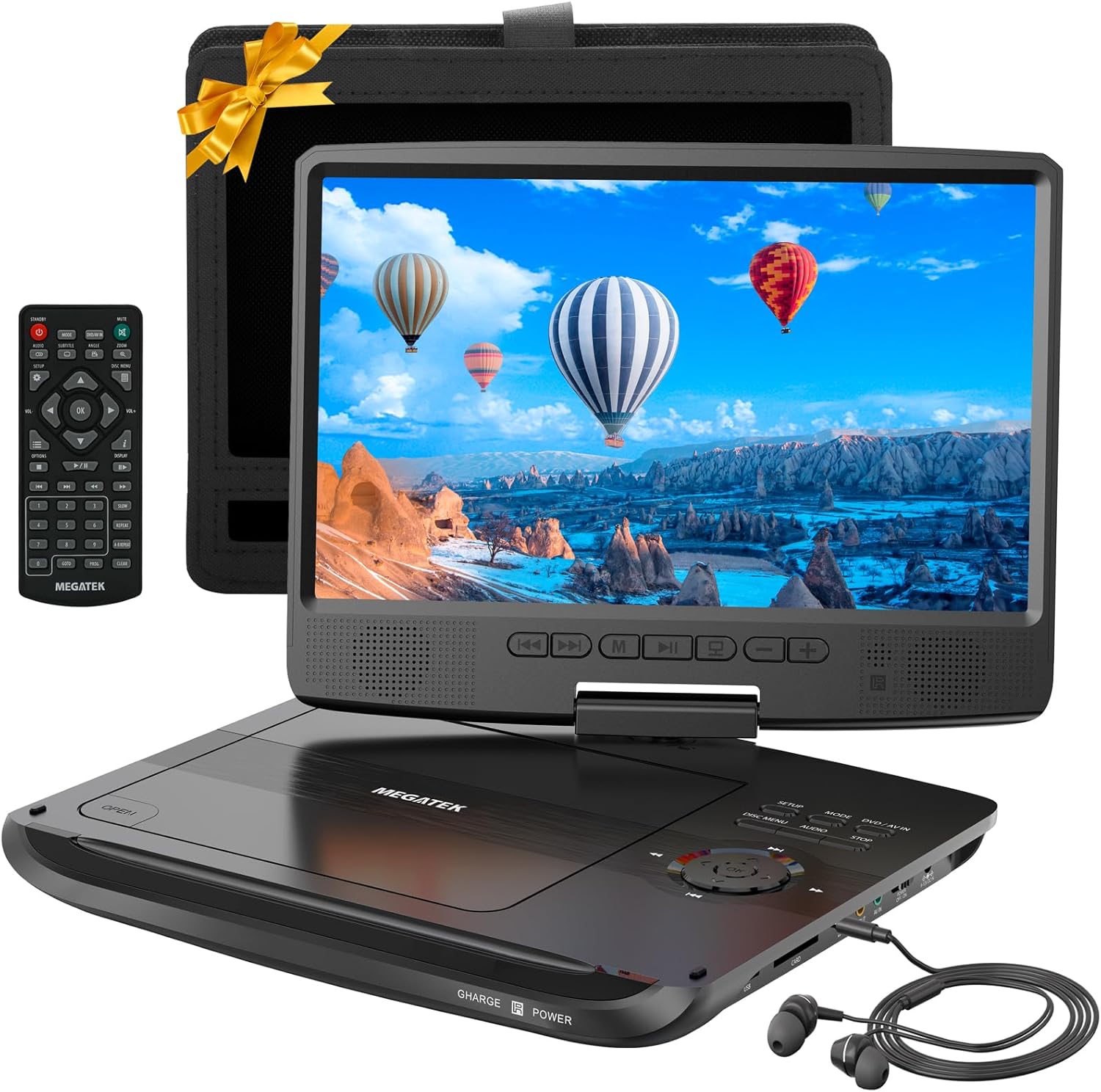
Image: The Megatek 12.5" Portable DVD Player, showcasing the main unit, remote control, wired headphones, and a car headrest mounting pouch. The screen displays a vibrant landscape with hot air balloons.
What's in the Box

Image: A visual representation of all items included in the product packaging, such as the portable DVD player, remote control, headphones, AV cables, AC power adapter, car adapter, and user manual.
Your MEGATEK Portable DVD Player package should contain the following items:
- Portable DVD Player
- Wired Headphones
- Remote Control (2 x AAA Batteries Included)
- AC Power Adapter
- Car Mounting Pouch
- AV Cables
- Car Adapter
- User Manual
Please check all contents upon unboxing. If any items are missing or damaged, contact customer support.
Product Features
The MEGATEK Portable DVD Player is designed for versatile entertainment on the go. Key features include:
High-Definition Swivel Screen

Image: The player's 10.5-inch HD screen, highlighting its 1024x600 pixel resolution and flexible 270° swivel and 180° flip features for optimal viewing angles.
Experience brilliant HD viewing with the 10.5" large LCD screen, delivering vibrant color reproduction and crystal-clear images at a resolution of 1024 x 600 pixels. The screen features a 270° swivel and 180° flip, providing exceptional viewing flexibility for various scenarios.
Multi-Format and Multi-Region Playback

Image: A graphic illustrating the player's compatibility with multiple disc and file formats, including DVD-Video, CD, MP3, WMA, JPEG, and various video file types. It also indicates multi-region DVD support.
The player supports a wide range of formats including DVD-Video, DVD+R, DVD+RW, DVD-R, DVD-RW, Video-CD (VCD), Audio-CD, CD-R, CD-RW, MP3-CD, and JPEG Discs. It is also a multi-region DVD player, capable of playing DVDs from different regions or countries. Additionally, it supports playback of MPEG2/AVI movies, MP3/WMA music, or JPEG photos from USB drives or SD/MMC cards (up to 128GB; FAT32 only, NTFS not supported).

Image: A diagram highlighting the player's versatility as a DVD, CD, USB, and SD card player, also supporting MP3 and MP4 playback, and functioning as an HD monitor.
Enhanced Audio Experience

Image: A user enjoying content on the portable DVD player with the included wired earphones, demonstrating the dual audio output feature for private listening.
The dual built-in speakers provide clear and relatively loud stereo sound. For a private and immersive listening experience, use the supplied wired earbuds.
Extended Battery Life

Image: A family enjoying the portable DVD player on a beach, emphasizing the upgraded 3000mAh rechargeable battery that provides up to 6 hours of playtime.
The upgraded built-in rechargeable battery, with its advanced technology and real 3000mAh high capacity, provides up to 6 hours of playtime for your favorite videos, movies, and TV shows.
Convenient Controls and Connectivity

Image: A hand interacting with the control keys on the display panel of the portable DVD player, which is mounted on a car headrest, demonstrating its ease of use in this setup.
The uniquely designed control keys on the display panel allow for convenient operation even when the player is mounted to a car headrest. The included remote control offers full function controls. You can also turn off the screen to save power when syncing to a big screen or listening to music.

Image: The portable DVD player connected to a television using AV cables, illustrating its capability to transfer the screen content to a larger display for an enhanced viewing experience.
The player features comprehensive ports including USB, SD card slot, headphone jack, AV OUT, and AV IN, allowing for versatile connectivity options.
Video: An official product video demonstrating the key features of the MEGATEK PD-1256 10.5 inch Portable DVD Player, including its slim design, lightweight nature, 270° swivel and 180° flip screen, DVD/CD playback, multi-format support, built-in stereo sound, 10.5" HD display, car mounting capability, display panel controls, 6 hours of playtime, and comprehensive ports. Duration: 0:39.
Setup Guide
Charging the Battery
Before first use, fully charge the player's built-in battery. Connect the AC power adapter to the DC IN port on the player and plug it into a wall outlet. The charging indicator light will illuminate. Once fully charged, the light may change color or turn off, depending on the model. A full charge provides up to 6 hours of playtime.
Inserting a Disc
- Gently open the disc cover by pressing the OPEN button.
- Place the DVD or CD disc onto the spindle with the label side facing up.
- Press down gently on the center of the disc until it clicks into place.
- Close the disc cover firmly until it latches.
Using USB/SD Card
Insert your USB flash drive into the USB port or your SD/MMC card into the CARD slot. Ensure the storage device is formatted to FAT32. The player will automatically detect the media and display the content for selection.
Car Mounting
To mount the player in a car, insert it into the provided car mounting pouch. Secure the pouch to the car headrest using the adjustable straps. The display panel controls remain accessible for easy operation.
Operating Instructions
Basic Playback
- Turn on the player using the POWER ON/OFF switch.
- Insert your desired media (DVD, CD, USB, or SD card).
- The player will automatically begin playback or display a menu for selection.
- Use the PLAY/PAUSE, STOP, NEXT, and PREVIOUS buttons on the player or remote control to manage playback.
- Adjust volume using the VOL+ and VOL- buttons.
Screen Orientation
The screen can swivel 270° and flip 180°. Gently adjust the screen to your preferred viewing angle. Ensure not to force the screen beyond its designed range of motion.
Connecting to a TV
To view content on a larger screen, connect the player to a TV using the provided AV cables. Connect the AV OUT port on the player to the AV IN ports on your TV. Select the correct input source on your TV. You can turn off the player's screen while connected to the TV to conserve battery life.
Parental Control
The player includes a parental control feature. Refer to the detailed instructions in the full user manual for setting up and managing parental restrictions on DVD playback.
Maintenance
Cleaning the Player
- Use a soft, dry cloth to clean the exterior of the player.
- For the screen, use a soft, lint-free cloth specifically designed for electronics screens. Do not use abrasive cleaners or solvents.
- Keep the disc compartment free of dust and debris.
Battery Care
- To prolong battery life, avoid fully discharging the battery frequently.
- Charge the player regularly, even if not in use, to maintain battery health.
- Store the player in a cool, dry place when not in use for extended periods.
Troubleshooting
| Problem | Possible Cause | Solution |
|---|---|---|
| Player does not turn on. | Battery is drained; Power switch is off. | Connect to AC power adapter and charge; Ensure power switch is in the ON position. |
| No disc playback. | Disc inserted incorrectly; Disc is dirty or scratched; Unsupported disc format. | Reinsert disc correctly; Clean disc with a soft cloth; Check if disc format is supported. |
| No sound. | Volume too low; Headphones not connected properly; Mute function active. | Increase volume; Reconnect headphones; Deactivate mute. |
| USB/SD card not recognized. | Incorrect format (not FAT32); Card/drive not inserted fully. | Ensure device is FAT32 formatted; Reinsert firmly. |
For further assistance, please refer to the "Warranty and Support" section.
Specifications
- Product Dimensions: 9.84 x 7.87 x 1.57 inches
- Item Weight: 2.09 pounds
- Model Number: PD-1256
- Batteries: 1 Lithium Polymer battery (included)
- Media Type: CD, CD-R, CD-RW, MP3, WMA, JPEG, DVD, DVD-R, DVD+R, DVD-RW, DVD+RW, VCD, VOB, AVI
- Color: Black
- Screen Size: 10.5 Inches
- Display Type: LCD
- Screen Resolution: 1024 x 600 pixels
- Battery Playtime: Up to 6 hours
Warranty and Support
MEGATEK is committed to providing high-quality products and excellent customer service.
- Customer Service: 24/7 support available.
- Exchange or Return: 12 Months exchange or return policy.
- Technical Support: Lifetime technical support.
For any inquiries, technical assistance, or warranty claims, please contact MEGATEK customer support through the official website or the contact information provided in your product packaging.
Related documentsPD-1256


Ask a question about this manual
Ask about setup, troubleshooting, compatibility, parts, safety, or missing instructions. Manuals+ will review the question and use this page’s manual context to help answer it.