1. Introduction
This user manual provides detailed instructions for the setup, operation, maintenance, and troubleshooting of your Dell UltraSharp 24" Hub Monitor (U2424HE). This monitor is designed to deliver exceptional visual clarity and versatile connectivity for various computing needs. Please read this manual thoroughly before using your monitor to ensure proper installation and optimal performance.

Figure 1.1: Front view of the Dell UltraSharp 24" Hub Monitor (U2424HE). This image shows the monitor from the front, displaying a vibrant landscape with mountains and a lake, highlighting its visual capabilities.
3. Package Contents
Verify that all components are present in your package. If any items are missing or damaged, contact Dell support.
- Dell UltraSharp 24" Hub Monitor (U2424HE)
- Stand Riser
- Stand Base
- Power Cable
- USB-C to USB-C Cable
- DisplayPort to DisplayPort Cable
- Quick Setup Guide
- Safety and Regulatory Information
5. Operating Instructions
5.1 Power On/Off
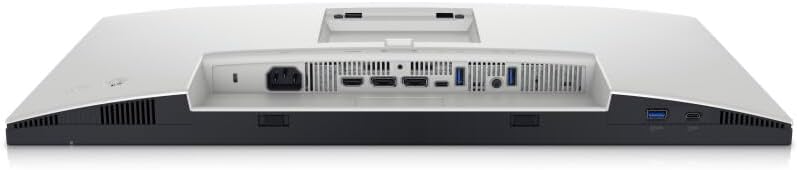
Press the power button located on the bottom right side of the monitor to turn it on or off. The power LED will indicate the monitor's status.
5.2 Input Source Selection
The monitor can automatically detect the active input source. To manually select an input:
- Press any button on the monitor (except the power button) to bring up the On-Screen Display (OSD) menu.
- Navigate to the "Input Source" option.
- Select your desired input (e.g., HDMI, DisplayPort, USB-C).
5.3 On-Screen Display (OSD) Menu
The OSD menu allows you to adjust various monitor settings:
- Brightness/Contrast: Adjust the display's luminance and contrast levels.
- Color: Select color presets, adjust RGB values, or set color temperature.
- Display: Adjust aspect ratio, sharpness, and response time.
- Menu: Change OSD language, transparency, and timeout.
- Personalize: Customize shortcut keys.
- Others: Access DDC/CI, LCD conditioning, and factory reset options.

Figure 5.1: The Dell UltraSharp 24" Hub Monitor displaying a vibrant dashboard. This image demonstrates the monitor's ability to render detailed graphics and data, suitable for professional use.
5.4 Advanced Features
- KVM Switch Functionality: The monitor features a built-in KVM (Keyboard, Video, Mouse) switch, allowing you to control two different computers using a single keyboard and mouse connected to the monitor's USB ports. To use this, connect both computers to the monitor (one via USB-C, the other via USB-B upstream + video input) and switch between them via the OSD menu.
- Ambient Light Sensor: The integrated ambient light sensor automatically adjusts the screen brightness based on the surrounding light conditions, optimizing viewing comfort and energy efficiency. This feature can be enabled or disabled in the OSD menu.
- ComfortView Plus: This hardware-based low blue light solution reduces harmful blue light emissions without compromising color accuracy. It is always-on and does not require software installation.
- USB Power Delivery: The USB-C port supports power delivery, allowing you to charge compatible laptops and devices directly through the monitor while receiving video and data.
6. Maintenance
6.1 Cleaning the Monitor
- Always unplug the monitor from the electrical outlet before cleaning.
- Use a soft, lint-free cloth lightly dampened with water or a non-abrasive screen cleaner.
- Do not spray cleaner directly onto the screen.
- Avoid using benzene, thinner, ammonia, or abrasive cleaners.
6.2 Storage
When storing the monitor for an extended period, ensure it is powered off and disconnected from all cables. Store it in a cool, dry place, preferably in its original packaging to protect it from dust and physical damage.