
Berserker 65H
Berserker 1700W SDS-Max Demolition Jack Hammer 65H Instruction Manual
Model: 65H | Brand: Berserker
1. Introduction
Thank you for choosing the Berserker 1700W SDS-Max Demolition Jack Hammer 65H. This manual provides essential information for the safe and efficient operation, maintenance, and troubleshooting of your new tool. Please read this manual thoroughly before first use and keep it for future reference.
2. Important Safety Instructions
WARNING: Read all safety warnings, instructions, illustrations, and specifications provided with this power tool. Failure to follow all instructions listed below may result in electric shock, fire, and/or serious injury.
2.1 General Power Tool Safety
- Work Area Safety: Keep work area clean and well-lit. Cluttered or dark areas invite accidents. Do not operate power tools in explosive atmospheres, such as in the presence of flammable liquids, gases, or dust.
- Electrical Safety: Power tool plugs must match the outlet. Never modify the plug in any way. Do not use any adapter plugs with earthed (grounded) power tools. Avoid body contact with earthed or grounded surfaces.
- Personal Safety: Always wear eye protection. Use hearing protection when operating for extended periods. Wear a dust mask if operating in dusty conditions. Dress properly; avoid loose clothing or jewelry.
- Tool Use and Care: Do not force the power tool. Use the correct power tool for your application. Disconnect the plug from the power source before making any adjustments, changing accessories, or storing power tools.
- Service: Have your power tool serviced by a qualified repair person using only identical replacement parts. This will ensure that the safety of the power tool is maintained.
2.2 Specific Demolition Hammer Safety
- Hold power tool by insulated gripping surfaces when performing an operation where the cutting accessory may contact hidden wiring or its own cord.
- Always ensure the chisel is securely locked in place before operation.
- Be aware of falling debris when working overhead or on walls.
- Maintain a firm grip on the tool, especially during startup and when breaking through material.
3. Product Overview and Components
Familiarize yourself with the parts of your Berserker Demolition Jack Hammer 65H.
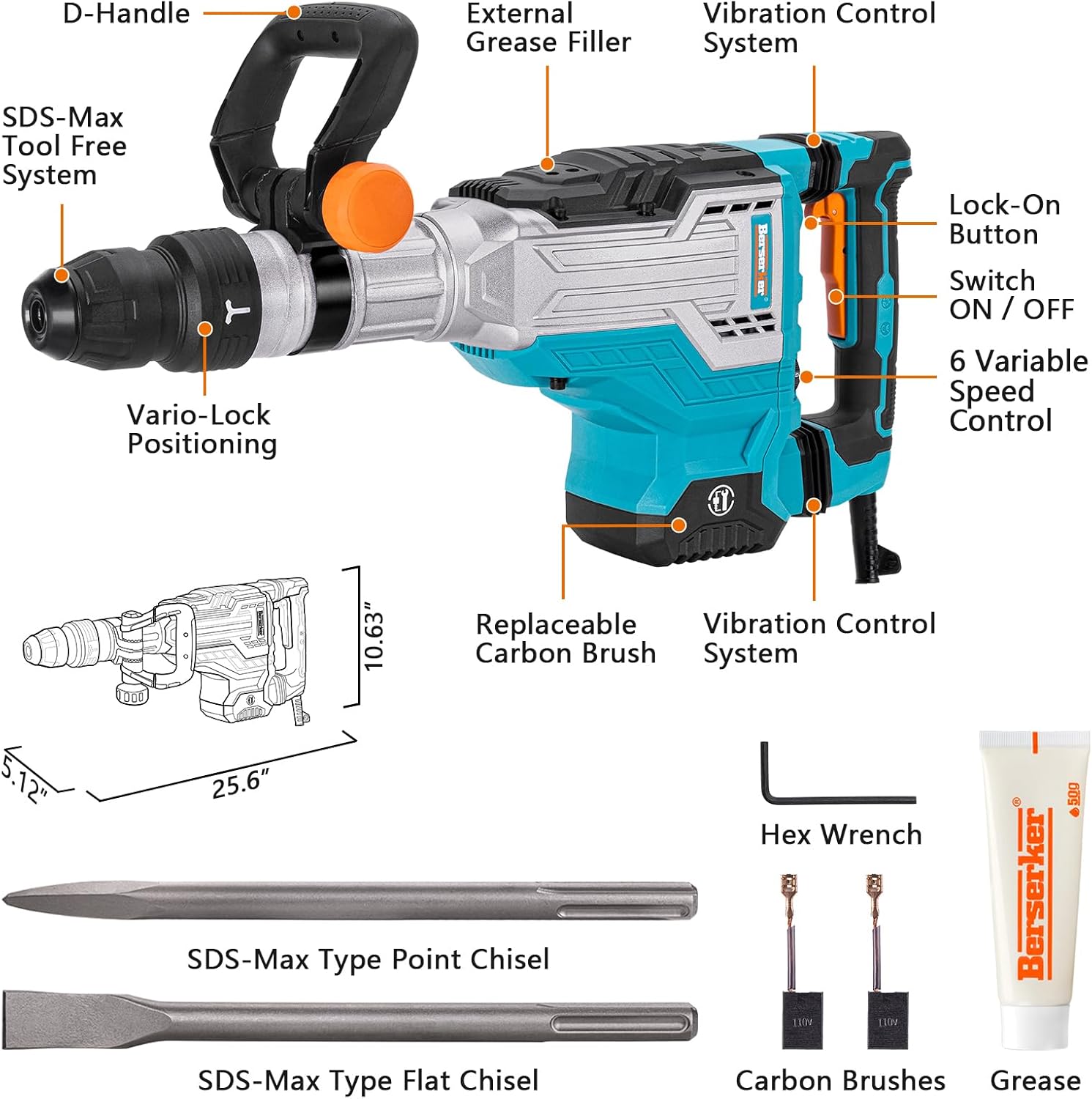
Figure 3.1: Overview of the Berserker 65H Demolition Jack Hammer and included accessories. Key components include the D-Handle, SDS-Max Tool Free System, External Grease Filler, Vibration Control System, Lock-On Button, ON/OFF Switch, 6 Variable Speed Control, Replaceable Carbon Brush, Hex Wrench, SDS-Max Point Chisel, SDS-Max Flat Chisel, Carbon Brushes, and Grease.
- D-Handle: Provides a secure grip and can be adjusted for optimal comfort and control.
- SDS-Max Tool Free System: Allows for quick and easy bit changes without additional tools.
- External Grease Filler: For convenient lubrication of the hammer mechanism.
- Vibration Control System: Designed to reduce vibration and user fatigue.
- Lock-On Button: For continuous operation without holding the trigger.
- Switch ON/OFF: Main power switch.
- 6 Variable Speed Control: Adjusts the impact rate (BPM) for different applications.
- Replaceable Carbon Brush: Essential wear part for motor longevity.
- SDS-Max Point Chisel: For general breaking and chipping.
- SDS-Max Flat Chisel: For wider breaking and surface removal.
- Carrying Case: For storage and transport.
- Grease: For lubrication.
- Wrench: For maintenance tasks.
- Replaceable Carbon Brush: Spare brushes for maintenance.
4. Setup and Assembly
4.1 Attaching the D-Handle
- Loosen the D-handle clamp by turning the orange knob counter-clockwise.
- Position the D-handle to your desired angle and rotation (360° on main axis, 180° on secondary axis).
- Tighten the orange knob clockwise until the D-handle is securely fastened.
4.2 Installing SDS-Max Chisels
- Ensure the tool is unplugged from the power source.
- Clean the shank of the SDS-Max chisel and apply a thin layer of grease.
- Pull back the SDS-Max tool-free chuck collar.
- Insert the chisel into the chuck, rotating it slightly until it clicks into place.
- Release the chuck collar. Pull on the chisel to ensure it is securely locked. The chisel should have a small amount of play, which is normal for SDS-Max systems.

Figure 4.1: The Berserker 65H Demolition Jack Hammer can be used horizontally or vertically for concrete and wall removal applications.
5. Operating Instructions
5.1 Powering On and Off
- To turn on the tool, press the ON/OFF switch.
- To turn off the tool, release the ON/OFF switch.
- For continuous operation, press the ON/OFF switch and then press the Lock-On button. To release, press the ON/OFF switch again.
5.2 Adjusting Impact Speed
The Berserker 65H features a 6-level variable speed control, allowing you to adjust the impact rate (BPM) from 200 to 2,100 BPM to suit different materials and tasks.
- Locate the 6-level speed control dial on the side of the tool.
- Rotate the dial to select the desired impact speed. Lower settings are suitable for delicate work, while higher settings are for heavy-duty demolition.

Figure 5.1: The 6-level variable speed control dial allows precise adjustment of the impact rate.
5.3 Demolition Techniques
- Chipping: Hold the tool firmly and apply moderate pressure. Allow the tool to do the work.
- Breaking: For larger sections, start by creating pilot holes or cracks, then work to expand them.
- Trenching: Guide the chisel along the desired line, maintaining a consistent angle.

Figure 5.2: The 33.2 ft.lbs. (45 Joules) impact energy makes heavy-duty slotting, demolition, chipping, and breaking work efficient.

Figure 5.3: The integrated vibration control system effectively reduces vibration and operator fatigue during prolonged use.
6. Maintenance
Regular maintenance ensures the longevity and optimal performance of your demolition hammer.
6.1 Lubrication (Greasing)
The hammer mechanism requires periodic lubrication. Use the provided grease or a suitable equivalent.
- Unplug the tool from the power source.
- Locate the external grease filler cap.
- Unscrew the cap and apply a small amount of grease into the opening.
- Replace the cap and tighten securely.
6.2 Carbon Brush Replacement
Carbon brushes are wear items and need to be replaced when worn down to approximately 1/4 inch (6mm).
- Unplug the tool from the power source.
- Locate the carbon brush caps on the sides of the motor housing.
- Using a screwdriver or the provided wrench, unscrew the carbon brush caps.
- Remove the old carbon brushes.
- Insert new carbon brushes, ensuring they are seated correctly.
- Replace the carbon brush caps and tighten securely.
Figure 6.1: The location of the replaceable carbon brush is indicated in the product overview diagram.
6.3 Cleaning and Storage
- After each use, clean the tool with a dry cloth to remove dust and debris.
- Store the tool in its carrying case in a dry, secure location, out of reach of children.
7. Troubleshooting
Before attempting any repairs, always unplug the tool from the power source.
| Problem | Possible Cause | Solution |
|---|---|---|
| Tool does not start | No power supply; Faulty switch; Worn carbon brushes | Check power connection; Test switch; Replace carbon brushes |
| Reduced impact power | Insufficient lubrication; Worn chisel; Worn carbon brushes | Apply grease; Replace chisel; Replace carbon brushes |
| Excessive vibration | Loose components; Damaged internal parts | Check for loose parts; Contact customer support for inspection |
| Overheating | Prolonged heavy use; Blocked ventilation slots | Allow tool to cool down; Clean ventilation slots |
8. Technical Specifications
| Feature | Specification |
|---|---|
| Brand | Berserker |
| Model Number | 65H (PGJ-DMA5-44) |
| Power Source | Corded Electric |
| Voltage | 120 Volts (AC) |
| Amperage | 14 Amps |
| Maximum Power | 1700 Watts |
| Impact Energy | 45 Joules (33.2 ft.lbs.) |
| Impact Rate (BPM) | 200-2100 BPM (Variable Speed) |
| Chuck Type | SDS-Max Tool Free System |
| Maximum Chuck Size | 1.56 Inches |
| Weight | 25 Pounds |
| Dimensions (L x W x H) | 25.6"L x 5.12"W x 10.63"H |
| Material | Metal, Plastic |
| Included Components | 1×Demolition Jack Hammer; 1×SDS-Max Point Chisel; 1×SDS-Max Flat Chisel; 1×Carrying Case; 1×Grease; 1×Wrench; 1xReplaceable Carbon Brush; 1×User Manual |
9. Product Videos
Watch this official product video for visual guidance on using your Berserker Demolition Jack Hammer.
Video 9.1: Official product video demonstrating the Berserker Demolition Jack Hammer 65H in various demolition tasks. This video highlights the tool's power and ease of use.
10. Warranty and Support
Berserker provides a 24-month warranty service for this product. If you have any suggestions, questions, or require support, please feel free to contact us on Amazon.
For warranty claims or technical assistance, please refer to your purchase documentation or contact Berserker customer service through the Amazon platform.
Related documents65H


Ask a question about this manual
Ask about setup, troubleshooting, compatibility, parts, safety, or missing instructions. Manuals+ will review the question and use this page’s manual context to help answer it.