
1. Introduction
This manual provides detailed instructions for the assembly, operation, and maintenance of your Canglan Technology MD-3010II LCD Metal Detector. Please read this manual thoroughly before using the device to ensure proper function and to maximize your metal detecting experience. Keep this manual for future reference.
2. Safety Information
- Always obtain permission before searching on private property.
- Avoid detecting in areas where underground utilities (cables, pipes) may be present.
- Exercise caution when digging to prevent injury or damage to property.
- Do not expose the control unit to rain or excessive moisture. The search coil is waterproof, but the control unit is not.
- Dispose of batteries responsibly according to local regulations.
3. Package Contents
Verify that all components are present in the package:
- MD-3010II Control Unit with LCD Display
- Waterproof Search Coil
- Adjustable Stem (Upper and Lower sections)
- Armrest
- Mounting Hardware (screws, washers)
- User Manual
4. Product Overview
The MD-3010II metal detector is designed for efficient and accurate metal detection. Key features include an LCD display for target identification, adjustable sensitivity, and a waterproof search coil.
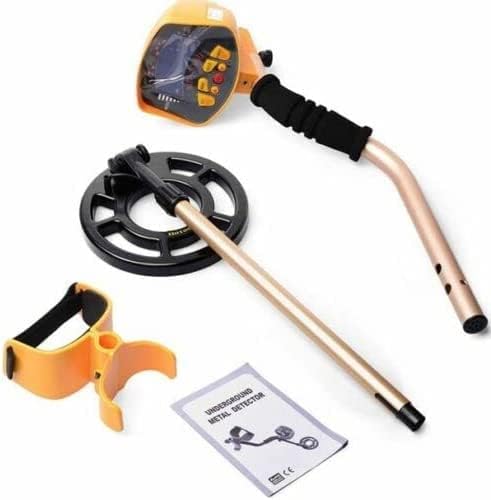
Figure 4.1: Overview of the MD-3010II Metal Detector components, including the control unit, search coil, stem, armrest, and user manual.
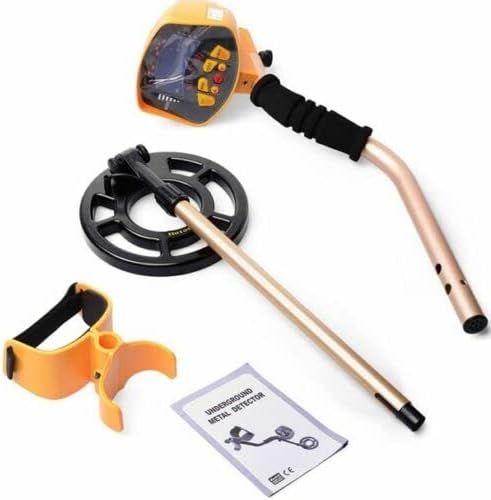
Figure 4.2: Detailed view of the control unit, showing the LCD screen for target identification and various control buttons for operation.
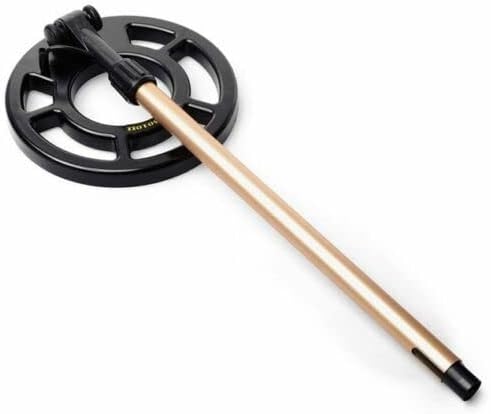
Figure 4.3: The waterproof search coil attached to the lower stem, designed for detection in shallow water.
5. Setup and Assembly
- Attach the Search Coil: Connect the search coil to the lower stem using the provided non-metallic bolt and wing nut. Ensure it is securely fastened but allows for slight angle adjustment.
- Assemble the Stem: Insert the lower stem into the upper stem. Adjust the length to a comfortable position for your height. The hidden search coil cable is designed to prevent tangling during adjustment.
- Install the Armrest: Slide the armrest onto the upper stem and secure it. The armrest is designed to reduce forearm strain during extended use.
- Mount the Control Unit: Attach the control unit to the top of the upper stem. Ensure the micro-plug from the search coil cable is securely connected to the control unit. This metal plug enhances reliability.
- Battery Installation: Open the battery compartment on the control unit. Insert six (6) 1.5V AA alkaline batteries, observing the correct polarity (+/-). Close the compartment securely. The Batteries Condition Indicator on the LCD will show the battery status.
6. Operating Instructions
6.1 Powering On and Basic Operation
- Press the Power button to turn on the detector. The LCD will illuminate.
- Adjust the Volume Control knob to a comfortable listening level for the loudspeaker or connected headphones.
- The detector operates in a fully automatic, all-metal detection mode by default.
6.2 LCD Display and Target Identification
The LCD provides visual information about detected objects, even in low light conditions due to its backlight.
- Target Identity: When a metal object is detected, its likely identity will be displayed on the LCD. This allows you to quickly assess if the object is worth recovering.
- Unique Tone for Target: In addition to the visual display, the detector generates a unique audio tone corresponding to the detected target. This allows for detection without constantly watching the screen.
- Batteries Condition Indicator: The LCD also shows the current charge level of the batteries.
6.3 Unwanted Target Elimination (Discrimination)
The MD-3010II allows you to set the detector to ignore certain types of metal objects. Refer to the specific controls on your unit for adjusting discrimination settings. This feature helps in focusing on desired targets and reducing false signals from junk metal.
6.4 Using Headphones
A headphone jack is provided for private listening or to enhance detection of faint signals. Both stereo and mono headphones can be used. Connect your headphones to the designated jack on the control unit.
6.5 Detecting in Shallow Water
The search coil is waterproof, allowing you to use it in shallow water. However, the control unit is NOT waterproof and must be kept dry. Avoid submerging the control unit.
7. Maintenance
- Cleaning: Wipe the detector with a damp cloth after each use. Do not use abrasive cleaners or solvents.
- Battery Care: Remove batteries if the detector will not be used for an extended period to prevent leakage.
- Storage: Store the detector in a cool, dry place, away from direct sunlight and extreme temperatures.
- Cable Inspection: Periodically check the search coil cable and connections for any signs of wear or damage.
8. Troubleshooting
| Problem | Possible Cause | Solution |
|---|---|---|
| Detector does not power on. | Dead or incorrectly installed batteries. | Replace batteries with new 1.5V AA alkaline batteries. Ensure correct polarity. |
| Erratic signals or false readings. | High electromagnetic interference; incorrect sensitivity setting; mineralized ground. | Move to a different location. Reduce sensitivity. Adjust discrimination settings. |
| No sound from speaker/headphones. | Volume too low; faulty headphones; loose connection. | Increase volume. Test with different headphones. Check headphone jack connection. |
| Poor detection depth. | Low battery power; incorrect ground balance (if applicable); highly mineralized soil. | Replace batteries. Ensure proper sweep technique. |
9. Specifications
| Feature | Detail |
|---|---|
| Model | MD-3010II |
| Power Source | 6 x 1.5V AA Alkaline Batteries (not included) |
| Operating Current | Standby: 65mA, Max: 150mA |
| Operating Voltage Range | 7.2V - 9.6V |
| Operating Frequency | 7.5 KHz +/- 1 KHz |
| Sensitivity | Min. 8 inch (for US 50 cent coin) |
| Audio Frequency | 294Hz (re), 330Hz (me), 349Hz (fa), 392Hz (so), 440Hz (la), 494Hz (ti), 523Hz (do) |
| Temperature Range | -20°C to 60°C (-4°F to 140°F) |
| International Protection Rating | IP54 (Control unit not waterproof, search coil is) |
| Material | Metal (main construction) |
| Adjustable Length | Yes |
| Weight | 1.37 kg (approx.) |
10. Warranty and Support
For warranty information or technical support, please contact Canglan Technology directly. Refer to the contact information provided with your purchase or visit the official Canglan Technology store for assistance.
You can visit the Canglan Technology Store for more products and support.