Introduction
This manual provides instructions for the VINABTY YKF348-001 replacement remote control, designed for use with various Philips Smart TV models. This remote control offers direct functionality without the need for complex programming.

Image: Front view of the VINABTY YKF348-001 replacement remote control, showing all buttons and their layout.
Setup
1. Battery Installation
The VINABTY YKF348-001 remote control requires two AAA batteries (not included). Follow these steps to install them:
- Locate the battery compartment cover on the back of the remote control.
- Press down on the tab and slide the cover downwards to open the compartment.
- Insert two AAA batteries, ensuring the positive (+) and negative (-) terminals align correctly with the markings inside the compartment.
- Slide the battery compartment cover back into place until it clicks securely.
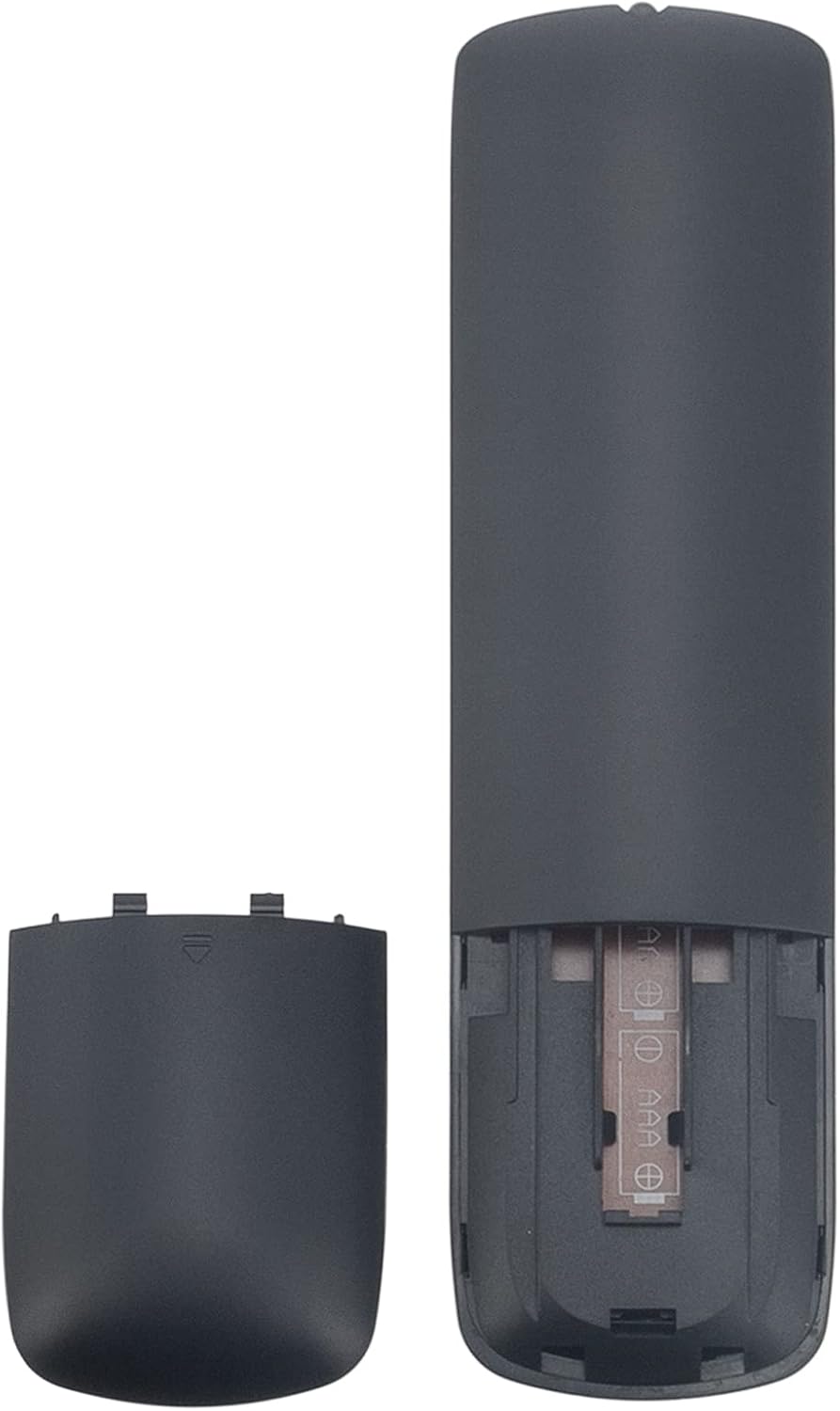
Image: Back view of the remote control with the battery compartment open, showing where to insert two AAA batteries.
2. Initial Use
This replacement remote control is designed to work directly with compatible Philips Smart TVs without any additional programming. Once batteries are installed, point the remote control towards your television and begin operation.
Operating Instructions
The VINABTY YKF348-001 remote control features a standard layout for Philips Smart TVs. Below are the functions of key buttons:
- Power (●): Turns the television on or off.
- TV Guide: Accesses the electronic program guide.
- SMART TV: Opens the Smart TV interface or app menu.
- INFO: Displays information about the current program or input.
- Navigation Pad (Up, Down, Left, Right, OK): Used to navigate menus and confirm selections.
- BACK: Returns to the previous menu or screen.
- SOURCES: Selects input sources (HDMI, AV, etc.).
- EXIT: Exits the current menu or application.
- OPTIONS: Accesses context-sensitive options for the current screen.
- Volume (+/-): Adjusts the television volume.
- Mute (🔇): Mutes or unmutes the television sound.
- Channel (+/-): Changes television channels.
- Number Buttons (0-9): Directly enters channel numbers or text.
- SUBTITLE: Toggles subtitles on or off.
- TEXT: Accesses teletext services (if available).
- Multimedia Controls (Play, Pause, Stop, Rewind, Fast Forward, Record): Controls media playback.
Maintenance
Cleaning
To clean the remote control, gently wipe its surface with a soft, dry cloth. For stubborn dirt, slightly dampen the cloth with water. Avoid using abrasive cleaners, solvents, or chemical sprays, as these can damage the remote's finish or internal components.
Battery Replacement
Replace the AAA batteries when the remote control's performance degrades or it stops responding. Always replace both batteries at the same time with new ones. Do not mix old and new batteries, or different types of batteries, as this can lead to leakage or malfunction.
Storage
When not in use for extended periods, it is recommended to remove the batteries to prevent potential leakage and damage to the remote control.
Troubleshooting
- Remote control not responding:
- Check if the batteries are correctly inserted with the correct polarity (+/-).
- Replace the batteries with fresh AAA batteries.
- Ensure there are no obstructions between the remote control and the television's infrared sensor.
- Confirm that the remote control is pointed directly at the television.
- Some buttons not working:
- This remote is designed for specific Philips TV models. Ensure your TV model is listed under compatibility.
- Clean the remote control surface, especially around the unresponsive buttons, to remove any dirt or debris.
- Short operating range:
- Replace the batteries with new ones.
- Ensure no strong light sources (like direct sunlight) are interfering with the infrared signal.
Specifications
| Model Number | YKF348-001 |
| Brand | VINABTY |
| Connectivity Technology | Infrared |
| Compatible Devices | Television (Philips Smart TVs) |
| Special Features | No programming required |
| Number of Buttons | 44 |
| Controller Type | Button Control |
| Maximum Range | 10 Meters |
| Batteries Required | 2 x AAA (not included) |
| Item Weight | 80 Grams |
Compatibility
This VINABTY YKF348-001 replacement remote control is compatible with various Philips Smart TV models, including but not limited to:
- Philips Full HD LED 22PFK4209
- Philips Full HD LED 47PFK6109
- Philips Full HD LED 49PUS7809
- Philips Full HD LED 22PFK4209/12
- Philips Full HD LED 22PFK420912
- Philips Full HD LED 24PHK420912
- Philips Full HD LED 24PHK4109/12
If your Philips TV model is not listed, please verify compatibility with the seller before purchase.
Warranty and Support
Specific warranty information for this replacement remote control is not provided in the product details. For any questions regarding warranty, technical support, or product issues, please contact the seller directly through your purchase platform. They will be able to provide the most accurate and up-to-date assistance.


