1. Introduction
This manual provides essential instructions for the setup, operation, maintenance, and troubleshooting of your HAVIT M9006 Bluetooth Smartwatch. Please read this manual thoroughly before using the device to ensure proper function and longevity.
2. Package Contents
Before proceeding, please verify that all items are present in your package:
- HAVIT M9006 Smartwatch
- Charging Cable (USB)
- User Manual (this document)

Image: HAVIT M9006 Smartwatch packaging and various color options. The image displays the smartwatch box and three smartwatches in black, pink, and blue colors, showcasing the product and its packaging.
3. Setup Guide
3.1 Charging the Smartwatch
- Connect the USB charging cable to a compatible USB power source (e.g., computer USB port, USB wall adapter).
- Attach the magnetic end of the charging cable to the charging contacts on the back of your HAVIT M9006 smartwatch. Ensure it snaps into place securely.
- The watch display will indicate charging status. Allow the watch to charge fully before first use. A full charge typically takes approximately 2 hours.
3.2 Pairing with Your Smartphone
To unlock the full functionality of your smartwatch, pair it with your smartphone via Bluetooth.
- Download the companion application for the HAVIT M9006 from your smartphone's app store (e.g., Google Play Store for Android, Apple App Store for iOS). Refer to the packaging or quick start guide for the specific app name or QR code.
- Ensure Bluetooth is enabled on your smartphone.
- Open the companion app and follow the on-screen instructions to create an account or log in.
- Within the app, navigate to the device pairing section and select "Add Device" or similar.
- Select "HAVIT M9006" from the list of available devices. Confirm the pairing request on both your smartphone and the smartwatch if prompted.
- Once paired, the app will guide you through initial settings and synchronization.
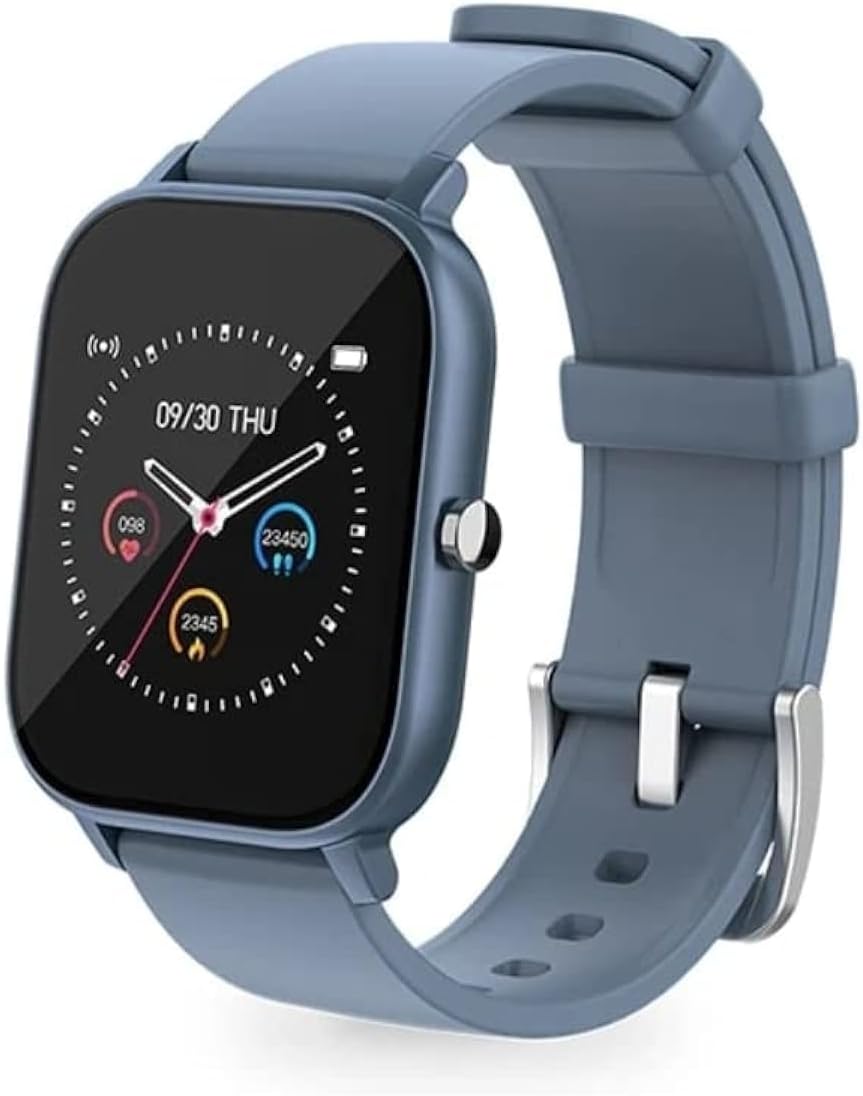
Image: HAVIT M9006 Smartwatch with a blue strap, displaying the time (09/30 THU) and various health metrics like heart rate and step count on its square screen. This image illustrates the watch's display and design.
4. Operating Instructions
4.1 Basic Navigation
- Touchscreen: Swipe left, right, up, or down to navigate through menus and features. Tap to select an item.
- Side Button: Press the side button to return to the home screen or wake the display. A long press may access power options.
4.2 Key Features
- Custom Dial: Personalize your watch face with various pre-installed options or custom images via the companion app.
- Heart Rate Monitoring: The smartwatch features 24-hour heart rate detection. Access heart rate data directly on the watch or through the companion app for detailed insights.
- Activity Tracking: Monitor steps taken, distance traveled, and calories burned throughout the day.
- Sleep Monitoring: Track your sleep patterns, including deep sleep, light sleep, and wake times.
- Notifications: Receive call, message, and app notifications directly on your wrist when paired with your smartphone.
- IP67 Water Resistance: The device is resistant to splashes and brief immersion in water. It is suitable for daily use but not recommended for swimming or showering.
5. Maintenance and Care
- Cleaning: Wipe the watch screen and strap regularly with a soft, dry, lint-free cloth. For stubborn dirt, slightly dampen the cloth with water. Avoid using harsh chemicals or abrasive materials.
- Water Resistance: While the HAVIT M9006 is IP67 water-resistant, avoid exposing it to hot water, steam, or high-velocity water. Do not press buttons underwater. Dry the watch thoroughly if it gets wet.
- Storage: When not in use for extended periods, store the smartwatch in a cool, dry place away from direct sunlight and extreme temperatures.
- Charging: Use only the provided charging cable. Do not attempt to disassemble or modify the battery.
6. Troubleshooting
- Watch not turning on: Ensure the watch is fully charged. Connect it to the charger for at least 30 minutes.
- Unable to pair with smartphone:
- Ensure Bluetooth is enabled on your smartphone.
- Make sure the smartwatch is within Bluetooth range (typically 10 meters).
- Restart both your smartphone and the smartwatch.
- Clear any previous pairing records for the smartwatch on your phone's Bluetooth settings.
- Ensure the companion app is updated to the latest version.
- Inaccurate heart rate or activity data:
- Ensure the watch is worn snugly on your wrist, about one finger's width above the wrist bone.
- Clean the sensor on the back of the watch.
- Avoid excessive movement during heart rate measurement.
- Short battery life:
- Reduce screen brightness.
- Disable unnecessary notifications.
- Limit continuous heart rate monitoring if not required.
- Ensure the watch is fully charged each time.
- Screen unresponsive: Try restarting the watch by long-pressing the side button until power options appear, then select restart. If unresponsive, allow the battery to drain completely and then recharge.
7. Specifications
| Feature | Detail |
|---|---|
| Brand | HAVIT |
| Model Number | M9006 |
| Display Size | 36 Millimeters |
| Connectivity Technology | USB, Bluetooth |
| Special Feature | Heart Rate Monitor |
| Water Resistance Rating | IP67 |
| Battery Type | Lithium-Ion |
| Compatible Devices | Smartphones |
| Country of Origin | China |
8. Warranty and Support
For warranty information, please refer to the documentation provided at the time of purchase or contact your retailer. The HAVIT M9006 typically comes with a manufacturer's warranty covering defects in materials and workmanship.
For technical support, troubleshooting assistance beyond this manual, or inquiries regarding warranty claims, please contact the retailer where you purchased the product or visit the official HAVIT website for support resources.


