
1. Introduction
This manual provides essential information for the proper use and maintenance of your DOMO Slate SLP9 10.1-inch Tablet PC. Please read this guide thoroughly before operating the device to ensure optimal performance and longevity. The DOMO Slate SLP9 is an Octa Core tablet featuring a 10.1-inch IPS LCD display, Dual SIM 4G LTE connectivity, and a 5020 mAh battery.

Front view of the DOMO Slate SLP9 tablet displaying a colorful screen.
2. Product Overview
Familiarize yourself with the physical components of your DOMO Slate SLP9 tablet.
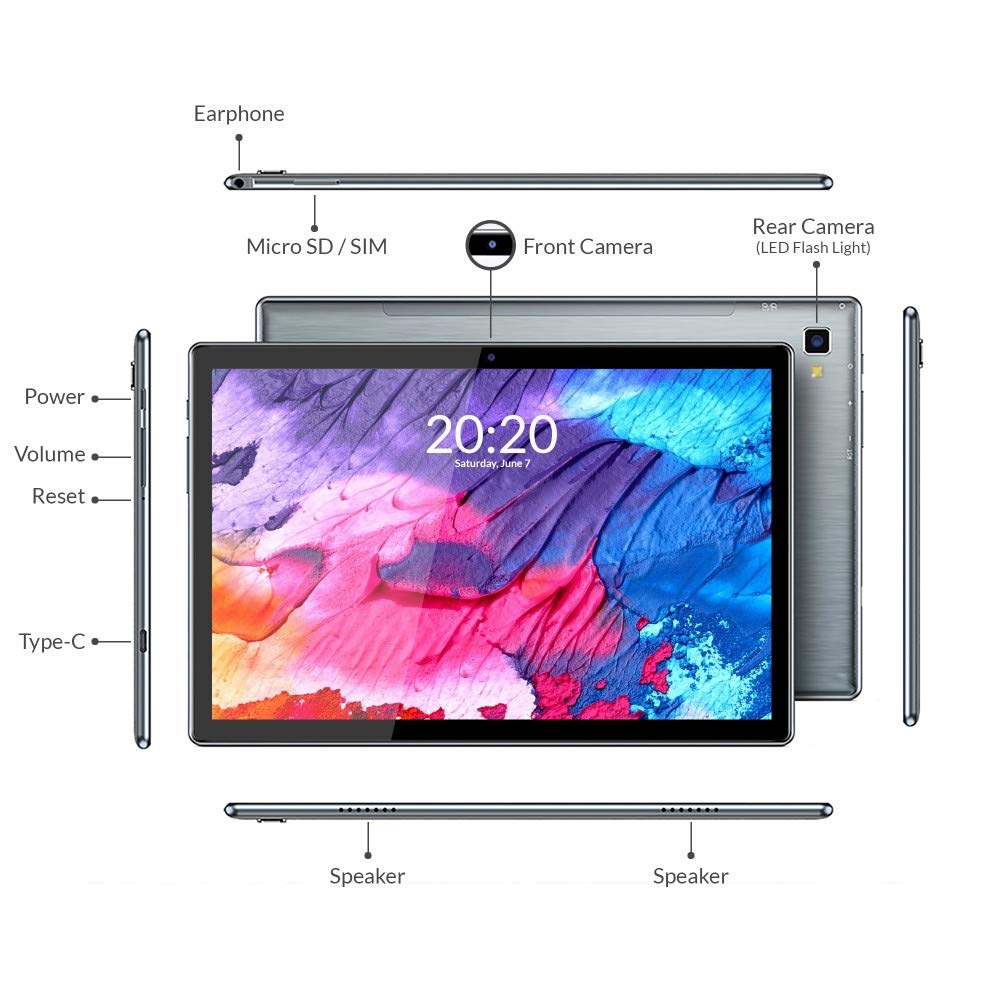
Diagram of DOMO Slate SLP9 tablet showing earphone jack, Micro SD/SIM slot, front camera, rear camera with LED flash, power button, volume buttons, reset button, Type-C port, and dual speakers.
- Earphone Jack: Connect 3.5mm headphones.
- Micro SD / SIM Slot: Insert Micro SD card for expandable storage (up to 512GB) and Dual 4G LTE SIM cards for cellular connectivity and calling.
- Front Camera: 5MP camera for video calls and selfies.
- Rear Camera (with LED Flash): 13MP camera for photos and videos.
- Power Button: Press and hold to power on/off or restart. Press briefly to turn the screen on/off.
- Volume Buttons: Adjust media volume and notification sounds.
- Reset Button: Use a pin to press for a hard reset if the device becomes unresponsive.
- Type-C Port: Connect for charging and data transfer.
- Speakers: Dual box speakers for audio output.
3. Setup
3.1 Charging the Tablet
Before first use, fully charge your tablet. Connect the provided Type-C cable to the tablet's Type-C port and the other end to the included power adapter. Plug the adapter into a wall outlet. The battery indicator on the screen will show charging status.

The DOMO Slate SLP9 is equipped with a 5020 mAh rechargeable battery.
3.2 Inserting SIM and Micro SD Cards
- Locate the SIM/Micro SD card tray on the side of the tablet.
- Use the provided SIM card tray eject pin to open the tray.
- Carefully place your 4G LTE SIM cards and/or Micro SD card into the designated slots on the tray. Ensure correct orientation.
- Gently push the tray back into the tablet until it clicks into place.
3.3 Powering On/Off
- To Power On: Press and hold the Power button until the DOMO logo appears on the screen.
- To Power Off: Press and hold the Power button until the power options menu appears. Select "Power Off".
- To Restart: Press and hold the Power button until the power options menu appears. Select "Restart".
4. Operating Instructions
4.1 Display and Navigation
The tablet features a 10.1-inch IPS HD LCD display with a resolution of 1920x1200 pixels. Navigate the interface using touch gestures: tap to select, swipe to scroll, pinch to zoom.

The DOMO Slate SLP9 features a 10.1-inch IPS HD LCD display.
4.2 Making Calls
With Dual SIM 4G LTE and VoLTE support, you can make and receive calls directly from your tablet. Use the pre-installed Phone application. Ensure a SIM card is properly inserted and activated.
4.3 Camera Usage
The tablet is equipped with a 5MP front camera and a 13MP rear camera with LED flash. Open the Camera application to capture photos and videos. Tap the screen to focus and press the shutter button to take a picture.
4.4 Connectivity
- Wi-Fi: Go to Settings > Network & internet > Wi-Fi to connect to available wireless networks.
- Bluetooth: Go to Settings > Connected devices > Bluetooth to pair with Bluetooth-enabled devices like headphones or speakers.
- GPS: The tablet includes built-in GPS for location services and navigation.
4.5 Audio
The DOMO Slate SLP9 features dual box speakers for clear audio output. Adjust volume using the physical volume buttons or through the system settings.

The DOMO Slate SLP9 is equipped with dual box speakers.
5. Maintenance
5.1 Battery Care
- Avoid exposing the tablet to extreme temperatures.
- Do not allow the battery to fully discharge frequently.
- Use only the original charger and cable provided with the device.
5.2 Cleaning
Wipe the screen and body of the tablet with a soft, lint-free cloth. Avoid using harsh chemicals or abrasive materials, which can damage the screen or finish.
6. Troubleshooting
- Tablet does not power on: Ensure the battery is charged. Connect the charger and try again. If unresponsive, press the reset button with a pin.
- Screen is unresponsive: Try restarting the tablet. If the issue persists, perform a hard reset using the reset button.
- Cannot connect to Wi-Fi: Check if Wi-Fi is enabled in settings. Restart your router and the tablet. Ensure you have the correct password.
- SIM card not detected: Ensure the SIM card is correctly inserted and activated by your service provider. Restart the tablet.
- Slow performance: Close unnecessary background applications. Clear cache and temporary files. Consider performing a factory reset if performance issues continue (back up data first).
7. Specifications
Key technical specifications for the DOMO Slate SLP9 Tablet PC.

The DOMO Slate SLP9 is powered by an Octa-core ARM Cortex processor.
| Feature | Detail |
|---|---|
| Model Name | Slate SLP9 |
| Display | 10.1 Inches IPS LCD, 1920 x 1200 Pixels |
| Processor | MTK 6762 (Helio P22) 64-bit Octa-core @ 2GHz ARM Cortex-A53 |
| RAM | 4 GB |
| Internal Storage | 64 GB |
| Expandable Storage | Up to 512 GB (Micro SD) |
| Cellular Technology | Dual SIM 4G LTE, VoLTE Calling |
| Rear Camera | 13 MP with LED Flash |
| Front Camera | 5 MP |
| Battery Capacity | 5020 mAh |
| Operating System | Android 11 |
| Connectivity | Wi-Fi (802.11n), Bluetooth, GPS |
| Dimensions (L x W x T) | 24.4L x 1W x 16.2Th Centimeters |
| Weight | 505 Grams |
8. Box Contents
The DOMO Slate SLP9 package includes the following items:
- DOMO Slate SLP9 Tablet
- Power Adapter
- Type-C Cable
- OTG Cable
- SIM Card Tray Eject Pin
- User Manual (this document)
9. Warranty and Support
9.1 Warranty Information
The DOMO Slate SLP9 device comes with a 6-month warranty. Accessories have a 3-month warranty. The warranty type is Onsite, including free pickups and deliveries for covered issues. The warranty does not cover physical damages, water damages, moisture damages, seal tampering, or burnout cases.
9.2 Customer Support
For support inquiries, please contact DOMO Support:
- Phone: +91 8080 98 3666
- Timings: 11:00 AM to 06:00 PM, Monday to Friday (except bank holidays)
- Online Support: Online Knowledge Base, Support Tickets
Post-warranty services are available Onsite as paid services.