Introduction
This manual provides essential information for the safe and effective operation and maintenance of your FIFISH QYSEA V6 Expert M200A Underwater Drone. Please read this manual thoroughly before using the device.

Figure 1: FIFISH QYSEA V6 Expert M200A Underwater Drone with Robotic Arm.
Setup
1. Package Contents
The FIFISH V6 Expert M200A package includes the following components:
- FIFISH V6 Expert ROV
- Tether Reel (660ft)
- Remote Controller
- Chargers for ROV and Controller
- Industrial Case for transport and storage
- Robotic Arm with Add-on Grippers
- Spare Propellers (x2)
- 128GB Micro SD Card (pre-installed or included)
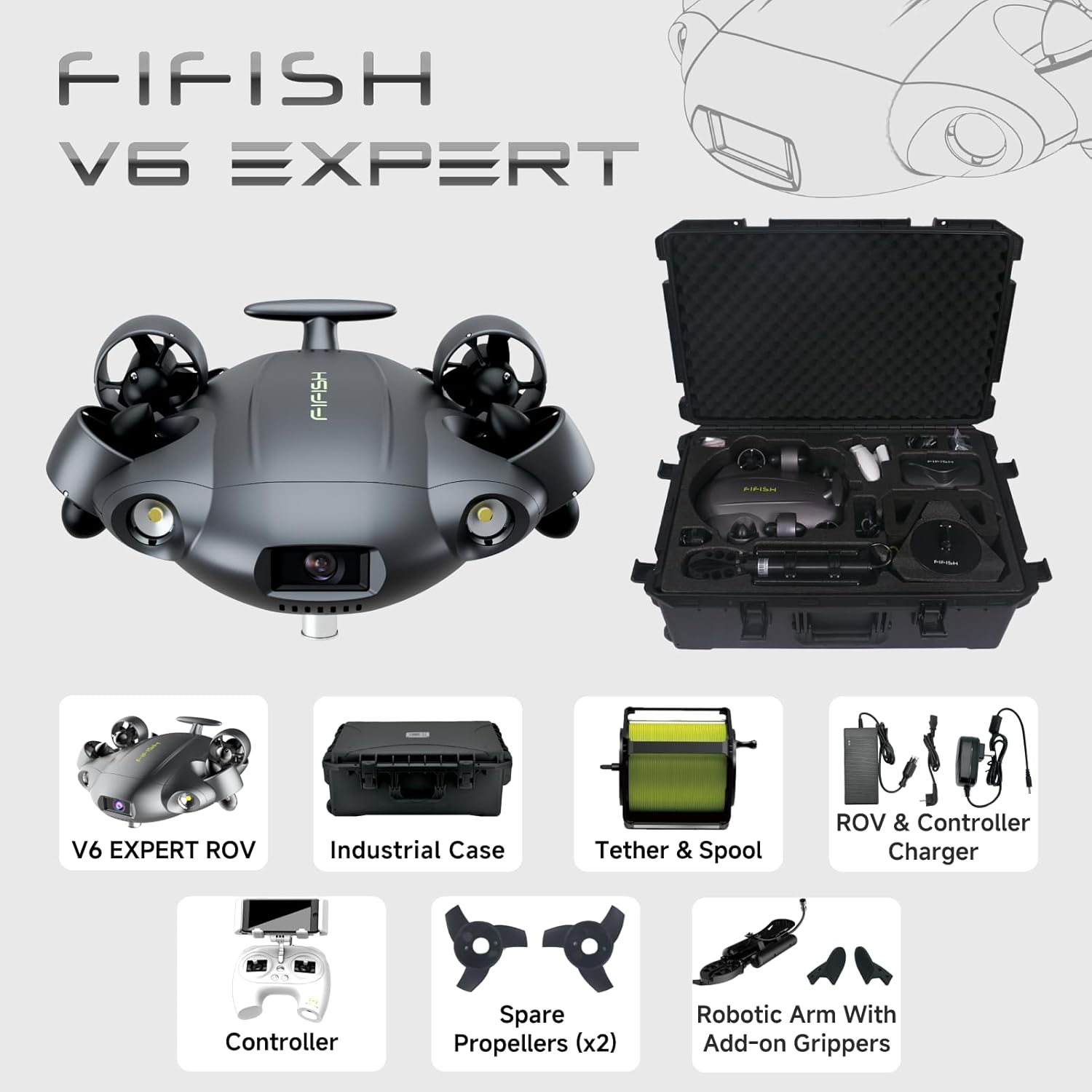
Figure 2: Overview of the FIFISH V6 Expert M200A package contents, including the ROV, industrial case, tether, controller, chargers, robotic arm, and spare propellers.
2. Initial Charging
Before first use, ensure both the ROV and the remote controller are fully charged. The ROV supports quick charging, reaching 90% capacity in approximately 1 hour. Use the provided chargers for both devices.
3. Tether Connection
Connect the tether from the tether reel to the ROV. Ensure the connection is secure and watertight to prevent water ingress during operation.
4. Robotic Arm Attachment
If using the robotic arm, securely attach it to the designated interface port on the ROV. Ensure all connections are firm before deployment.

Figure 3: FIFISH V6 Expert M200A with the robotic arm attached, ready for underwater operations.
5. Micro SD Card
The ROV is equipped with a 128GB Micro SD card for data storage. This card can be easily inserted and removed from the quick plug compartment for data transfer. Ensure the compartment is securely closed before submerging the ROV.

Figure 4: Detail of the Micro SD card slot on the FIFISH V6 Expert ROV for easy data transfer.
Operating Instructions
1. Controller and App Setup
Power on the remote controller. Download and install the FIFISH app on your smartphone or tablet. Connect your device to the controller via Wi-Fi. The app provides a live view from the ROV's camera and allows full control over its functions.
Video 1: General overview of the V6 Expert Underwater Drone, demonstrating basic setup and initial deployment.
2. Movement Controls
The V6 Expert ROV features patented omnidirectional movement and 360° maneuverability. Use the remote controller joysticks to control forward, backward, up, down, and rotational movements. The upgraded motor system provides enhanced stability for seamless operation.
Video 2: Demonstration of the V6 Expert's 360-degree omnidirectional movement capabilities underwater.
3. Camera Operation and Lighting
The ROV's camera system delivers 4K low-noise shooting, a 166° ultra-wide field of view, and 240 FPS slow-motion filming. Two upgraded 3000 lumen LED lights provide vivid visuals in turbid or dark environments. Adjust camera settings and lighting via the FIFISH app.

Figure 5: Close-up of the FIFISH V6 Expert's 4K UHD camera and integrated LED lights.
4. AI Vision Lock
Utilize the AI Vision Lock function to precisely focus on and adaptively lock onto subjects in real-time. This feature enhances stability and clarity when observing specific points of interest.
Video 3: Explanation and demonstration of the QYSEA FIFISH Disruptive Vision Lock feature.
5. Multi-Tool Integration
The V6 Expert ROV's Q-Interface and accessory port allow for integration with a wide range of professional-level tools. These tools can be used for various tasks, including inspection, navigation, sampling, measuring, and grappling. Refer to specific tool manuals for detailed usage instructions.
Video 4: Showcase of the QYSEA V6 Expert ROV in infrastructure inspection, highlighting its adaptability with various tools.
6. Data Transfer and Sharing
With the built-in Micro SD card, recorded videos and images can be easily transferred. The FIFISH app also supports live streaming and sharing of your underwater explorations.
Maintenance
Proper maintenance ensures the longevity and optimal performance of your FIFISH V6 Expert M200A.
- Cleaning: After each use in saltwater, thoroughly rinse the ROV, tether, and robotic arm with fresh water to prevent corrosion.
- Battery Care: Store batteries in a cool, dry place. Avoid fully discharging the batteries for extended periods.
- Propeller Inspection: Regularly inspect propellers for any damage or entanglement with debris. Replace damaged propellers using the provided spare parts.
- O-Ring Inspection: Before each dive, inspect all O-rings and seals for any signs of wear or damage. Ensure they are clean and properly seated to maintain watertight integrity.
Troubleshooting
If you encounter issues with your FIFISH V6 Expert M200A, consider the following common solutions:
- No Power: Ensure all batteries (ROV and controller) are fully charged. Check power connections.
- Connection Issues: Verify that the tether is securely connected to both the ROV and the controller. Ensure your smart device is correctly connected to the controller's Wi-Fi network.
- Poor Video Quality: Check for debris on the camera lens or LED lights. Ensure sufficient lighting in dark environments.
- ROV Not Responding: Power cycle both the ROV and the controller. Check for any obstructions in the propellers.
For persistent issues, refer to the official FIFISH support resources or contact customer service.
Specifications
| Feature | Detail |
|---|---|
| Brand | FIFISH |
| Model Name | FIFISH V6 Expert M200A |
| Video Capture Resolution | 4K UHD 2160p |
| Connectivity Technology | Wi-Fi |
| Item Weight | 13.02 Kilograms (28.6 pounds) |
| Product Dimensions | 29.5 x 20 x 11.6 inches |
| Battery Capacity | 14400 Milliamp Hours |
| Maximum Range | 660 Feet (Tether length) |
| Working Time | Up to 6 hours |
| LED Lights | 2 x 3000 lumen |
| Micro SD Card | 128GB (included) |
Warranty and Support
For warranty information and technical support, please refer to the official FIFISH website or contact your authorized dealer. Keep your purchase receipt as proof of purchase for warranty claims.


