
1. Product Overview
The Wilxisum HDMI H.265 H.264 Video Encoder is designed to convert an HDMI video signal into an IP stream, supporting various streaming protocols for online live broadcasting. This device is capable of acquiring video at up to 1080P@30FPS and encoding it using H.265 or H.264 codecs.
Important Note:
- This encoder supports video acquisition up to 1080P@30FPS and is backward compatible with lower resolutions.
- It outputs one main stream and one secondary stream, with a maximum frame rate of 30FPS after encoding.
- If your video source is 1080P@60FPS, this product is not recommended.
2. Package Contents
Verify that all items are present in your package:
- Wilxisum HDMI Encoder Unit
- Power Adapter
- User Manual (this document)
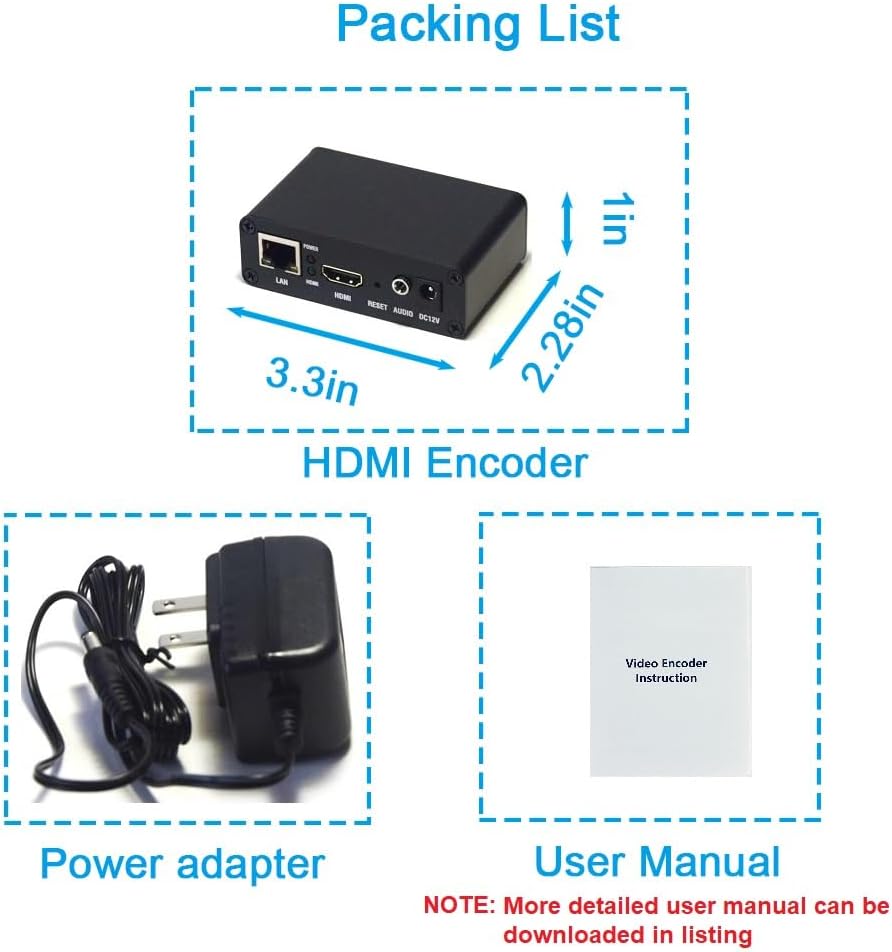
Image: Contents of the product package, including the HDMI encoder, power adapter, and a printed user manual. The encoder dimensions are approximately 3.3 inches (L) x 2.28 inches (W) x 1 inch (H).
3. Product Features
The Wilxisum HDMI Encoder offers the following key features:
- Video Encoding: Supports H.264 and H.265 encoding.
- Protocol Support: Compatible with SRT, RTMP, RTMPS, RTSP, UDP, RTP, HTTP TS, HTTP FLV, and HLS network protocols.
- Live Broadcasting: Direct streaming to platforms like YouTube, Ustream, Wowza, and Facebook without requiring a computer.
- Multi-Client Viewing: Supports multicast, unicast, and IPTV viewing within a local area network (LAN).
- Dual Stream Output: Simultaneously outputs a main stream and a secondary stream, each supporting different protocol transmissions.
- Web Interface: Easy configuration and management via a web-based interface.
- HDCP Support: Compatible with High-bandwidth Digital Content Protection.
- OSD Function: Supports video overlay with logo, text, and time.
- Gigabit Network: Equipped with a 1000Mbps Ethernet port for stable network connectivity.
- 24/7 Operation: Designed for continuous, uninterrupted work.

Image: Visual representation of the encoder's functions, including HDCP, H.264/H.265/MJPEG encoding, OSD (logo/text/time), live streaming, LAN multicast/unicast, web interface settings, 24/7 operation, and Gigabit network support.

Image: Illustration of the various streaming protocols supported by the encoder, including RTMP/RTMPS, RTSP, UDP/RTP, HLS, SRT, HTTP TS, HTTP FLV, and ONVIF.
4. Product Interface
Familiarize yourself with the ports and indicators on the encoder unit:

Image: Rear panel of the encoder. From left to right: LAN port (Ethernet), Power LED (red), HDMI LED (green), HDMI Input port, Reset button, Audio Input port (3.5mm), and DC12V Power Input port.
- LAN: RJ45 Ethernet port for network connection (1000Mbps).
- POWER: Red LED indicator for power status.
- HDMI: Green LED indicator for HDMI signal detection.
- HDMI Input: Connect your HDMI video source here (supports up to 1080P@30FPS).
- RESET: Button to reset the device to factory settings.
- AUDIO: 3.5mm audio input jack for external audio sources.
- DC12V: Power input port for the included 12V power adapter.
5. Setup Guide
Follow these steps to set up your Wilxisum HDMI Encoder:
5.1 Basic Connection
- Connect your HDMI video source (e.g., video camera, set-top box, SLR camera, Blu-Ray player) to the HDMI Input port on the encoder using an HDMI cable.
- Connect a network cable from the encoder's LAN port to your router or network switch.
- Connect the included power adapter to the DC12V port on the encoder and plug it into a power outlet. The Power LED should illuminate.
- Ensure the HDMI LED illuminates, indicating a detected HDMI signal.
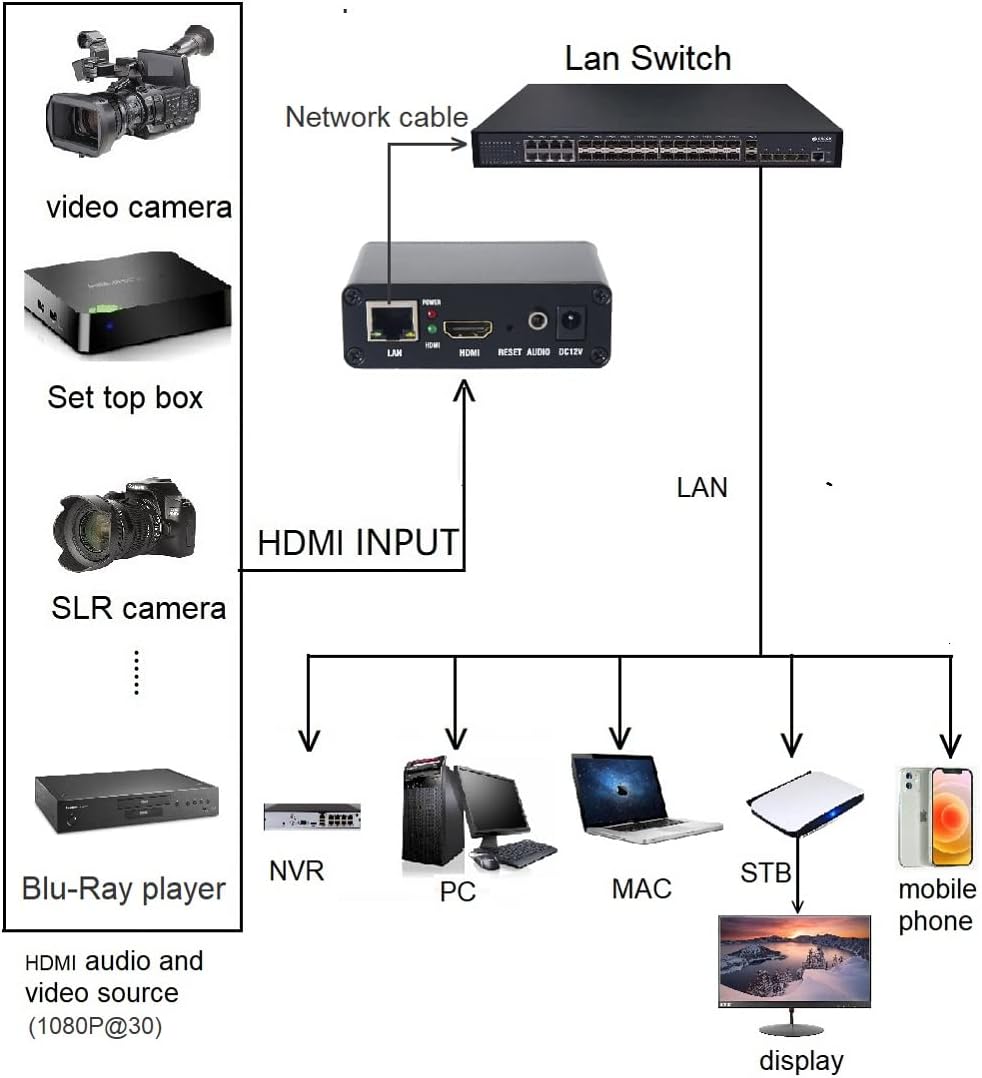
Image: Setup diagram illustrating an HDMI audio and video source (1080P@30) connected to the encoder, which is then connected to a router via a network cable. The router provides internet access for streaming to platforms like YouTube, Facebook, Twitter, and Twitch.

Image: Setup diagram illustrating an HDMI audio and video source (1080P@30) connected to the encoder, which is then connected to a LAN switch. The LAN switch distributes the stream to various devices on the local network, such as NVR, PC, Mac, STB, mobile phones, and displays.
5.2 Initial IP Address Configuration
The HDMI encoder has a default IP address. If your network segment does not match the encoder's default IP, you will need to change the encoder's IP address. Refer to the detailed user manual (available for download) for specific methods to configure the IP address.
6. Operating Instructions
Access the encoder's web interface to configure streaming settings.
6.1 Accessing the Web Interface
- Open a web browser on a computer connected to the same network as the encoder.
- Enter the encoder's IP address into the browser's address bar. (Consult the full user manual for the default IP and login credentials).
- Log in to the web interface.
6.2 Configuring Streaming Parameters
Within the web interface, navigate to the 'Encoder' section to adjust settings for the main and secondary streams.
Image: Screenshot of the encoder's web interface showing settings for H.264 encoding. Key configurable parameters include Encoding Type, Encoded Size, FPS, GOP, Bitrate, H.264 Level, Bitrate Control, and various streaming protocol URLs (TS, HLS, FLV, RTSP, RTMP/RTMPS). A field for pasting the RTMP streaming address is highlighted, along with an 'Apply' button to save changes.
- Encoding Type: Select H.264 or H.265.
- Encoded Size: Set the output resolution.
- FPS (Frames Per Second): Adjust the frame rate (max 30FPS).
- Bitrate: Configure the video bitrate (kbit/s).
- Streaming Protocols: Enable and configure the URLs for your desired streaming protocols (e.g., RTMP/RTMPS for YouTube, Facebook).
- Dual Stream Output: The encoder supports simultaneous output of a main stream and a substream. Each stream can be configured independently with different protocols and settings.
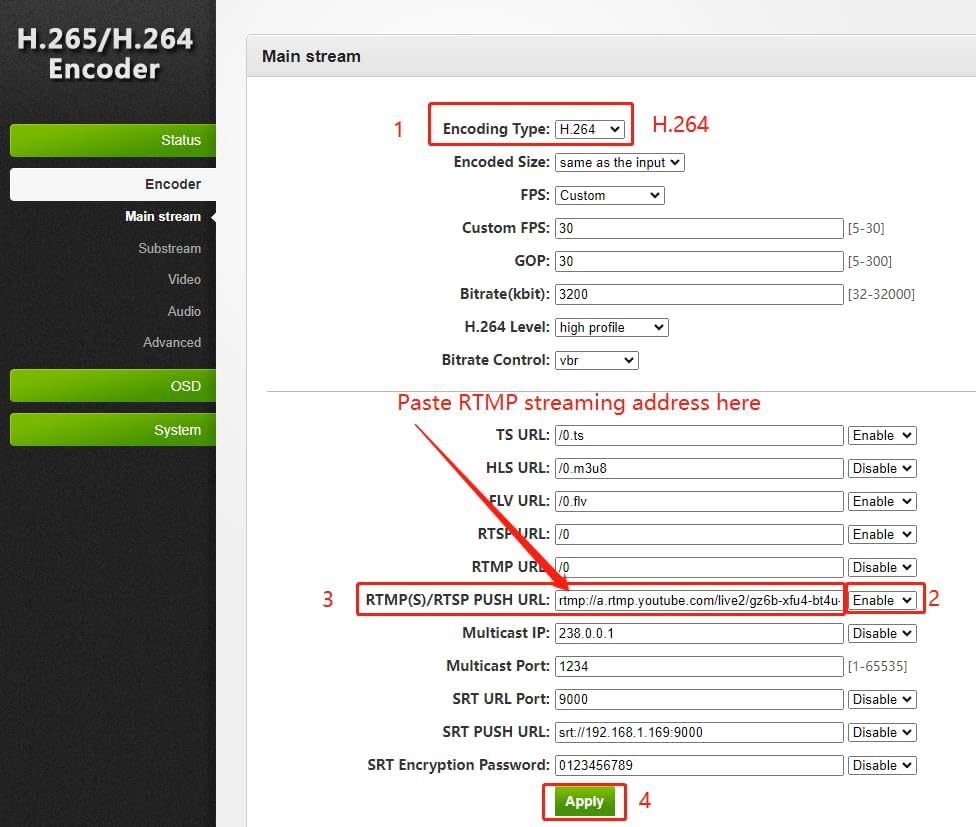
Image: Illustration of the dual stream output capability, showing two monitors displaying a 'Main Stream' and a 'Substream' simultaneously, emphasizing the ability to transmit each stream using different protocols.
After making changes, click the Apply button to save your settings.
7. Troubleshooting
- No Video Output/HDMI LED Off: Ensure your HDMI source is active and providing a signal. Verify the HDMI cable connection. Remember, the encoder supports up to 1080P@30FPS; a 1080P@60FPS source may not be compatible.
- Cannot Access Web Interface: Check network cable connections. Verify that the encoder and your computer are on the same network segment. If not, you may need to temporarily adjust your computer's IP address to match the encoder's default segment to change its IP.
- Streaming Issues: Double-check all streaming URLs and keys in the web interface. Ensure your internet connection is stable and has sufficient upload bandwidth for your chosen bitrate.
- Encoder Overheating: Ensure the encoder is placed in a well-ventilated area. The device is designed for continuous operation but proper airflow is always recommended.
8. Specifications
| Category | Parameter | Value |
|---|---|---|
| Input | Video Input | 1x HDMI, supports HDCP |
| Audio Input | 1x HDMI Built-in audio, 1x 3.5mm External analog audio (Active audio) | |
| Video Resolution Input | Max 1920x1080 (1080P@30FPS) | |
| Video Encode | Video Encode Type | H.264/H.265/MJPEG |
| Frame Rate after Encoding | 5-60 adjustable (Max 30FPS output) | |
| Video Encoding GOP | 5-300 adjustable | |
| Bit Rate (kbit) | 32-32000 | |
| Encoded Size | Max 1920x1080 and Downward adjustable | |
| H.264 Level | Baseline profile/main profile/high profile | |
| Bit Rate Control | CBR/VBR | |
| Streaming Protocol | SRT/RTMP/RTMPS/RTSP/HTTP TS/HTTP FLV/HLS/UDP/RTP/ONVIF | |
| Audio Encode | Audio Encoding Type | AAC/AAC+/AAC++/MP3/MP2/AC3 |
| Audio Encoding Sample Rate | 44100/48000 | |
| Audio Encoding Bit Rate | AAC: 48000-256000 / AAC+: 24000-48000 / AAC++: 12000-32000 / MP3: 64000-320000 / MP2: 64000-320000 / AC3: 40000-640000 | |
| Output | Audio Output | Supports either HDMI audio or external analog audio |
| Video and Audio Output | 2 video stream output (1 main, 1 sub) | |
| OSD | Functionality | Support encoder video with text/image/scrolling text/time |
| Network Configuration | Interface | 1000Mbps Ethernet |
| Dimensions | Product Dimensions (L x W x H) | 3.3 x 2.26 x 1 inches |
| Weight | Item Weight | 4.4 ounces |
| Model | Item Model Number | WXX-02 |
Note: Specifications are subject to change without prior notice.
9. Warranty and Support
Wilxisum provides the following support for this product:
- Warranty: 2-year limited warranty.
- Technical Support: Lifelong technical support is available.
If you encounter any issues or have questions during use, please contact us. To do so, locate your order and click the "contact Seller" button. We aim to resolve your problem within 24 hours.
