
Product Overview
The AcuRite Atlas Home Weather Station High-Definition Display (Model 06105M) is designed to provide comprehensive indoor and outdoor weather conditions when paired with an AcuRite Atlas outdoor weather sensor (sold separately). This display offers real-time data for temperature, humidity, wind speed, wind direction, rainfall, barometric pressure, and UV index.
Key features include:
- Real-Time Weather Conditions: Track temperature, humidity, wind speed, wind direction, barometric pressure, rainfall totals, and UV index on a high-definition display.
- Patented Self-Calibrating Forecasting Technology: Provides a hyperlocal, personalized weather forecast 12 hours from your current conditions.
- Indoor Thermometer and Hygrometer: Monitor indoor temperature and humidity for improved home comfort.
- Comprehensive and Historical Weather Information: Includes trend arrows for temperature and humidity, heat index, dew point, wind chill, and daily, weekly, monthly, and yearly rainfall data.
- High-Definition Display with Battery Backup: Offers easy readability from any angle and saves data during power outages with optional backup batteries.

Figure 1: AcuRite Atlas High-Definition Display showing outdoor temperature, humidity, wind, forecast, indoor conditions, and historical data.
Setup
Unpacking and Initial Setup
- Carefully remove all components from the packaging.
- Insert 3 AAA batteries (not included) into the battery compartment on the back of the display for backup power.
- Plug the AC adapter into a standard electrical outlet and then into the display unit.
- Ensure your AcuRite Atlas outdoor sensor (sold separately) has batteries installed and is placed in an optimal outdoor location for accurate readings.
- The display will automatically begin searching for the outdoor sensor signal. This may take a few minutes.
Mounting Options
The display unit can be placed on a tabletop using its integrated fold-out stand or wall-mounted using the keyholes on the back.

Figure 2: Side view of the display showing the fold-out stand.

Figure 3: Back of the display with battery compartment and keyholes for wall mounting.
Compatibility Note: This display is exclusively compatible with the AcuRite Atlas weather sensor (Model #06059M, sold separately). It will not function with other AcuRite sensor models.

Figure 4: Display compatibility with AcuRite Atlas sensor.
Operating the Display
Real-Time Data
The high-definition display presents current indoor and outdoor conditions, including temperature, humidity, wind speed, wind direction, rainfall, and barometric pressure. Trend arrows indicate rising or falling values for temperature and humidity.

Figure 5: Display indicators for wind direction, peak wind, rainfall start time, and customizable alerts.
Hyperlocal Forecast
The display utilizes patented self-calibrating technology, combining data from your outdoor sensor with the built-in barometer to generate a personalized 12-hour weather forecast specific to your location.
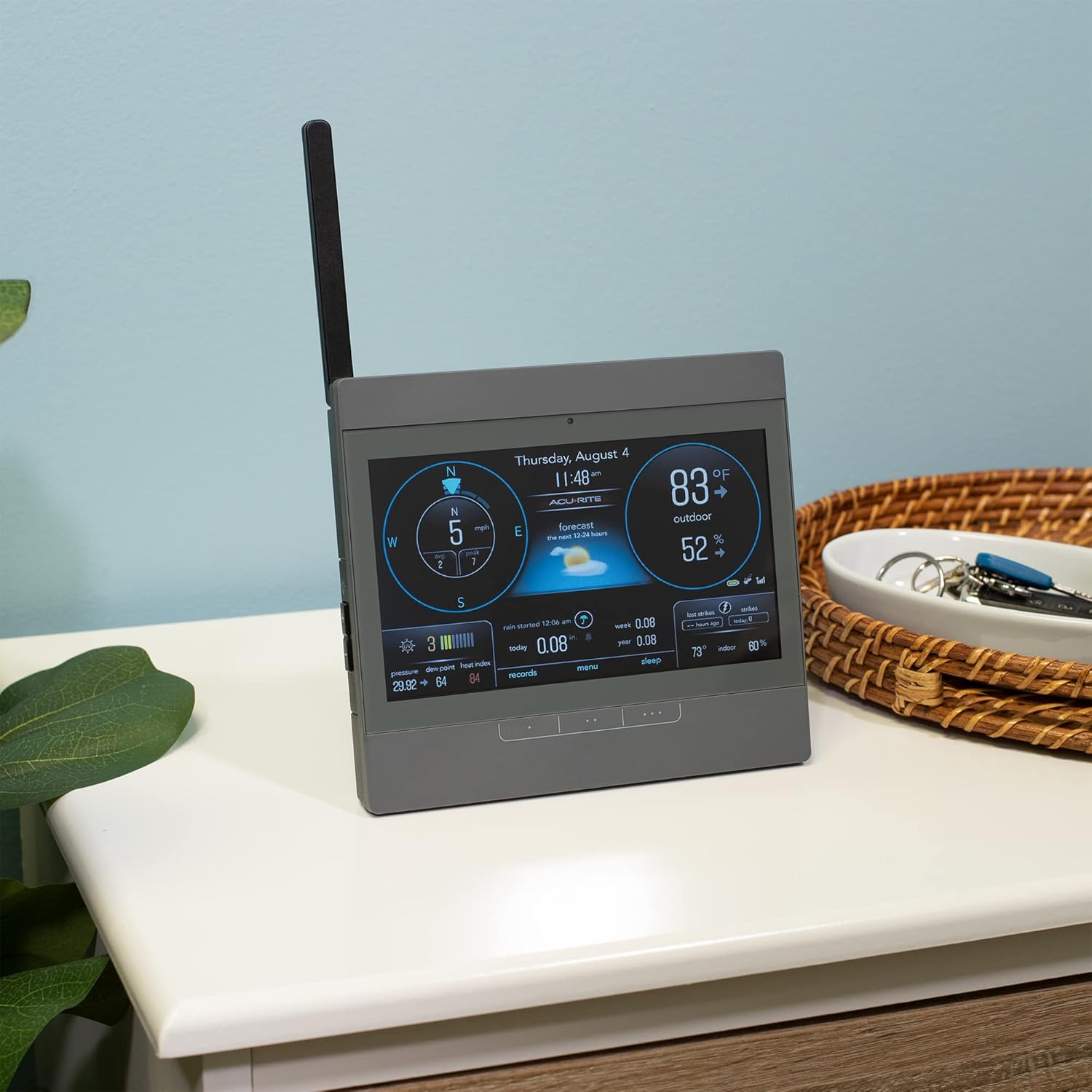
Figure 6: Display showing hyperlocal forecast and current conditions.
Programmable Alerts
Set customized alarms for critical weather changes, such as high or low temperatures, wind speeds, or rainfall thresholds, to receive timely notifications.
Historical Data
Access daily, weekly, monthly, and yearly records for rainfall, as well as historical highs and lows for temperature and humidity. This allows for tracking weather patterns over time.

Figure 7: Display showing a table of today's records for various weather metrics.
Maintenance
Battery Replacement
For the display unit, replace the 3 AAA backup batteries annually or when the low battery indicator appears. For the outdoor sensor, refer to its specific instruction manual for battery replacement guidelines.
Cleaning
Wipe the display screen and casing with a soft, damp cloth. Avoid abrasive cleaners that may scratch the screen or damage the finish. Regularly check the outdoor sensor for debris (e.g., leaves, insects) that might obstruct its rain collection funnel or wind sensors.
Troubleshooting
- No Outdoor Sensor Data: Ensure the outdoor sensor has fresh batteries and is within range of the display unit. Check for any obstructions between the sensor and display.
- Inaccurate Readings: Verify that the outdoor sensor is mounted in an open area, away from heat sources or obstructions that could affect wind or rain measurements. Ensure the display's barometer is properly calibrated (refer to the full manual for calibration steps).
- Display Not Powering On: Check if the AC adapter is securely plugged into both the wall outlet and the display unit. Ensure backup batteries are correctly installed.
Specifications
| Feature | Detail |
|---|---|
| Brand | AcuRite |
| Model Number | 06105M |
| Power Source | Corded Electric (with 3 AAA battery backup) |
| Display Type | LCD |
| Connectivity Technology | Wi-Fi (for sensor communication) |
| Temperature Accuracy | 0.5556 °C |
| Upper Temperature Rating | 158 Degrees Fahrenheit |
| Item Weight | 1.28 pounds (0.58 Kilograms) |
| Included Components | Add-On Atlas Display, Instruction Manual |
Warranty and Support
This AcuRite Atlas Home Weather Station High-Definition Display comes with a one-year limited warranty from the manufacturer. For warranty claims or technical support, please refer to the contact information provided in the full instruction manual or visit the official AcuRite support website.