
ATOMSTACK S10 Pro_001
ATOMSTACK S10 Pro Laser Engraver Instruction Manual
Model: S10 Pro_001
1. Introduction and Overview
The ATOMSTACK S10 Pro Laser Engraver is a high-performance laser engraving and cutting machine designed for precision and versatility. Featuring a 10000mW output laser power (Laser Class 4) and a compressed spot area of 0.06*0.06mm, it offers high-precision engraving and high-penetration cutting capabilities.
This manual provides essential information for the safe and effective operation of your ATOMSTACK S10 Pro, including setup, operating procedures, maintenance, and troubleshooting.

Figure 1: The ATOMSTACK S10 Pro Laser Engraver, showcasing its design and potential applications.
2. Safety Information
WARNING: This product contains a Laser Class 4 device. Direct exposure to the laser beam can cause severe eye damage and skin burns. Always wear appropriate protective eyewear when operating the machine.
The S10 Pro features a panoramic glass eye protection design, which filters 98% of ultraviolet light, allowing direct observation of the engraving process without additional goggles. However, it is always recommended to exercise caution.
- Emergency Stop Button: The machine is equipped with an emergency stop button. Pressing this button immediately terminates operation and cuts off power. To restart, turn the button to unlock.
- Polished Edges: All edges of the frame are polished to prevent accidental scratches during handling and operation.
- Ventilation: Ensure adequate ventilation in your workspace to dissipate fumes produced during engraving and cutting.

Figure 2: Panoramic glass eye protection design on the laser module.

Figure 3: The emergency stop button on the control box for immediate shutdown.
3. Product Components and Package Contents
The ATOMSTACK S10 Pro package includes all necessary components for assembly and operation. Please verify that all items listed below are present upon unboxing.

Figure 4: Detailed view of the S10 Pro Laser Engraver package contents.
Key components include:
- Y-axis left slide rail
- Support beam
- Y-axis right slide rail
- X-axis rail
- Control box
- Display screen
- Laser head
- Connecting plate
- Foot bracket (3 pcs)
- Power adapter
- Power cable
- Synchronous belt
- Metal mat board
- Product Manual
- Acrylic sheet (3 pcs)
- Fixed focus film
- Mounting screws
- Toolkit
- Wood chips (3 pcs)
- HDMI cable
- USB cable
- Dust-free cloth
- Brush
4. Setup and Assembly
The ATOMSTACK S10 Pro is designed for fast and easy installation. Follow the instructions in the included Product Manual for detailed assembly steps. The frame features precise scale lines on both X and Y axes for accurate positioning.
The laser module incorporates a new type of fixed-focus laser with an adjustable knob, simplifying the focusing process. Simply adjust the knob to set the correct distance between the laser head and the material.

Figure 5: Precise scale lines on the X and Y axes for accurate material placement.
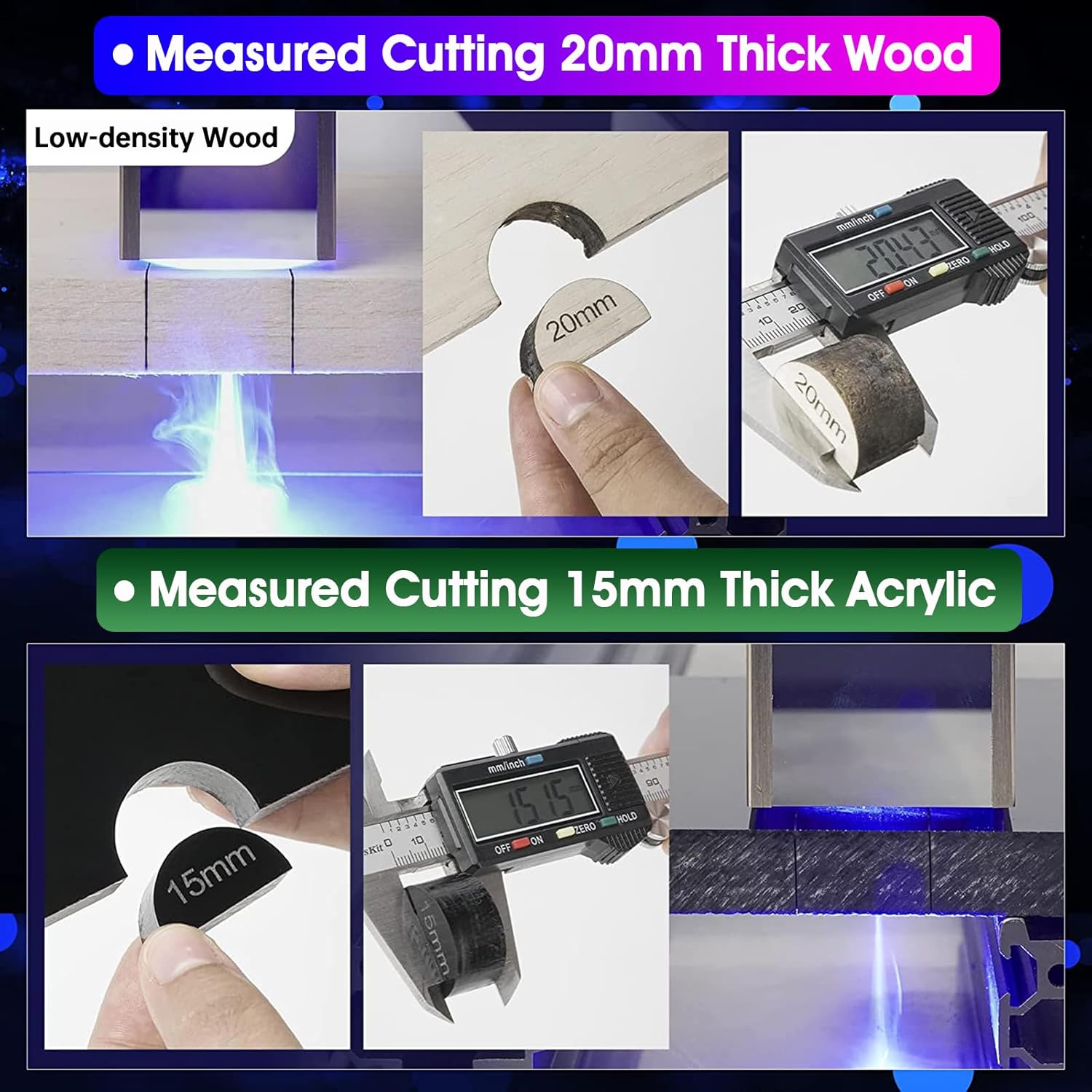
Figure 6: The adjustable knob on the laser head for quick and easy focusing.
5. Operating Instructions
The ATOMSTACK S10 Pro offers multiple control methods, providing flexibility for various user preferences.
5.1 Control Methods
- Computer Software: Compatible with LightBurn (paid), LaserGRBL (free), and the exclusive free "AtomStack Studio" PC software. Supports Win XP / Win 7 / Win 8 / XP / Win 10 / Win 11, and MAC system (LightBurn only).
- Smartphone APP: The free "ATOMSTACK" mobile APP is available on Android and Apple App Store, enabling convenient WiFi control from your smartphone.
- Touchscreen (Offline Engraving): The machine supports offline engraving via a TF card. Simply place the configured engraving file on the TF card and insert it into the control terminal.

Figure 7: Overview of the three available control methods.
5.2 Engraving and Cutting Capabilities
The S10 Pro is capable of engraving and cutting a wide range of materials due to its powerful 10W optical output laser. The ultra-fine laser spot ensures high precision for detailed work.
- Engraving: Directly engrave on materials such as wood, leather, stainless steel, coated metal, ceramics, and glass.
- Cutting: Easily cut through materials like 20mm wood board and 15mm acrylic.

Figure 8: Examples of cutting capabilities on wood and acrylic.
Figure 9: A selection of materials suitable for engraving with the S10 Pro.
5.3 Product Video Demonstration
Video 1: An official demonstration of the ATOMSTACK S10 Pro Laser Engraver, showcasing its features, assembly, and various engraving and cutting applications on different materials like wood, leather, and metal.
6. Maintenance
Regular maintenance ensures the longevity and optimal performance of your ATOMSTACK S10 Pro.
- Cleaning: Regularly clean the laser lens and the machine's frame to prevent dust and debris buildup, which can affect performance. Use the provided dust-free cloth.
- Belt Tension: Periodically check the tension of the synchronous belts. They should be taut but not overly tight.
- Connections: Ensure all cables and connections are secure before and after each use.
7. Troubleshooting
If you encounter issues with your ATOMSTACK S10 Pro, refer to the following common troubleshooting tips:
- Machine Not Powering On: Check the power cable connection to both the machine and the power outlet. Ensure the power switch is in the 'ON' position.
- Laser Not Firing/Engraving: Verify that the laser head is properly connected. Check the focus adjustment. Ensure the software settings are correct and the file format is supported (NC, BMP, JPG, PNG, DXF, etc.).
- Inaccurate Engraving/Cutting: Check the belt tension. Ensure the material is flat and securely placed. Verify the design file for any errors.
- Software Connection Issues: For PC, ensure correct drivers are installed and the USB cable is functioning. For APP, verify WiFi connection and ensure the APP is updated.
For further assistance, please contact ATOMSTACK customer support.
8. Specifications
| Feature | Detail |
|---|---|
| Product Dimensions | 25.91 x 22.09 x 10.43 inches |
| Item Model Number | S10 Pro_001 |
| Item Weight | 13.26 pounds |
| Manufacturer | ATOMSTACK, Co, Ltd |
| Country of Origin | China |
| Date First Available | August 19, 2022 |
9. Warranty and Support
ATOMSTACK is committed to providing high-quality products and customer satisfaction. If you encounter any problems or have questions regarding your S10 Pro Laser Engraver, please do not hesitate to contact our support team.
For more information and support resources, visit the official ATOMSTACK Store.
Ask a question about this manual
Ask about setup, troubleshooting, compatibility, parts, safety, or missing instructions. Manuals+ will review the question and use this page’s manual context to help answer it.