1. Introduction
Thank you for choosing the ROCKBROS P1-1BK 4-in-1 Multifunction Bicycle Light. This device integrates a powerful bicycle headlight, a secure phone holder, a convenient power bank, and an audible bicycle horn into a single, compact unit. Designed for durability and ease of use, it enhances your cycling experience by providing illumination, navigation, communication, and safety features.
2. Safety Information
- Always ensure the device is securely mounted to your bicycle handlebar before riding.
- Do not look directly into the LED lights when they are on, as this may cause temporary vision impairment.
- Keep the device away from extreme temperatures and direct sunlight for prolonged periods.
- Do not attempt to disassemble or modify the device, as this will void the warranty and may cause damage or injury.
- Ensure the charging port cover is properly sealed when not in use to maintain water resistance.
- Use the horn responsibly and only when necessary to alert others.
3. Package Contents
The package should contain the following items:
- 1 x ROCKBROS P1-1BK 4-in-1 Multifunction Bicycle Light (Black)
- 1 x Handlebar Mounting Bracket
- 1 x USB Charging Cable
- 1 x User Manual
4. Product Features
- 4-in-1 Functionality: Bicycle Headlight, Phone Holder, Power Bank, and Bicycle Horn.
- High-Quality Construction: Made from durable plastic materials.
- Adjustable Phone Holder: Universal clamp design with adjustable width to securely hold various smartphone models.
- Multiple Lighting Modes: Three LED light modes (Glare, Low Light, Strobe) for different riding conditions.
- Integrated Horn: 130dB horn with 5 distinct sound modes for effective warning.
- Waterproof Design: Provides protection against splashes and rain.
- Easy Installation: Simple handlebar mounting system.
5. Setup and Installation
5.1 Mounting the Device
- Identify a suitable position on your bicycle handlebar for mounting the device. Ensure it does not obstruct your view or control of the bicycle.
- Attach the mounting bracket to the handlebar. Tighten the screw until the bracket is firm and stable.
- Slide the main unit of the 4-in-1 bicycle light onto the mounting bracket until it clicks securely into place.
- Adjust the angle of the light and phone holder for optimal visibility and access.
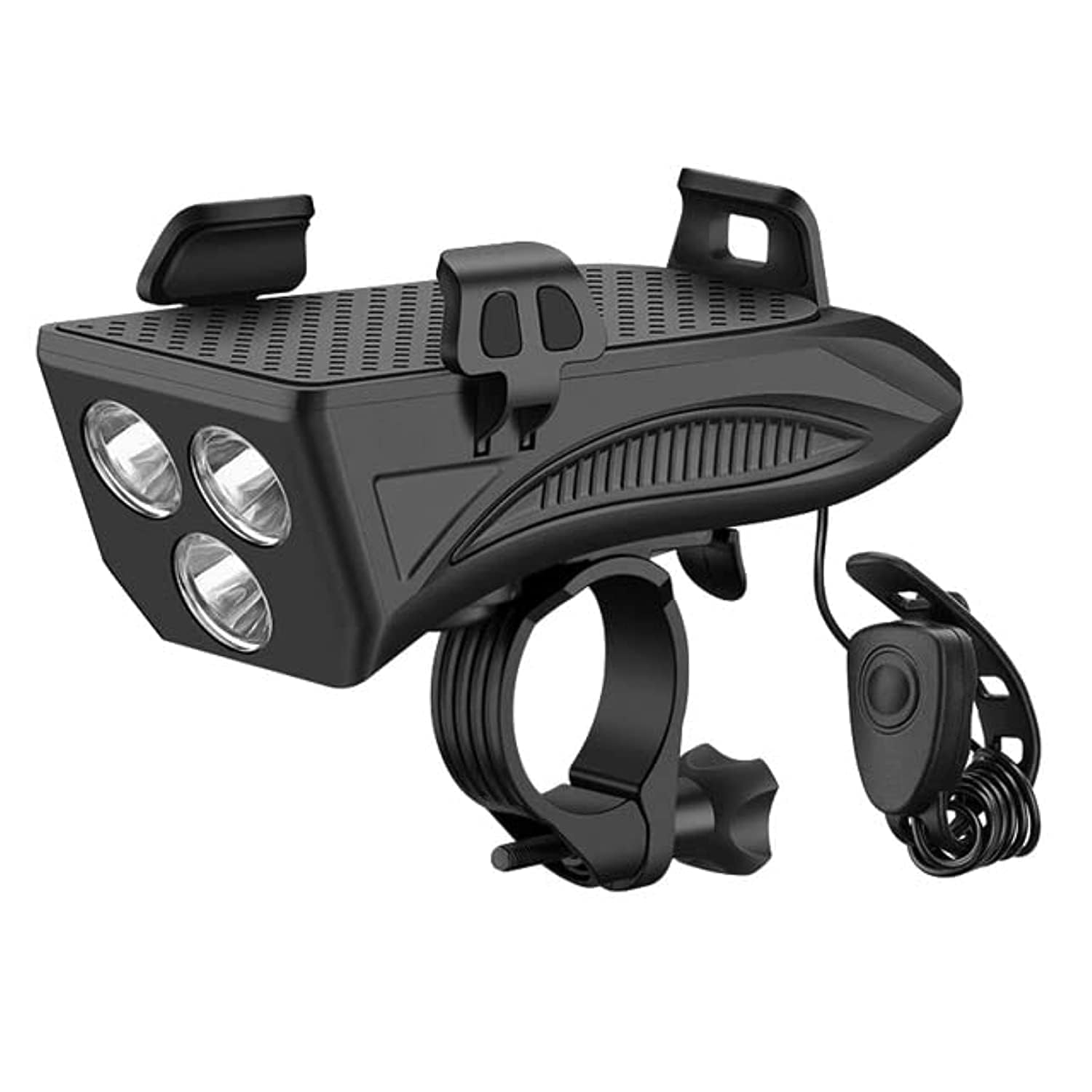
The ROCKBROS P1-1BK 4-in-1 Multifunction Bicycle Light mounted on a handlebar. It features three powerful LED lights for illumination and a secure, adjustable clamp for a smartphone.
5.2 Charging the Device
Before first use, fully charge the device. Connect the provided USB charging cable to the charging port on the device and to a standard USB power source (e.g., computer, wall adapter). The charging indicator light will show the charging status.
6. Operating Instructions
6.1 Bicycle Light Operation
- Power On/Off: Press and hold the light button for 2 seconds to turn the light on or off.
- Change Modes: Short press the light button to cycle through the three lighting modes: Glare (High Brightness) → Low Light → Strobe → Off.
6.2 Phone Holder Usage
Adjust the side clamps of the phone holder to fit your smartphone. Place your phone securely within the holder, ensuring it is firmly gripped before riding.
6.3 Power Bank Function
To use the device as a power bank, connect your smartphone or other USB-powered device to the USB output port on the bicycle light using your device's charging cable. The light will automatically begin charging your device.
6.4 Bicycle Horn Operation
- Activate Horn: Press the horn button to sound the horn.
- Change Sound Modes: Press and hold the horn button for approximately 4 seconds to cycle through the 5 available horn sound modes. Release the button to select the desired mode.
7. Maintenance
- Clean the device regularly with a soft, damp cloth. Do not use abrasive cleaners or solvents.
- Ensure the charging port cover is always closed when not charging to prevent water and dust ingress.
- Store the device in a cool, dry place when not in use for extended periods.
- Periodically check the mounting bracket for tightness and wear.
8. Troubleshooting
| Problem | Possible Cause | Solution |
|---|---|---|
| Light does not turn on. | Battery is depleted. | Charge the device fully. |
| Phone is not charging. | Cable is faulty or not connected properly. | Check cable connection; try a different USB cable. |
| Horn is not sounding. | Battery is low or horn button is stuck. | Charge the device; ensure button moves freely. |
| Device feels loose on handlebar. | Mounting bracket is not tight. | Re-tighten the mounting bracket screw. |
9. Specifications
| Feature | Detail |
|---|---|
| Model Number | P1-1BK |
| Brand | ROCKBROS |
| Color | Black |
| Material Type | Plastic |
| Product Dimensions | 28 x 17.7 x 8.7 cm |
| Item Weight | 380 grams |
| Light Brightness | 250 Lumen |
| Number of Light Modes | 3 (Glare, Low Light, Strobe) |
| Horn Loudness | 130 dB |
| Number of Horn Settings | 5 |
| Water Resistance Level | Waterproof |
| Mounting Type | Handlebar Mount |
| UPC | 686259773508 |
10. Warranty and Support
ROCKBROS products are manufactured to high-quality standards. For warranty information, technical support, or service inquiries, please refer to the warranty card included with your purchase or visit the official ROCKBROS website. Please retain your proof of purchase for warranty claims.


