1. Introduction
This manual provides detailed instructions for the setup, operation, and maintenance of your Chatthen eMylo WiFi Room Thermometer Hygrometer. This device is designed for real-time remote monitoring of indoor temperature and humidity, suitable for various environments such as baby rooms, greenhouses, garages, and offices. Its lightweight and portable design allows for flexible placement on a desktop or hanging on a wall.

Image 1.1: The eMylo WiFi Room Thermometer Hygrometer showing its display with current temperature, humidity, date, and time.
2. Product Features
- High Definition Screen Display: Connects to the Smart Life/TUYA Smart app via 2.4 GHz WiFi for automatic time and date synchronization. The screen lights up for 10 seconds when the button is pressed, aiding visibility in low light.
- High Accuracy & Fast Refresh: Equipped with a high-quality built-in sensor. Temperature range: -10℃ to 60℃ (accurate to ±1℃). Humidity range: 0%RH to 100%RH (accurate to ±5%RH). Data refreshes every two minutes for precise readings.
- Remote Monitoring & Intelligent Linkage: Monitor temperature and humidity data remotely via the Smart Life app. Supports intelligent linkage with other smart devices (e.g., air conditioners, humidifiers) when environmental conditions change, requiring a compatible WiFi IR remote.
- Free Data Storage & Export: The device supports data export and stores in-app data for up to one year. Logs can be downloaded to a smartphone and exported as a CSV file via email.
- Third-party Voice Control & Device Sharing: Compatible with Alexa and Google Assistant smart speakers for voice queries regarding ambient temperature and humidity. Devices can be shared with family members through the app.

Image 2.1: The sensor monitoring conditions in a baby's room, highlighting its application in sensitive environments.
3. Package Contents
Ensure all items are present in the package:
- eMylo WiFi Room Thermometer Hygrometer (1 unit)
- User Manual (1 unit)
- AAA Batteries (3 units, included)
4. Specifications
| Parameter | Value |
|---|---|
| Model Number | CSAC905 |
| Brand | Chatthen |
| Manufacturer | eMylo |
| Dimensions (L x W x H) | 7.94 x 0.03 x 0.03 cm |
| Weight | 90 g |
| Material | ABS |
| Connectivity Technology | Bluetooth, WiFi (2.4G) |
| Power Source | Battery Powered (3 x AAA batteries) |
| Temperature Measure Range | -20℃ to 60℃ |
| Humidity Measure Range | 0%RH to 100%RH |
| Temperature Accuracy | ±1℃ |
| Humidity Accuracy | ±5%RH |
| Mounting Type | Tabletop |

Image 4.1: Overview of the sensor's accuracy, range, and update frequency.
5. Setup Guide
Follow these steps to set up your eMylo WiFi Room Thermometer Hygrometer:
- Install the App: Scan the QR code provided in the product packaging with your smartphone, or search for "Smart Life" or "TUYA Smart" app in your device's app store (Google Play Store or Apple App Store) and install it.
- Create an Account: Open the app and create an account using your mobile number and the provided authentication code.
- Connect to WiFi: Ensure your mobile phone is connected to your 2.4 GHz WiFi network. In the app, click the "+" icon in the upper right corner of the homepage or select "Add Device."
- Enable Bluetooth: The app will prompt you to turn on Bluetooth on your mobile device. Enable Bluetooth, then select the eMylo sensor from the list of available devices to add.
- Enter WiFi Credentials: Input your WiFi network name (SSID) and password when prompted. The device will automatically connect to the WiFi network.
- Configuration Complete: Once connected, the configuration is complete. Click on the sensor icon within the app to access its interface and customize settings, such as setting temperature and humidity alarm values.
6. Operation
6.1. Display and Backlight
The device features a high-definition screen that displays current temperature, humidity, date, and time. To activate the backlight for 10 seconds, press the button located on the device. This is useful for viewing readings in dark environments.
6.2. Remote Monitoring via App
After successful setup, open the "Smart Life" or "TUYA Smart" app on your smartphone to view real-time temperature and humidity data from anywhere. The app provides a graphical representation of historical data, allowing you to track environmental changes over time.
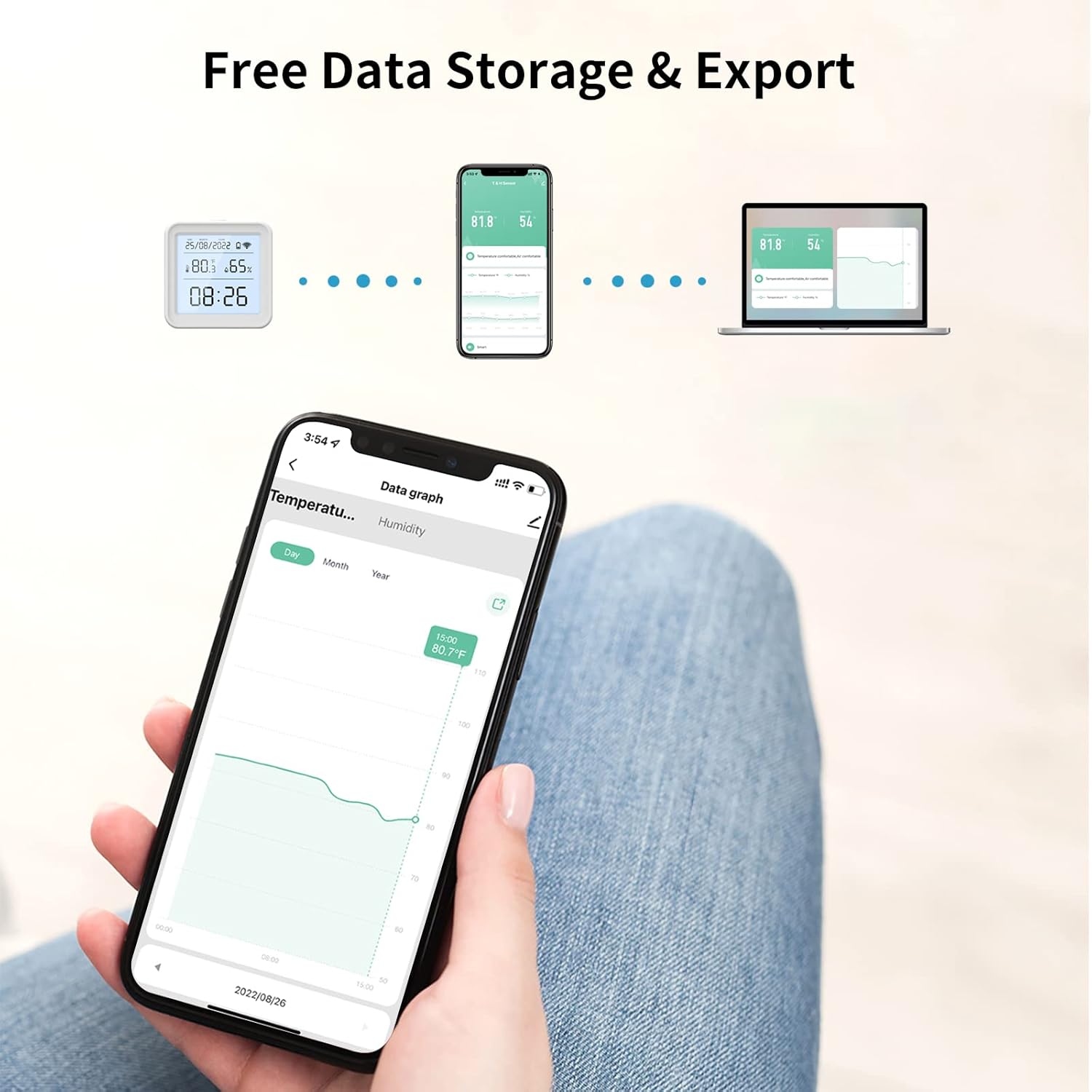
Image 6.1: App interface displaying data storage and export options, including historical graphs.
6.3. Intelligent Linkage
The sensor supports intelligent linkage with other smart home devices through the app. For example, you can set rules to automatically turn on an air conditioner if the temperature exceeds a certain threshold, or activate a humidifier if humidity drops too low. This functionality typically requires a compatible WiFi IR remote or other smart home hub.

Image 6.2: Example of intelligent linkage with an air conditioner based on sensor data, controlled via the app.
6.4. Voice Control
Integrate your eMylo sensor with Amazon Alexa or Google Assistant. Once linked, you can use voice commands to inquire about the current temperature and humidity. For example, say "Alexa, what is the temperature of the [device name]?" or "OK Google, what is the humidity in the [device name]?"

Image 6.3: Voice control functionality with smart speakers for convenient monitoring.
7. Maintenance
- Battery Replacement: The device uses 3 AAA batteries. When the battery level is low, the app will provide a notification. Replace all three batteries simultaneously with new ones to ensure optimal performance.
- Cleaning: Wipe the device with a soft, dry cloth. Do not use liquid cleaners or abrasive materials, as they may damage the screen or internal components.
- Placement: Place the sensor in a location away from direct sunlight, heat sources, or strong drafts to ensure accurate readings. Avoid placing it near windows or vents.
- Storage: If storing the device for an extended period, remove the batteries to prevent leakage.
8. Troubleshooting
| Problem | Possible Cause | Solution |
|---|---|---|
| Device not connecting to WiFi | Incorrect WiFi password; device too far from router; only 2.4 GHz WiFi supported; Bluetooth not enabled during setup. | Verify WiFi password. Move device closer to the router. Ensure your router is broadcasting a 2.4 GHz network. Enable Bluetooth on your phone during the pairing process. |
| Inaccurate temperature/humidity readings | Sensor placed near heat/cold sources, direct sunlight, or strong drafts. | Relocate the sensor to a stable environment, away from direct environmental influences. Allow a few minutes for readings to stabilize after relocation. |
| Short battery life | Low-quality batteries; frequent backlight activation. | Use high-quality alkaline AAA batteries. Minimize unnecessary backlight activation. |
| App not displaying data | Device disconnected from WiFi; app not refreshed; internet connectivity issues. | Check device's WiFi connection status. Refresh the app. Ensure your phone has stable internet access. |
9. Warranty and Support
For warranty information and technical support, please refer to the contact details provided on the product packaging or the official Chatthen/eMylo website. Keep your purchase receipt as proof of purchase for warranty claims.
If you encounter any issues not covered in this manual, please contact customer support for assistance.
10. Usage Scenarios
The eMylo WiFi Room Thermometer Hygrometer is versatile and can be used in various indoor environments to maintain optimal conditions:
- Bedroom: Monitor comfort levels for better sleep.
- Office: Ensure a productive and comfortable working environment.
- Wine Cellar: Maintain ideal temperature and humidity for wine storage.
- Greenhouse: Optimize conditions for plant growth.
- Baby Rooms: Provide a comfortable and safe environment for infants.
- Garage: Monitor conditions to protect stored items.
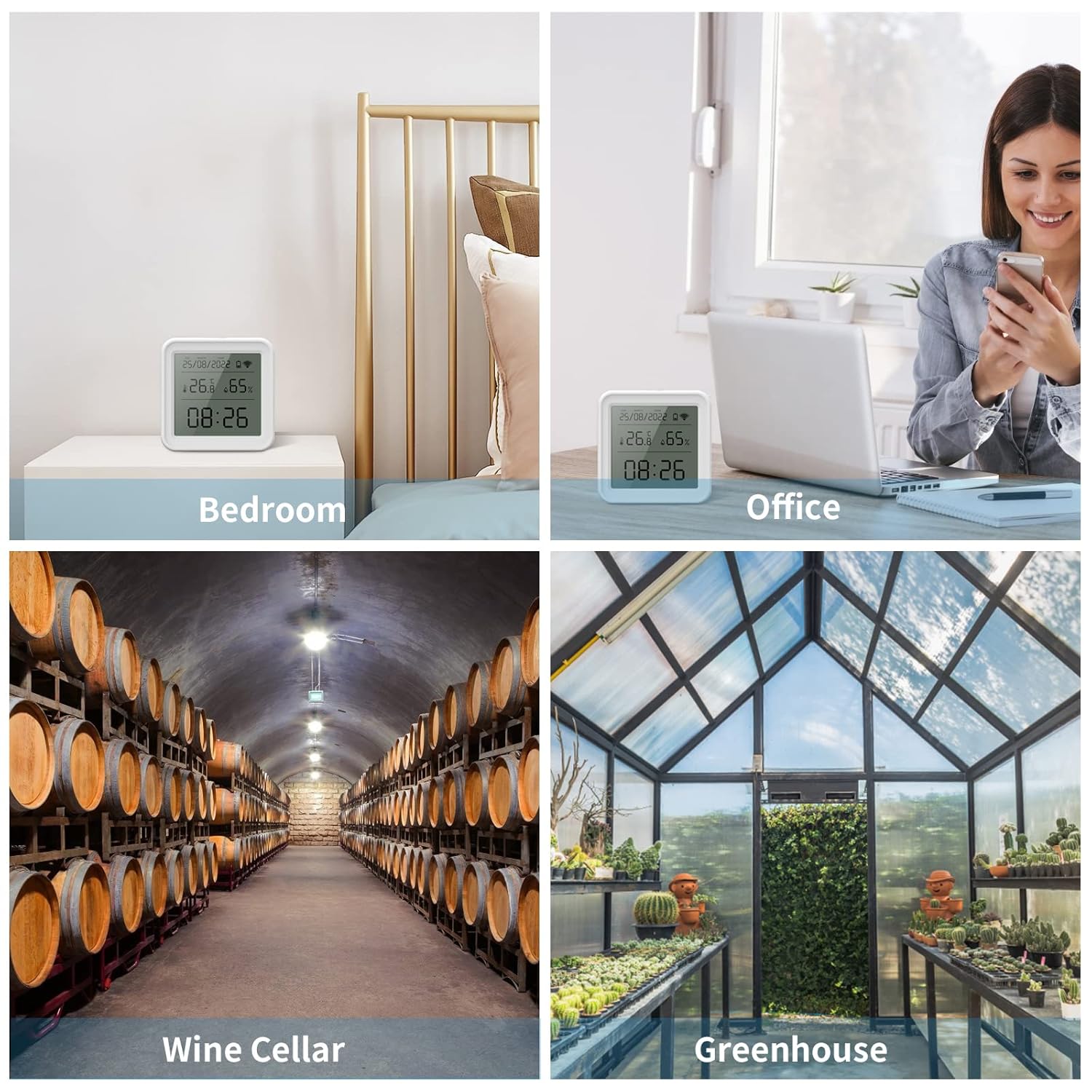
Image 10.1: Examples of where the eMylo sensor can be effectively used to monitor environmental conditions.

